

The best synth VST plugin depends on what you need to make: an evolving bass, a vintage pad, a wide dance lead or a cinematic texture. Serum 2 is a strong choice for modern electronic sound design, Diva focuses on analog character, and Pigments 7 offers several synthesis methods in one instrument. If you want to start free, choose Vital or Surge XT.
Below, we explain what each synth does well, what we would buy it for and when another option makes more sense. You will find a quick comparison, a SoundShaper verdict on every instrument, and practical patch ideas to help you decide which workflow fits your music.
Updated 5 October 2026.
Best synth VST plugins: quick comparison
Use this shortlist to match an instrument to your next project. The paid-plugin buttons link to current offers rather than fixed sale prices, which vary by region and promotion.
Which synth should you choose first?
- Starting from zero: download Vital and learn envelopes, filters and modulation before buying another synth.
- One paid instrument for varied production: compare Pigments 7 with Serum 2.
- Vintage basses and pads: try Diva in a real project.
- Complex patches built from scratch: explore Phase Plant.
- Dance leads and plucks: audition Spire and Sylenth1.
- Cinematic sound exploration: consider Omnisphere 3.
What is a synth VST plugin?
A synth plugin is a software instrument that turns MIDI notes into sound using oscillators, synthesis algorithms, samples or a combination of these. Filters shape the tone, envelopes control how notes develop, and modulation sources such as LFOs create movement.
VST is a plugin format, not a type of synthesis. Producers often use “VST synth” as shorthand for a software synthesizer. Your DAW determines which format to install: Logic Pro uses Audio Units (AU), while hosts such as FL Studio and Ableton Live support VST formats. Pro Tools uses AAX. Check the specific product's supported formats and operating-system requirements before purchasing.
A sampler and a synthesizer are different tools, although hybrid instruments overlap. Kontakt primarily hosts sampled instruments; Serum 2, Pigments and Omnisphere combine synthesis with sample-based capabilities. For this shortlist, the focus is instruments with substantial synth sound-design controls.
1. Serum 2 — best for modern electronic sound design
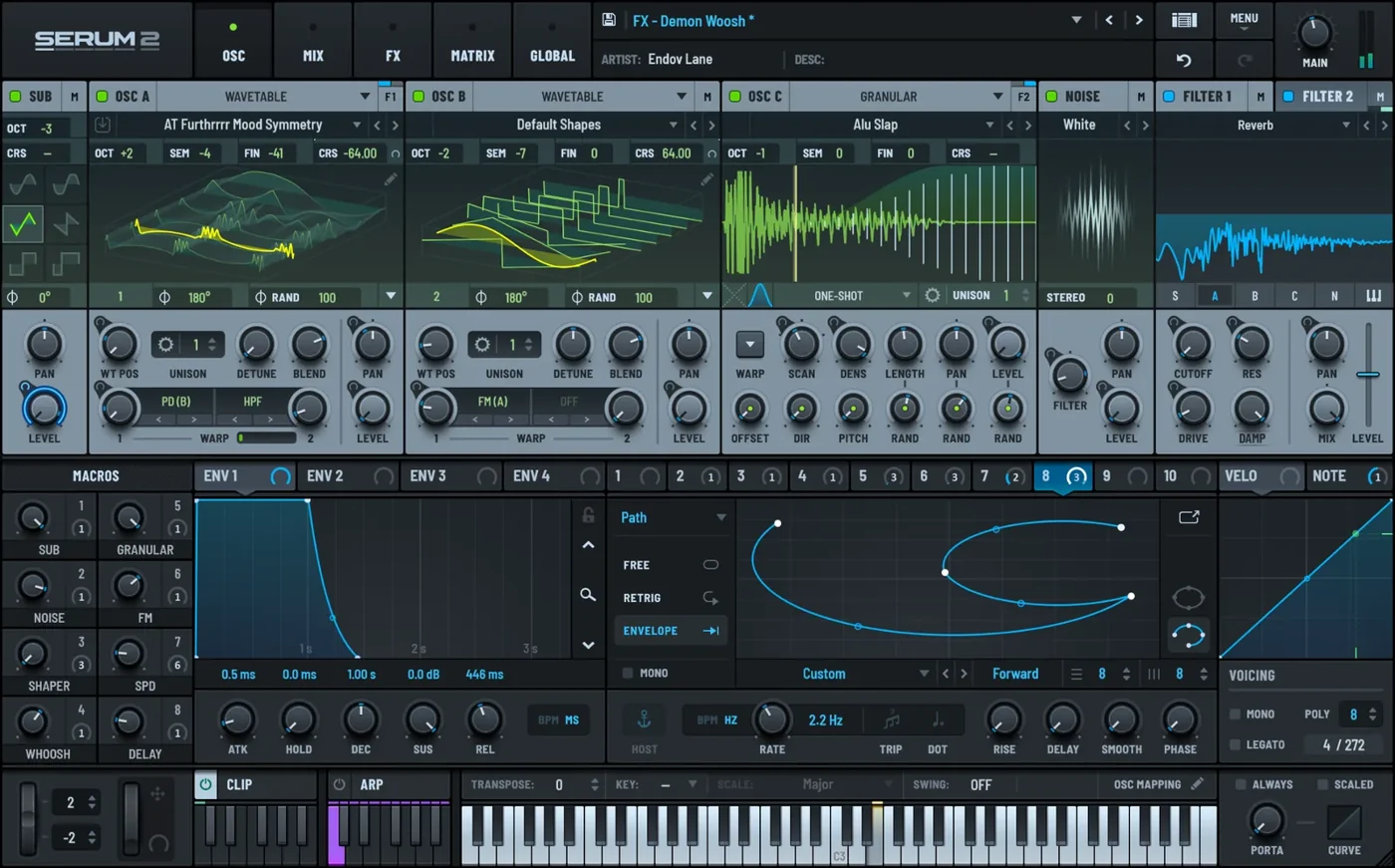
Choose Serum 2 if you want to build moving basses, detailed leads and expressive electronic sounds in a visual interface. Its appeal extends beyond wavetables: sample, multisample, granular and spectral oscillator modes make it a broader instrument than the original Serum.
- Standout tools: visual wavetable editing, flexible effects routing, an arpeggiator and a clip sequencer.
- Good fit: dubstep, drum and bass, future bass, EDM and producers learning modulation.
- Main trade-off: the additional engines take time to learn; a free wavetable synth may already cover your needs.
Start with an initialized patch and assign an LFO to wavetable position. If you enjoy that workflow, Serum's deeper tools give you room to grow. If you mainly need a few standard basses and plucks, try Vital before paying. Our Serum 2 review and Serum 2 vs Vital comparison explain the buying decision in more detail.
Our take: pay for the workflow you will actually use
Serum 2 earns a place on our shortlist because its architecture gives a developing sound designer a clear route from a simple oscillator patch to a more complex hybrid instrument. The valuable upgrade over a free wavetable synth is not an automatic improvement in sound quality. It is having more ways to build the sound without moving to another plugin.
For a producer making bass-heavy electronic music, we would put Serum 2 ahead of Diva as the first paid purchase: wavetable movement and the extra oscillator types suit that job more directly. For someone recording songs and needing a few analog-style backing parts, we would reverse that recommendation. Buying Serum because it appears in tutorials is a weak reason; buying it because those tutorials teach the techniques you want to use is a much stronger one.
Patch idea: build a stable low bass layer, then use a separate brighter oscillator layer for movement. Modulate the upper layer while keeping the low end steady. This illustrates why flexible sound generation matters more than adding effects to every part of a patch.
2. Vital — best free wavetable synth
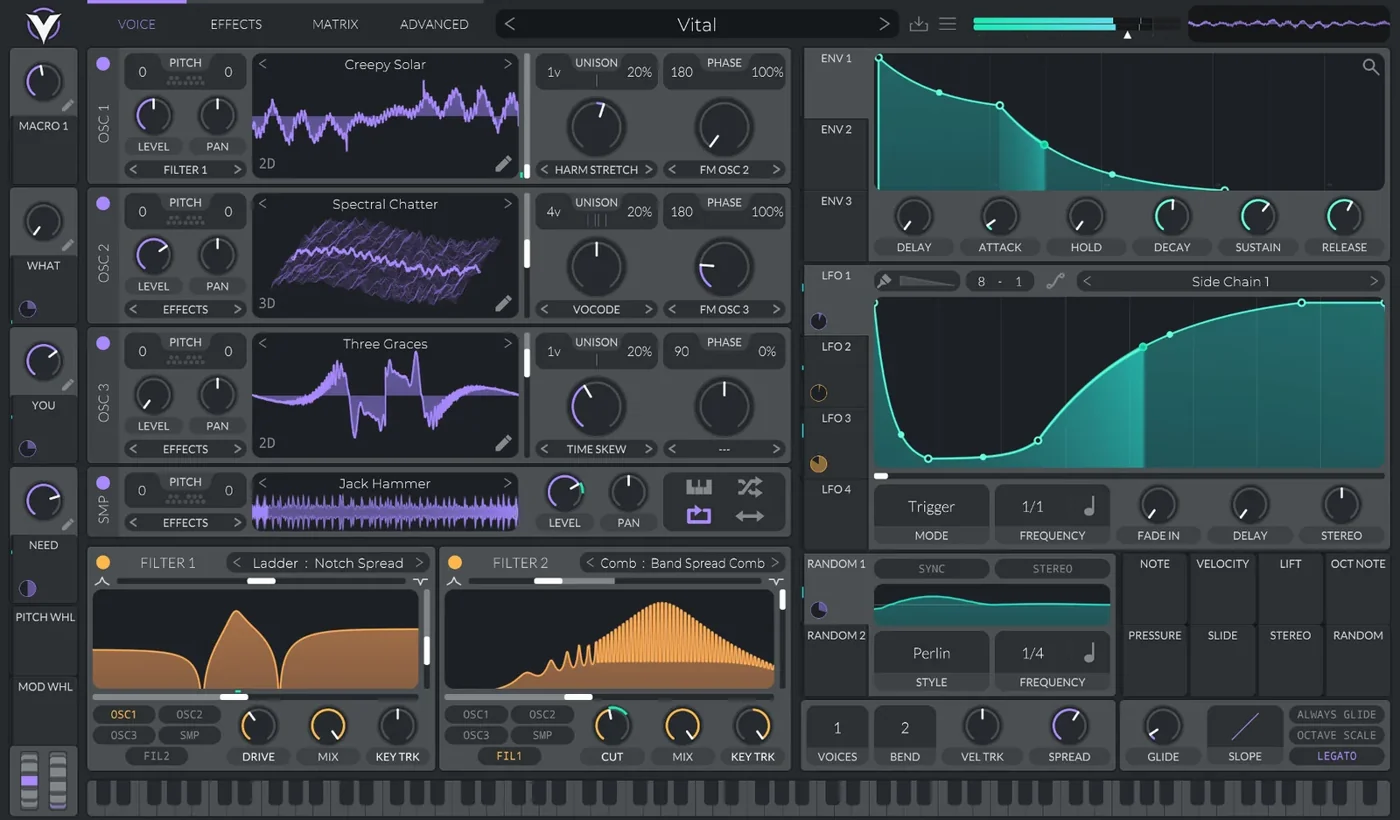
Vital is the strongest starting point here if your budget is zero and you want to design your own electronic sounds. Its free Basic tier provides the synthesis engine rather than a time-limited demo. Paid options add content and other benefits; you do not need them to begin making patches.
- Standout tools: spectral warping, visual modulation, drag-and-drop routing and MPE support.
- Good fit: EDM, trap, bass music and learning wavetable synthesis.
- Main trade-off: Basic includes fewer factory presets than the paid editions.
Use Vital to learn how envelopes shape a pluck and how an LFO changes a sustained bass note. Those skills transfer to paid synths later. It is a sensible choice for beginners who want hands-on sound design; producers who depend on a large ready-made sound library should compare the included content first.
Our take: the default recommendation before spending money
We would recommend Vital before a paid wavetable synth to most newcomers who are willing to learn sound design. You can explore what makes a bass move, how a filter changes a lead and why an envelope makes a note feel short or sustained without making a purchasing decision first. That is more useful than paying for a large preset library and never understanding the patches inside it.
The limitation is convenience, not whether you can make a finished record. A producer who wants a wide selection of ready-made sounds may prefer a paid library or a different instrument. A producer who enjoys starting from an empty patch gets much more value from Vital's free engine. If Vital already does everything your tracks need, our recommendation is to keep using it rather than upgrade out of habit.
Patch idea: make a pluck with a short amplitude envelope, then give the filter a slightly longer decay. You will hear the brightness fade independently of the volume. Try that before reaching for another preset pack.
3. u-he Diva — best for vintage analog character
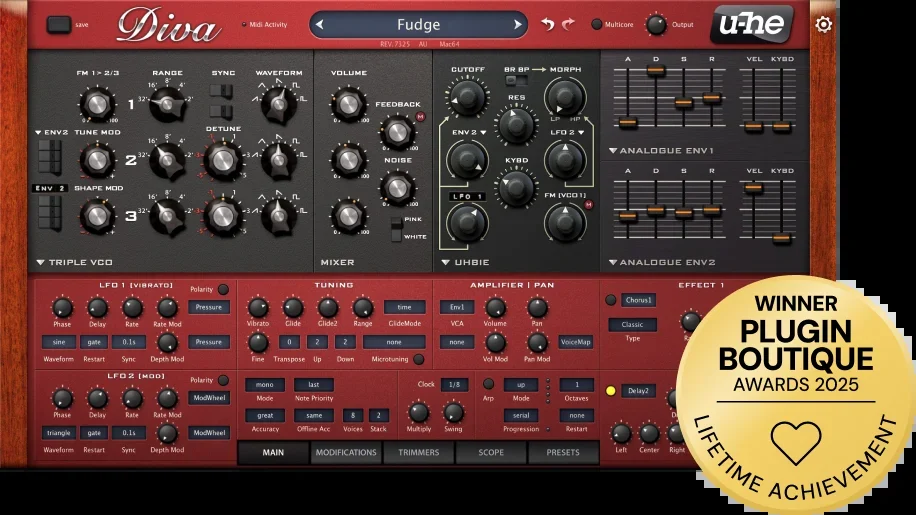
Diva focuses on modeled analog oscillators, filters and envelopes. You can combine module designs inspired by different classic synthesizers, rather than stay inside one hardware recreation. It is a focused choice for rounded basses, expressive leads and vintage-style pads.
- Standout tools: interchangeable oscillator and filter models, voice drift and per-voice variation.
- Good fit: house, melodic techno, synthwave, disco and analog-style pop production.
- Main trade-off: higher quality settings and layered voices can put pressure on your CPU.
Choose Diva when the filter response and character of a relatively simple patch matter more to you than a long list of synthesis engines. Audition its demo in an actual project: a bass patch and a stacked pad can have very different processing demands. Lower playback quality or freeze finished tracks when needed.
Our take: a focused purchase for a specific kind of sound
Diva is the synth we would shortlist when the goal is an expressive bass or pad with an analog-style response, rather than an elaborate patch full of digital transformations. The benefit of its module choices is that a relatively straightforward sound can still be explored through different oscillator and filter combinations. You do not need a complicated modulation diagram to justify opening it.
We would choose Diva over Pigments for a producer who repeatedly reaches for vintage-inspired parts and wants an instrument dedicated to that approach. We would choose Pigments instead if that same producer also needs granular atmospheres, sample manipulation and a broader synthesis toolkit. Diva's narrower focus is a strength when it matches your music, and an expensive limitation when it does not.
Patch idea: hold a simple chord and vary filter cutoff, envelope amount and voice variation before adding reverb. Listen for the motion already inside the patch. If you enjoy that style of editing, Diva's approach is likely to suit you.
4. Arturia Pigments 7 — best versatile all-in-one synth
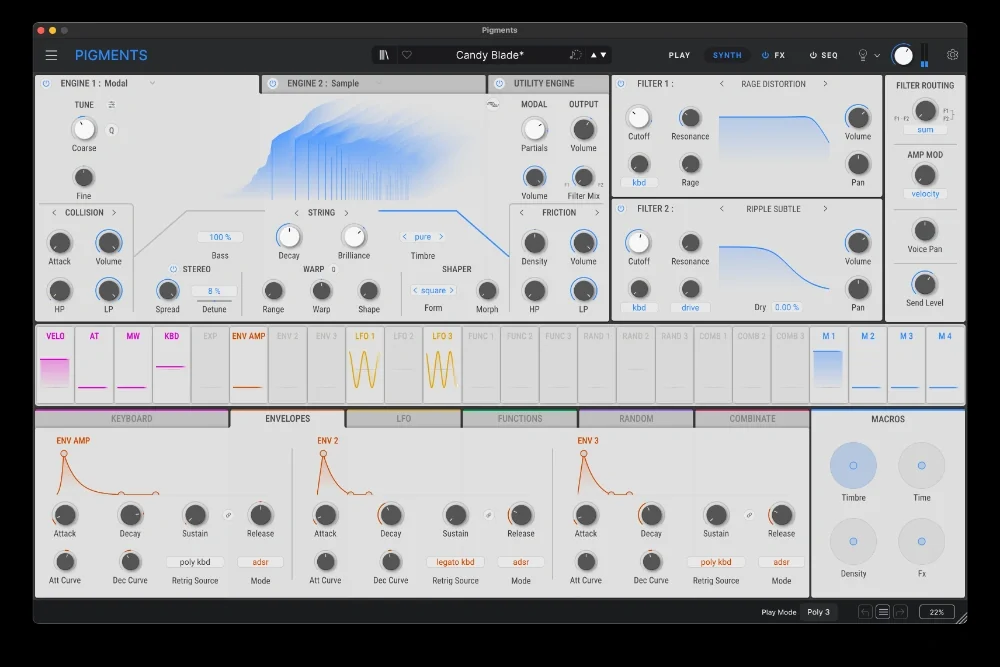
Pigments 7 is the pick for exploring several synthesis approaches in one instrument. Its six methods include virtual analog, wavetable, sample, granular, harmonic and modal synthesis. Color-coded modulation helps you follow what is changing as you reshape a patch.
- Standout tools: combined engines, drag-and-drop modulation, creative filters and generative sequencing.
- Good fit: electronic production, ambient textures, hybrid percussion and producers working across genres.
- Main trade-off: its breadth makes it easy to spend more time experimenting than finishing an arrangement.
Choose Pigments if you want a conventional bass one moment and a transformed sample texture the next. Start with one engine before layering more. For a simpler preset workflow, compare the free Play edition with the full instrument in our Pigments Play vs Pigments 7 guide; read our Pigments 7 review for the full breakdown.
Our take: our broadest paid recommendation
Pigments is our first shortlist choice for a producer who wants one paid synth to explore several kinds of sound. Its combination of methods makes the purchase easier to justify when your projects move between electronic basses, sampled textures and more unusual percussion. The important point is that those methods can become part of one patch, rather than simply exist as separate items on a feature list.
We would choose it over Diva for variety, and over Phase Plant for a producer who prefers an established layout to assembling a generator structure. Phase Plant remains the more attractive choice when constructing that structure is part of the creative process. Pigments sits between those preferences: plenty of depth, with a framework that helps keep the patch understandable.
Patch idea: combine a conventional synth tone with a quiet granular texture made from a recording. Let the conventional layer supply the note's identity and the granular layer supply motion. This is a practical reason to want a hybrid instrument, rather than buying one simply because it has more engines.
5. Kilohearts Phase Plant — best for modular sound design
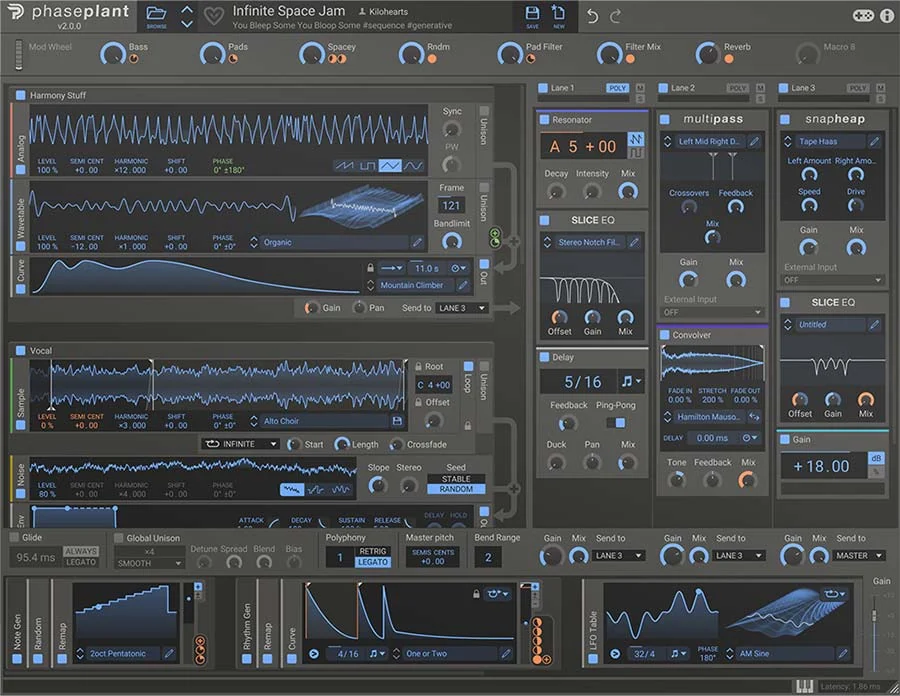
Phase Plant lets you assemble generators and modulators around the sound you want to make. Combine analog oscillators, wavetables, samples, granular sources and noise, then process them through effects lanes. This is useful when a fixed synth layout gets in the way of your patch idea.
- Standout tools: modular generator groups, audio-rate modulation and flexible effects processing.
- Good fit: experimental bass, game audio, complex layered patches and sound designers who enjoy building from scratch.
- Main trade-off: some premium Kilohearts effects require an additional purchase.
Phase Plant is a paid synthesizer. The included Kilohearts Essentials effects give you plenty to work with; you do not need to purchase every extra effect to start. Choose it for patch-building freedom, and compare that workflow with Serum's more predefined layout in our Phase Plant vs Serum 2 guide.
Our take: buy it for construction, not just complexity
Phase Plant is most compelling when you can describe a patch that a fixed-layout synth makes awkward to build. Perhaps you want multiple sound sources with different processing, or you want to experiment with modulation between generators. Its modular approach lets the structure follow the idea. That is the advantage we would pay for.
We would choose Serum 2 first for someone learning a conventional electronic sound-design workflow, and Phase Plant for someone who already understands that workflow and keeps wanting to rearrange it. This is a preference about how to work, not a claim that one produces better audio. Phase Plant can make simple sounds too, but its purchase becomes harder to justify if you only intend to browse bass presets.
Patch idea: place a short sampled attack alongside a synthesized sustained body, shape their envelopes separately, then process the combined sound. Start with that clear two-part structure before adding more generators. A patch that solves a musical problem is more valuable than a patch that merely fills the screen.
6. Native Instruments Massive X — best for animated wavetable patches
Massive X combines wavetable oscillators with flexible routing and drawn modulation patterns. Its Performer system is particularly useful when a sound needs an evolving rhythmic shape, rather than a single repeating LFO movement.
- Standout tools: multiple wavetable playback modes, phase modulation and Performer sequences.
- Good fit: drum and bass, techno, experimental electronic music and animated bass patches.
- Main trade-off: understanding the routing takes more effort than tweaking a simple subtractive synth.
Consider Massive X if you like designing a patch's movement as much as its tone. Begin with a preset, identify the main modulation sources, then replace one pattern with your own. Before buying it separately, check whether your existing Native Instruments bundle already includes it. Massive and Massive X are distinct instruments, so verify which one you own.
Our take: a worthwhile alternative when movement is the point
Massive X deserves consideration when you want to design how a sound changes over several beats. Drawing a Performer pattern gives you a different way to think about modulation than repeatedly assigning a standard LFO. The practical benefit is control over a patch's phrase: where it opens, where it closes and how it responds to a musical pattern.
We would not make Massive X the automatic first purchase for a beginner just because the original Massive is familiar. Serum and Vital make a sensible starting shortlist for a visual wavetable workflow. Massive X becomes more interesting when its routing and pattern-based modulation answer a particular need. If it is already in your bundle, learning those tools is a better first move than purchasing another wavetable synth.
Patch idea: draw a repeating modulation phrase with one restrained section and one brighter accent. Apply it to a tone-shaping parameter while playing a simple bassline. The modulation should support the groove rather than compete with every note.
7. Reveal Sound Spire — best for layered dance leads
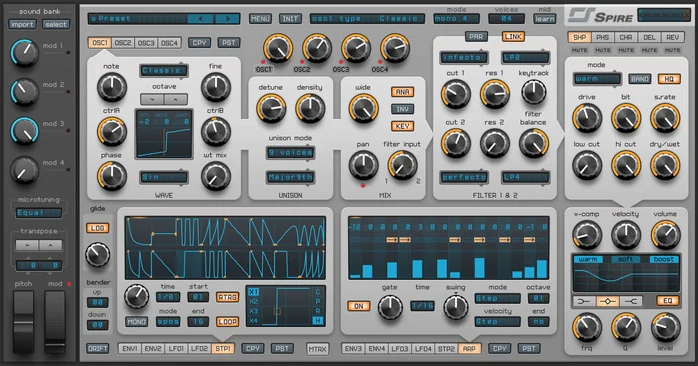
Spire is worth considering when wide leads, stacked chords and bright plucks are central to your tracks. Its four multimode oscillators and per-oscillator unison provide a direct way to build layered dance sounds.
- Standout tools: four oscillators, flexible unison settings and built-in processing.
- Good fit: trance, progressive house, dance-pop and melodic electronic production.
- Main trade-off: for extensive sample manipulation, compare a hybrid instrument such as Pigments or Serum 2.
Choose Spire if you enjoy shaping oscillator layers into a finished lead. Keep unison and effects under control while auditioning: an impressive solo preset can take too much space around a vocal. Test the sound in your chorus before deciding it is the right plugin for your style.
Our take: choose it when the lead is central to the track
Spire is a sensible shortlist choice for producers who build arrangements around a prominent lead, chord stack or pluck. Its oscillator and unison controls let you make decisions about the layers inside the sound. That is useful when a melody needs width and weight without relying entirely on duplicating tracks in the DAW.
Against Sylenth1, we would audition the oscillator modes and unison options rather than try to declare a universal winner. Against Pigments, the decision is clearer: choose Spire for this focused style of oscillator-led production, and Pigments for a wider range of hybrid textures. We would not buy Spire as another general-purpose synth if the leads in your existing collection already fit your tracks.
Patch idea: start with a narrow lead, add a quieter detuned layer, then compare it in mono and in the full arrangement. Keep the melody audible without letting the stereo layer obscure the vocal. That is a more revealing audition than judging a heavily reverberant factory preset in isolation.
8. LennarDigital Sylenth1 — best for straightforward supersaws and plucks
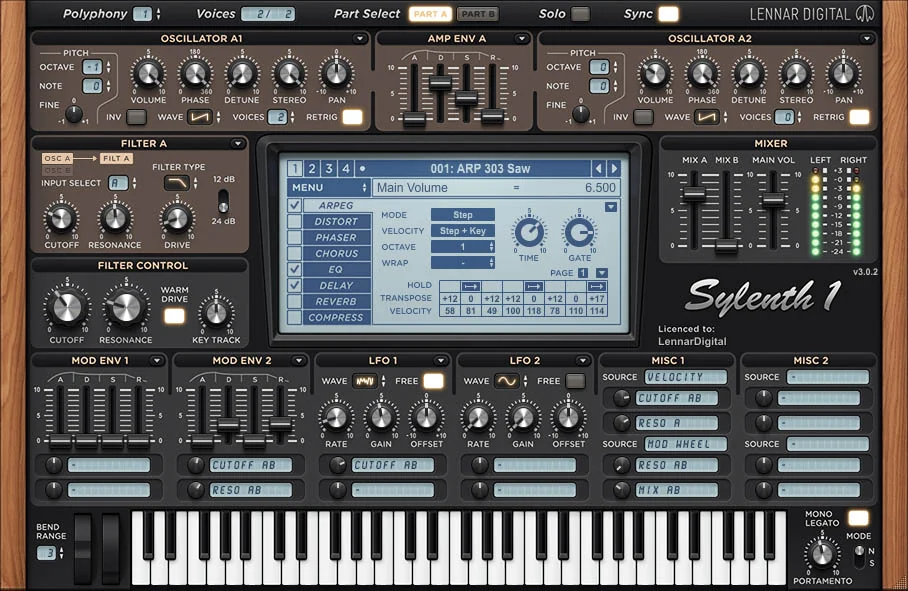
Sylenth1 offers a focused subtractive workflow built around four unison oscillators, two filters and a compact effects section. Its appeal is direct control over familiar synth sounds: layered saw leads, short plucks and driven basses.
- Standout tools: stereo unison, filter drive, an arpeggiator and built-in effects.
- Good fit: trance, progressive house and producers who prefer a conventional synth layout.
- Main trade-off: it lacks the sample and granular workflows available in newer hybrid instruments.
Choose Sylenth1 when you want to spend your time on oscillator balance, filter movement and envelopes. Choose Vital or Serum instead if wavetable editing is the main technique you want to learn. Our Sylenth1 guide covers the instrument in more detail.
Our take: simplicity is the reason to consider it
Sylenth1 remains a useful purchase candidate for a producer who wants direct access to familiar subtractive sounds. Its relatively focused layout encourages you to finish the sound through oscillator balance, filter movement and envelopes. We see that as its main appeal: fewer competing approaches to consider when a track just needs a recognizable lead or pluck.
We would not recommend it over Vital purely on value for someone starting today. A free instrument is the better place to find out which techniques you enjoy. Sylenth1 makes more sense when you specifically prefer its layout, already work with its patches, or want a focused instrument for those classic dance parts. If sample-based and granular design are high on your wish list, put your money toward a hybrid synth instead.
Patch idea: make a short saw-based pluck, automate the filter envelope amount across a build, and keep the delay quieter than the dry attack. This shows how an uncomplicated patch can carry an arrangement through changes in phrasing and automation.
9. Spectrasonics Omnisphere 3 — best for cinematic textures and sound libraries
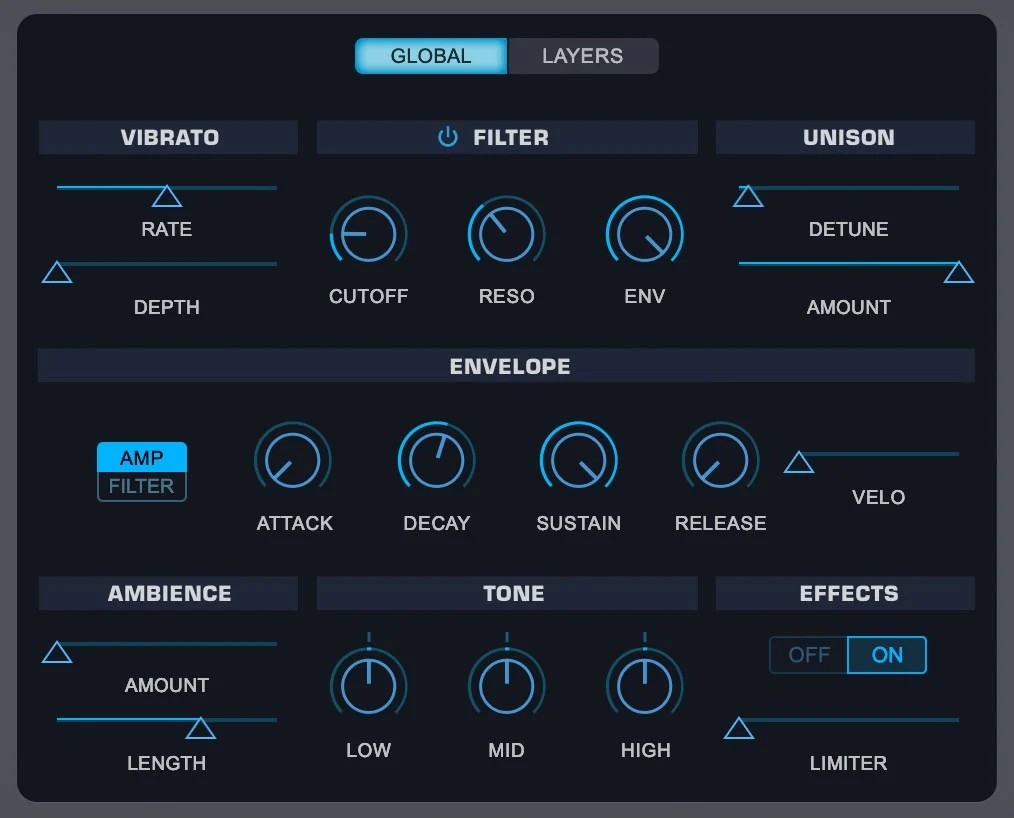
Omnisphere 3 combines sample-based soundsources with synthesis tools, including granular processing, wavetables and modulation. It suits producers who want to begin with an inspiring texture and transform it into a playable instrument.
- Standout tools: layered patches, user audio import, granular transformations and a broad sound library.
- Good fit: film and game scoring, ambient music and atmospheric pop or hip-hop production.
- Main trade-off: consider the library's installation requirements and whether you will use its breadth.
Choose Omnisphere if exploring sounds is part of your writing process. For focused electronic bass design, a smaller instrument may be a more direct purchase. Read our Serum 2 vs Omnisphere 3 comparison to decide between those workflows, or the Omnisphere 3 guide for more context.
Our take: buy the breadth only if it helps you write
Omnisphere is the purchase we would consider when searching and transforming sounds is part of composition itself. An interesting source can suggest a chord progression, an atmosphere or a scene before you have decided on the rest of the arrangement. Its sample-based material and synthesis controls make that a different proposition from buying a focused oscillator synth.
We would choose Omnisphere over Serum for a composer prioritizing layered atmosphere and library-led exploration, and Serum for a producer prioritizing a direct electronic patch-building workflow. That is not a genre rule: either instrument reaches beyond those uses. The deciding question is which starting point helps you write. A huge library has little value if it interrupts your process with endless auditioning.
Patch idea: choose a texture with a clear mood, reduce its ambience, then adjust its envelope so it leaves space around the lead instrument. Treat the library sound as raw material for your arrangement rather than assume a dramatic preset should remain unchanged.
10. Surge XT — best free synth for deeper experimentation
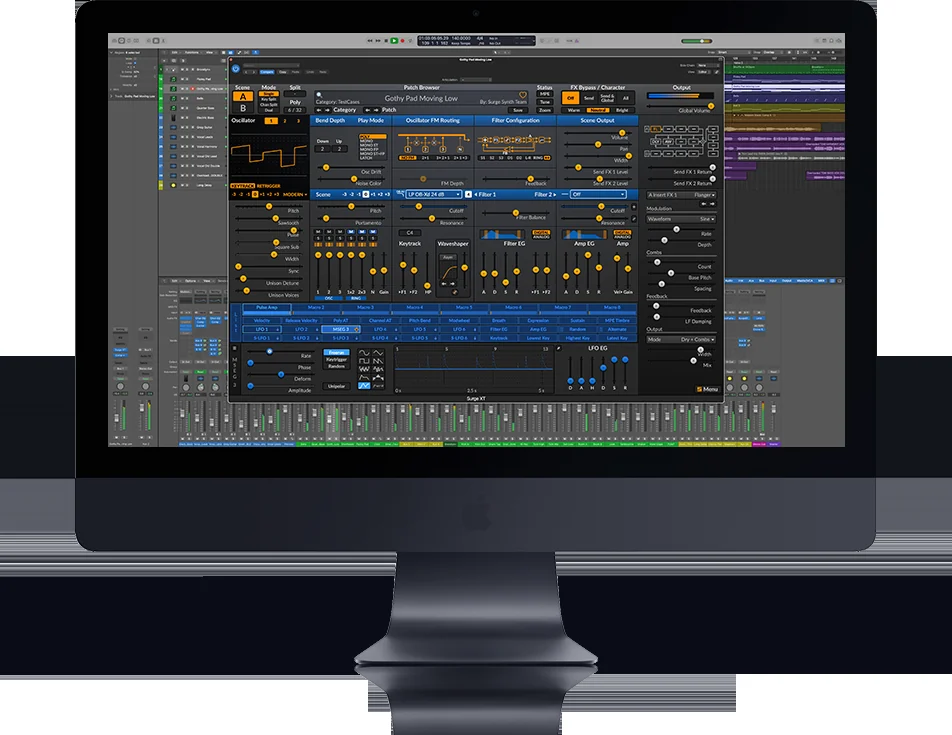
Surge XT is a free, open-source synthesizer with multiple synthesis techniques, extensive modulation and effects. Its two-scene architecture lets you layer or split sounds inside one patch, making it a useful alternative to buying another hybrid instrument.
- Standout tools: layered scenes, a flexible modulation engine, MPE and microtuning support.
- Good fit: ambient, experimental electronic music and producers exploring synthesis on a budget.
- Main trade-off: the dense interface requires patience if you are completely new to synthesis.
Choose Surge XT for breadth at no cost. Choose Vital if you prefer to start with a more visual wavetable workflow. Download the stable release from the official project website, then learn one scene before combining two. Our free synth VST guide covers more options.
Our take: the free option for curiosity and depth
Surge XT is our recommendation for a producer who wants to explore a broad synthesis toolkit without a financial commitment. The two-scene structure is especially useful: you can think of a patch as two related instruments, each contributing a different role. That makes it possible to investigate layered sounds before deciding whether a paid hybrid synth is necessary.
We would point a complete beginner toward Vital first if visual wavetable editing is the immediate goal. We would point a curious producer toward Surge XT if exploring oscillator approaches, modulation and layered scenes sounds more appealing. Its depth is valuable, but the interface asks you to learn where things are. If you enjoy that process, paying for a different synth is an optional workflow choice rather than a requirement for more capable sounds.
Patch idea: use one scene for a short, defined attack and the other for a quieter sustained layer. Balance the scenes until the sound has both articulation and body, then remove anything the arrangement does not need.
How to choose a synth plugin without wasting money
Start with the sound and workflow you need
For an analog-style bass, begin with a subtractive or virtual analog instrument. For a bass that changes timbre throughout a note, try wavetable synthesis. For turning a recording into an evolving atmosphere, explore granular processing. These are starting points, not genre restrictions: a capable synth can cover many styles.
Also decide whether you want to build sounds or browse presets. Phase Plant rewards custom patch construction. Omnisphere is worth investigating for library-led composition. Serum and Pigments combine presets with extensive editing. Listen to the included sounds before paying for a plugin plus several expansion packs.
Test CPU demand inside your DAW
There is no useful universal CPU ranking without matching the computer, patch, voice count and quality settings. High unison counts, layered engines and demanding effects can change the result dramatically. Test a bass, a sustained chord and several simultaneous instances at your normal buffer size. Freeze or render tracks once a sound is finished.
Check compatibility and what the license includes
Confirm your operating system, processor support, plugin format, available storage and activation method. Check whether the listing is the full instrument, an upgrade or a preset expansion. An expansion pack usually requires the synth already; a cheap preset listing is not a cheap synth license.
Before buying, look through your existing bundles and DAW instruments. Your next track may need a technique you have not learned yet, rather than another plugin. Use a demo where available and buy when the instrument solves a specific problem in your workflow.
Frequently asked questions about synth VST plugins
What is the best free synth VST?
Vital is our starting recommendation for visual wavetable sound design. Surge XT is a strong alternative if you want several synthesis methods and layered scenes. Both are useful production instruments; choose the interface and workflow that help you finish music.
Is Serum 2 worth buying if I already have Vital?
It depends on what you are missing. Vital covers extensive wavetable sound design for free. Serum 2 adds other oscillator approaches, flexible effects routing and sequencing tools. Buy it for features you will use, rather than expecting the same MIDI part to sound better simply because the plugin costs money. See our Serum 2 vs Vital comparison.
Which synth VST is best for beginners?
Start with Vital if you want to learn synthesis without paying, or a synth already included with your DAW. Begin with one oscillator, one filter and one envelope. A larger preset library is helpful for writing quickly, but it does not replace learning the controls that shape your sound.
Can I use these synths in FL Studio, Ableton Live or Logic Pro?
Use the format supported by your DAW and supplied by the developer. For Logic Pro, check for an AU version. For FL Studio or Ableton Live, check the supported VST version on your operating system. Do not assume every product supplies every format.
Do I need Kontakt for these synth plugins?
No. The synthesizers in this list run as their own instruments and do not require Kontakt. Kontakt is a separate platform used by many sampled-instrument libraries.
Is Phase Plant free?
No. Phase Plant is a paid synthesizer, with a trial available from Kilohearts. Kilohearts Essentials is a free effects collection included in its ecosystem; it is not a free Phase Plant license.
Our recommendation: pick one synth you will learn
Start with Vital for free wavetable synthesis, Pigments 7 for a broad paid toolkit, or Diva for analog-style sounds. Choose Serum 2 when its visual workflow and extra oscillator engines match the sounds you want to build. For modular experimentation, put Phase Plant on your demo shortlist.
Choose one instrument, make a bass, a lead and a pad with it, and use those sounds in a finished track. That tells you more about its value than collecting another folder of unused presets.
How we chose these synth plugins
This is a research-based editorial buying guide. We compared developer documentation, manuals and current product listings, then assessed the practical implications for producers. The product images are developer or retailer images, rather than screenshots from a SoundShaper testing session.
Our recommendations weigh four factors: the sound-generation methods available, how the interface supports patch building, the value compared with free alternatives, and the limitations that affect a buying decision. The verdicts and patch ideas are our analysis of those workflows. We have not assigned benchmark scores or claimed hands-on tests across all ten instruments.
Use the patch ideas as starting points for your own audition. Where a demo is available, compare instruments using the same MIDI part, similar output levels and similar effects settings. That helps you judge the workflow and the result you actually need.
Product information and sources
Features and listings were checked on 5 October 2026. Visit the official resources below for specifications, demos and developer purchase options alongside the retailer links in this guide.
![[background image] image of recording equipment (for a musician & band)](https://cdn.prod.website-files.com/68efa70811edd8e5af30a90d/6acd43b8998701bbde84e11a_Best%20Export%20Settings%20for%20FL%20Studio.png)
![[background image] image of recording equipment (for a musician & band)](https://cdn.prod.website-files.com/68efa70811edd8e5af30a90d/6acd3f9347bd0dd62b202621_ShaperBox%203%20vs%20Infiltrator%202.png)
![[background image] image of recording equipment (for a musician & band)](https://cdn.prod.website-files.com/68efa70811edd8e5af30a90d/6acd3d99fa68785e0f58960e_Kontakt%208%20vs%20Decent%20Sampler.png)