

Omnisphere 3 is worth considering when a distinctive sound library and detailed sound shaping are central to your music. I would shortlist it for atmospheric parts, hybrid textures and production ideas that begin with an unusual source. I would compare a more focused synth first if you mainly need straightforward basses and leads.
For existing Omnisphere 2 owners, my buying question is more specific: will the new sound collections, global controls, Patch Mutations or FX Rack change how you work? An upgrade can be useful without being essential. If version 2 already delivers the parts you need, there is no musical deadline to replace it.
Jump to: What it is · What is new · Version 2 vs 3 · Price and upgrades · Installation · Alternatives · Soundbank · FAQ
What is Omnisphere 3?
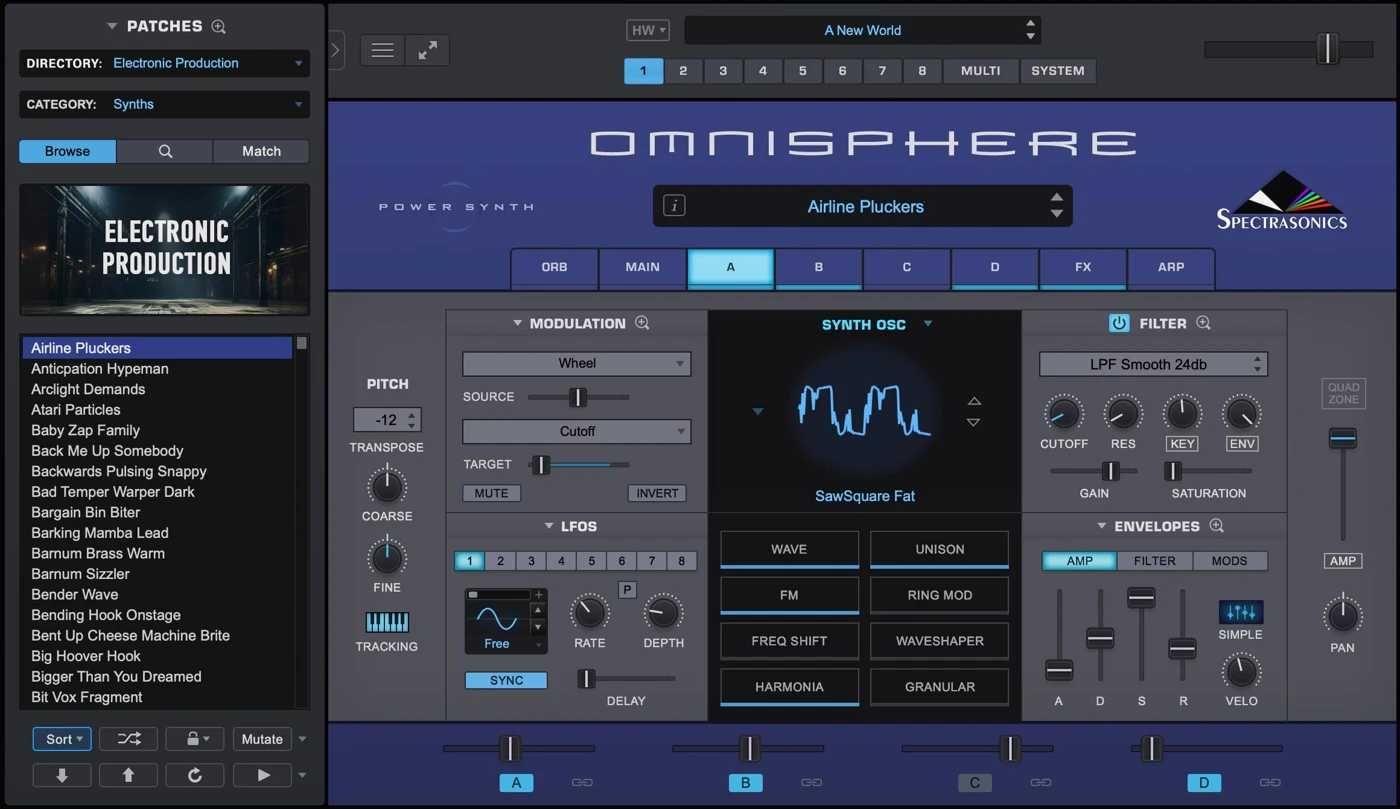
Omnisphere 3 is Spectrasonics’ hybrid synthesizer and sound-library instrument. You can start from a finished patch, build with sampled soundsources, or shape synthesized material. It is useful to think of it as both a source of musical ideas and an instrument for developing those ideas into a part.
A soundsource is material used to build a sound. A patch combines sound choices with synthesis, modulation and effects. The library therefore offers more than a folder of audio samples: how those sources are turned into playable patches is part of the appeal.
The current library includes collections such as Ambient Dreams, Organic Vibes, Club Land and Scoring Electronic. I like that range as a starting point because a project may need an intimate pluck in one section and an unfamiliar texture in another. The meaningful advantage is finding material that changes the direction of the song, not simply owning more sounds.
Who would I recommend it to?
- Composers and sound designers: a varied source palette helps when a cue needs an identity rather than another familiar pad.
- Producers working with atmospheric layers: a textured part can add character behind a vocal or piano without becoming the main melody.
- Writers who enjoy starting from patches: discovering a playable sound can suggest a progression, rhythm or arrangement.
- Regular Omnisphere users: an upgrade deserves a look if the new tools address decisions you make every session.
I would be less enthusiastic if your aim is to collect one plugin that eliminates every future purchase. A broad instrument still has a particular workflow and library character. It also does not replace learning arrangement, synthesis or mixing.
What is new in Omnisphere 3?
The most useful changes to assess are the curated and refreshed sound library, the redesigned browser, adaptive global controls, Patch Mutations, new synthesis tools and the separate Omnisphere FX Rack plugin. Some of the instrument’s deeper architecture already existed before version 3; it would be misleading to present every layering or modulation feature as newly invented.
Adaptive global controls: my strongest workflow reason to upgrade
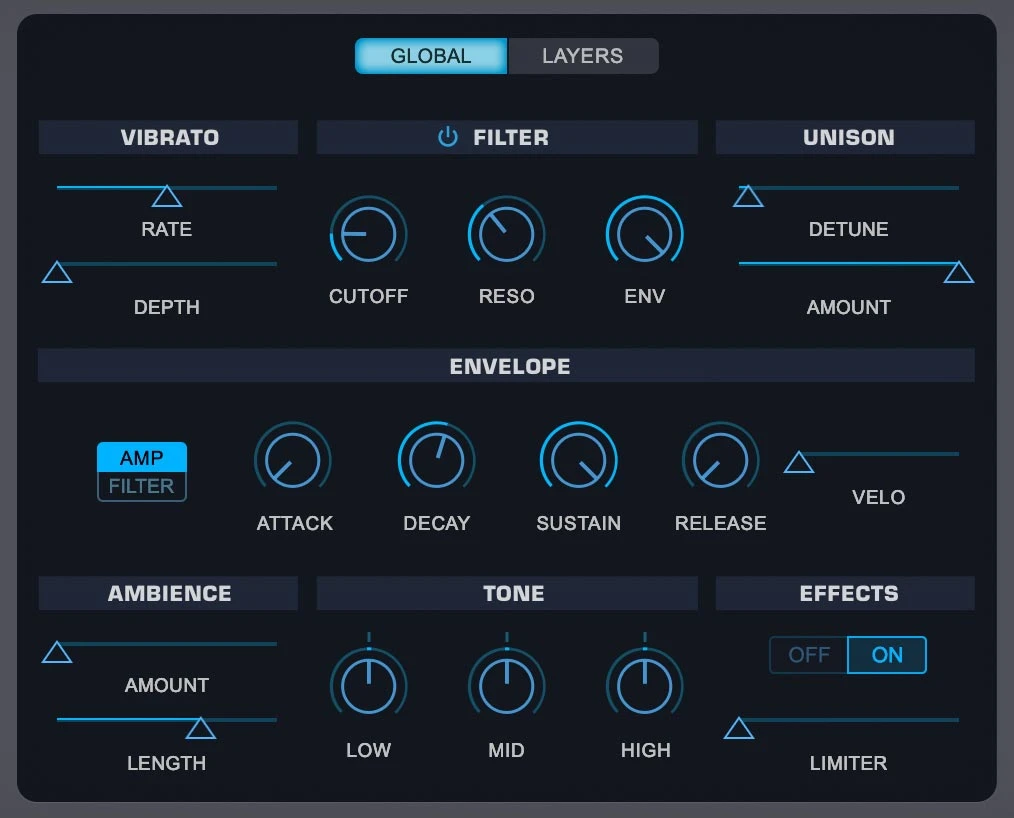
The global controls provide access to tone, ambience, filter, envelope, vibrato and unison at the overall patch level. My interest here is practical: a patch can be close to what the arrangement needs while its decay, brightness or space is wrong.
My take: this is a stronger buying argument than a vague promise of “more power.” During writing, I would rather make a few useful changes to a promising sound than abandon it because adjusting several layers breaks the flow.
Try thinking in terms of the part’s role. If a preset sits behind a vocal, make its note length and brightness serve that role. If it is the chorus hook, give it enough definition to carry the melody. The controls are a route to those decisions; they do not make every preset automatically fit every mix.
Patch Mutations: useful exploration with a stopping point

Patch Mutations generate variations of an existing patch, from restrained to more extreme changes. I would use that as an exploration tool after finding a sound that already works reasonably well.
My opinion: the best use is a defined brief. “Find a less busy version for the verse” is more productive than generating variations indefinitely. Compare a small selection with the actual arrangement playing, keep the strongest candidate and move on.
There is also value in keeping the original nearby. A different sound is not necessarily an improvement. Listen for whether the variation changes the emotional role, timing or frequency balance in a useful way.
New synthesis options: movement and character
Version 3 adds features including Quadzone modulation, new filter types, frequency shifting, oscillator drift and MPE support. I would judge those by the kinds of changes they let you make, rather than treating the feature names as a reason to buy.
For example, an evolving texture should have a clear relationship to the harmony and section length. If it changes constantly, it may compete with the vocal or dialogue. For a sustained atmosphere, I would begin with subtle movement and increase it only when the scene or arrangement needs more tension.
MPE is more relevant if your controller and playing style support expressive per-note gestures. If you draw every note with a mouse and rarely automate performance, other parts of the upgrade may matter more.
The included FX Rack: a separate reason to compare the upgrade
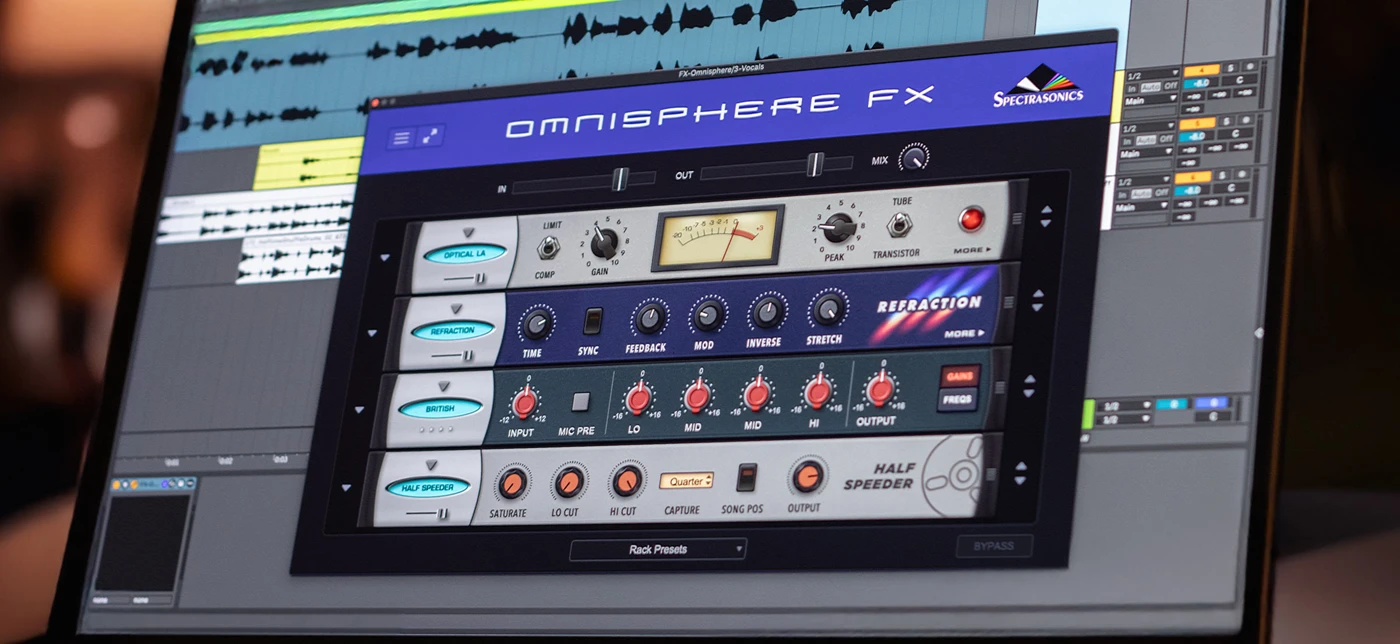
The included FX Rack lets you use Omnisphere effects as a separate plugin in your DAW. Its value is therefore not limited to sounds coming from the instrument itself.
My take: I would consider this meaningful if I already like the effects and want to try them on other material. A simple keyboard part, a recorded texture or a percussion loop may benefit from a different treatment. It is a weaker upgrade reason if your existing effects already deliver the same results comfortably.
A practical audition is to process one dry phrase with the rack and compare it at a similar level to your usual chain. Judge the movement, space and character in context. Louder or wetter is not automatically better.
Omnisphere 2 vs Omnisphere 3: should you upgrade?
I would upgrade sooner if Omnisphere is a regular part of my writing process and the new global controls or FX Rack address work I do repeatedly. I would wait if it mainly opens to the same few patches that already fit my music.
The new library can also justify an upgrade for a producer who mainly uses presets. Deep programming is not the only valid use of an instrument. The right question is whether the new material is useful enough to earn its cost in your actual projects.
Before upgrading, back up important sessions and render essential parts as audio. Spectrasonics states that version 3 replaces the previous plugin and supports earlier projects. A session backup is still a sensible way to preserve a finished arrangement before changing a central instrument.
Three ways I would use Omnisphere in a track
1. An atmospheric layer behind a vocal
Start with a restrained pad or organic texture and play a simple voicing. Keep the notes out of the lead melody’s register where possible. Reduce ambience and release until chord changes stay clear, then bring space back gradually.
My preference would be a part you notice when it disappears, rather than one that announces itself throughout the verse. If you need a bigger chorus, automate brightness or level before adding another dense layer. Check whether the lyric remains easy to follow.
2. A pulse that adds tension without replacing the drums
Choose a rhythmic patch and listen to its accents against the kick and snare. If it creates a competing groove, simplify the MIDI or try a less active sound. A pulse can support momentum without filling every gap.
I would use a short loop containing a section transition to make the decision. The patch should help the song enter the next section, not merely sound impressive over four repeated bars. Leave room for the drummer’s fill or the vocal pickup.
3. A hybrid texture with a recognisable role
Start with one main source and add a contrasting element only when you can describe what it contributes: attack, body, noise, movement or depth. Audition the layers separately as well as together.
My advice is to avoid making every layer equally important. A subtle texture beneath a clear musical tone can be more distinctive than a patch where everything competes for attention. Save a usable version before exploring more extreme variations so that experimentation does not erase the part that already worked.
Omnisphere 3 price and upgrade options
Spectrasonics currently lists the full boxed product at $499 / €399, the full download at $499, the Standard Upgrade at $199 and the Atmosphere Upgrade at $249. These are listed purchase options, not a guarantee of the same tax-inclusive total in every country. Check the final seller price and delivery format.
The Standard Upgrade is for registered Omnisphere 1 or Omnisphere 2 owners. The Atmosphere Upgrade is for registered owners of that legacy instrument. Both lead to the full Omnisphere 3 product. Owning Keyscape or Trilian by itself is not the same as meeting either of those upgrade conditions.
New download purchases and upgrades are available through Spectrasonics. Boxed editions are supplied through authorised resellers. I would compare the installation format, final cost and seller support rather than assuming a particular seasonal discount is guaranteed.
My buying advice: decide what you are buying before comparing prices. A full licence, an upgrade and a third-party soundbank are different products. A low price on a preset pack does not include the synthesizer.
System requirements and storage: plan for installation too
The current requirements list 8 GB RAM, with 16 GB or more recommended, a 2.4 GHz or faster processor and 64 GB free storage. Supported systems include macOS 13 Ventura or later and Windows 10 or later, with a compatible 64-bit host. Native Apple Silicon support is available.
The published storage requirement is not the whole download-installation budget. Spectrasonics explains that downloading a full installer and installing it requires space for both sets of files. Its upgrade example uses a 61 GB installed library and at least 122 GB of temporarily available space, even when Omnisphere 2 is already installed.
That example helps explain why “the new library is no larger” does not mean “no extra space needed to upgrade.” Check the current installer instructions for your purchase and drive setup. The library can live on a suitable secondary or external drive.
I would check available space before starting a long download, then keep the installed library and reusable installer clearly organised. Do not move or delete the working library simply because you want to remove downloaded installation files.
For performance, start by judging the patches you actually need in your own session. Long releases, layered material and effects can increase the amount of work. Published minimum requirements are not a promise that every patch will run comfortably in every large project.
Does Omnisphere 3 include Keyscape or Trilian?
Keyscape and Trilian are separate Spectrasonics products. Do not assume the main Omnisphere purchase includes their complete libraries. Integration with another instrument you own is different from receiving that instrument as part of the licence.
If your priority is detailed playable keyboard instruments, our Keyscape article is a more focused next step. I would choose around that need rather than buying a broader sound-design instrument solely because it has keyboard patches.
Omnisphere 3 alternatives worth comparing
The most useful comparison is about where your ideas come from. Do you want a broad library that suggests a musical direction, or do you prefer building and inspecting a patch from the beginning?
Pigments 7: my shortlist choice for visual sound design
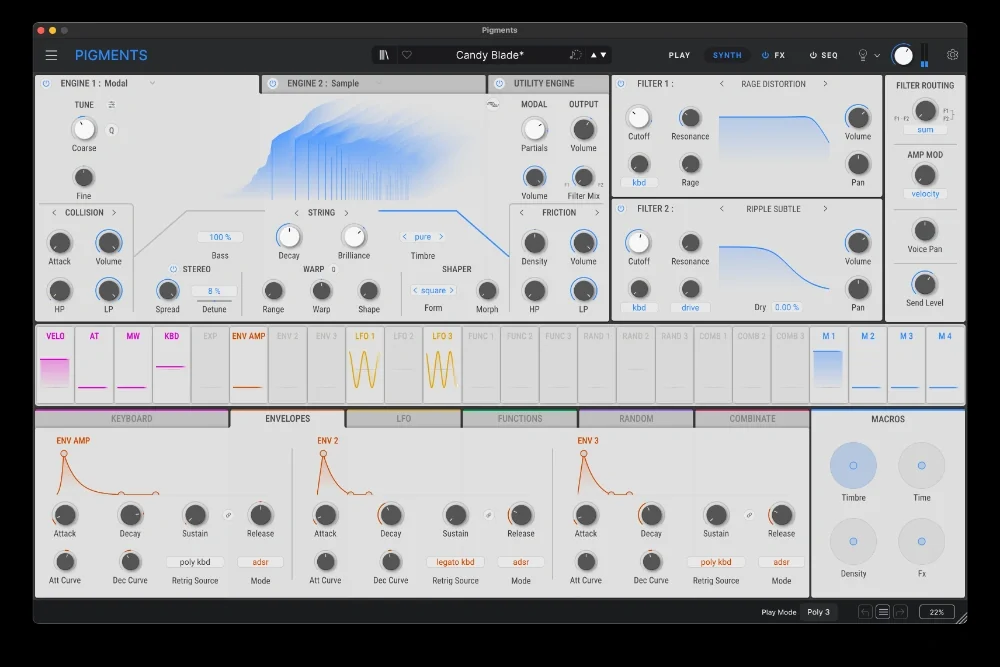
Pigments offers several synthesis approaches, including virtual analog, wavetable, sample, granular, harmonic and modal engines. Its visual modulation workflow is a strong reason to compare it when you enjoy seeing how the sound is being shaped.
My take: I would favour Pigments when the goal is to understand and build the patch actively. I would favour Omnisphere when its library and source character are a major part of why I sit down to write. Both approaches can produce atmospheric material; the difference is how you prefer to get there.
A practical comparison is to make a pad whose brightness and movement change over one chord progression. Pay attention to how quickly you can control the movement, rather than which factory preset sounds more dramatic. The full Pigments product is separate from the more limited Pigments Play edition.
Serum 2: my shortlist choice for wavetable and sample work
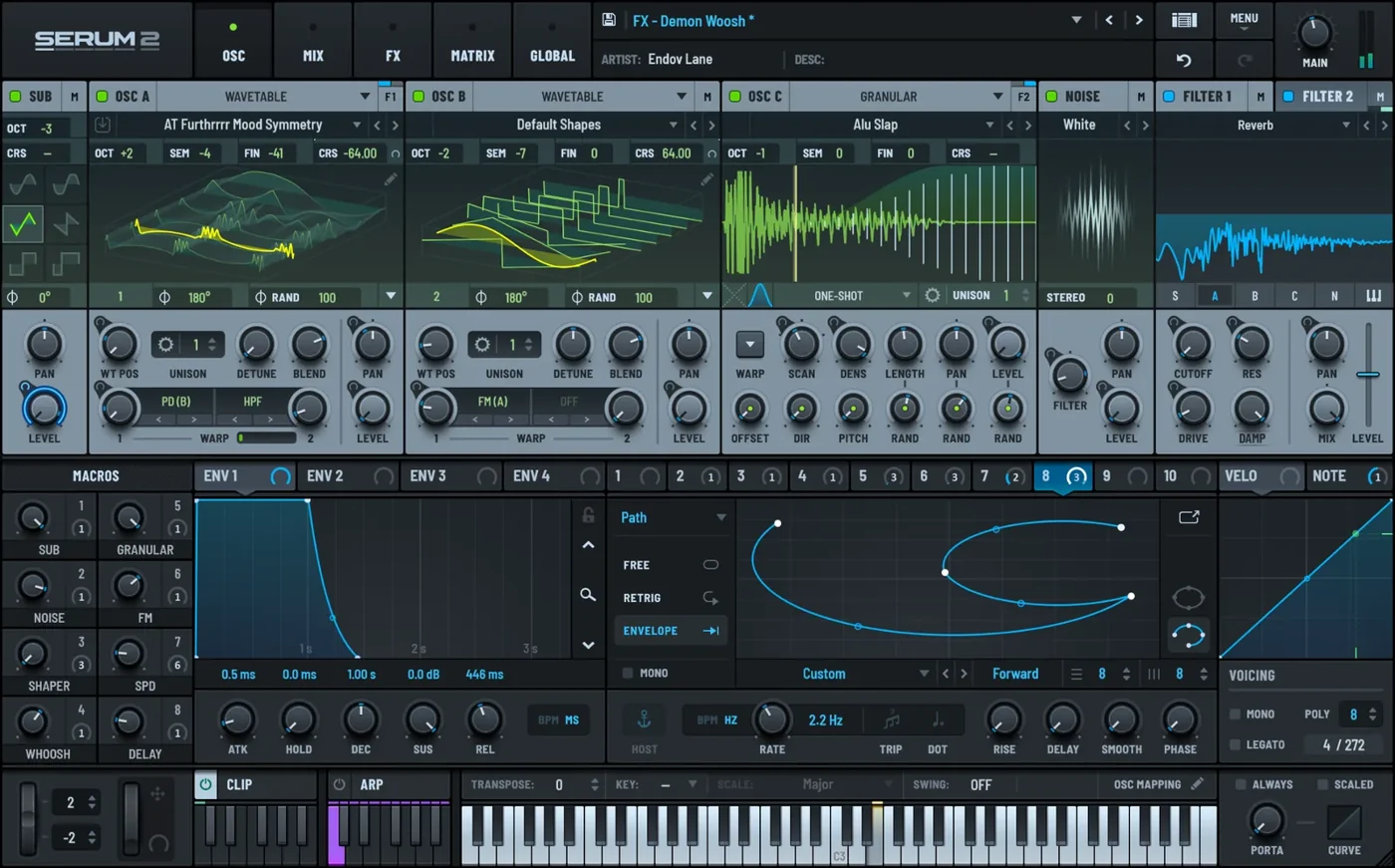
Serum 2 combines wavetable, sample, multisample, granular and spectral oscillator methods. I would compare it if transforming audio and controlling oscillator behaviour are central to the sounds you want to create.
My opinion: Serum is a convincing alternative for a producer who wants to shape a bass, lead or texture around a specific brief. Omnisphere deserves attention when an unusual library source or playable patch is what starts the idea. Neither instrument owns a genre.
Try one sound-design task you regularly face: a moving bass, a playable sampled texture or a pad with controlled evolution. Then compare which workflow makes the intended result easier to reach. Read our Serum 2 review and Serum 2 vs Omnisphere 3 comparison for the narrower buying decision.
Already own Omnisphere? Cinematic II is a targeted soundbank
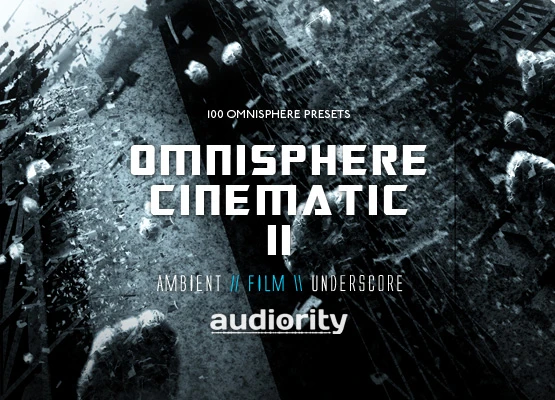
Audiority’s Cinematic II contains 100 presets focused on dark ambient, film, soundtrack and underscore. The listing specifies a full Omnisphere installation, with version 2.1.0d or higher for the modern bank. Spectrasonics states that existing third-party Omnisphere libraries are compatible with version 3.
My take: I would consider this only after exploring the relevant factory collections. A targeted bank can help when its style matches a project brief, but a large existing library is a good reason to be selective about expansions.
Audition the demo for a few specific roles: one pulse, one background texture and one transition. If those roles fit your music, the bank has a purpose. If you mainly want a different-looking folder to browse, it is unlikely to solve the session’s real problem.
A useful first exercise after loading a patch is to adapt its note length and ambience to a short scene or arrangement. Keep the emotional direction of the sound while making its timing fit your own music.
My verdict: buy for the palette, upgrade for a clear use
Omnisphere 3 makes the strongest case when its sound palette becomes part of your creative process. A good patch or source can suggest a part you would not have written with a more familiar instrument, and the editing tools let you develop that idea rather than only replay it.
For an upgrade, I would put the global controls, useful new collections and separate FX Rack ahead of an abstract promise of “better sound.” These are concrete things to evaluate against your current workflow. If they have a regular role, the upgrade deserves serious consideration.
If your current tools already let you finish the music you want to make, keep using them. Compare Pigments for a visual programming workflow and Serum 2 for focused wavetable and sample exploration. The right purchase is the one whose sound and workflow you will actually use.
Omnisphere 3 FAQ
Is Omnisphere 3 worth it?
It is worth considering when you want its broad sound palette and enjoy developing library patches or unusual sources into musical parts. A narrower synth may be better value if you mainly need straightforward bass and lead sounds.
Should I upgrade from Omnisphere 2?
Compare the new sound collections, global controls, Patch Mutations and FX Rack against your regular workflow. Upgrade when those additions have a clear purpose; keep version 2 if it already covers your needs.
How much is the Omnisphere 3 upgrade?
Spectrasonics lists the Standard Upgrade at $199 and the Atmosphere Upgrade at $249 at the time of this update. Verify eligibility and the final checkout total.
Can I download a free Omnisphere 3 trial?
Spectrasonics does not offer a downloadable trial. Its FAQ suggests arranging a demonstration with an authorised local dealer. Official videos and library demos can also help you evaluate the sound.
Will my older projects and soundbanks still work?
Spectrasonics states that earlier Omnisphere projects, custom patches and third-party libraries are compatible. The upgrade replaces the previous plugin. Back up important sessions before changing versions.
How much disk space do I need?
The product requirements list 64 GB free storage. A downloaded full installer requires additional temporary space; follow the installation guidance for your edition and setup.
Does Omnisphere 3 include a standalone application?
Yes. It can also run as a plugin in a compatible DAW. Choose the format supported by your host and system.
Does the Cinematic II button buy Omnisphere 3?
No. It buys a preset soundbank that requires Omnisphere. The full-instrument and upgrade buttons link to Spectrasonics’ purchase page; Pigments is clearly labelled as a separate alternative.
Sources and related reading
This editorial assessment uses Spectrasonics’ current product information and compatibility FAQ, library catalogue, purchase options and installation-space guidance. Alternative engine details were checked against Arturia and the Serum 2 manual. The linked soundbank listing supplies its contents and requirements. Recommendations are research-based judgements, not claims of a new hands-on benchmark.
For a broader shortlist, read our VST synth buying guide. For a focused virtual analog option, see the Sylenth1 review.
![[background image] image of recording equipment (for a musician & band)](https://cdn.prod.website-files.com/68efa70811edd8e5af30a90d/6acd43b8998701bbde84e11a_Best%20Export%20Settings%20for%20FL%20Studio.png)
![[background image] image of recording equipment (for a musician & band)](https://cdn.prod.website-files.com/68efa70811edd8e5af30a90d/6acd3f9347bd0dd62b202621_ShaperBox%203%20vs%20Infiltrator%202.png)
![[background image] image of recording equipment (for a musician & band)](https://cdn.prod.website-files.com/68efa70811edd8e5af30a90d/6acd3d99fa68785e0f58960e_Kontakt%208%20vs%20Decent%20Sampler.png)