Serum 2 and Omnisphere 3 are both premium instruments, but they solve very different problems.
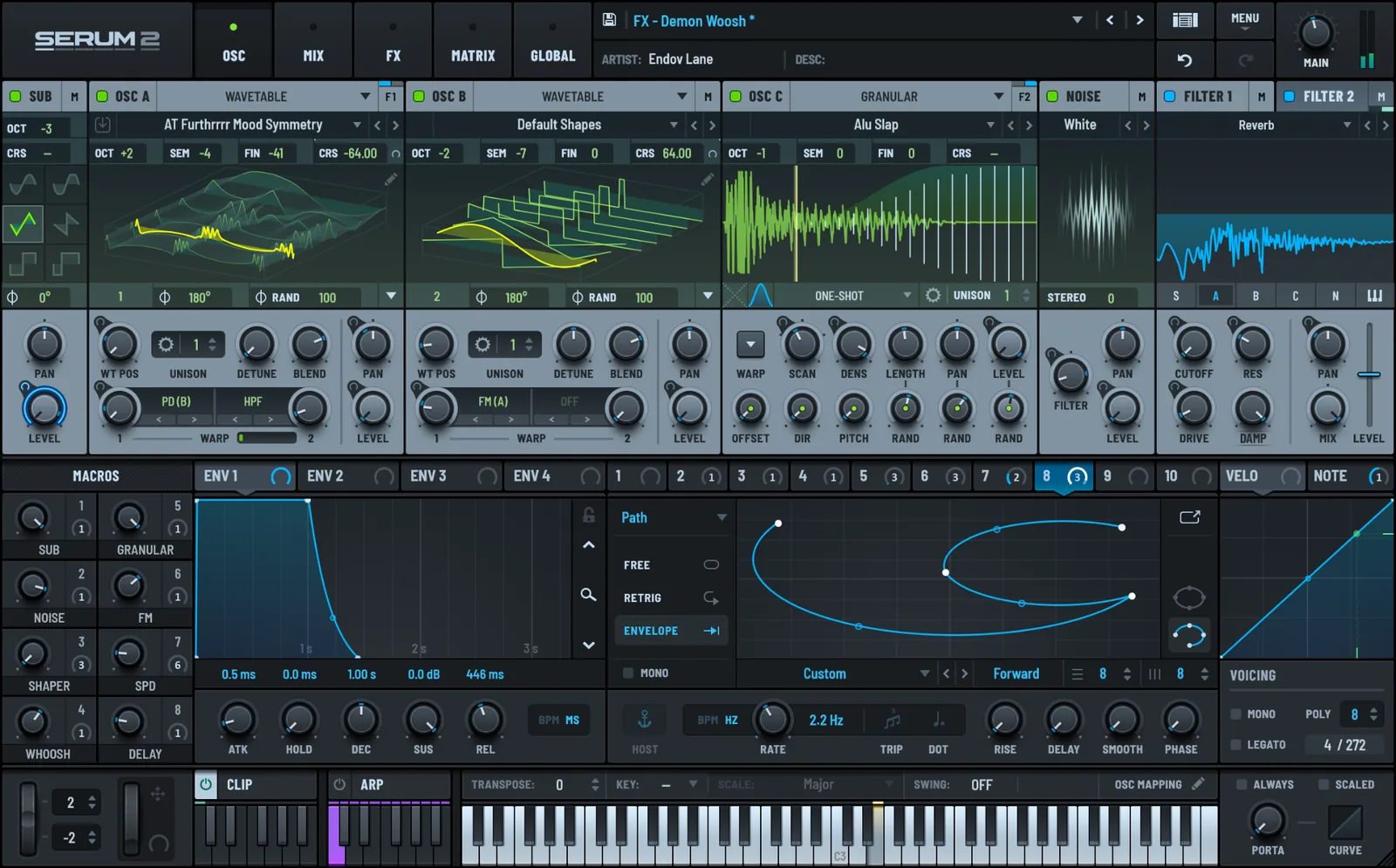
Serum 2 is a focused sound-design synth. It gives you a highly visual workflow for building basses, leads, pads, textures and effects from scratch, with wavetable, sample, multisample, granular and spectral engines inside one interface.
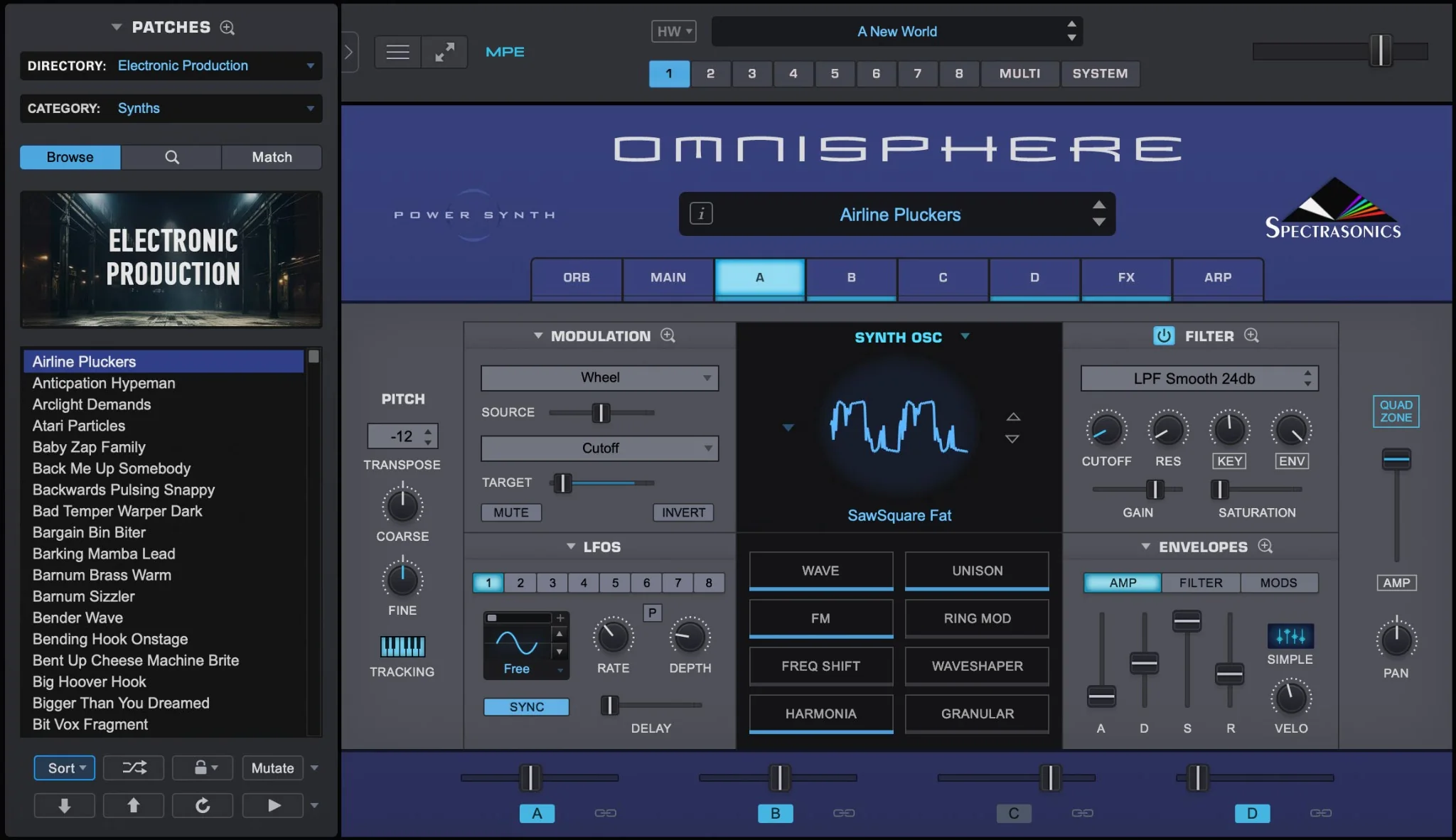
Omnisphere 3 is closer to a complete sound environment. Its strength is the combination of synthesis, layered sound sources and a huge curated library designed to cover everything from cinematic textures and organic instruments to modern electronic sounds. Spectrasonics has also expanded Omnisphere 3 with features such as Quadzone modulation, new filters, adaptive global controls and patch mutations.
That makes the buying decision very different from something like Serum 2 vs Nexus 5. Here, the question is not simply whether you prefer presets or sound design.
It is whether you want a focused synth you can deeply learn and shape yourself, or a much larger instrument ecosystem built around discovering, layering and transforming sounds.
In this comparison, we’ll look at sound design, presets, synthesis, workflow, cinematic and organic sounds, CPU and storage, and value to find out which one actually makes more sense for your money.
Choose Serum 2 if you want a focused synth for designing your own sounds. Its visual modulation, flexible synthesis engines and streamlined workflow make it easier to build patches from scratch and understand exactly what is happening inside them.
Choose Omnisphere 3 if you want a much larger sound library and a broader creative palette. It is especially strong for cinematic textures, organic sounds, layered instruments and producers who want thousands of high-quality starting points without building everything themselves.
Serum 2 is the better fit for hands-on synthesis and control. Omnisphere 3 is the better fit for sound discovery, layering and sheer variety.
The price gap between Serum 2 and Omnisphere 3 is not just about one synth having more features.
With Serum 2, you are mainly paying for a focused synthesis environment. The value comes from how quickly you can build, modulate and reshape sounds without working through a huge library or complex multi-layer structure.
With Omnisphere 3, a much larger part of the price goes into the overall ecosystem: an enormous sound library, detailed sample sources, multiple layers, extensive synthesis tools and a much broader range of ready-made material.
That makes Omnisphere 3 feel less like a single synth and more like a complete sound workstation.
If you mainly want to design electronic sounds yourself, Serum 2 gives you more of what you need for less money. If you want one instrument that can cover synths, textures, organic sounds, cinematic material and layered patches, the higher price of Omnisphere 3 becomes easier to understand.
If you prefer starting from an initialized patch, Serum 2 is the more direct instrument.
Its interface keeps the main synthesis tools visible and easy to reach, so you can move quickly between oscillators, filters, modulation and effects without digging through a large multi-layer structure.
That makes Serum 2 especially strong for producers who like to shape basses, leads, plucks, pads and experimental sounds step by step.
Omnisphere 3 can go far deeper than its preset reputation suggests. You can build complex patches from multiple layers, combine different sound sources, use granular and wavetable synthesis, and create highly detailed modulation setups.
The difference is workflow. Serum 2 feels faster when the goal is to design one sound clearly and intentionally, while Omnisphere 3 gives you a much larger environment with more layers and source material to explore.
For hands-on synthesis from scratch, Serum 2 is easier to stay focused in.
This is where Omnisphere 3 pulls far ahead.
Serum 2 includes more than 626 presets and 288 wavetables, which is plenty for a focused synth and gives you a strong collection of starting points for electronic sound design.
Omnisphere 3 is on a completely different scale. Its factory library currently contains more than 41,000 sounds, including synths, pads, textures, vocals, guitars, keyboards, organic sources and cinematic material.
The difference is not just quantity. Omnisphere is designed around sound discovery. Its libraries are curated and organized so you can browse by use case, find a strong starting point and then reshape it with the synth engine.
Serum 2 works differently. Its presets are useful, but the instrument still feels most natural when you open a patch and start changing oscillators, modulation and effects yourself.
If you want a synth with enough presets to get started but still expect to build your own sounds, Serum 2 is more than enough.
If you want the widest possible range of ready-made sounds inside one instrument, Omnisphere 3 is in another league.
For cinematic textures, evolving atmospheres and organic source material, Omnisphere 3 is the stronger choice.
A large part of its appeal comes from combining synthesis with a huge collection of recorded sound sources. That makes it easy to blend acoustic material, textures, vocals, instruments and synthetic layers into patches that feel more detailed and less purely electronic.
Serum 2 can still create cinematic pads, drones and experimental textures, especially with its granular, sample and spectral engines. But the workflow usually starts from a smaller set of source material that you shape more deliberately.
Omnisphere 3 gives you far more material to explore before you even begin designing the patch.
So if your music depends heavily on film-score textures, ambient layers, organic sounds or hybrid instruments, Omnisphere 3 offers the broader palette.
Both synths are extremely capable, but they approach modulation very differently.
Serum 2 keeps modulation visual and immediate. Envelopes, LFOs and other modulation sources can be assigned directly to parameters, making it easy to see what is moving and how much influence each source has.
That makes complex patches easier to understand, especially when you are building movement into basses, leads, pads or rhythmic sounds.
Omnisphere 3 offers a much deeper environment with multiple layers, extensive modulation options and more complex patch structures. The trade-off is that it can take longer to understand exactly what is happening inside a large patch.
So this comes down to depth versus clarity.
Serum 2 is faster and easier to follow, while Omnisphere 3 gives you more room to build large, layered and highly detailed instruments.
For most producers who want hands-on modulation without slowing down the workflow, Serum 2 feels more immediate.
This is one area where the difference between the two becomes very practical.
Serum 2 is the lighter option to live with. Xfer does not list a large factory-library storage requirement on the product page, and the instrument is built around synthesis rather than a massive sample library.
Omnisphere 3 needs much more storage. Spectrasonics lists 64 GB of free drive space in the system requirements, while the installed Omnisphere 3 library itself is roughly 56–61 GB, depending on platform.
CPU use is less clear-cut. Either synth can become demanding when you build complex patches, stack voices, add multiple effects or use heavier synthesis modes. Spectrasonics also notes that some newer Omnisphere 3 patches require more resources than older ones.
We did not run a controlled benchmark, so we would not claim that one is universally more CPU-efficient.
If you want the smaller, simpler installation, Serum 2 is the easier choice. If you are comfortable dedicating significantly more storage to a huge sound library, Omnisphere 3’s footprint is part of the trade-off.
The price difference is significant.
Serum 2 costs $249, which makes it much cheaper upfront. You can also buy it through Splice using Rent-to-Own, so you do not need to pay the full amount at once.
Omnisphere 3 costs $499, roughly twice the price of Serum 2. That higher price mainly reflects the scale of the product: the much larger sound library, broader source material and more workstation-style environment.
If your main goal is electronic synthesis and building your own patches, Serum 2 gives you more focused value for considerably less money.
Omnisphere 3 becomes easier to justify if you know you will use its huge library for cinematic music, scoring, organic sounds, textures and layered instruments. In that case, you are not just paying for another synth, but for a much larger collection of sounds and creative tools.
For most producers who mainly want a powerful synth, Serum 2 is the better value.
Choose Serum 2 if you mainly produce electronic music and want a synth you can deeply learn over time. It makes the most sense if you enjoy building basses, leads, pads and effects yourself and want a fast, visual workflow without paying for a massive sound library you may not need.
Serum 2 is also the better fit if you want to keep your setup relatively simple. You get a powerful synthesis environment at a much lower price, with enough presets and third-party content to cover a wide range of modern production styles.
Choose Omnisphere 3 if you want one instrument that can cover far more than traditional synth sounds. Its huge library makes it especially useful for cinematic music, ambient production, scoring, organic textures and layered instruments.
Omnisphere 3 also makes more sense if sound discovery is an important part of your workflow. Instead of always starting from an initialized patch, you can browse thousands of sounds, combine them and then reshape them into something new.
Serum 2 and Omnisphere 3 are both excellent instruments, but they are aimed at different kinds of producers.
Serum 2 is the better choice if you want a focused synth for building and shaping sounds yourself. It is faster to understand, more immediate to modulate and significantly cheaper.
Omnisphere 3 is the better choice if you want a much larger creative environment. Its strength is the scale of its library, the range of organic and cinematic material, and the ability to layer and transform sounds inside one instrument.
For most electronic producers, we would choose Serum 2 because it offers the better balance of depth, speed and price.
Omnisphere 3 is the stronger buy if you know you will make real use of its huge library and broader sound palette.
![[team] image of team member (for a mobile gaming)](https://cdn.prod.website-files.com/68efa70811edd8e5af30a90d/690abaa8987a07a672c4cd2c_channels4_profile.jpg)
![[background image] image of recording equipment (for a musician & band)](https://cdn.prod.website-files.com/68efa70811edd8e5af30a90d/6aa35b3b03d3771388765f76_Main%20Image.png)
![[background image] image of recording equipment (for a musician & band)](https://cdn.prod.website-files.com/68efa70811edd8e5af30a90d/6aa35785b8608362620d46e3_Main%20Image.png)
![[background image] image of recording equipment (for a musician & band)](https://cdn.prod.website-files.com/68efa70811edd8e5af30a90d/6aa351f638777f809800a4ff_Main%20Image.png)