


Sylenth1 is still worth considering if you want a focused synth for classic dance leads, plucks, basses and pads. I would buy it for that workflow, rather than expecting it to cover every modern synthesis technique. Its appeal is making useful oscillator-and-filter decisions without turning each patch into a large sound-design project.
My recommendation: try the demo with a track you are already working on. If its sound and layout help you finish the part, Sylenth1 has a clear purpose. If you mainly want wavetable editing, sample manipulation or complex evolving modulation, compare Serum 2 or Vital first.
Updated 6 October 2026. This is a research-based editorial review using manufacturer documentation and current product listings. It does not claim new hands-on testing or measured CPU comparisons.
Jump to: What it is · Sound and workflow · Patch ideas · Price and licence · Preset packs · Alternatives · FAQ
What is Sylenth1?
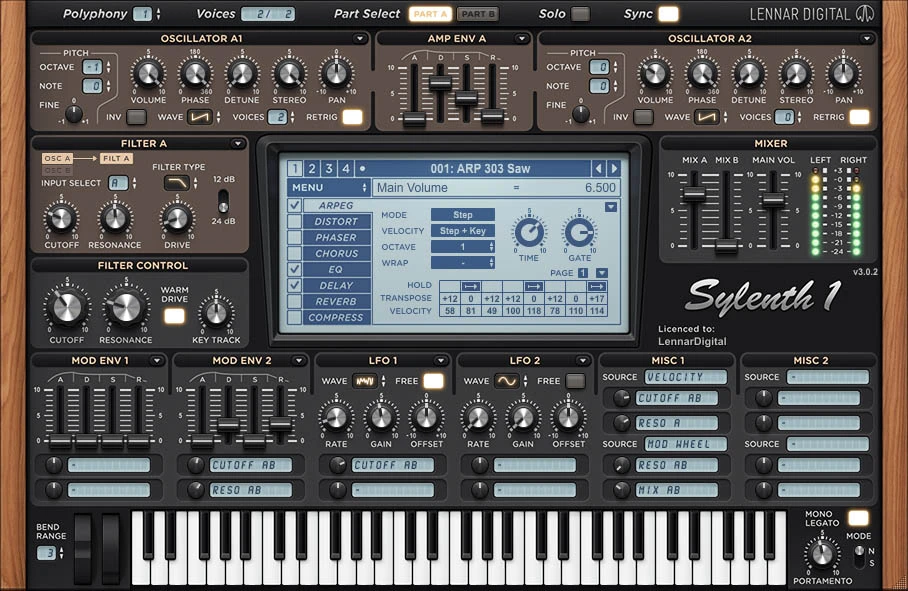
Sylenth1 is LennarDigital’s virtual analog synthesizer. Its main approach is subtractive synthesis: begin with an oscillator waveform, shape the frequencies with a filter, then use envelopes and modulation to control how the sound changes over time.
The core includes four oscillators, up to eight unison voices per oscillator, two filter sections and 16-note polyphony. Unison voices are copies inside a played note; they are not the same thing as the number of notes you can play. A large voice count can create width, but it is not a requirement for a good patch.
The instrument also includes modulation sources, an arpeggiator and effects. You can produce a usable part inside one plugin, then decide whether the arrangement needs further processing in your DAW.
Who is it best for?
- Trance and melodic dance producers: oscillator layers, detuning and filter movement are a natural starting point for leads and plucks.
- House producers: a short envelope and restrained effects can make a bass or chord patch fit around the groove.
- Pop writers: a simple patch can support a vocal without becoming the main event.
- Producers who already own useful Sylenth1 banks: keeping a familiar instrument may be more productive than rebuilding everything in another synth.
I would be more cautious if this is your first paid synth and you do not yet know what sound you need. A free instrument such as Vital gives you room to learn before spending money. Sylenth1 earns a purchase when you prefer its particular workflow or need its preset ecosystem, not because paid plugins are a necessary step toward professional music.
What I like about Sylenth1’s sound-design approach
The strongest case for Sylenth1 is focus. I like the idea of a synth that encourages decisions about the waveform, filter, envelope and width before adding more layers. Those are the choices that often determine whether a part belongs in the track.
A bright lead can sound exciting on its own but mask a vocal. A wide bass can feel impressive through headphones and become less solid when summed to mono. The useful question is therefore not “how big can I make this sound?” It is “what role should this patch play?”
Sylenth1’s two-part layout deserves attention. You switch between Part A and Part B, and the central display also handles different effect pages. The old claim that everything is permanently visible on one flat screen was too simplistic. The layout is compact, but learning its signal flow still matters.
Filters and envelopes do much of the work
I would start with filter cutoff and envelope shape before auditioning extra effects. A low-pass filter can make a saw-based sound more restrained. A short decay can turn a sustained tone into a pluck. Changing the release can make the same notes feel tight or leave a trail into the next chord.
The practical benefit is consistency. If the patch is too crowded, you can often solve the problem inside the instrument instead of stacking an EQ, transient processor and gate after it. That does not mean external processing is wrong; it means the source deserves a decision first.
Effects should support the part
Sylenth1 has built-in distortion, phaser, chorus, EQ, delay, reverb and compression, plus its arpeggiator. I would treat these as part of the patch rather than automatically leaving every effect enabled.
When auditioning a preset, temporarily reduce the delay and reverb. Listen to the dry note length and tone against the drums and bass. Bring the ambience back until it supports the arrangement. If a patch only feels attractive with a huge tail, it may still be the right sound, but you should know how much space it is asking for.
Three Sylenth1 patch ideas to try
These are programming starting points, not claims that a particular setting reproduces a famous record. Build them with your own MIDI phrase and adjust by ear. Keep the output level under control as you add voices or drive.
1. A wide lead that leaves room for the vocal
- Start from a simple saw-based sound with a fast amplitude attack.
- Add a modest number of unison voices and increase detuning gradually. Stop before the pitch centre feels vague.
- Use the filter to control brightness rather than pushing every layer into the same high-frequency space.
- Give the release enough length to connect the phrase without blurring the next note.
- Add a little delay, then check the lead in mono and alongside the vocal.
My preference: begin with fewer layers than you think you need. If the melody already carries the chorus, more detuning may add width while weakening its focus. Automating brightness between sections can create a useful lift without adding another instrument.
2. A house pluck that follows the groove
Begin with a saw or pulse-style tone. Use a short amplitude envelope, reduce sustain and apply an envelope to the filter so that each note opens and then settles. Adjust the decay while the drums are playing: the gap before the next note is part of the groove.
I would shorten the release before applying aggressive sidechain compression. A patch that naturally leaves space may need less processing. Then audition a tempo-synchronised delay quietly enough that the repeats add movement without becoming extra lead notes.
3. A bass patch with a clear centre
Start with a simple waveform and restrained unison. Shape the filter and amplitude envelope around the kick, then compare short notes with longer ones. If the line needs slides, explore mono/legato and portamento settings while checking how overlapping MIDI notes affect the phrase.
My advice is to keep the low-end role clear before adding a wide upper layer. Listen on smaller speakers as well as headphones. More distortion can improve audibility, but it can also make the bass compete with the vocal or synth chords. Keep the version that works in the arrangement.
Where I would choose another synth
Sylenth1’s focused virtual analog architecture is also its boundary. It does not offer the wavetable editing, sample-based oscillator modes or granular workflow you might want for more experimental sound design.
I would not call that a failure. A focused instrument can be easier to commit to when you already know the sound. But if you repeatedly want to import audio, reshape a wavetable or build evolving textures from samples, another purchase is more likely to solve the problem.
Likewise, I would avoid treating “low CPU” as a guaranteed benchmark result. LennarDigital describes an optimised engine, but actual session load depends on the patch, voice count, effects, settings and computer. Test several instances in your own project if efficiency is an important reason for buying.
Sylenth1 price, payment plan and licence
LennarDigital lists the full version at €139 excluding VAT when checked for this update. That is a euro price before applicable tax, not $139 and not a universal checkout total. Check the final amount for your country.
The developer also advertises a €9.95 monthly instalment option. It is a payment plan toward ownership: after all required instalments are paid, you keep the full licence. If you stop the plan before finishing it, the licence is put on hold until payments resume. The developer also specifies periodic internet access for the plan.
The full purchase includes activations for two computers, more than 2,500 presets and free updates. Two activations is materially different from the old article’s promise of unlimited computers.
My buying advice: use the demo first and compare the final total, not just the monthly amount. An instalment plan helps spread payment; it does not make an unused plugin valuable. If you already own another synth that covers these parts comfortably, identify the specific reason you want Sylenth1 before adding it.
The Sylenth1 demo and DAW compatibility
The official demo has important limits: a reminder sound roughly every minute, restricted modulation, disabled preset saving/exporting, and a smaller preset selection. It helps you judge the sound and layout, but it does not represent every capability of the full version.
The downloads page currently lists different demo builds for Windows and macOS, so do not assume the version number must match across platforms. Get the installer for your system from LennarDigital.
VST3 and native Apple Silicon support were introduced in version 3.072. Sylenth1 also has AU and AAX formats. The manufacturer lists Windows 7–11 and macOS 10.9 or later on its requirements page; check current host and operating-system support for your exact setup before purchasing.
For FL Studio, install the appropriate plugin format and use the DAW’s plugin scan to find it. For Logic Pro, use the AU version. Activate the full plugin using LennarDigital’s licence instructions; the DAW’s plugin manager is not a substitute for the instrument’s activation process.
Sylenth1 preset packs: useful when you already own the synth
The following products are soundbanks, not Sylenth1 licences. They require Sylenth1 to use their presets. I would browse the included factory banks first and buy an expansion when it fills a recognisable gap in your music.
SOR Summer Deep House Sylenth1: a focused house starting point

This Resonance Sound pack includes 71 Sylenth1 presets, 11 construction kits, 50 MIDI files and 56 WAV files. The listing specifies Sylenth1 version 3.031 or later. Drum and vocal sounds heard in the demo are not included.
My take: I would shortlist this when the goal is a coherent house palette and arrangement inspiration. The MIDI and audio material provide context beyond individual patch names, which can help you understand how a sound works with other parts.
A useful exercise is to audition one chord or pluck patch with your own progression, then change the envelope and ambience until it supports your drums. Use the construction kits as a reference for relationships between parts, rather than letting the supplied arrangement dictate your whole song.
Pumped: Sylenth1 EDM Essentials: a broader preset palette
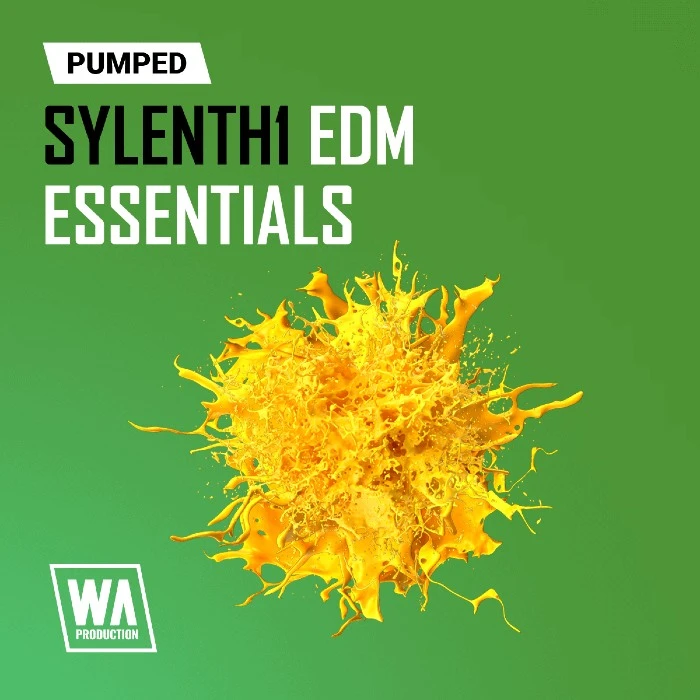
W. A. Production’s pack contains 186 Sylenth1 presets. Its broader EDM focus makes it an option to compare if you want several types of starting sound rather than one tightly themed house collection.
My opinion: I would only favour the larger bank if its demos contain patches you can imagine using. A high preset count is not a reason to buy by itself. A smaller bank that fits your tracks can be worth more than another large folder you rarely open.
Make a shortlist of a bass, a pluck and a lead before purchasing. Listen for their note lengths and frequency roles, not just the finished demo’s energy. Once loaded, adapt those three patches to one of your songs instead of spending the session browsing all 186.
Sylenth1 alternatives: what would I choose?
Spire: my closest comparison for dance production
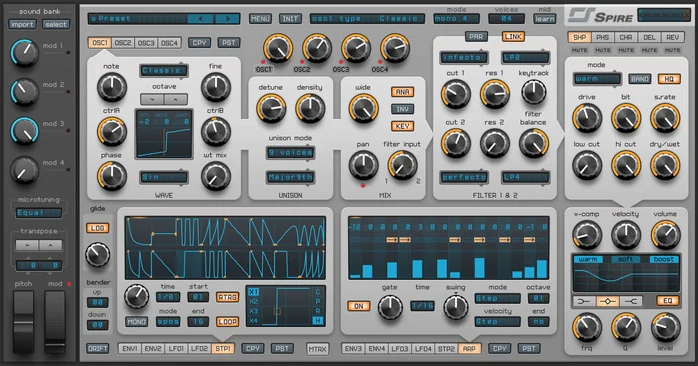
Spire is the comparison I would make first for prominent dance leads, chord stacks and plucks. Its multimode oscillator and modulation options offer more directions to explore than Sylenth1’s focused architecture.
My take: I would choose between them by building the same musical part in their demos. Start with similar dry sounds and compare how quickly you reach a useful result. If Spire’s extra options help you shape the patch, they have value. If you spend longer browsing without improving the part, Sylenth1’s focus may suit you better.
For a practical audition, use one chorus progression, one bass phrase and one short melody. Keep levels comparable and check how the lead sits around the vocal. That answers the buying question better than comparing two unrelated factory demos.
Serum 2: my choice for broader sound design
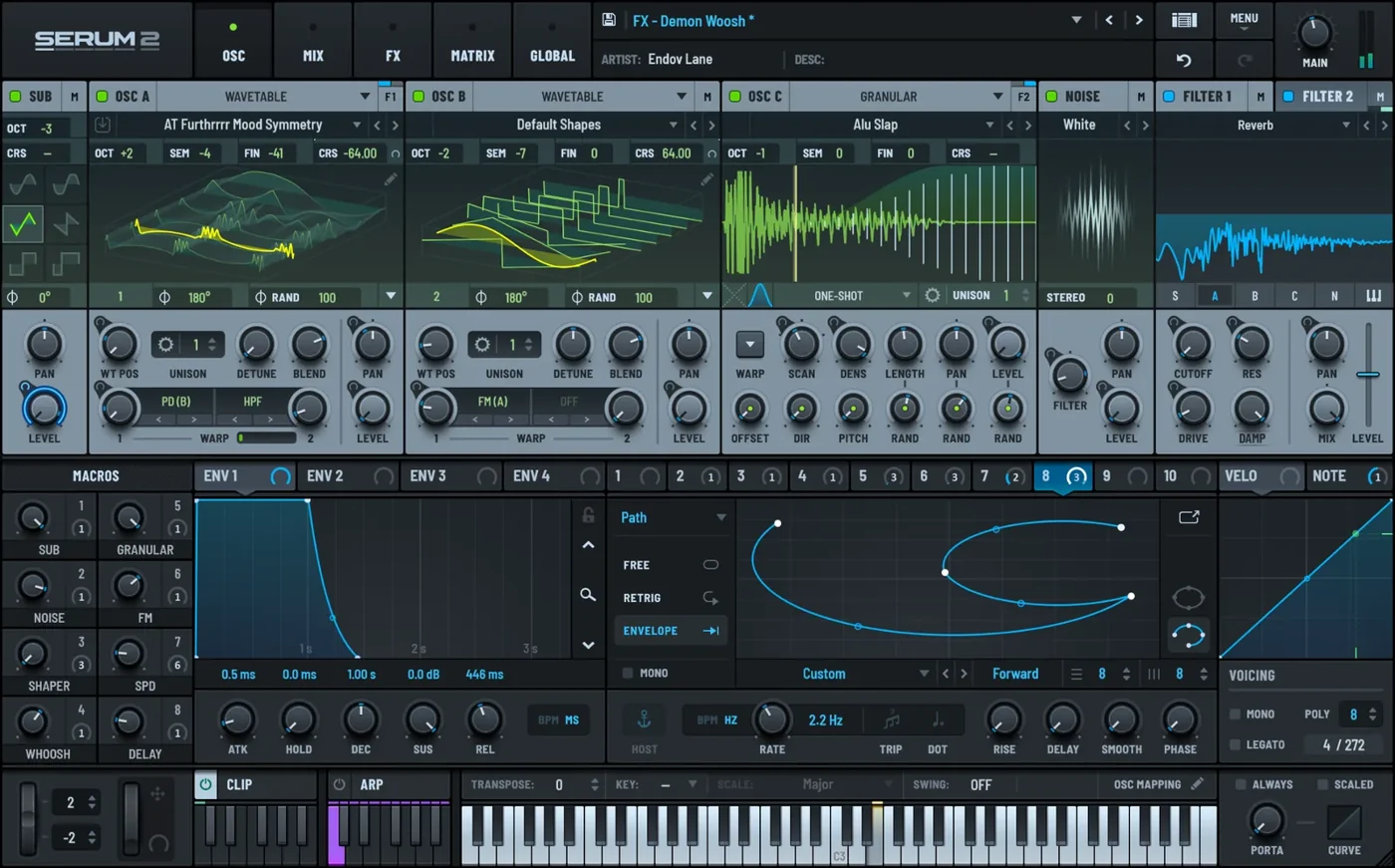
Serum 2 combines wavetable, sample, multisample, granular and spectral oscillator approaches. I would favour it when you want to transform audio or build sounds that move beyond traditional oscillator-and-filter patches.
My opinion: this is a stronger fit when sound design is a major part of the session. It is less compelling as an upgrade if you only want another straightforward saw lead. The broader toolkit earns its place when you use it, not simply because it appears on the feature list.
Try rebuilding a texture from a short recording and adding movement over a sustained chord. If that is the kind of work you want to do regularly, the difference from Sylenth1 becomes meaningful. Our Serum 2 review covers the instrument in more detail.
Vital: my first stop when budget matters
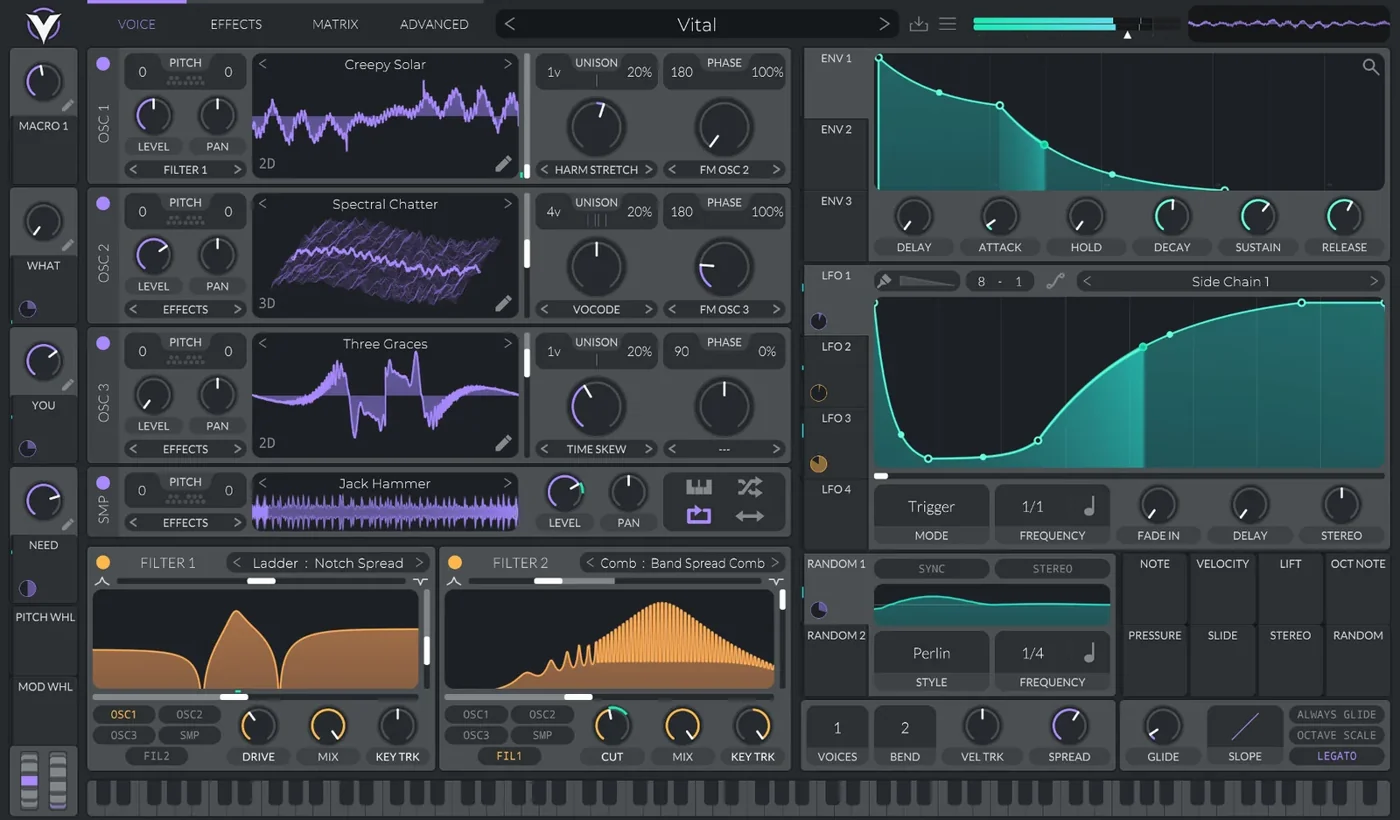
Vital’s Basic tier is free and includes the full synth engine, with a smaller included preset and wavetable collection than its paid bundles. Its visual modulation and spectral wavetable warping make it a useful alternative for learning and experimenting.
My take: I would recommend starting here if you are buying Sylenth1 mainly because you think a paid synth is necessary. Work through a bass, pluck and pad in Vital first. You will learn what kind of workflow you prefer, and any later purchase becomes a more informed choice.
For the difference between the two wavetable options, read our Serum vs Vital comparison. For a wider shortlist, use the VST synth guide.
My verdict: Sylenth1 is a focused purchase
I would buy Sylenth1 because I like the way it helps me build a particular kind of part, or because its soundbanks fit the music I make. I would not buy it to cover every possible synthesis method.
Its strongest case is straightforward virtual analog sound design with a large preset library. The trade-off is a narrower range of sound-generation methods than some newer instruments. That makes it a good shortlist choice for classic dance sounds and a less obvious first purchase for experimental sample-based work.
Use the demo in a real arrangement, check the licence and tax-inclusive total, then decide. If it gives you a sound and workflow you prefer, its age is not the deciding factor. If another instrument already solves the same problem, learning that instrument more deeply may be the better investment.
Sylenth1 FAQ
Is Sylenth1 still worth buying in 2026?
Yes, when you specifically want its virtual analog workflow and soundbanks for leads, basses, plucks or pads. Compare another instrument first if your main goal is wavetable editing, granular synthesis or transforming samples.
How much does Sylenth1 cost?
LennarDigital lists €139 excluding VAT at the time of this update. The final price depends on applicable tax and any current offer. A monthly instalment plan is also available.
Is Sylenth1 free?
The full instrument is paid. An official demo is available, with reminder audio and restrictions including disabled preset saving and reduced modulation.
Does Sylenth1 support VST3 and Apple Silicon?
Yes. LennarDigital introduced VST3 and native ARM support in version 3.072. Use the current installer for your platform and verify compatibility with your DAW.
How many computers can I activate?
The developer’s full-version offer lists two computer activations, for Mac and/or PC. Check its current licence terms if you need to move an activation or change machines.
Does Sylenth1 come with FL Studio?
Sylenth1 is a separate LennarDigital instrument. Owning FL Studio does not include a Sylenth1 licence. Install and activate it separately, then scan for the plugin in FL Studio.
Can I buy Sylenth1 through the Plugin Boutique buttons here?
The Sylenth1 links at Plugin Boutique in this article are preset packs that require the synth. The full Sylenth1 purchase buttons link to LennarDigital. Spire is separately labelled as a full synthesizer alternative.
Is Sylenth1 better than Serum 2?
They prioritise different workflows. Sylenth1 offers focused virtual analog synthesis; Serum 2 adds wavetable and several sample-based approaches. Choose around the sounds you want to create and the way you prefer to work.
Sources and related reading
Technical details were checked against LennarDigital’s product overview, specifications, store and payment-plan information, demo limitations and version history. Alternative synthesis details were checked with Reveal Sound, the Serum 2 manual and Vital. Preset contents and requirements were checked on the linked retailer listings. Recommendations and patch exercises are editorial advice, not measured test results.
Continue with the VST synth buying guide or our drum synthesizer plugin guide to build out the rest of your production setup.
![[background image] image of recording equipment (for a musician & band)](https://cdn.prod.website-files.com/68efa70811edd8e5af30a90d/6acd43b8998701bbde84e11a_Best%20Export%20Settings%20for%20FL%20Studio.png)
![[background image] image of recording equipment (for a musician & band)](https://cdn.prod.website-files.com/68efa70811edd8e5af30a90d/6acd3f9347bd0dd62b202621_ShaperBox%203%20vs%20Infiltrator%202.png)
![[background image] image of recording equipment (for a musician & band)](https://cdn.prod.website-files.com/68efa70811edd8e5af30a90d/6acd3d99fa68785e0f58960e_Kontakt%208%20vs%20Decent%20Sampler.png)