

The best drum synthesizer plugin depends on whether you need a complete electronic drum kit or a better kick. Microtonic is our starting pick for focused kit design, DrumComputer suits evolving percussion, and KICK 3 gives you detailed control over a kick’s shape. For a free kick synth, start with ChowKick.
This guide compares nine drum synth plugins by workflow, sound-design scope and practical limitations. Each choice includes a SoundShaper verdict, a real interface image and an idea you can try in your own production.
Updated 5 October 2026.
Best drum synthesizer plugins: quick comparison
Full-kit synths cover several drum roles. Kick specialists focus on the low-end foundation and still need other instruments for snares, hats and percussion. Prices and promotions change, so the buttons lead to current product offers.
Which drum synth should you choose?
- Your first dedicated drum synth: Microtonic for a compact, complete synthetic kit.
- Rhythmic experimentation: DrumComputer for evolving patterns and layered timbres.
- Analog-inspired drums with variation: Tekno for a broad synthetic kit and current onboard sequencer.
- Synthesis plus an existing sample library: Punch 2.
- Deep percussion design on a Mac: DrumSpillage 2 in an Audio Unit host.
- One kick that needs precise editing: KICK 3.
- Quick body-and-attack adjustments: BigKick.
- More layered, processed kicks: PunchBox 2.
- No budget: ChowKick for learning kick synthesis.
What is a drum synthesizer plugin?
A drum synthesizer generates percussion using oscillators, noise, resonant filters, physical models or other synthesis methods. Envelopes shape the rapid changes in pitch, tone and level that make a sound behave like a drum hit. Some instruments combine synthesis with samples.
A sampler starts with recorded audio. A drum synth gives you more direct access to the mechanism creating the hit. Neither approach is inherently better: a carefully chosen sample can finish a track faster, while synthesis is useful when you need a different pitch movement, decay or texture.
VST is a plugin format, not a synthesis method. Mac users may need Audio Units, and Pro Tools users need an appropriate AAX version. Check the developer’s current compatibility page for your DAW, operating system and processor before buying. DrumSpillage is the macOS Audio Units exception in this shortlist.
1. Sonic Charge Microtonic: a focused synthetic drum kit
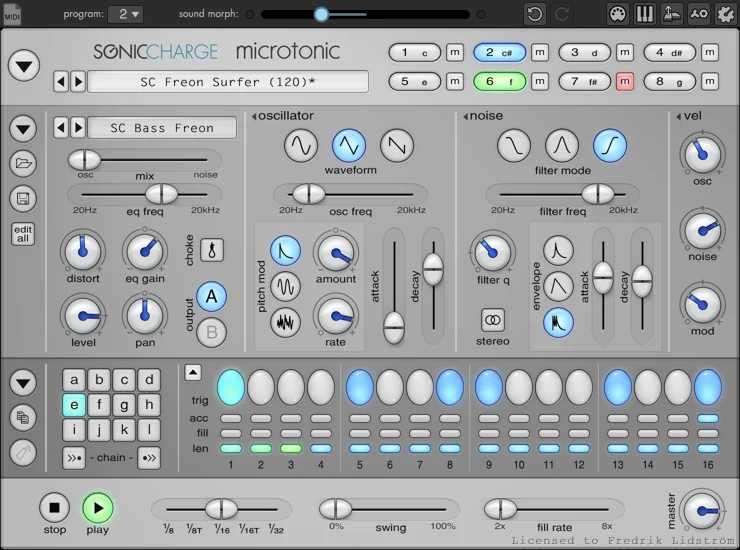
Microtonic is the pick we would start with if the goal is to learn electronic drum synthesis while still writing complete beats. Its eight channels generate sound in real time without samples, and the built-in pattern engine can drive the kit or follow your DAW. You can also treat it as a sound module and sequence everything externally.
The attraction is focus. Instead of sorting through acoustic kits, loops and a large effect rack, you work on the relationship between tone, noise, pitch movement and decay. That makes it a useful choice for tight techno percussion, electro rhythms and deliberately synthetic snares. Morphing and randomization help you move beyond the first usable preset without abandoning the kit structure.
Patternarium, Sonic Charge’s library of evolving computer-generated patterns and sounds, offers another starting point. We would use it to find an interesting rhythmic shape, then simplify the pattern and tune the individual voices to the track. A busy demo pattern is rarely the finished arrangement.
- Why consider it: Eight synthetic voices and an integrated pattern workflow keep kit design coherent.
- Trade-off: It does not play your sample collection or aim to reproduce a recorded acoustic drummer.
SoundShaper verdict
Microtonic is our strongest starting recommendation for a dedicated drum synth. We prefer its narrower focus to a feature-heavy hybrid when the priority is understanding and shaping a small, purposeful electronic kit. Choose Punch 2 instead if sample import is central to your workflow.
Sound-design idea
Make a dry electro kit with a short kick, a noise-heavy snare and a metallic accent. Leave space between the accent hits, then morph the kit gradually for a transition rather than filling every gap with another drum.
2. Sugar Bytes DrumComputer: evolving percussion and generative patterns
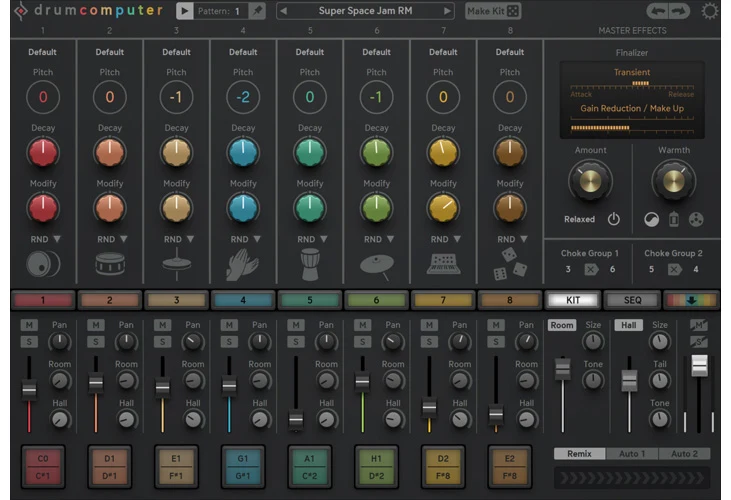
DrumComputer suits producers who want the rhythm itself to be part of the sound design. Its eight sound engines each offer three complementary layers. Each engine combines a resonator, wavetable/analog oscillator and resynthesis/sampler layer, giving you ways to blend a solid percussive body with brighter or stranger textures.
Its sequencer is a major reason to choose it. Probability, rolls, step timing, swing and humanize can turn a repeated figure into a changing groove. Pattern generation and fills are useful for developing variations, while MIDI drag and drop lets you move an idea into the DAW for arrangement. Multiple outputs also allow separate mixing.
The layered architecture offers more territory than a simple analog-style drum voice. It also asks for more decisions. A complex engine can occupy the space of a kick, percussion hit and synth stab at once; adding seven more equally dense sounds can make the beat difficult to arrange. Start with a few voices and give each one a clear role.
- Why consider it: Layered engines and detailed sequencing make variation a core part of the instrument.
- Trade-off: The extra layers and modulation create a steeper learning curve than a focused drum machine.
SoundShaper verdict
This is our choice for experimental electronic percussion and rhythms that evolve across a phrase. We would buy it for its interaction between sound and sequencing, rather than as a shortcut to a conventional kit. For a stable, minimal groove, Microtonic is the cleaner starting point.
Sound-design idea
Keep the kick pattern fixed. Give one high percussion voice occasional probability-based hits and use a restrained roll on the final step of the phrase. Export the MIDI and remove any variation that distracts from the main groove.
3. Baby Audio Tekno: analog-inspired kits with modern variation
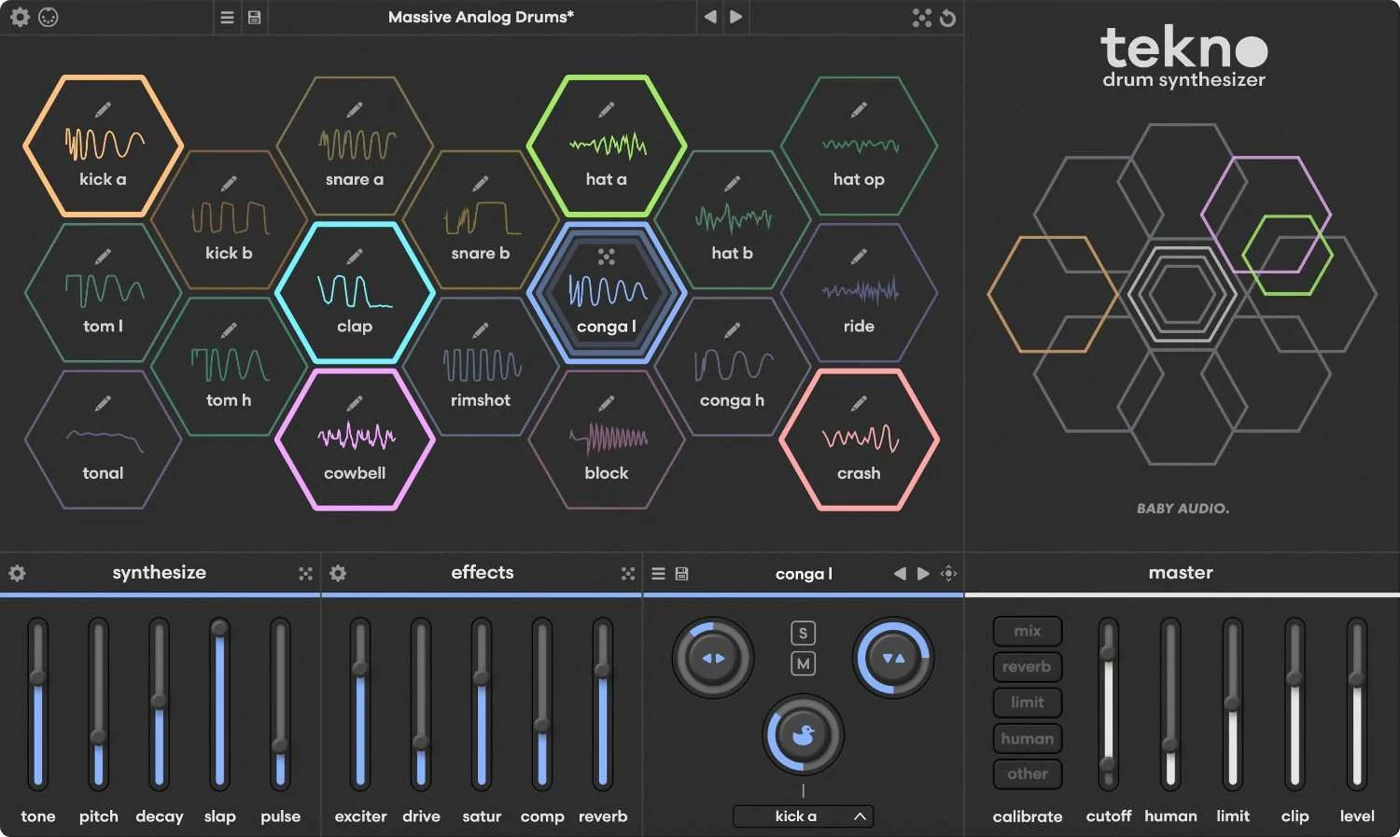
Tekno offers eighteen distinct synthesized drum voices covering kicks, snares, claps, hats and percussion. It takes inspiration from the behavior of analog drum machines, with deeper editing available behind each voice’s controls. It is a drum synthesizer rather than a player for imported drum samples.
The current v1.1 workflow includes an onboard sequencer, smart randomization, fills and MIDI export. Variable lane lengths and speeds support polyrhythmic patterns, while chance controls can introduce optional variation. You can also sequence it through your DAW and export individual drum sounds as audio.
The humanize controls matter when you want an electronic kit to feel less rigid. Timing, velocity and timbre variation can soften the repetition of a loop, but they should serve the arrangement. We would keep the kick disciplined and apply more movement to hats or secondary percussion. Changing every element at once can weaken the rhythmic anchor.
- Why consider it: A broad synthetic kit, deeper voice editing and a current built-in sequencer.
- Trade-off: Its eighteen voice engines are more than some producers need; sample-based layering requires another tool.
SoundShaper verdict
Tekno is the one we would shortlist for a modern, all-synthetic drum machine with analog-inspired behavior. The attraction is a complete kit with controlled variation. Compare it with Microtonic in your own DAW: choose Tekno for the broader voice palette, and Microtonic for a more compact starting point.
Sound-design idea
Build a four-on-the-floor kick and clap pattern, then make the closed hats slightly uneven in velocity. Add a short percussion lane with a different length, keeping it quiet enough that the main beat still feels obvious.
4. Rob Papen Punch 2: combining synthesized drums and your samples
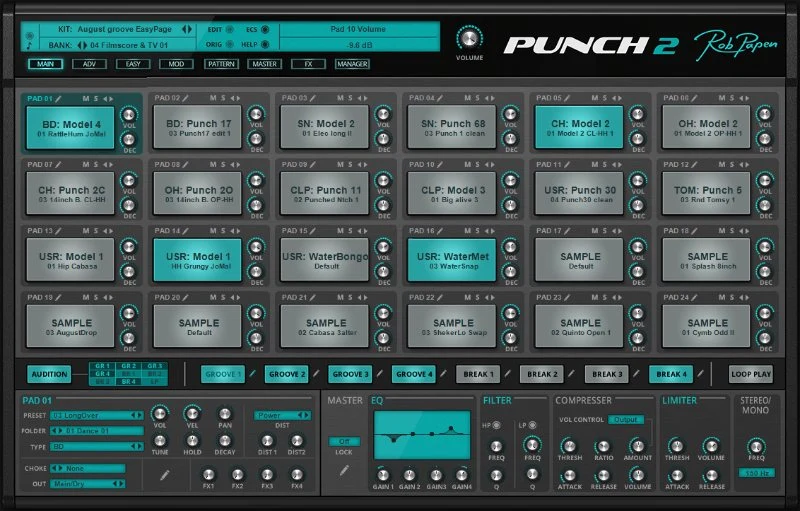
Punch 2 is the broad hybrid choice in this list. Its twenty-four pads can use drum synthesis models, samples or sliced material, so a kit does not have to follow one sound-generation method. You can build a synthesized low end and combine it with the particular snap or texture of samples you already like.
The drum models cover familiar categories as well as more unusual percussion. Sample pads support layered playback, and the instrument includes patterns, effects and a master section. Separate output options let you take mixing decisions into your DAW instead of committing the entire kit to one processed stereo signal.
This flexibility is useful when a purely synthetic kit feels too uniform. It also means Punch 2 needs more setup than a small dedicated synth. Mapping pads, balancing layers and deciding where processing belongs are part of the workflow. If your DAW already handles sample kits well, ask whether a second large drum environment will simplify production or duplicate it.
- Why consider it: Synthesis and sample-based sounds can coexist in one substantial kit.
- Trade-off: The number of modes and processing choices can slow down a simple beat-making session.
SoundShaper verdict
We would choose Punch 2 for producers who want original synthesized drums without leaving their sample library behind. It earns its place as a hybrid workstation. We would skip it if the only missing tool is a better kick designer; BigKick or KICK 3 addresses that narrower need more directly.
Sound-design idea
Pair a synthesized kick with one short sampled snare texture and a synthetic hat. Balance the three before adding more pads. Route the kick separately so its low end can stay controlled while the upper drums share ambience.
5. AudioSpillage DrumSpillage 2: deep percussion design on macOS
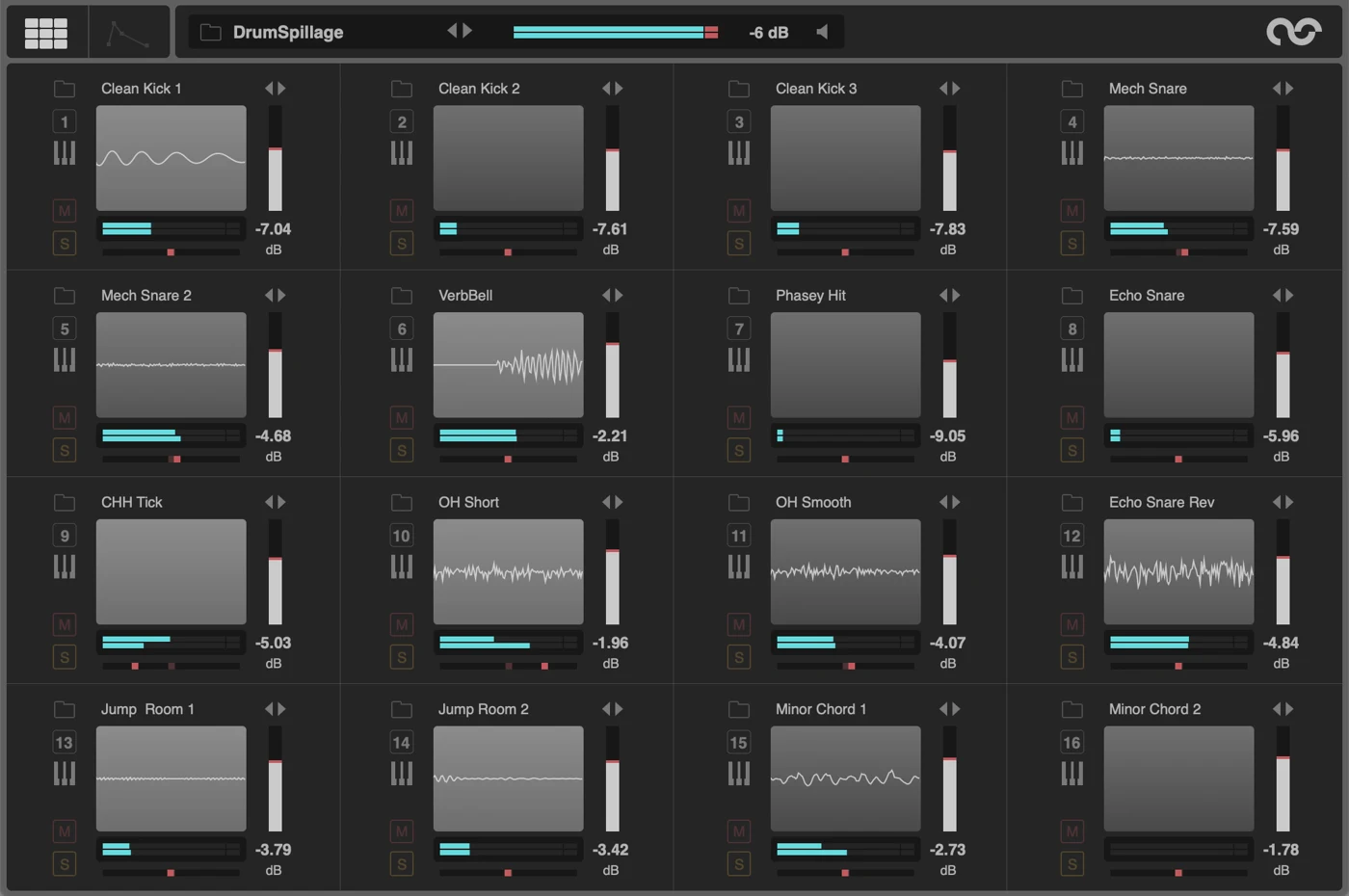
DrumSpillage is a model-based drum synth for macOS Audio Unit hosts. The current product page lists version 2.2, twelve synthesis models and universal Intel/Apple Silicon support. It is not a Windows VST instrument, so compatibility should be the first decision, not an afterthought.
The models include bass drums, snares, claps, hats and more exploratory percussion such as membrane and FM designs. Instead of making every sound with one generic oscillator setup, you select a model suited to the kind of hit you want. Envelopes, LFOs and velocity modulation then give you room to shape the movement within that sound.
Audio export makes it useful even if you ultimately arrange beats in a sampler. Design a hit, render it and build a personal drum library with a consistent aesthetic. Separate outputs and choke groups support working directly with the plugin, too. The model-based approach is especially appealing for producers who enjoy creating odd accents and metallic textures rather than only recreating a familiar drum machine.
- Why consider it: Dedicated percussion models, extensive modulation and audio export.
- Trade-off: macOS Audio Units only; it cannot serve as a cross-platform VST solution.
SoundShaper verdict
This would be our specialist choice for a Mac producer who treats percussion as synthesis. We like the clear separation between models: it encourages designing the right kind of hit rather than forcing every part through one architecture. Windows users should look at DrumComputer or Microtonic instead.
Sound-design idea
Use the membrane or FM percussion model for a short, pitched accent. Keep its tail brief, vary intensity with MIDI velocity and export a few related hits to build a small, recognizable percussion family.
6. Sonic Academy KICK 3: detailed pitch and amplitude shaping
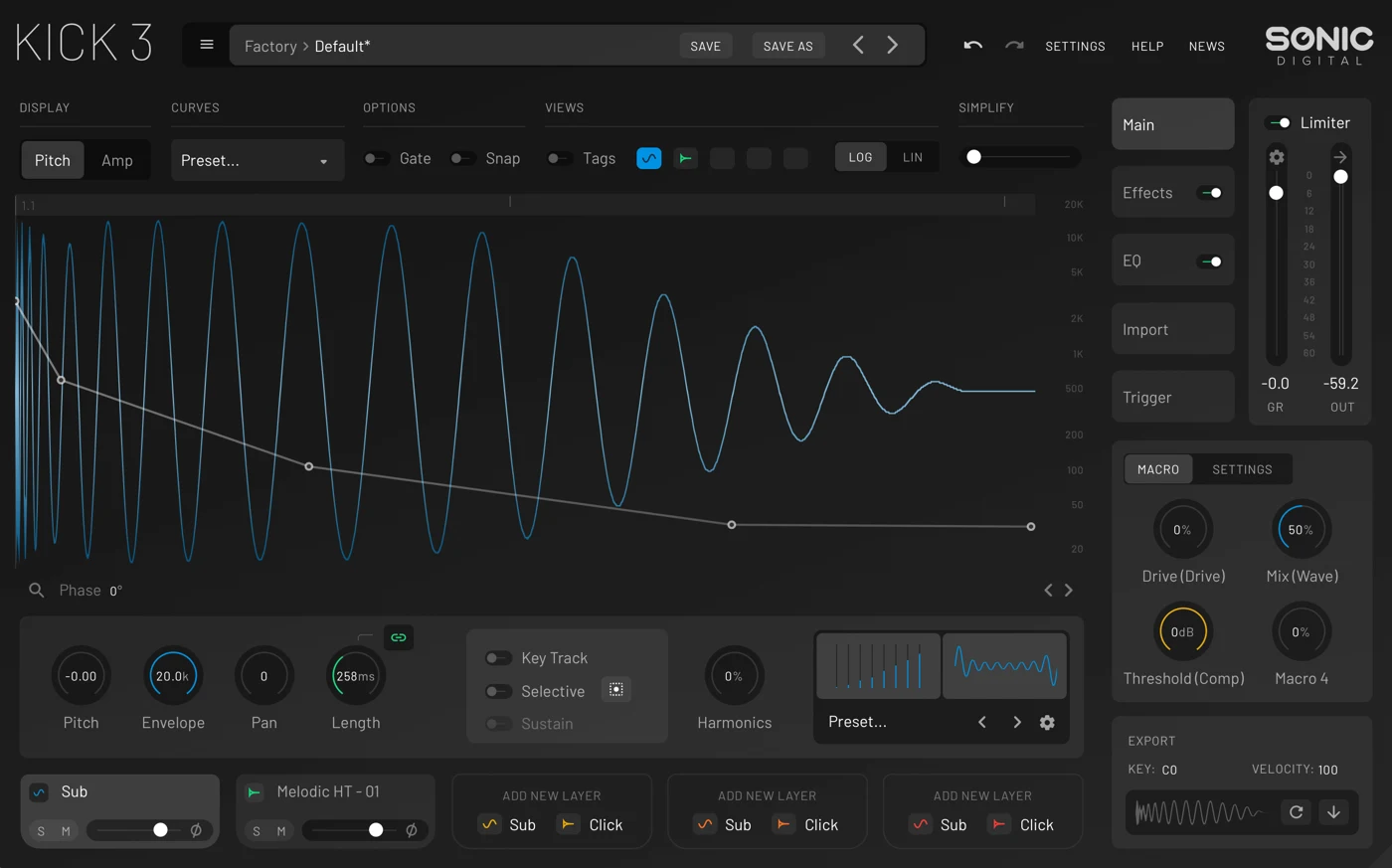
KICK 3 is for producers who want to edit the shape of a kick in detail. Node-based pitch and amplitude envelopes let you control how the initial attack falls into the low-frequency body and how that body fades. This visual approach is valuable when a kick is close to working but its pitch drop or tail is wrong for the bass line.
Five layers can combine synthesized sub elements and clicks. Import and Analyze provides a route from an existing sample to editable kick components, while audio export lets you commit the result to your DAW. These are reasons to choose it as a dedicated kick workstation rather than expecting it to supply an entire drum kit.
The practical challenge is avoiding endless microscopic adjustments. A longer tail may seem impressive in solo but obscure the bass when the track plays. Likewise, sample analysis is a starting point to refine by ear, not a promise that every imported kick will become an exact reconstruction. Audition the result with your actual bass and rhythm section.
- Why consider it: Visual envelopes and layered kick design provide detailed control over the low-end shape.
- Trade-off: It solves kick design, not hats, snares or a complete kit; detailed editing takes attention.
SoundShaper verdict
KICK 3 is our pick when the kick needs precise structural editing. We would choose it over BigKick when drawing the pitch and amplitude contour is part of the job. If you simply want to change a body and transient quickly, BigKick offers a less involved route.
Sound-design idea
Start with one sub layer and one click. Set the tail so it leaves space before the next bass note, then adjust the early pitch drop until the kick has enough attack without sounding like a tom.
7. Plugin Boutique BigKick: fast kick design with sample attacks
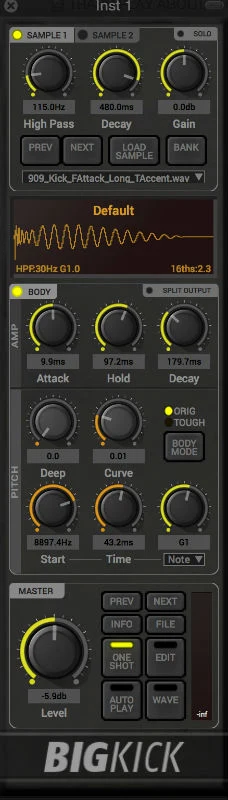
BigKick separates two jobs that often get confused when layering kick samples: creating the low-frequency body and choosing the attack character. It combines a synthesized body with sample-based attack material, allowing you to keep a useful transient while changing the low end underneath it.
The body models and direct controls favor a quick workflow. You can import your own sounds, adjust the pitch and length, add drive or EQ, and export the finished hit to the DAW. Split output mode also lets the attack and body receive different processing. This is useful when the top of the kick needs presence but the sub should remain comparatively clean.
Its appeal is practical rather than maximal. If two full-range samples fight each other, replacing one low-frequency body is often a clearer solution than adding more layers. The sampled attack still needs checking: an imported full kick may contain more tail or low end than you actually want to retain. Listen to the attack layer by itself before assuming the new body has fixed everything.
- Why consider it: A direct body-plus-attack workflow and convenient import/export.
- Trade-off: Less suitable than a detailed envelope editor for elaborate pitch contours or modulation.
SoundShaper verdict
BigKick is the tool we would choose for quickly turning a nearly-right kick into a useful one. It is especially logical if you already have attack samples you like. We would pick KICK 3 for finer contour editing and PunchBox 2 for a more elaborate layered character.
Sound-design idea
Take an attack you like, shorten or filter its unnecessary low-frequency tail and pair it with a compact synthesized body. Compare the result with the original at the same listening level while the bass is playing.
8. D16 Group PunchBox 2: layered and processed kick textures
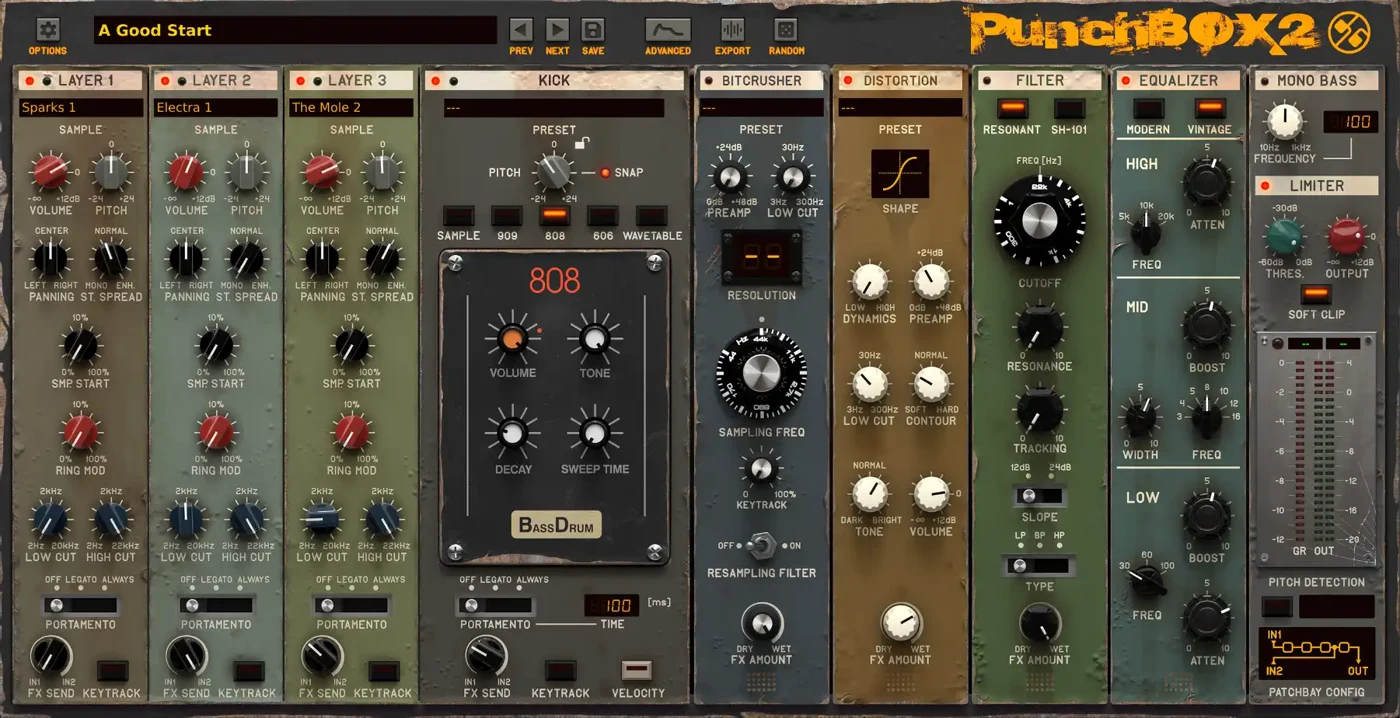
PunchBox 2 builds a kick from a main generator and three supporting sample layers. The main source can use sample playback, classic drum-machine-inspired modes or wavetable generation. This makes it useful when the desired result includes an audible texture or complex attack as well as a clean low-frequency foundation.
The effect chain, routing options and multistage envelopes give you ways to shape how the layers interact over time. Drag-and-drop audio export helps you commit a completed design. Rather than treating it as another sample browser, use it to decide which part of the kick each layer should supply and how those parts should change through the hit.
More sources are not automatically better. Three supporting layers can easily obscure the identity of the main generator, and distortion can make a weak design sound louder without making it fit the track. Build the body first, add one purposeful texture, then compare with processing bypassed. Keep a clear reason for every additional layer.
- Why consider it: Flexible kick sources, supporting sample layers and substantial processing options.
- Trade-off: More routing and layering decisions than a simple body-and-click designer.
SoundShaper verdict
We would shortlist PunchBox 2 for producers who want the kick to be a designed texture, especially in harder or more experimental electronic music. It is a stronger fit for that job than a whole-kit synth. We would pass if speed matters more than layered exploration.
Sound-design idea
Begin with a restrained main kick and add a very short noisy layer for attack. Process the texture more aggressively than the body, then reduce its level until the kick still has a clear low-frequency center.
9. Chowdhury DSP ChowKick: a free introduction to kick synthesis
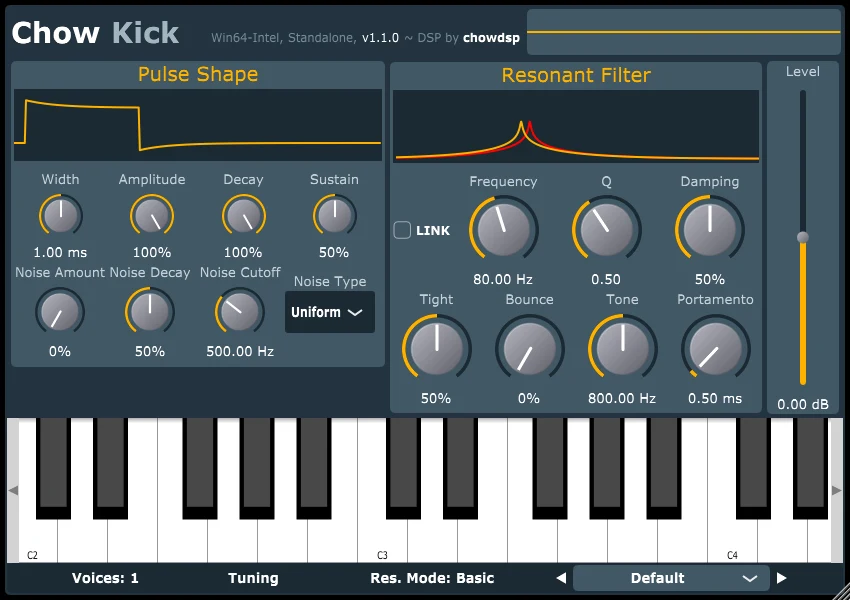
ChowKick is a free, open-source kick synthesizer based on modeling old drum-machine circuits. A shaped pulse excites a resonant filter, and the filter can be tuned to a fixed frequency or follow incoming MIDI notes. The design provides a useful alternative to simply replaying a downloaded kick sample.
Pulse shaping and nonlinear filter behavior let you explore how the excitation and resonant body contribute to the hit. This is an approachable learning exercise: change one parameter, listen to the transient and tail separately, and connect the control to what you hear. Developer downloads cover Windows, macOS and Linux.
It is deliberately a kick instrument. You still need another source for hats, claps and snares, and it does not provide the layered visual editing environment of the larger paid kick tools. That limitation is acceptable if your immediate goal is to understand the building blocks rather than acquire another full drum workstation.
- Why consider it: Free, open source and focused on a useful circuit-inspired synthesis process.
- Trade-off: A single kick instrument rather than a kit, sequencer or sample-layering workstation.
SoundShaper verdict
ChowKick is where we would start if budget is zero or you are unsure whether synthesized kicks suit your production process. Learn to make one convincing kick with it before buying a deeper editor. The paid options become easier to assess once you know which control you actually miss.
Sound-design idea
Create a short kick at a fixed pitch, then enable note-based tuning and try a sparse pitched pattern. Keep the lowest notes controlled and decide whether the part should function as a kick or as a bass instrument.
How to choose a drum synth that fits your workflow
Start with the missing job
If your hats and snares already work, a new twenty-four-pad workstation may be unnecessary. Try a kick specialist first. If you want a kit whose sounds share an identity, a full drum synth makes more sense. For producers who build around chopped loops or found sounds, a hybrid such as Punch 2 is the more logical comparison.
Compare in a real session
Use the same short pattern and bass line in each demo. Match the listening level before deciding which one has more impact. Build a basic kick, snare and hat from scratch, then try a variation. That exercise reveals how easily you can reach your own sounds, rather than how impressive the factory demo is.
Check routing, export and compatibility
Separate outputs matter when you want different processing on the kick and percussion. Audio export matters if your final arrangement lives in a sampler. MIDI export matters if you prefer editing patterns in the DAW. Confirm the exact format and system requirements on the developer’s site; a broad Windows/macOS label is not a guarantee that every host configuration works.
Consider the tools you already own
A general synth can make kicks, hats and snares with short envelopes, noise and pitch modulation. Your DAW may already include suitable instruments. If you mostly need occasional custom hits, learn those tools before buying a dedicated drum environment. Our guide to synth VST plugins compares broader instruments that can also contribute to percussion design.
How to make synthesized drums fit the mix
Set the kick’s length before adding more processing
A long sub tail can overlap the bass or the next kick. Shorten the decay while the whole groove plays and listen for the point where the rhythm becomes clearer. A kick that sounds smaller alone can be more effective in a busy arrangement. Decide whether the kick or bass should hold the longest low-frequency sustain.
Tune deliberately, not automatically
A long tonal kick may benefit from a pitch that relates to the bass line. A very short kick can be too transient to need a clearly defined musical note. Listen to the settled tail, not only the rapidly falling initial pitch. Try a few sensible pitches and keep the one that supports the groove; matching a tuner display is not the whole decision.
Give each layer a separate role
Use one source for the body, another for attack and an optional third for texture. If two layers both carry long sub tails, simplify them and check their combined waveform and level. Listen in mono and adjust timing, phase or filtering only when it improves the result. A polarity flip is a comparison tool, not a universal solution.
Keep movement away from the rhythmic anchor
Probability, randomization and humanize can make a loop less repetitive. Start with hats or background percussion while the main kick stays predictable. Save an intentional variation or render a useful version before further randomizing. Leave headroom while designing: a louder processed preset can disguise a less balanced sound.
Drum synthesizer plugin FAQ
What is the best drum synth plugin for beginners?
Microtonic is our first paid recommendation for learning full-kit synthesis because its scope is focused. If you only want to experiment with synthesized kicks, ChowKick is a useful free starting point. Choose according to the part you need to create, rather than buying the largest feature list.
Is there a free drum synthesizer plugin?
Yes. ChowKick is a free, open-source kick synth with developer downloads for Windows, macOS and Linux. It does not make an entire kit. Mac users can also explore AudioSpillage’s free MiniSpillage, which offers bass drum, wood drum and hi-hat models as an Audio Unit plugin.
Are synthesized drums better than samples?
They offer different kinds of control. Synthesis is useful for creating a new body, pitch contour or percussion texture. Samples are useful for a specific recorded attack, acoustic detail or a sound that already works. Hybrid instruments combine these strengths; a finished track can use both.
Can a drum synth create realistic acoustic drums?
Physical models can create drum-like resonances, but this shortlist primarily targets electronic percussion. If your goal is a convincing recorded drummer with detailed articulations, compare dedicated acoustic drum instruments instead. Do not expect a synthetic hat engine to replace a multisampled acoustic kit in every context.
What is the difference between KICK 3, BigKick and PunchBox 2?
We would compare KICK 3 for precise visual contour editing, BigKick for fast synthesized-body and sampled-attack work, and PunchBox 2 for layered sources and more extensive processing. All three are kick specialists. None replaces a complete drum kit on its own.
Should I program patterns inside the plugin or in my DAW?
Use the plugin sequencer when its probability, fills or per-step controls help generate the idea. Use the DAW when arrangement editing and interaction with other instruments matter more. Where MIDI or audio export is available, you can sketch inside the instrument and commit the useful result outside it.
Our final recommendations
For one dedicated full-kit drum synth, start your comparison with Microtonic. Choose DrumComputer if evolving percussion is the main goal, or Tekno for a broader analog-inspired synthetic kit. If only the kick needs work, compare KICK 3 with BigKick before buying another complete drum machine. With no budget, start with ChowKick and learn which controls you actually need.
How we selected these plugins
This is a research-based editorial buying guide. We checked current developer information, documentation and product listings, then compared scope, sound-design access, sequencing, export and practical workflow trade-offs. The SoundShaper verdicts are our editorial recommendations; we do not present them as measured audio benchmarks or claim that every plugin was personally tested. The sound-design ideas are suggested exercises, not reported test results.
Interface images come from developer or retailer product materials and may show a different preset or version from the latest installer. Selection includes full-kit synths, hybrids and kick specialists because they solve different production problems. We avoid fixed sale prices and recommend checking the latest compatibility and offer before purchasing.
Product documentation: Sonic Charge Microtonic · Sugar Bytes DrumComputer · Baby Audio Tekno · Rob Papen Punch 2 · AudioSpillage DrumSpillage 2 · Sonic Academy KICK 3 · Plugin Boutique BigKick · D16 Group PunchBox 2 · Chowdhury DSP ChowKick.
![[background image] image of recording equipment (for a musician & band)](https://cdn.prod.website-files.com/68efa70811edd8e5af30a90d/6acd43b8998701bbde84e11a_Best%20Export%20Settings%20for%20FL%20Studio.png)
![[background image] image of recording equipment (for a musician & band)](https://cdn.prod.website-files.com/68efa70811edd8e5af30a90d/6acd3f9347bd0dd62b202621_ShaperBox%203%20vs%20Infiltrator%202.png)
![[background image] image of recording equipment (for a musician & band)](https://cdn.prod.website-files.com/68efa70811edd8e5af30a90d/6acd3d99fa68785e0f58960e_Kontakt%208%20vs%20Decent%20Sampler.png)