
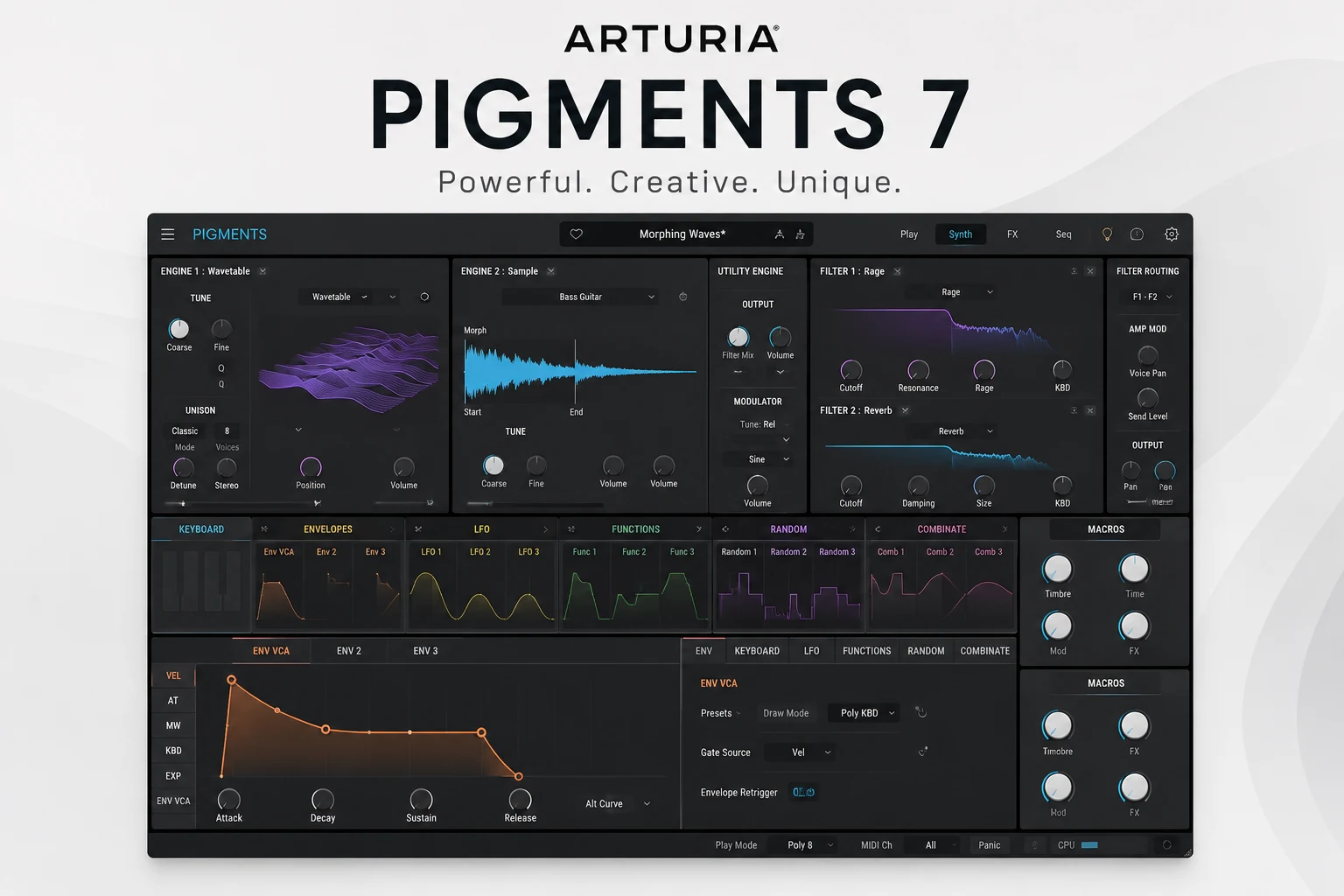

Pigments has always been an easy synth to admire. Few plugins offer this much in one place: multiple synthesis engines, deep modulation, powerful filters, built-in effects, sequencing and a huge preset library.
But having more features doesn't automatically give a synth more personality.
That has arguably been one of Pigments' weaker points. For all its flexibility, previous versions could sometimes come across as very clean, polished and digital — impressive from a sound-design perspective, but not always the first synth you'd reach for when you wanted something raw, gritty or immediately distinctive.
Pigments 7 feels like Arturia's answer to that criticism.
Instead of simply adding another major synthesis engine, version 7 puts much more emphasis on character. The new Rage, Ripple and Reverb filters introduce more aggressive and unconventional tone shaping, while Corroder adds another way to push clean sounds into textured, degraded territory. Arturia has also refined the envelopes, workflow and CPU performance.
So for this Pigments 7 review, I'm less interested in asking how much can Pigments do?
Quick Verdict
Pigments 7 doesn't reinvent Arturia's flagship synth, but it improves exactly the area where Pigments arguably needed it most: character.
The new Rage, Ripple and Reverb filters, together with Corroder, make it much easier to push clean sounds into more aggressive, textured and unusual territory. Combined with the already excellent modulation system, multiple synthesis engines and huge preset library, Pigments 7 feels more complete than ever.
I still wouldn't recommend it to everyone. If you want a simple synth that gets you from an initialized patch to a finished sound as quickly as possible, Pigments can feel like overkill. But for producers who enjoy sound design — or simply want one synth that can cover an enormous amount of ground — it's one of the strongest options available right now.
What Is Pigments 7?
Pigments 7 is Arturia’s flagship software synthesizer, built around the idea of combining several types of synthesis inside one instrument.
Instead of focusing on a single method, Pigments gives you access to six synthesis types, including virtual analog, wavetable, sample, granular, harmonic and modal synthesis. You can combine different engines inside the same patch, then shape them with an extensive filter section, modulation system, effects and sequencing tools.
That makes Pigments unusually versatile.
You can use it for everything from simple basses, leads and plucks to evolving pads, cinematic textures, granular soundscapes and much more experimental patches.
At the same time, Pigments is designed to make that complexity relatively easy to understand. Its color-coded modulation system and constant visual feedback make it much clearer what is happening inside a patch than in many other synths with a similar level of depth.
And with more than 1,700 factory presets included, you don't have to be a dedicated sound designer to get value from it either.
The foundation was already extremely strong before version 7.
So the more interesting question is: what did Arturia actually change this time?
What's New in Pigments 7?
Pigments 7 isn't the kind of update that completely changes the synth overnight.
There is no new synthesis engine and the core workflow remains familiar. Instead, Arturia focused on refining the areas that affect tone, character, performance and day-to-day usability.
What stands out most is where Arturia focused its attention.
Instead of adding another major synthesis method, Pigments 7 puts much more emphasis on shaping and transforming the sounds the synth can already create.
And nowhere is that more obvious than in the new filter section.
The New Filters Are the Highlight of Pigments 7
The biggest change in Pigments 7 isn't a new oscillator or synthesis engine. It's what Arturia has done to the filter section.
Rage, Ripple and Reverb each take a very different approach, but they all share the same purpose: giving Pigments more ways to move beyond the clean, polished character it has sometimes been associated with.
These feel less like minor additions to an already long filter list and more like dedicated sound-design tools.
And out of the three, Rage is probably the one that makes the biggest first impression.
Rage Filter
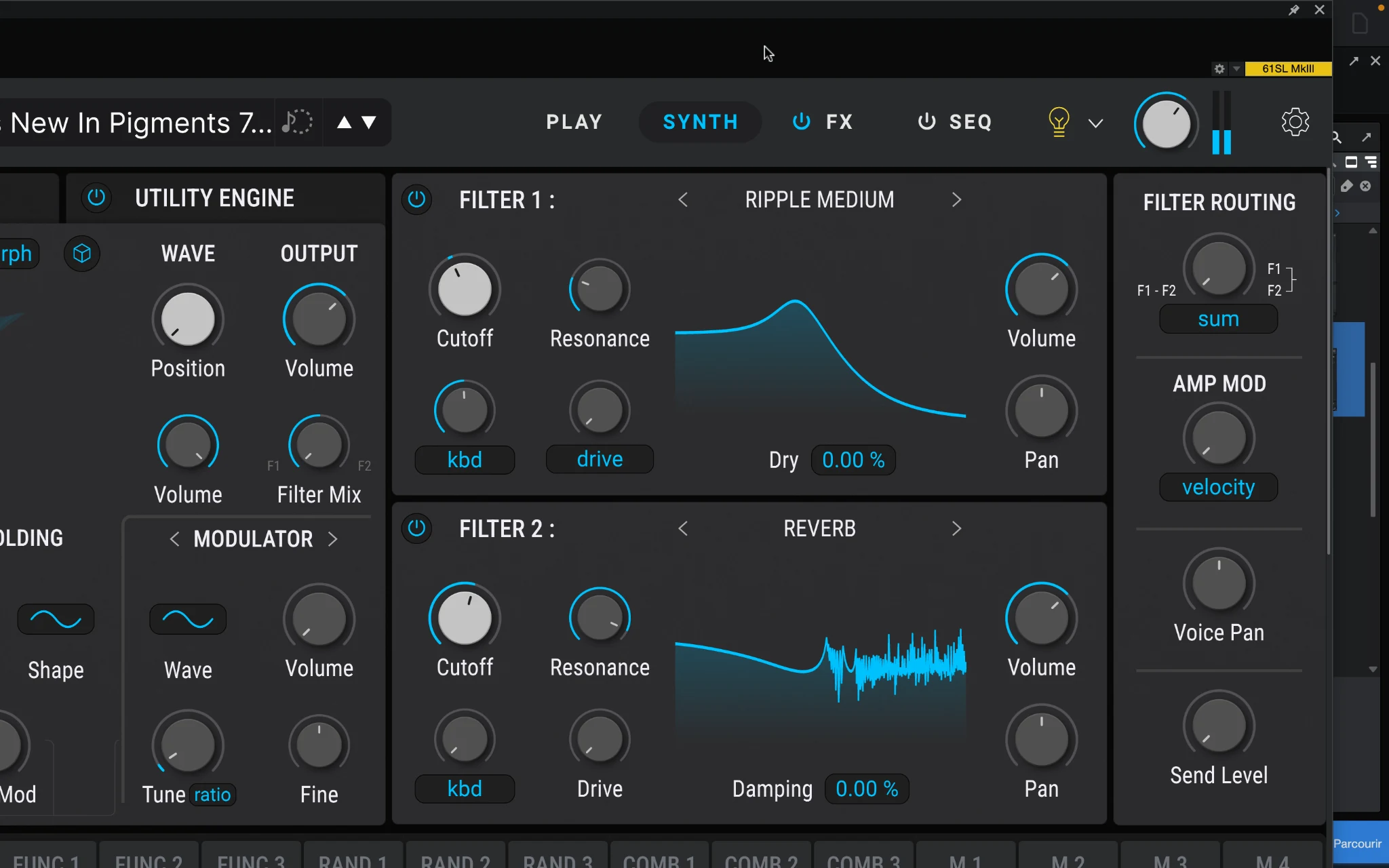
Rage is probably the most immediately noticeable of the three new filters.
Instead of simply filtering the signal and adding distortion afterwards, Rage places the distortion inside the filter’s feedback loop. As you increase the Rage control, the feedback becomes progressively more aggressive and the resonance starts to take on a rougher, more unstable character.
That distinction matters because the distortion and filtering react to each other. You are not just making the sound louder or dirtier — you are changing the way the filter itself behaves.
This is where Pigments 7 starts to feel noticeably less polite than previous versions. Even relatively simple source material can be pushed into heavier basses, distorted leads and more aggressive electronic sounds without immediately reaching for another effect after the synth.
And importantly, Rage still feels like a sound-design tool rather than a distortion effect that has simply been added for the sake of having one more feature.
For producers who previously found Pigments a little too clean or controlled, this is probably one of the most interesting additions in the entire update.
Ripple Filter
Ripple is a very different kind of filter.
Instead of focusing mainly on cutting frequencies, it uses a chain of all-pass filters to create phase shifts, resonant movement and more unusual tonal changes across the spectrum.
That makes it especially useful when a sound already works harmonically, but still feels too static.
On pads, plucks and more atmospheric patches, Ripple can introduce movement without turning the sound into something completely different. Push it harder and it becomes much more obvious, creating metallic, hollow and almost comb-filter-like textures.
What makes it particularly interesting inside Pigments is the modulation system. Once parameters inside Ripple start moving with LFOs, envelopes or random modulation, even a fairly simple source can develop into something much more animated.
It is less immediately aggressive than Rage, but arguably more versatile for evolving sounds and experimental textures.
Reverb Filter
The Reverb Filter is probably the most unusual of the three.
Despite the name, it is not really designed to add obvious space or ambience like a traditional reverb. Instead, it uses extremely short reflections to reshape the tone of the sound itself.
That makes it feel closer to a resonator or creative timbre-shaping tool than a conventional reverb effect.
On basses and leads, it can add body, resonance and a slightly more complex edge without creating a long tail that starts cluttering the mix. On more experimental patches, it can push the sound into much stranger territory, especially once the filter is modulated.
What I like about the idea behind this filter is that it fits Pigments 7's overall direction perfectly. Arturia is not just adding more processing for the sake of it — these new filters are all designed to give otherwise clean sounds a stronger identity.
Rage is the obvious choice for aggression, Ripple for movement, and Reverb for reshaping the tone in a way that is much harder to achieve with a standard filter.
Corroder Adds Another Layer of Character
Corroder continues the same idea as the new filters, but takes it in a more destructive direction.
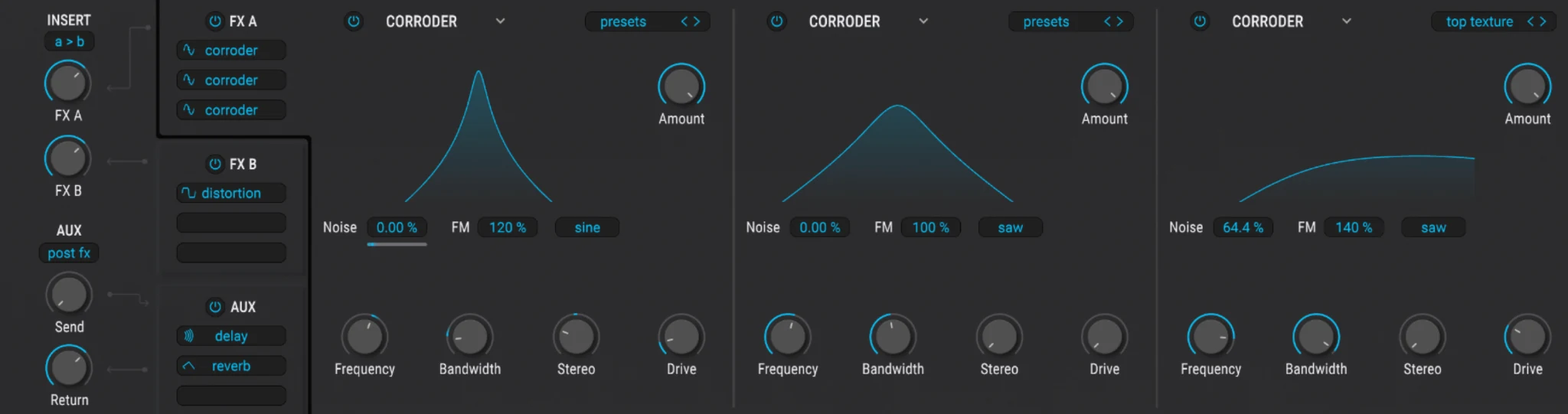
Rather than behaving like a conventional distortion or saturation effect, Corroder uses frequency modulation to roughen up the incoming signal. At lower settings, it can add a subtle layer of texture and stereo complexity. Push it harder and the sound starts breaking apart into something much more metallic, digital and aggressive.
What makes Corroder interesting is that it does not have to completely destroy the original patch to be useful.
That matters in Pigments, because one of the easiest ways to give a very polished digital sound more personality is often to introduce just a little instability or imperfection. Corroder gives you another way to do that without immediately turning the patch into noise.
It also works particularly well with Pigments' modulation system. Automating the amount or movement inside Corroder can make a fairly static patch gradually become rougher, wider or more chaotic over time.
For subtle sound design, it can simply take some of the shine off an overly clean patch. For more experimental production, it can become much more extreme.
And that range is exactly what makes it feel like a useful addition rather than just another distortion effect.
Sound Quality: Does Pigments 7 Finally Have More Character?
This is where Pigments 7 starts to make the most sense as an update.
Pigments was already capable of producing almost any kind of sound you could reasonably ask from a modern software synth. The problem was never a lack of flexibility. If anything, its biggest weakness was that all that flexibility could sometimes result in sounds that felt extremely polished, controlled and unmistakably digital.
Version 7 does not suddenly turn Pigments into an analog synth, nor should it.
What has changed is how easily you can move away from that clean starting point.
The new filters and Corroder make it much easier to introduce distortion, resonance, movement and instability without building a complicated effects chain first.
That is ultimately what makes this update work.
Pigments 7 can still sound extremely clean and precise when you want it to, but version 7 gives you far more ways to make it less clean on purpose.
For me, that is much more valuable than adding another synthesis engine simply to make the feature list longer.
The Sound Engines Are Still Incredibly Flexible
The real strength of Pigments isn't simply how many synthesis engines it includes, but how easily you can combine them inside the same patch.
You can start with something familiar, layer it with a completely different synthesis method, and then process everything through the same modulation, filter and effects environment.
For example, a relatively simple analog-style oscillator can provide the main body of a sound while a wavetable or granular layer adds movement and texture. From there, the entire patch can be shaped with the same modulation system or pushed further through the new filters and Corroder.
That makes Pigments especially useful for sounds that would otherwise require several different plugins or a much more complicated setup.
There is a downside to having that much freedom, though. If your workflow mostly consists of loading a bass, lead or pluck and making a few quick adjustments, you may never use most of what Pigments offers.
But for producers who actually enjoy building layered and evolving sounds, the flexibility here is one of the biggest reasons to choose Pigments over a more focused synth.
Modulation Is Still One of Pigments' Biggest Strengths
Pigments has a very deep modulation system, but it rarely feels as intimidating as it should.
A big reason for that is the visual feedback. Modulation sources are color-coded, ranges are clearly displayed, and you can quickly see which parameters are being controlled and by how much.
That makes complex patches much easier to understand.
Instead of constantly digging through modulation matrices, you can drag an LFO, envelope or other modulation source directly onto a parameter and immediately see the result. For a synth this powerful, that kind of workflow matters a lot.
It also works particularly well with the new tools in Pigments 7.
Rage, Ripple, Reverb and Corroder all become much more interesting once you start modulating them. A static patch can quickly turn into something more animated, unstable or expressive without needing a complicated setup.
Arturia also refined Quick Edit in version 7, making modulation ranges easier to read and adjust when you want to make fast changes without diving into the full patch.
That combination of depth and clarity is still one of Pigments' strongest advantages.
There are synths that are just as powerful on paper, but very few make that power this easy to work with.
The New Play View Makes Pigments More Accessible
Pigments has always been deep, but version 7 does a better job of making that depth optional.
The redesigned Play View gives you a much cleaner front end for interacting with presets without immediately exposing the full synth architecture. Larger macro controls, clearer performance parameters and improved visual feedback make it easier to shape a sound quickly and move on.
That matters more than it sounds.
Not every production session needs deep sound design. Sometimes you just want to load a preset, adjust the tone, movement or intensity, and get back to the track.
The new Play View makes Pigments much better at that kind of workflow.
It also creates a clearer separation between two ways of using the synth: you can stay in the simplified performance view when you want speed, or dive into the full interface when you want complete control.
That makes Pigments 7 easier to recommend to producers who like the sound and preset library but do not necessarily want to build every patch from scratch.
And with Pigments Play now offering a free version of that simplified experience, Arturia has made the entry point into the Pigments ecosystem much more approachable as well.
Pigments Play vs Pigments 7
Pigments Play makes the choice around Pigments 7 a little more interesting, because you can now get a surprisingly large part of the Pigments experience for free.
Both versions share the same underlying sound engines, filters and effects, so Pigments Play is not a completely separate synth. The main difference is how much control Arturia gives you over what is happening underneath the preset.
Pigments Play is built around the simplified Play View. You can load sounds, use the macros and make quick adjustments, but you do not get the full sound-design environment.
Pigments 7 opens everything up.
You get access to the full synthesis engines, modulation system, sequencing tools, effects routing and detailed parameter editing, along with a much larger preset library.
That means the choice is actually pretty simple.
If you mainly browse presets and make small adjustments, Pigments Play may already give you everything you need.
But if you find yourself wanting to change how a sound is actually built — swapping engines, creating modulation, redesigning filters or building patches from scratch — the full version becomes a completely different instrument.
Pigments Play is therefore a great way to try the ecosystem.
Pigments 7 is what you buy when you want to actually take control of it.
Presets: More Than Enough to Get Started
With more than 1,700 factory presets included, Pigments 7 gives you plenty to work with before you ever start designing sounds from scratch.
The library covers a wide range of sounds, including basses, pads, leads, keys, sequences, cinematic textures and more experimental patches. That breadth fits Pigments well because the synth itself isn't tied to one particular genre or style of synthesis.
More importantly, the preset library makes all of Pigments' complexity optional.
You can use the synth as a deep sound-design environment, but you don't have to. There is enough factory content here to simply find a strong starting point and adapt it to your track.
Of course, a huge preset count means very little if the sounds aren't actually useful.
What matters more is the variety and how quickly you can find something that fits what you're working on. In that regard, Pigments' large library is a genuine strength rather than just another impressive number on the feature list.
CPU Performance Is Better in Pigments 7
A synth this deep is always going to put some pressure on your CPU, especially once you start stacking engines, unison, modulation, filters and effects inside the same patch.
That has been one of Pigments' trade-offs for a while.
Version 7 improves this by optimizing voice processing and reducing some of the unnecessary load in more demanding polyphonic patches. Arturia also adjusted several defaults to make the synth behave more efficiently without changing the way you actually work with it.
The difference probably matters most in larger projects.
One heavy Pigments patch is rarely the problem. It becomes more noticeable once you have several instances running at the same time, especially with complex presets or high voice counts.
Pigments 7 still isn't what I would call a lightweight synth, but the performance improvements make it easier to use as a main instrument across a full project instead of reserving it for only a few tracks.
That is a much more useful upgrade than it might look on a feature list.
And because CPU performance depends heavily on your system, buffer size and the patch itself, this is also one of the areas where a proper real-world test is more valuable than a generic percentage claim.
Pigments 7 Pros and Cons
By this point, Pigments 7's biggest strengths and weaknesses are pretty clear. It offers an enormous amount of sound-design depth while remaining more approachable than most synths with this many possibilities, but that depth will not benefit every producer.
Pigments 7 vs Serum 2
Pigments 7 and Serum 2 overlap much more than they used to.
Serum was once the obvious choice if you wanted a dedicated wavetable synth, while Pigments positioned itself as the more flexible multi-engine option. With Serum 2, that gap has become much smaller.
Both are now extremely capable flagship synths, but they still feel very different in use.
Pigments 7 is broader and more visual. Its modulation system, multiple synthesis types and built-in sound-design tools make it feel like a complete environment for building complex patches.
Serum 2 is more immediate. The workflow is faster to understand, the wavetable side still feels extremely direct, and the huge ecosystem of presets, tutorials and third-party content makes it easy to get results quickly.
So the decision comes down less to raw features and more to how you like to work.
Choose Pigments 7 if: you want deeper sound-design flexibility, multiple synthesis methods and a very visual modulation workflow.
Choose Serum 2 if: you want a faster, more familiar workflow with a huge existing ecosystem around it.
For pure versatility, I would give Pigments 7 the edge.
For speed and familiarity, Serum 2 is still hard to beat.
Pigments 7 vs Phase Plant
Pigments 7 and Phase Plant are both built for serious sound design, but they approach it from very different directions.
Pigments gives you a deep but structured environment. Its six synthesis engine types, visual modulation system, filters, effects and sequencing tools are all integrated into a workflow that stays relatively easy to follow, even when patches become complicated.
Phase Plant is much more open-ended.
Kilohearts describes it as a semi-modular synth, and that is really the key difference. Generators, modulators and effects can be combined much more freely, with extensive routing and audio-rate modulation between modules.
That extra freedom gives Phase Plant an advantage when you want to build highly customized or unusual patches from the ground up.
Pigments, on the other hand, feels more complete straight out of the box. The large preset library, polished interface and more structured workflow make it easier to move between preset browsing and deep sound design without feeling like you are building an instrument every time.
Choose Pigments 7 if: you want deep sound design in a more polished, guided environment with a strong preset library.
Choose Phase Plant if: you want maximum modular freedom and enjoy building complex signal chains yourself.
If I had to choose purely for flexibility, Phase Plant has the edge.
For the better balance between depth, speed and accessibility, I would pick Pigments 7.
Who Should Buy Pigments 7?
Pigments 7 is an especially strong choice if you enjoy sound design and want one synth that you can keep exploring for years.
It gives you enough depth to build complex, evolving patches, but you can just as easily start with the preset library and only dive deeper when you need to.
Where I would hesitate is if your priority is speed and simplicity. If you mostly need straightforward basses, leads and plucks, Pigments may give you far more control than you actually use.
The same applies if you already own Serum 2, Phase Plant or another flagship synth that completely covers your workflow.
But if you want a versatile synth that sits somewhere between an immediate preset instrument and a full sound-design playground, Pigments 7 is one of the strongest options available.
Is Pigments 7 Worth It in 2026?
Yes. Pigments 7 is one of the strongest choices available if you want a flagship synth that combines serious sound-design depth with a workflow that remains relatively approachable.
Version 7 doesn't transform Pigments into a completely different instrument, but that isn't really what it needed. Arturia has focused on giving an already extremely capable synth more character, better performance and a more accessible workflow.
The result is a synth that feels more complete rather than simply bigger.
There are still better choices for certain producers. Serum 2 may feel faster and more immediate, while Phase Plant offers more freedom if you want a semi-modular environment. But Pigments 7 strikes an excellent balance between those extremes.
Final Verdict
Pigments 7 gives you enough depth to spend years designing sounds, while still being practical when you simply want to find a preset, shape it and continue producing.
That combination of flexibility, usability and now stronger sonic character is what makes it so easy to recommend in 2026.
SoundShaper Rating: 9.2/10
![[background image] image of recording equipment (for a musician & band)](https://cdn.prod.website-files.com/68efa70811edd8e5af30a90d/6acd43b8998701bbde84e11a_Best%20Export%20Settings%20for%20FL%20Studio.png)
![[background image] image of recording equipment (for a musician & band)](https://cdn.prod.website-files.com/68efa70811edd8e5af30a90d/6acd3f9347bd0dd62b202621_ShaperBox%203%20vs%20Infiltrator%202.png)
![[background image] image of recording equipment (for a musician & band)](https://cdn.prod.website-files.com/68efa70811edd8e5af30a90d/6acd3d99fa68785e0f58960e_Kontakt%208%20vs%20Decent%20Sampler.png)