


A vocal compressor should make a performance easier to place without taking away the delivery that makes it work. Waves CLA-2A and Renaissance Vox, usually called R-Vox, both offer a short route to compression, but they give you different decisions to make. We would audition CLA-2A for its optical-style leveling response and R-Vox for a compact dynamics stage with an optional gate. The deciding moment is often what happens after a loud word, when the next quiet syllable needs to remain audible.
Below, we explain the controls, build practical vocal starting points and cover the situations where either processor needs help. The settings are suggested exercises based on the documented functions, rather than results from a matched listening test.
CLA-2A vs R-Vox: Quick Comparison
| Decision | Waves CLA-2A | Waves R-Vox |
|---|---|---|
| Design and main job | Modeled optical tube compression for leveling sustained material | Compact vocal dynamics with compression, downward expansion and limiting |
| First controls to learn | Peak Reduction and Gain | Comp, Gain, then Gate |
| Attack and release knobs | No independent timing controls; program-dependent recovery | No independent attack and release controls |
| Quiet gaps | No dedicated gate | Gate provides downward expansion below its threshold |
| Additional choices | Compress/Limit, HiFreq detector weighting, Mix, Trim and Analog; current Auto Makeup | A deliberately restricted control set; Gain interacts with output limiting |
| Best first audition | A sung phrase with a sustained loud vowel followed by a quieter line | A vocal that needs a quick dynamics pass and careful control between phrases |
| U.S. offers checked November 20, 2026 | $29.99; stated regular price $149 | $34.99; stated regular price $129 |
CLA-2A: listen to the recovery after the loud phrase
CLA-2A models an optical tube compressor, with Peak Reduction controlling the compression and Gain compensating level. Its release depends on the material it has just processed. That makes the lead-in to a phrase part of a useful audition, especially after a long, loud note.
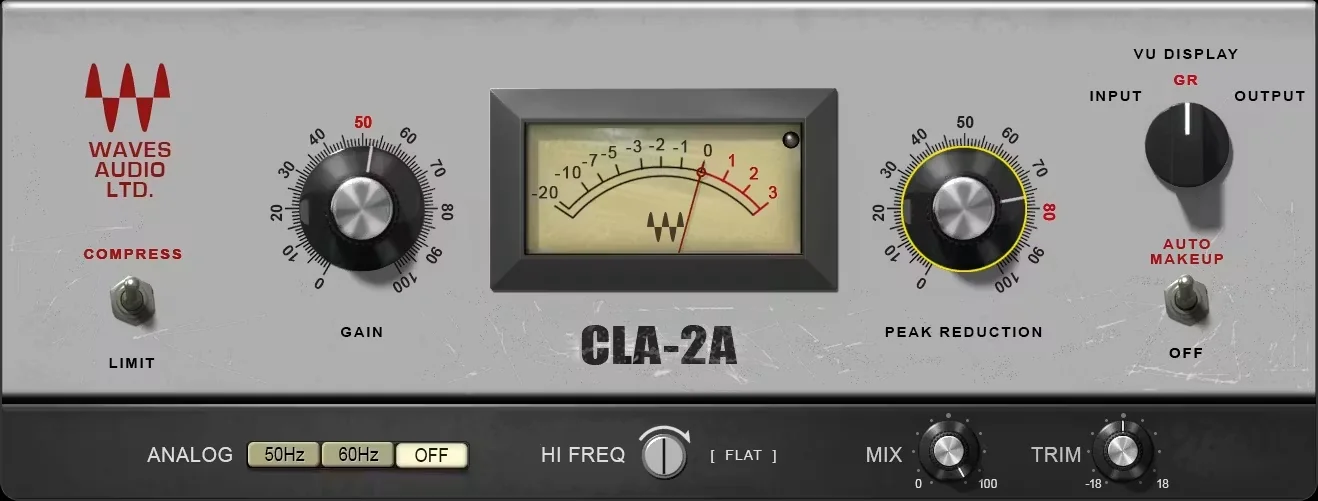
Imagine a chorus that ends with a strong held vowel, followed immediately by an intimate next line. The important question is whether compression supports the held note while allowing that next line to recover naturally. A setting can feel reassuring on the loud vowel yet leave the following words too far back.
Peak Reduction is an amount control, not a target in dB
The Peak Reduction knob's 0–100 scale is not a readout of the gain reduction your vocal will receive. Input level and the performance both affect the result. Put the meter in GR mode and increase the knob until stronger phrases show roughly 2–4 dB of reduction as a suggested first exercise. Leave enough playback before each phrase to hear the recovery in context.
If one word triggers much deeper reduction, lower that word with clip gain and replay the passage. This is often more useful than changing the compressor around an isolated peak. The aim is to let the general setting serve the performance instead of forcing every syllable through the same severe correction.
Compress, HiFreq, Mix and Auto Makeup
Select Compress for the first leveling pass. Limit changes the compression behaviour; it is not a master-output safety setting. Begin with HiFreq at Flat. This control changes the detector's frequency weighting, rather than directly turning down treble, so adjust it only after hearing which sounds drive unwanted reduction.
For the first comparison, keep Mix at 100%, Analog off and Auto Makeup off. Set the compression, compensate with Gain, then use Trim for the final output match. Afterwards, try reducing Mix if the fully compressed version loses too much expression. This blends in dry signal, so strong original peaks return too; it is not a substitute for fixing one excessive word.
Current Auto Makeup links the Peak Reduction and Gain adjustments to keep output more stable. It can speed up later changes, but still compare by ear. A steadier output does not establish that the quiet syllables and held notes are balanced correctly.
R-Vox: how Comp and Gain interact
R-Vox combines compression and limiting with a Gate control that applies downward expansion. Its main appeal is the small number of adjustments between loading the plugin and deciding whether the result suits the voice.
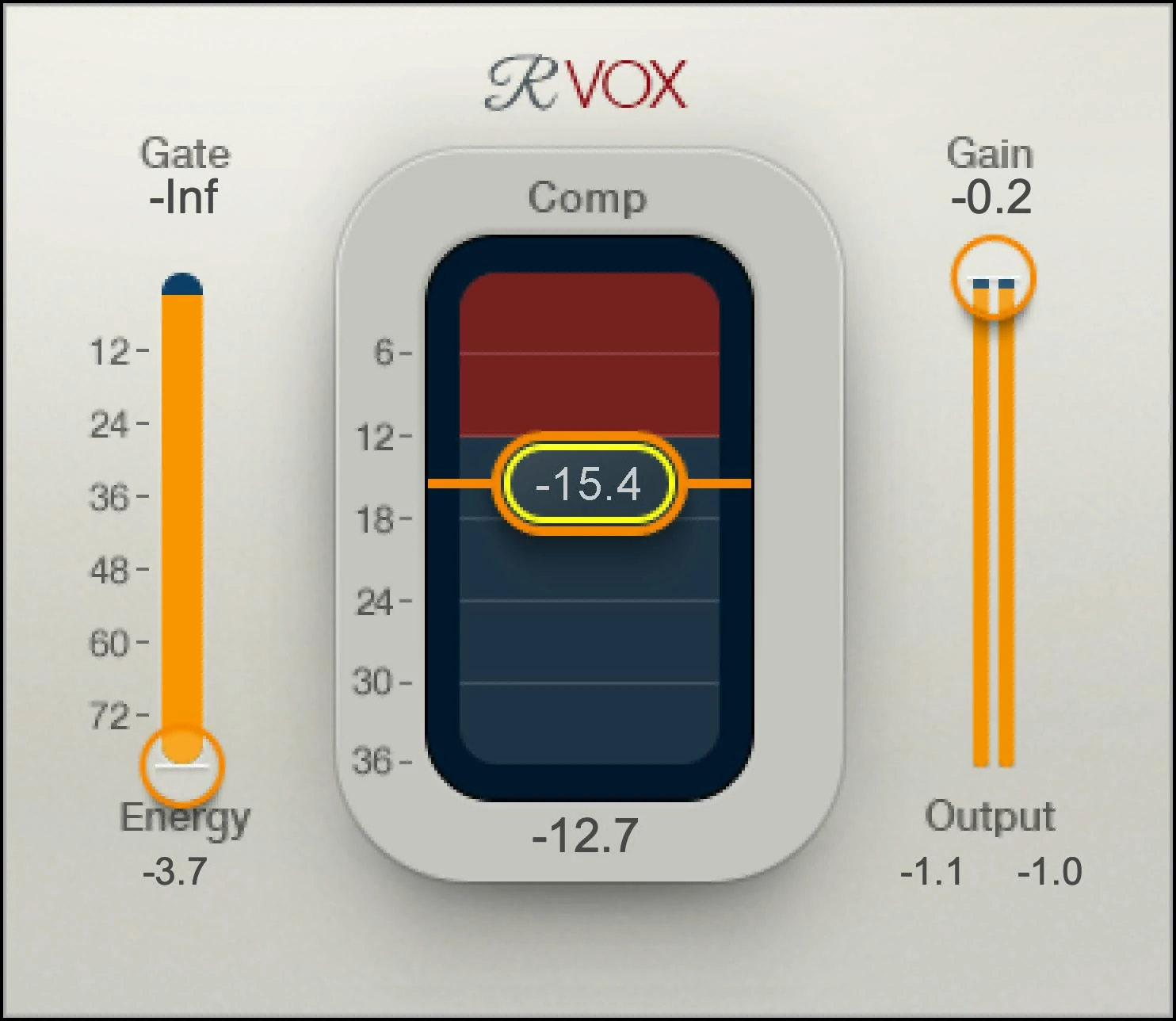
Why lowering Comp can make the vocal louder
R-Vox's Comp fader combines compression decisions with level compensation, so moving it down does more than reduce the loudest words. Gain also affects the output limiting. This is why the first impression can be a louder, denser vocal even when you have not solved the uneven performance.
Try a Comp value around -8 dB as an initial experiment with Gate at minimum, then watch the reduction on the actual recording. The fader value is not a promise of 8 dB of reduction. Input level matters, so move it until the strongest words sit more comfortably rather than treating that number as a vocal preset.
If the result becomes grainy or strained, compare a lower Gain setting and less compression, using a separate clean gain control afterwards to restore the comparison level. Turning down the track fader alone makes existing distortion quieter; it does not change how hard R-Vox's internal stages were driven.
For more detail on the individual processor, see our R-Vox review.
A fair comparison on one vocal take
Choose a verse-to-chorus passage with quiet delivery, a loud phrase, a held vowel and an audible breath. Make the same repair edits before either plugin. Fix one accidental shout or plosive first so the comparison is about the performance's general dynamics.
- Create two alternative chains. Use the same recording and upstream processing. Put CLA-2A on one version and R-Vox on the other. Listen to one at a time; playing both together changes the level and comparison.
- Use the starting setups above. Keep R-Vox's Gate at minimum for this part of the comparison. Adjust each compressor for the useful result rather than forcing identical meter readings.
- Match the outputs. Use CLA-2A's final Trim or a clean gain plugin after either processor. Set R-Vox's own Gain for its intended limiter behaviour first, then use the separate trim to match the alternatives. Check both quiet and loud phrases.
- Listen with the instrumental. Focus on the first word after the loud phrase, the end of the held vowel and the consonants in a fast line. Does the voice remain readable without pulling the fader up every few seconds?
- Check the trade-off. Bypass at a similar level and describe one specific improvement and one drawback. If the compressed version mainly brings up breaths or dulls articulation, reduce the amount before adding another processor.
Write observations such as “the held note stays in place” or “the next quiet word drops back.” These identify a change you can act on; a description such as “more professional” does not.
Singing and rap: different stress tests
For a sung vocal, use a note that begins softly and grows in volume. Listen to whether compression restrains its body while preserving the initial consonant. Follow the note into the next phrase: CLA-2A's recovery may suit the sustained movement, while R-Vox may reach a useful density with fewer adjustments. Neither response is guaranteed by the genre label.
For fast rap, choose a line with quieter linking words between strong syllables. Judge the rhythm of the complete sentence. If those smaller words disappear, reducing compression or editing an exceptional loud syllable can help more than pushing the entire line harder.
Neither plugin has independent attack and release knobs. When you can hear that a particular timing adjustment is missing, compare a compressor that provides it. For fuller detail on the optical model, see our CLA-2A review. If a controlled vocal still disappears behind the instrumental, our vocal placement guide covers balance and masking.
Backing vocals and doubles: test the group response
Compressing a stack on one bus and compressing every double separately solve different problems. On the bus, one loud layer can trigger reduction for the whole group. If a single double jumps out on one word, correct that track's level before asking either bus compressor to hide it.
For a backing-vocal bus, try CLA-2A with modest reduction on the loudest combined phrase. Listen to whether the group stays behind the lead and whether the soft entrance after a full harmony remains audible. For R-Vox, first keep Gate at minimum and judge whether Comp helps the stack hold a consistent place.
Then audition individual tracks if the blend still changes from word to word. Stronger bus compression is not always the answer to inconsistent doubles. Also check consonant alignment and phrase endings: a compressor will change their level, but it will not line up mismatched performances.
Noise, breaths and harshness are separate problems
R-Vox's Gate can reduce low-level material between words, but it cannot selectively remove room sound that overlaps the vocal. CLA-2A has no dedicated gate.
Edit an isolated click in a pause directly. For noise running throughout a take, improve or clean up the recording before compressing it. A gate that only acts during gaps cannot solve that continuous problem.
If sharp S sounds remain the problem, compare a targeted de-essing step before changing the whole vocal's compression around them. Our FL Studio de-essing guide explains that workflow.
Set the R-Vox gate around the quietest wanted word
Choose a pause containing room sound, followed by the quietest word you want to keep. Raise Gate gradually until the gap becomes less distracting, then replay the word's first consonant and final tail. If either starts fading unnaturally, lower the threshold. Check the same setting in the verse, not just the louder chorus.
The Total Compression display includes both compression and expansion. A large reading in a pause does not mean the compressor is still reducing a nonexistent loud note. Judge the gate by the material it removes, and judge the compression again during the phrases.
For breaths, try a small clip-gain reduction on the distracting breath before increasing the gate. Breath level varies too much to assume one threshold can remove every unwanted inhale while retaining every intimate syllable.
Should you use CLA-2A and R-Vox together?
A second stage is useful when you can give it a separate job. If the first compressor handles individual loud words but the phrase still moves too much, try splitting those tasks across two stages.
Save the best single-compressor version first. Try R-Vox before CLA-2A with Gate at minimum and enough compression to restrain the strongest words. Then add a restrained CLA-2A leveling pass for the remaining phrase movement. Watch both meters so the combined chain does not quietly become much heavier than the original setup.
Now reverse the order and readjust: the second processor receives a different signal, so identical knob values do not create a fair comparison. Keep the order that preserves the difficult syllables with less total intervention. The point of two stages is a clearer division of work, rather than collecting two familiar plugin names in a chain.
Bypass each stage separately at matched output. If the second mainly adds loudness or brings up breaths, remove it. For a different pairing, see CLA-2A vs CLA-76; our attack and release guide explains the timing choices. When compression already sounds right but phrases need level rides, Vocal Rider vs R-Vox covers that separate task.
Price and which one to buy first
On November 20, 2026, Waves listed CLA-2A at $29.99 against a stated regular $149, and R-Vox at $34.99 against $129. These are dated U.S. offers; check the current price and final regional checkout total.
The $5 difference is less important than the response you prefer. Buy CLA-2A first if its leveling helps sustained phrases and you value its additional blend and detector choices. Buy R-Vox first if its compact dynamics workflow suits your delivery and the optional downward expansion is useful.
Skip both if a stock compressor plus a few edits already gives you the result. Check existing Waves bundles or Creative Access subscriptions before purchasing another license. A perpetual license remains yours after included Update Plan coverage expires, while later updates and compatibility deserve separate consideration.
Conclusion
CLA-2A offers optical-style leveling with additional blend and detector controls. R-Vox offers a compact dynamics stage with optional gating. Choose the response that holds the vocal in place while preserving the phrasing that made the take work.
Sources and editorial basis
Controls and processing behaviour were checked against the current CLA-2A guide and Renaissance Vox guide. Prices were checked on November 20, 2026 on the Waves CLA-2A and R-Vox product pages. See the Update Plan terms for coverage details. In-article interfaces are Waves images; exercises and buying judgments are SoundShaper's proposed workflow.


