


A vocal that disappears in a chorus and a vocal that needs a different compression feel are not necessarily asking for the same plugin. Waves Vocal Rider and Renaissance Vox, usually called R-Vox, can both help an uneven performance, but they approach it through different controls and workflows. We would start with Vocal Rider when the remaining job is repeated gain riding, and with R-Vox when we want a compact vocal dynamics stage. Before buying either, identify what still bothers you with the vocal playing inside the song.
This comparison uses the manufacturers' documented behavior and practical exercises we would try on the same recording. It does not claim a matched listening test. Waves U.S. prices were checked on November 17, 2026.
Vocal Rider vs R-Vox: Quick Comparison
| Job | Vocal Rider | R-Vox |
|---|---|---|
| Core workflow | Automatic movement of a Rider fader | Compact vocal dynamics processing |
| Main adjustments | Target, detection and movement range | Comp, Gain and Gate |
| Reference to backing music | Optional instrumental sidechain | Not the Vocal Rider music-reference workflow |
| First task we would test | Maintaining vocal position across the arrangement | Finding suitable vocal compression behavior |
| Editing approach | Can write a Rider fader automation pass in supported hosts | Adjust the dynamics stage and automate controls if needed |
| Lower-level background material | Check detection and allowed boost | Gate provides downward expansion |
| U.S. offers checked November 17, 2026 | $29.99; stated regular price $199 | $34.99; stated regular price $129 |
Choose a recording that reveals the difference
Use one dry lead-vocal take with a quiet line, a stronger line, a breath and a short gap. Include a musical transition where more instruments enter. Keep an untouched copy and make the same obvious repair edits before comparing the plugins.
Our first pass would use the same rough vocal balance and backing track for both. Work on separate saved chains and listen to one at a time. Do not assume that a particular control value or meter reading translates between the two designs.
Write down the unfinished job before touching a parameter. For example: the first word of the chorus disappears, the loud vowel feels too sharp, or the quiet line should remain intimate. These descriptions point toward different interventions.
If the problem is mostly masking, poor tone or an unsuitable recording, keep it in view. Neither plugin removes the need to choose a sensible level and arrangement. Our vocal placement guide covers those wider decisions.
Vocal Rider: build a restricted first pass
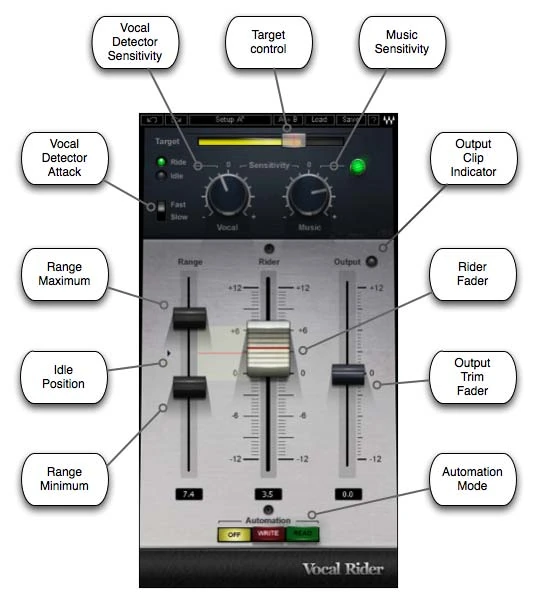
Start from a workable vocal tone and allow roughly ±3 dB of movement as an evaluation exercise. Set Target in the arrangement, then adjust Vocal Sensitivity and compare Fast/Slow Attack on word entrances. Check the return from Idle after a pause before widening the range.
Only add the music reference after the basic ride works. Feed the instrumental mix without the lead vocal into the sidechain and adjust Music Sensitivity across the verse-to-chorus transition. Confirm that this route does not create another audible copy of the backing.
R-Vox: establish the compression before the gate
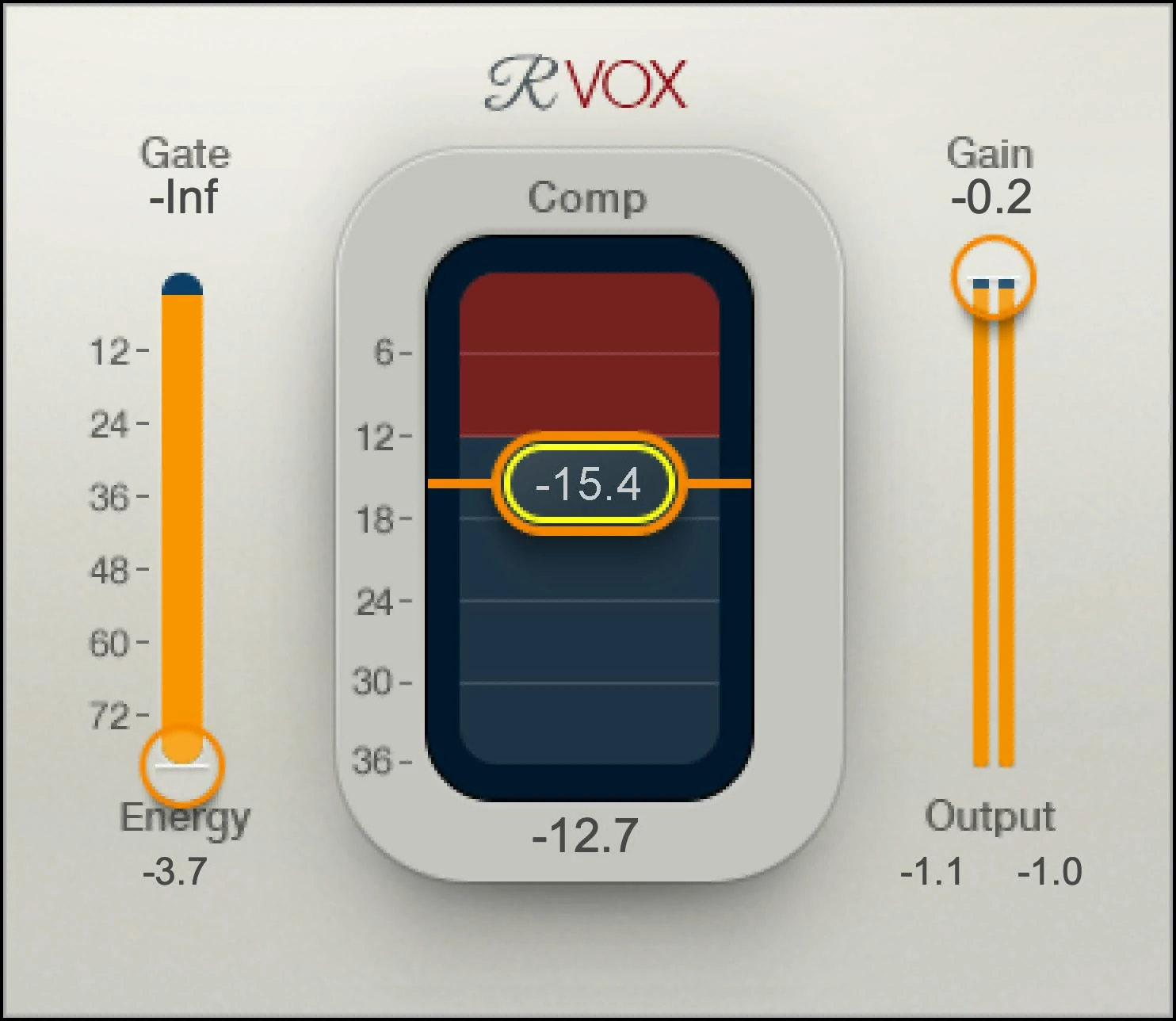
Leave Gate at minimum and lower Comp until the loud word sits comfortably. Adjust Gain, then use a clean downstream trim for a level-matched comparison: R-Vox’s Gain control also affects its limiter ceiling. Bring Gate in last, checking quiet syllables and breaths; the reduction display combines compression and expansion.
If the word becomes dull or the next syllable recovers awkwardly, R-Vox has no independent attack/release controls to refine that response. Try a more adjustable compressor instead of forcing a heavier setting.
For a different compressor workflow, read the Waves CLA-2A review.
Scenario 1: the vocal sounds right but disappears in the chorus
Begin by moving the normal vocal fader through the transition. If a small deliberate ride solves the issue while preserving the vocal sound, you have identified a level-placement job. Vocal Rider is worth evaluating when similar moves repeat throughout the performance.
Build the restricted ride, then try the instrumental reference. Listen to the last line of the verse and the first line of the chorus without changing playback level. The useful result is a coherent entrance into the larger arrangement, not a vocal that suddenly jumps above it.
R-Vox could still be useful if the louder section reveals a dynamics problem, but we would not keep lowering Comp merely because more instruments entered. That can change the delivery when the missing intervention was a small gain move.
If a guitar or synth masks the lyric at the transition, compare the arrangement and tonal balance too. Moving one competing element may be more effective than making the vocal increasingly dense.
Scenario 2: individual loud words feel too forceful
First inspect the recording. If one word is exceptional, a direct clip-gain edit is a clear starting point. Keep that repair identical in both versions so that the comparison is about their continuing role, not which one happens to hide an uncorrected mistake.
Then compare the stronger phrase through R-Vox. Listen to how its front edge and sustain relate to the next word after you adjust Comp and match the final level. If the response suits the performance, a compact dynamics stage may be the useful purchase.
Compare Vocal Rider separately with a restrained range. Decide whether the gain movement places the word appropriately without creating a different distraction around it. Do not infer equivalent transient behavior simply because both versions show less level variation.
Our decision would follow the intended performance. If you want a deliberate vocal compression feel, evaluate the dynamics stage. If the recording already has that feel and only needs a local level adjustment, avoid changing more of the phrase than necessary.
Scenario 3: compression has made breaths and room sound distracting
Return to the unprocessed take and identify which details are part of the performance. A breath before a fast line may support the delivery. A chair noise or long gap may be a straightforward edit. Keep those decisions separate from a general desire for a quieter noise floor.
R-Vox's gate uses downward expansion for material below its threshold. Raise it conservatively and replay from before a quiet entrance through the end of a phrase. Stop if wanted syllables or tails become less convincing, even when the gaps sound cleaner.
With Vocal Rider, inspect detection and the amount of available upward movement. A large boost is not a substitute for recording cleanup. If unwanted room sound is present during a word, a fader movement changes the word and that sound together.
We would choose neither product as the primary answer to serious background contamination. Improve or edit the recording first, then decide how much dynamics and riding work remains. A purchase should follow the identified problem.
Can you use Vocal Rider and R-Vox together?
Try R-Vox for the dynamics sound, followed by a narrow Vocal Rider pass for placement. Keep reverb and delay on separate returns during the first comparison so the detector receives the lead rather than long effect tails. Bypass each stage separately: both should have an audible job.
Riding before R-Vox is a different setup because it changes how hard phrases reach the compressor. Save the two orders separately and readjust them; moving an unchanged chain around is not a fair comparison.
Automation is a reason to evaluate Vocal Rider separately
If you want an editable first pass of vocal rides, Vocal Rider provides the relevant workflow. Its Write mode sends Rider fader movement to a compatible host, and Read follows the recorded lane. The plugin's automation Off setting still permits its internal riding behavior.
Test a short section in a saved session copy. Enable the Rider Fader parameter in the DAW, keep the plugin window open as Waves describes, record a brief pass and switch back to Read. Confirm that an intentional manual edit survives the next playback.
Waves' support information lists host-specific limitations, including automation writing in GarageBand. A successful plugin scan is not proof that every routing and writing feature works in your exact setup.
R-Vox can be automated like other effects where supported by the host, but that does not make it the same automatic Rider fader-pass workflow. Evaluate the actual editing task rather than treating the word automation as a shared specification.
We would learn one problem at a time. Begin with a recording that needs a clear correction, save the original and compare at a similar level. Our compressor fundamentals guide helps explain the dynamics side before adding more stages.
Price and what each purchase would add
On November 17, 2026, Waves listed Vocal Rider at $29.99 against a stated regular price of $199, and R-Vox at $34.99 against $129. Check current offers and final checkout terms before purchasing.
The small difference between the checked offers is less important than the job. We would not choose the cheaper plugin if the session needs the other workflow. Nor would we buy both merely because they appear inexpensive compared with their stated regular prices.
Check existing Waves bundles or Creative Access access first. For perpetual purchases, the Update Plan includes an initial year of coverage, with the owned product remaining yours after expiry. Future updates and plan benefits deserve their own consideration.
If the budget allows one purchase, finish a short comparison using your current tools first. A stock compressor and manual fader ride can reveal whether the missing value is dynamics behavior, repeated automation work or neither.
A fair decision checklist for your own session
Listen to three places: the loudest word, the quietest important word and the transition into a busier arrangement. A single soloed phrase does not show every job covered by this comparison.
For R-Vox, ask whether the vocal's dynamics feel more appropriate at matched loudness. For Vocal Rider, ask whether the gain movements maintain the intended position without erasing the performance's shape. With both, check breaths and room sound before accepting the chain.
Write down how much manual correction remains. If a processor replaces a repetitive first pass with a shorter review, it has a practical benefit. If you spend as long repairing its choices as making the original edits, a simpler workflow may be better for that project.
Conclusion
Choose Vocal Rider for repeated vocal-level moves and an editable first automation pass. Choose R-Vox for its compact compression workflow. If the existing compressor and a few fader edits already solve the recording, neither purchase is necessary.
Sources and editorial basis
Control behavior and workflow were checked against the Vocal Rider guide, Renaissance Vox guide, Waves' routing and automation instructions, host support information and Update Plan terms. U.S. offers were checked on the Waves product pages on November 17, 2026. Images are supplied by Waves; the exercises and judgments here are SoundShaper's proposed evaluation workflow.


