


A vocal compressor can become a distraction when you spend more time choosing timing settings than listening to the performance. Waves Renaissance Vox, usually called R-Vox, takes the opposite approach: a small set of controls for getting a vocal under control quickly. We would consider it when you want a straightforward dynamics stage and are happy to judge the result by ear. If you regularly need independent attack, release and ratio adjustments, a more adjustable compressor is a better starting point.
This review explains the documented design and the exercises we would use to evaluate it. The examples are proposed starting workflows rather than listening-test results. The Waves U.S. offer was checked on November 17, 2026.
Waves R-Vox: what you are buying
| Decision | R-Vox design | Our evaluation question |
|---|---|---|
| Main job | Compression, expansion and limiting | Does this dynamics response suit the delivery? |
| Main controls | Comp, Gain and Gate | Can a short setup replace a longer process? |
| Timing control | No independent attack and release adjustments | Do you need direct timing control? |
| Output behavior | Gain interacts with the limiting stage | Does texture change after level matching? |
| Meter reading | Total reduction combines gating and compression | What is contributing to the movement? |
| U.S. offer checked November 17, 2026 | $34.99; stated regular price $129 | Check existing licenses and current offers first |
What is Renaissance Vox?
Renaissance Vox combines compression, an expander-style gate and output limiting. The familiar interface presents three main adjustments: Comp, Gain and Gate. Its attraction is a short route from an uneven recording to a usable dynamics setting, rather than a large collection of modes.
We would think of it as a focused part of a vocal chain. It does not provide the pitch editing, de-essing, tonal shaping and effects that a complete vocal production may need. Start with a clear recording and a rough balance, then decide whether this particular dynamics workflow helps.
A useful evaluation asks whether the words remain intelligible and the delivery stays convincing. A smaller difference between loud and quiet syllables can help, but making everything equally forceful can remove the performance's shape. Compression should serve the phrase rather than become the main event.
If you are still identifying the problem, our guide to making vocals sit in the mix separates level, tone, masking and effects. R-Vox is most relevant once you know that a dynamics change is part of the answer.
The interface and the adjustment order
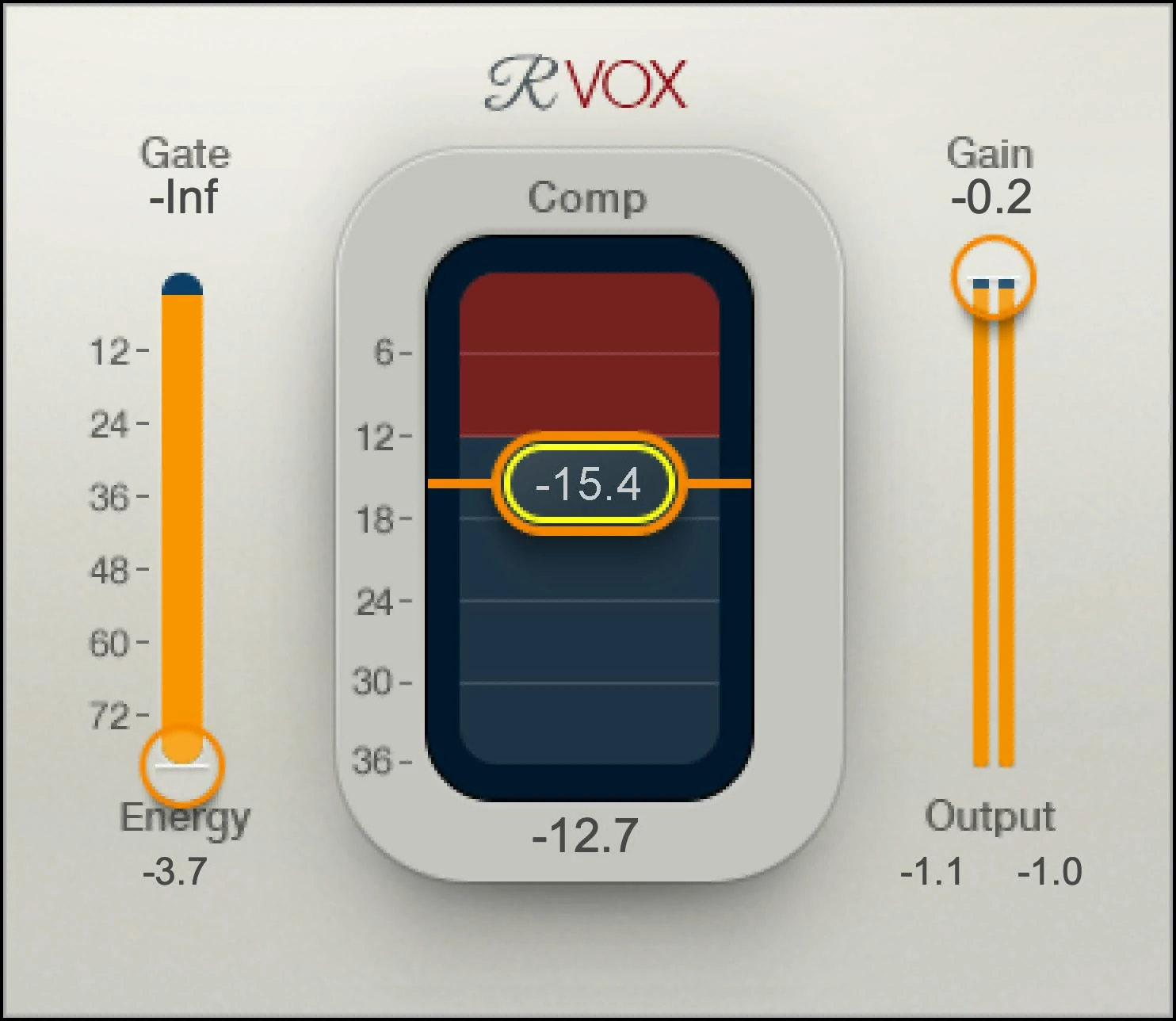
Waves recommends beginning with compression, adjusting the output behavior next, and setting or refining the gate afterward. That order is useful because changing compression also affects output level. A gate setting chosen too early may need revisiting after the rest of the processing changes.
For an initial comparison, leave Gate at its lowest setting and focus on the middle and right controls. Add another decision only after you can hear what the dynamics stage contributes. This makes it easier to identify why a breath, word ending or gap changes.
Comp changes more than a threshold number
The Comp fader combines compression behavior into a single adjustment. Moving it down increases compression, with a related change in output level. The displayed value is a control setting, not an instruction that every vocal should reach the same amount of gain reduction.
Our first exercise would lower Comp gradually while looping a quiet line followed by a stronger line. Stop when the stronger delivery sits more comfortably without making the softer line unnaturally insistent. Then match the processed level against bypass before deciding whether the change is useful.
If the result becomes tiring, back away from the setting before adding EQ or another processor. A crowded or aggressive vocal can be a dynamics decision rather than a frequency problem. The clearer you keep this first comparison, the easier the next step becomes.
Gain affects the output limiter
The manual describes Gain as the output ceiling control for the limiter. Treating it as a purely neutral volume fader misses part of the design. A setting can change how strongly the limiting contributes, even when the output seems controlled.
Our practical check would hold Comp steady and compare a few sensible Gain positions. Match the final listening level using a separate downstream gain control if needed. Listen for changes in texture, the fronts of words and the ease of the phrase, not just the output peak.
If you hear an unwanted edge at a strong setting, try less compression and review the input level as well. Lowering the signal entering a processor and changing its final output are different experiments. Save separate versions so that you know which change solved the problem.
Gate is gentle downward expansion
R-Vox's Gate attenuates lower-level material below the chosen threshold using a soft response. It is useful to investigate between phrases, but it is not a tool for separating room noise from a word when both occur together.
Raise the threshold slowly while listening to a breath, a quiet first syllable and a trailing vowel. Stop before those wanted details become distracting or incomplete. A threshold that makes a silent gap impressive can still damage the next entrance.
For an isolated click or chair noise, we would usually make a direct edit. For persistent noise under the vocal, assess recording cleanup separately. Avoid turning the gate up simply because a heavily compressed track makes its background more noticeable.
What the meters can and cannot tell you
The input Energy display provides a reference for Gate. The central reduction display includes the combined action of compression and gating. That matters when you are trying to understand a large reading: it should not automatically be described as compression alone.
Our first diagnostic pass would leave the gate at its minimum, establish the compression behavior and then bring Gate into the comparison. If the reduction display changes through a gap, you can connect that observation with the expander adjustment you just made.
Do not choose settings from the largest meter value. Listen to whether the loud word still has an intentional emphasis, whether the quieter word becomes understandable and whether the space between phrases remains believable. Those are the decisions the meter supports.
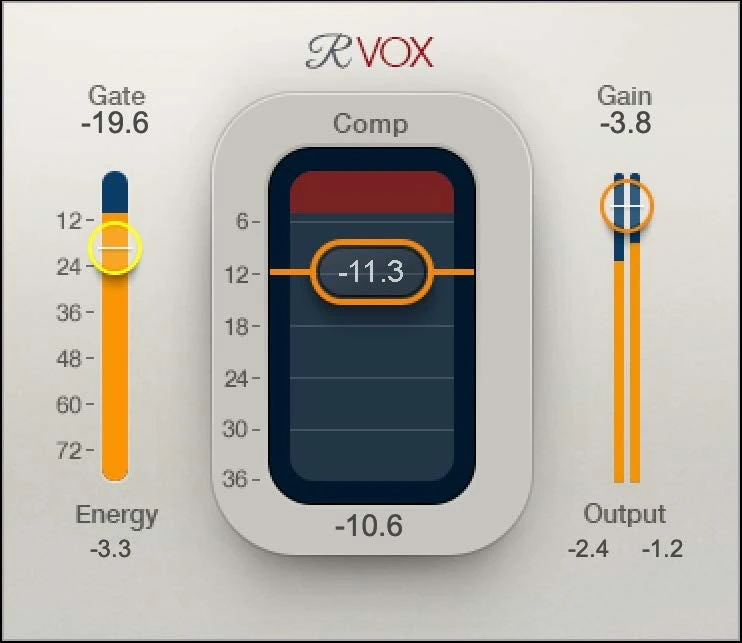
A first setup for a sung lead vocal
Choose a short section with a gentle phrase, a strong answer and a pause. Keep the instrumental playing and save the untouched take. Make an obvious clip-gain correction first if one word is dramatically louder than everything around it.
- Insert R-Vox on the isolated lead-vocal track and keep Gate at its lowest setting for the first pass.
- Lower Comp gradually until the louder phrase becomes easier to place against the backing track.
- Adjust Gain, then use a downstream trim if necessary to compare processing and bypass at a similar listening level.
- Replay the quiet phrase and listen for a change in its expressive contrast with the louder one.
- Refine Gate only after the main dynamics setting feels useful.
- Replay from before the pause to check the entrance and the end of the previous word.
As a modest listening exercise, you could begin by aiming for a few decibels of reduction on stronger words with the gate inactive. The amount is a trial, not a target that defines a successful vocal sound. Some recordings will need less processing or a direct edit instead.
If the entire phrase feels smaller, do not immediately compensate by making the plugin louder. First reduce the processing and compare again. If the vocal becomes easy to follow but loses the singer's intensity, the trade-off is telling you to stop earlier.
After the basic setting works, add the rest of the vocal chain and revisit the balance. A useful isolated exercise can change when brighter EQ, a de-esser or effects returns enter the picture.
R-Vox on rap: preserve the rhythm of the delivery
On rap, compare a fast line with a loud accented word. Listen for whether the consonants still carry the rhythm after compression, then inspect breaths between bars. If only one breath jumps out, lower that event with clip gain rather than increasing Gate across the whole performance. Use the sung-vocal setup above as the starting point.
If harshness remains after the dynamics decision, address it as a separate problem. Our harsh-vocal guide and FL Studio de-essing walkthrough cover more appropriate next steps than continuing to lower Comp.
R-Vox on dialogue and spoken recordings
For dialogue, include a quiet sentence ending and a pause in the test passage. Compression can make room sound more noticeable, while excessive expansion can cut off the ending or make the background switch abruptly. Keep enough room tone for smooth edits; use dedicated cleanup when noise overlaps the speech.
Where should R-Vox go in the chain?
There is no single insertion order that makes every recording behave the same. For a clear first evaluation, keep R-Vox before reverb and delay and work on the dry vocal. That lets you hear its contribution without the detector receiving a long effect tail.
If a large low-frequency plosive is the main problem, make a suitable edit or filtering decision before judging the compressor. Do not ask a simple dynamics stage to solve the recording, tone and balance at the same time.
Then compare the rest of the processing in the intended order. An EQ adjustment before compression changes what reaches the processor; one afterward changes the sound of its result. Save those as separate versions and decide by listening to the same phrase in context.
Adding a separate level ride
R-Vox can give a vocal the dynamics behavior you want while some phrases still need to move against the arrangement. In that situation, manual automation or a separate riding stage may be useful. A compressor setting does not determine which lyric should move forward in a busy chorus.
We would establish the R-Vox sound first, then make the remaining balance decisions. If the chain starts to feel overcontrolled, bypass each stage independently and identify which one still earns a place. More stages are only useful when their jobs are distinct.
R-Vox versus a fully adjustable compressor
R-Vox makes sense when its fixed timing produces the response you want quickly. If a word attack needs more space or the recovery needs to follow a particular rhythm, use a compressor with adjustable attack and release. A smaller interface is convenient only while its behavior suits the take.
You can explore a different style in our Waves CLA-2A review. For a broader shortlist, the compressor plugin guide explains why different jobs lead to different choices.
R-Vox versus automatic vocal riding
A level-riding workflow is a different purchase decision. Its purpose is to move gain around the performance or arrangement, while R-Vox provides a compact compression, expansion and limiting stage.
We would choose between them by describing the unfinished job. If the vocal needs a different dynamics character, start with a compressor comparison. If its character is already right but phrases disappear, try fader automation and determine how much repeated riding work remains.
This distinction matters because lowering Comp further can change a vocal that only needed a small phrase-level move. Likewise, a gain ride does not reproduce every reason you might choose compression. Test the simpler intervention before adding another product.
What we would check before calling it an improvement
First, compare at a similar listening level. A louder processed vocal can seem clearer even if the performance's contrast has become less interesting. Use a clean downstream trim for the final comparison when changing Gain would alter the limiter behavior you are assessing.
Second, include the gap around the phrase. Gate settings and stronger processing can make the space between words as important as the loudest vowel. Listen from before the edit point rather than repeatedly starting playback on the first loud word.
Third, compare in the arrangement and at a quieter monitoring level. If the vocal still disappears, investigate masking and balance. Turning the dynamics stage into a more extreme version of itself is not always the most direct answer.
Finally, leave the setting for a short break and return to the song. If you can describe a concrete benefit and prefer it without focusing on the plugin, the exercise has produced useful evidence for your own workflow.
Price, licensing and value
Waves listed R-Vox at $34.99 against a stated regular price of $129 when checked on November 17, 2026. Check the current offer before purchasing; the checked price is not a permanent promise or a statement of the final taxed checkout total.
For perpetual licenses, Waves includes a year of Update Plan coverage. Your owned product remains yours when that coverage expires; future updates and plan benefits are separate considerations. Check existing bundles or a Creative Access subscription before buying an extra license.
At the checked offer, we would consider R-Vox when a quick vocal dynamics workflow is a regular need. We would still compare it with a stock compressor on a familiar take. Paying less is useful only if the processor gives you a result or workflow you actually prefer.
At the stated regular price, we would be more demanding about what it adds to the current setup. A simple interface can be valuable, but simplicity alone does not establish that the processor is the best next purchase.
For beginners, the compact interface is helpful, but it should not replace learning what compression changes. Our compressor fundamentals guide provides a useful companion to the listening exercises here.
Product name and interface versions
R-Vox is the shortened name for Renaissance Vox. The alternative interface skins expose the same processing and settings; choose the layout you find easiest to read.
Conclusion
R-Vox is worth trialing for a fast vocal dynamics pass. Buy it if the level-matched result preserves articulation and saves work; skip it if you keep needing timing controls it does not provide. The gate is an optional finishing decision, not a cure for a noisy recording.
Sources and editorial basis
Features and control behavior were checked against the Renaissance Vox user guide, Waves product information and Update Plan terms. The U.S. offer was checked November 17, 2026. Interface illustrations come from Waves; examples and buying judgments are SoundShaper's proposed workflow rather than measured test findings.


