
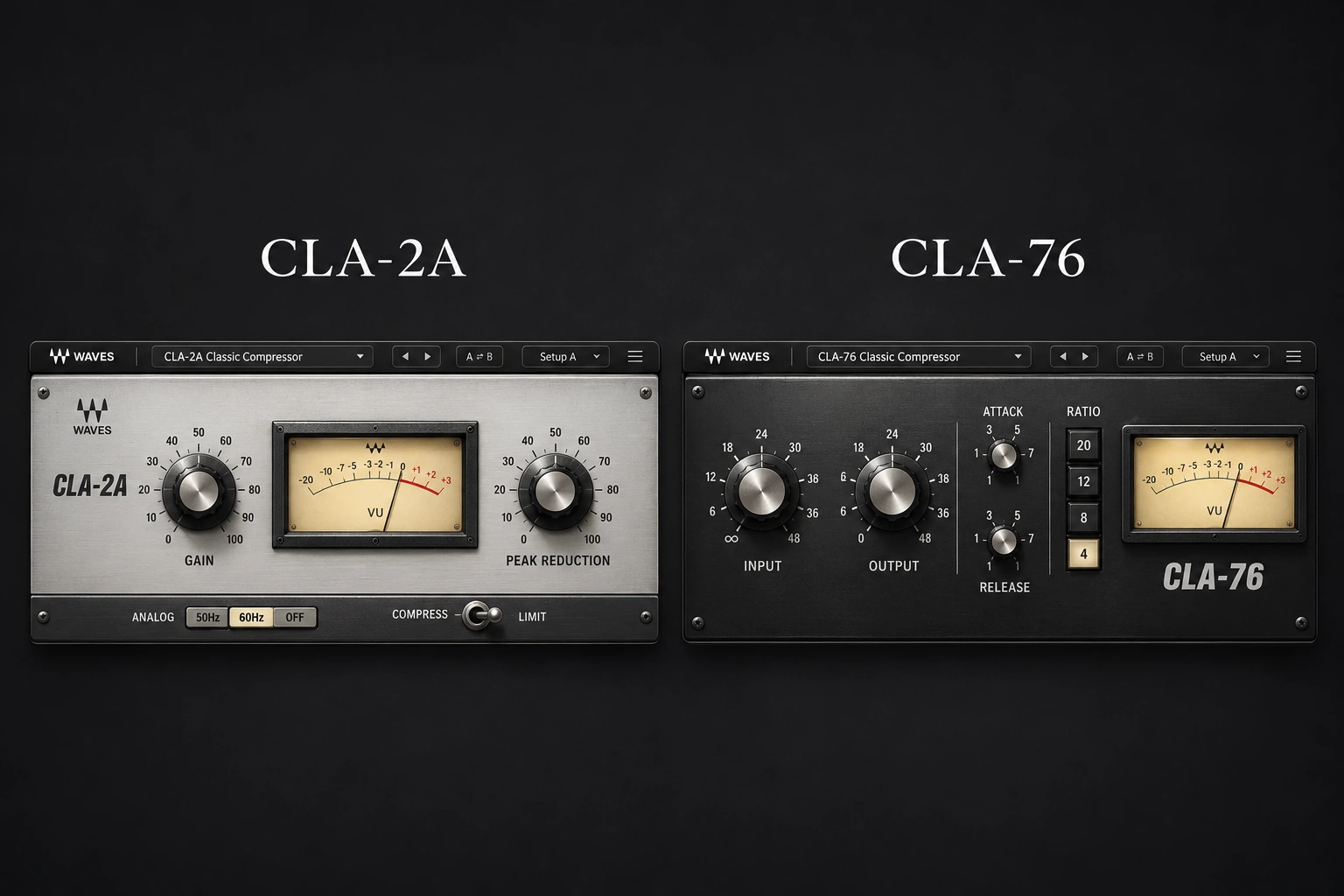

Choose Waves CLA-76 when you need to control fast vocal peaks and adjust how sharply the compressor grabs. Choose CLA-2A when you want a simpler way to steady a sung line. If the recording has both problems, try CLA-76 before CLA-2A, with each doing a smaller job. Buying both only makes sense if the second stage improves the vocal at the same playback level.
A rap verse with a few explosive syllables and a melodic chorus that fades behind the beat do not need identical compression. This comparison helps you identify which problem you have, set up each plugin and decide whether one compressor is enough. The settings below are starting exercises for your own recordings, not measured results from a SoundShaper listening test.
CLA-2A vs CLA-76: the differences that matter
| Decision | CLA-2A | CLA-76 |
|---|---|---|
| Main first audition | Leveling a sustained vocal line | Controlling sharp, uneven attacks |
| Set compression | Peak Reduction, then Gain for level | Input, then Output for level |
| Timing | Program-dependent; no separate attack/release knobs | Adjustable Attack and Release; higher numbers are faster |
| Useful next step | Check the quiet phrase after a long loud note | Check consonants and recovery between words |
Neither plugin is restricted to one genre. A singer with a sharp delivery may benefit from CLA-76, while a controlled rap performance may need only gentle leveling. Make the choice from the troublesome part of the take, rather than from a preset name.
Use CLA-76 when individual syllables jump forward
Suppose the verse sits well until the first word of every other line hits too hard. Turning the whole vocal down makes the remaining words disappear. Before compressing, reduce any isolated plosive or unusually loud edit by hand. Then give CLA-76 the recurring peaks to handle.

- Choose a representative passage. Include one loud consonant, a normal line and a quiet ending. Keep the instrumental playing so you can hear whether the words stay understandable.
- Begin conservatively. Try Blacky, a 4:1 ratio, Attack at 3 and Release at 5. These are positions on the plugin's scale, not milliseconds. Start with Mix fully wet and Analog off; disable Auto Makeup for a manual comparison.
- Raise Input gradually. Aim initially for roughly 2–4 dB of reduction on the louder moments. Adjust Output or the final trim to compensate for the level change. A copied Input value will not produce the same reduction on a different recording.
- Adjust the leading edge. If the start of a word still jumps out, move Attack higher. If diction loses its edge, move it lower or reduce the amount of compression.
- Check the recovery. If the next quiet word gets pulled down after a loud one, try a higher Release setting. If breaths or room noise swell between words, slow the recovery or use less compression.
On CLA-76, 1 is slowest and 7 is fastest for both Attack and Release. Even its slower attack settings remain fast compared with many general-purpose compressors. If you want a long transient to pass through untouched, another compressor may offer a more suitable timing range. Our compressor attack and release guide explains what to listen for.
Use CLA-2A when the body of the vocal needs support
Now consider a chorus whose initial words are clear but whose held vowels become uneven. You can keep chasing the fader, or try a leveling stage that reduces the difference between stronger and softer portions. CLA-2A is a useful audition here, provided its recovery fits the phrasing.

Select Compress, set Analog off and begin with Peak Reduction low. Leave Mix fully wet and Auto Makeup off for this exercise. Raise Peak Reduction until the stronger parts of the line show a few decibels of reduction, then use Gain to restore a comparable listening level. Stop adjusting and play the next line as well.
CLA-2A has no separate attack and release knobs. Its optical model has program-dependent recovery: a loud sustained note can affect how the compressor responds afterward. If the next phrase feels held back, lower Peak Reduction and handle more of the loud note with clip gain. Turning up makeup gain raises the held-back phrase and everything else; it does not fix recovery.
Do not force every word to produce the same meter movement. A better result is a chorus you can follow at low playback volume, with the singer's emphasis still intact. If compression makes the breath as prominent as the lyric, ease off and finish the balance with automation. For a wider look at the controls, read our Waves CLA-2A review.
Should CLA-76 go before or after CLA-2A?
Start with CLA-76 → CLA-2A when fast peaks make the leveling stage work too hard. Set up CLA-76 by itself, then bring in CLA-2A gently. For a first attempt, let the 76 catch occasional peaks and the 2A make a smaller adjustment to the sustained line. Those roles matter more than hitting a particular total reduction number.
Match the output of CLA-76 before inserting the second compressor. Otherwise the second stage may compress harder simply because you fed it a louder signal. When you compare the finished chain against bypass, match the final output again.
Reverse the order as a separate experiment if the vocal already has a good general level but you want a final stage to catch remaining spikes. A different order changes what the second detector receives. Keep the arrangement and effects fixed, and compare the same phrase from the same playback start point.
If two stages make the singer sound smaller or bring up excessive breath noise, go back to one. A heavily compressed chain cannot decide that the last word is emotionally important and deserves to rise above the backing track. That is still an automation decision; see how to make vocals sit in the mix.
Which one should you buy for rap or singing?
For a rapid rap delivery, audition CLA-76 first if uneven attacks are the main distraction. Loop the densest line and check every consonant after processing. A setting that makes one forceful word impressive can blur the next three.
For a sustained melodic lead, audition CLA-2A first if you mainly need steadier body and fewer timing decisions. Include a quiet phrase immediately after a loud note in the comparison. If that transition works better with adjustable recovery, CLA-76 may still be the better fit.
Already happy with a stock compressor? Keep it in the comparison. Neither Waves plugin is essential for a professional vocal. Buy for a workflow or tonal result you prefer on your material, not because a chain diagram contains two famous names.
Prices and version details
On November 20, 2026, Waves' product pages listed CLA-2A and CLA-76 at US$29.99 each, against a listed regular price of US$149 each. Promotions, taxes and checkout currency can change the total. Compare the current single-plugin price with any bundle you are already considering; extra plugins only add value if you will use them.
The current interfaces shown here include Mix, Trim and Auto Makeup controls. An older installed version may look different. Check the supported plugin formats and hosts and system requirements for your setup before purchasing.
Conclusion
CLA-76 is the stronger first candidate for fast peaks and adjustable timing. CLA-2A is the simpler candidate for sustained vocal leveling. Use both when each solves a separate problem, and keep the single-plugin version if the extra stage adds no clear benefit at matched volume.
Control references: CLA-76 user guide, CLA-2A user guide and Waves' serial-compression guide. Interface images: Waves. Suggested settings are exercises to adapt to your recording.


