


A compressor can remove a drum's impact or make a vocal feel steadier even when its threshold and ratio stay unchanged. Attack and release shape how the gain reduction moves through each sound. Begin by deciding whether you want to preserve the initial hit, restrain it or change the recovery between events. Then adjust one timing control at a time while comparing at similar loudness, rather than searching for a single “best” setting.
What to change when compression sounds wrong
| What you hear | First adjustment to audition | Check afterward |
|---|---|---|
| Snare loses its initial crack | A slower attack or less reduction | Whether peaks now escape too strongly |
| Sharp hits still jump out | A faster attack | Whether the source becomes dull or small |
| The next note arrives under heavy reduction | A shorter release | Roughness or excessive level movement |
| The tail surges back unnaturally | A longer release or less reduction | Whether recovery now takes too long |
| Bass becomes buzzy only with compression | Slower timing, especially release, and less reduction | Source distortion and output clipping as alternative causes |
Attack is a response speed, not an untouched waiting period
Attack controls how quickly gain reduction develops as the compressor reacts. A setting of 20 ms does not normally mean the signal passes completely unchanged for 20 ms and then gets turned down instantly. The gain typically moves along a curve, and the exact response depends on the design, the detector and the incoming sound.
A faster attack can restrain the front of a transient more strongly. A slower attack can leave more of that front exposed relative to the body. That makes slower attack useful when preserving a snare's articulation, but it can also leave an unwanted peak too loud. “Slow equals punchy” is a possible outcome, not a guarantee.
Do not compare milliseconds across different compressors as if they describe identical envelopes. Manufacturers can measure time constants differently, and program-dependent processing can change the practical response. Use a familiar compressor for the first exercise so you can concentrate on one variable.
Release controls the return from gain reduction
Release governs how the compressor relaxes its gain reduction when the detected level calls for less of it. It does not wait for the waveform to become silent. In a continuous bass line or busy drum loop, the compressor may move between different amounts of reduction without reaching zero.
A short release can let quieter detail and tails recover quickly. Push it too far and that recovery can become obvious pumping or roughness. A long release can create smoother movement, but may hold the signal down into the next note or phrase. The useful setting depends on both the sound's own envelope and the pattern it plays.
Some compressors use automatic release; others offer separate stages or separate peak and RMS timing. These can be useful, but they complicate a beginner's A/B comparison. Start with a simple manual mode if your compressor provides one, or learn what the automatic mode is doing before adding more variables.
A listening test that makes attack easier to hear
Use an isolated snare or a sparse drum loop with clearly separated hits. Temporarily exaggerating compression makes the timing difference easier to notice. The following values make useful comparison points on a compressor with millisecond timing controls.
- Turn off automatic makeup gain and use a ratio around 4:1.
- Choose a moderate release, such as 150 ms, and lower the threshold until the main hits show roughly 4–6 dB of reduction.
- Compare attack settings around 1 ms, 10 ms and 30 ms, leaving the other controls alone.
- Listen to the initial crack separately from the snare's body. Does the hit become smoother, sharper or simply louder?
- Match output loudness for the comparison, then choose the attack that preserves the articulation you actually need.
- Reduce the compression amount to suit the song and check your choice again.
If almost nothing changes, confirm the compressor is actually reducing gain and that a parallel mix control is not hiding the effect. If everything sounds distorted, back off the threshold and check the input and output levels. An exaggerated learning exercise should still let you hear the envelope rather than only clipping.
Set release against the phrase, not just the meter
Keep the attack you selected and compare release values such as 60, 150 and 300 ms on the same passage. Listen for the snare tail and the space before the next important hit. Notice whether the compressor adds a useful bounce or makes the loop breathe in a way that distracts from the rhythm.
The gain-reduction meter helps locate that movement, but the goal is not to make it return to zero at a prescribed point. A smooth bus setting may stay active through a busy section; a more rhythmic effect may recover substantially between accents. The appropriate behavior depends on the role of the processor.
Tempo calculations are audition markers
A quarter note lasts 60,000 divided by BPM milliseconds. At 120 BPM, that is 500 ms; an eighth note is 250 ms and a sixteenth is 125 ms. Those durations can give you sensible comparison points when looking for rhythmic movement.
They are not automatic release settings. A compressor's release curve is not necessarily a fixed countdown from full reduction to zero, and the signal can trigger new reduction before recovery completes. Try the calculated value, then move shorter or longer while listening to the actual groove.
Vocal timing: preserve articulation without letting peaks distract
Use a phrase containing a strong consonant, a sustained vowel and a softer ending. As an initial experiment in a conventional millisecond-based compressor, try attack around 10–20 ms and release around 80–150 ms, then set the threshold for modest reduction on the louder words. These ranges are starting points for comparison, not vocal standards.
If consonants jump ahead of the body, audition a faster attack. If the words lose clarity or the voice retreats behind the beat, try slowing it or reducing the amount of compression. Listen to meaning and phrasing, not only how steady the meter looks.
For release, check whether the end of a word swells as gain returns and whether the next quiet word remains held down. A single timing choice may not solve a very uneven performance. Use clip gain or automation for larger phrase-level changes, then let compression handle smaller variations. For the full balance, see how to make vocals sit in the mix.
Bass timing: listen for distortion as well as consistency
Low-frequency waveforms have relatively long cycles. A 50 Hz tone completes one cycle every 20 ms. Rapid gain changes can interact audibly with that waveform, so a setting that sounds smooth on a vocal may make a sustained bass note rougher. The exact result depends on the compressor and how much it is reducing.
For a controlled experiment, compare a release near 50 ms with one near 150 ms while leaving threshold and ratio fixed. If the shorter setting adds a buzz, try the slower option and reduce the reduction before reaching for another EQ. Also bypass the compressor to check whether the distortion already exists in the source.
Preserving a bass note's attack and stabilizing its low-end weight are separate goals. If only certain frequencies swell, a frequency-selective processor may be more appropriate than changing the entire signal's envelope. The important first step is identifying whether the problem is timing, tone or note level.
Where the controls are in a real compressor
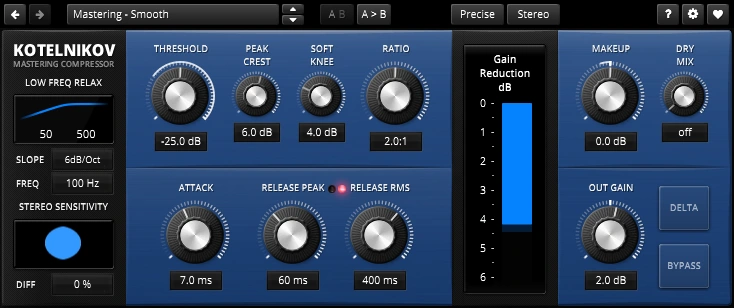
TDR Kotelnikov has one Attack control and separate Release Peak and Release RMS controls. Peak Crest influences how its peak and RMS processing interact. This is a useful example of why a single release number cannot describe every compressor: the plugin can recover differently after a transient and after more sustained material.
For an initial trial, load a neutral starting state and change only Attack, then restore it and compare the two release controls separately. Leave Peak Crest fixed during that exercise. Read our Kotelnikov Free vs GE comparison if you are deciding between editions; the standard edition already lets you explore these timing concepts.
When Kotelnikov GE makes sense
The free edition covers the timing exercises above. Kotelnikov GE adds Equal Loudness Bypass and output Trim, which help when comparing subtle attack and release changes without being distracted by a level difference. It also adds GR Limit for capping reduction and Frequency Dependent Ratio for shaping how strongly different frequencies are compressed. Consider GE if those controls solve a recurring mix-bus problem; you can learn the basic timing controls with the free edition.
Why timing changes sometimes seem to do nothing
Check the threshold and ratio first. If the source rarely triggers compression, changing attack may have little audible consequence. Look at the wet/dry balance as well: a large dry contribution preserves the original transient even when the processed path has a fast attack.
Another common problem is changing timing while automatic makeup continually changes output level. Disable it for the learning exercise and match the output manually. Then check the whole chain: an upstream limiter may already have removed the transient you are trying to reshape, while a downstream limiter may hide the peak difference between two attack settings.
Finally, verify units and direction. Some vintage-style controls use numbered positions rather than milliseconds, and a higher number can mean faster rather than slower. Follow that plugin's documentation instead of transferring a number from a different interface.
Conclusion
Use attack to shape how the compressor handles the front of the sound, and release to shape how it recovers through the phrase. Learn the contrast with clear, controlled comparisons, then reduce the intervention to fit the music. Keep the setting that improves articulation and movement at matched loudness, even when its numbers differ from a familiar preset.
Technical reference: Tokyo Dawn's Kotelnikov manual. Product controls checked November 17, 2026.


