


Choose Thermal if you want to explore distortion through presets, two linked macros and a performance-friendly XY control. Choose FabFilter Saturn 2 if you want a clear multiband layout for setting the drive, character and blend of different frequency areas. Both have enough depth for subtle colour and extreme sound design.
The difference becomes useful when you describe the task. “Make this synth more unpredictable and record the movement” points us toward a Thermal trial. “Add character to the bass mids while treating the low end separately” points us toward Saturn 2. Neither example is exclusive to one plugin, but they reveal which working method you may prefer.
Quick Comparison
| Buying question | Thermal | FabFilter Saturn 2 |
|---|---|---|
| Starting workflow | Explore a preset and its assigned macros, then edit the engine | Choose a style and adjust processing across frequency bands |
| Frequency control | Three processing stages with Band Split and Refilter controls | Up to six bands with separate drive, mix, dynamics, tone and level |
| Hands-on movement | Circular XY control moves the two macros together | Assignable XY controllers and other modulation sources |
| Beyond basic drive | Stage effects, feedback and width controls | Feedback, dynamics and extensive modulation |
| Our first trial | Transforming a loop or performing a moving distortion effect | Targeted saturation and deliberate multiband sound design |
Thermal: explore the sound, then open the engine
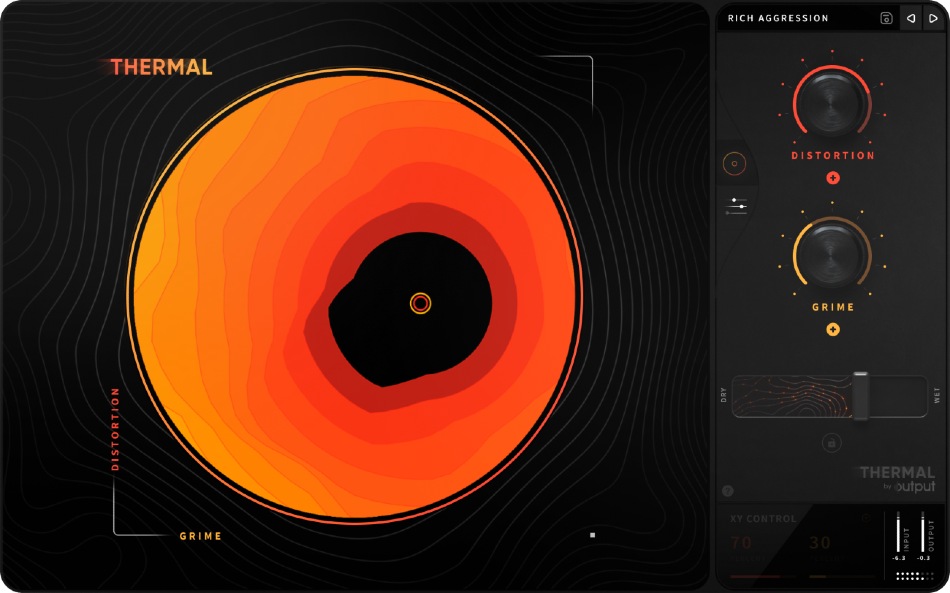
Thermal's main page puts a large circular XY control beside two macros. Moving around that control changes both macro positions together. The attraction is being able to audition a coordinated change as a gesture rather than adjusting every underlying parameter individually.
Try it on a short synth phrase or percussion loop. Find one position that supports the original part and a second that works as a variation. Record movement between them only where the arrangement needs a change.
The Advanced page exposes the processing behind that front panel. Thermal has three stages with distortion, effects, feedback and other controls. Band Split lets you select a stage's working frequency range, while Refilter can filter harmonics created by its processing.
That depth matters if a promising preset does too much. Open it and identify the part causing the problem instead of abandoning the whole sound. A width change or additional effect may be responsible for a result you initially blamed on distortion.
Our Thermal review looks at its broader workflow for bass, drums and sound design.
Saturn 2: build the treatment around frequency areas
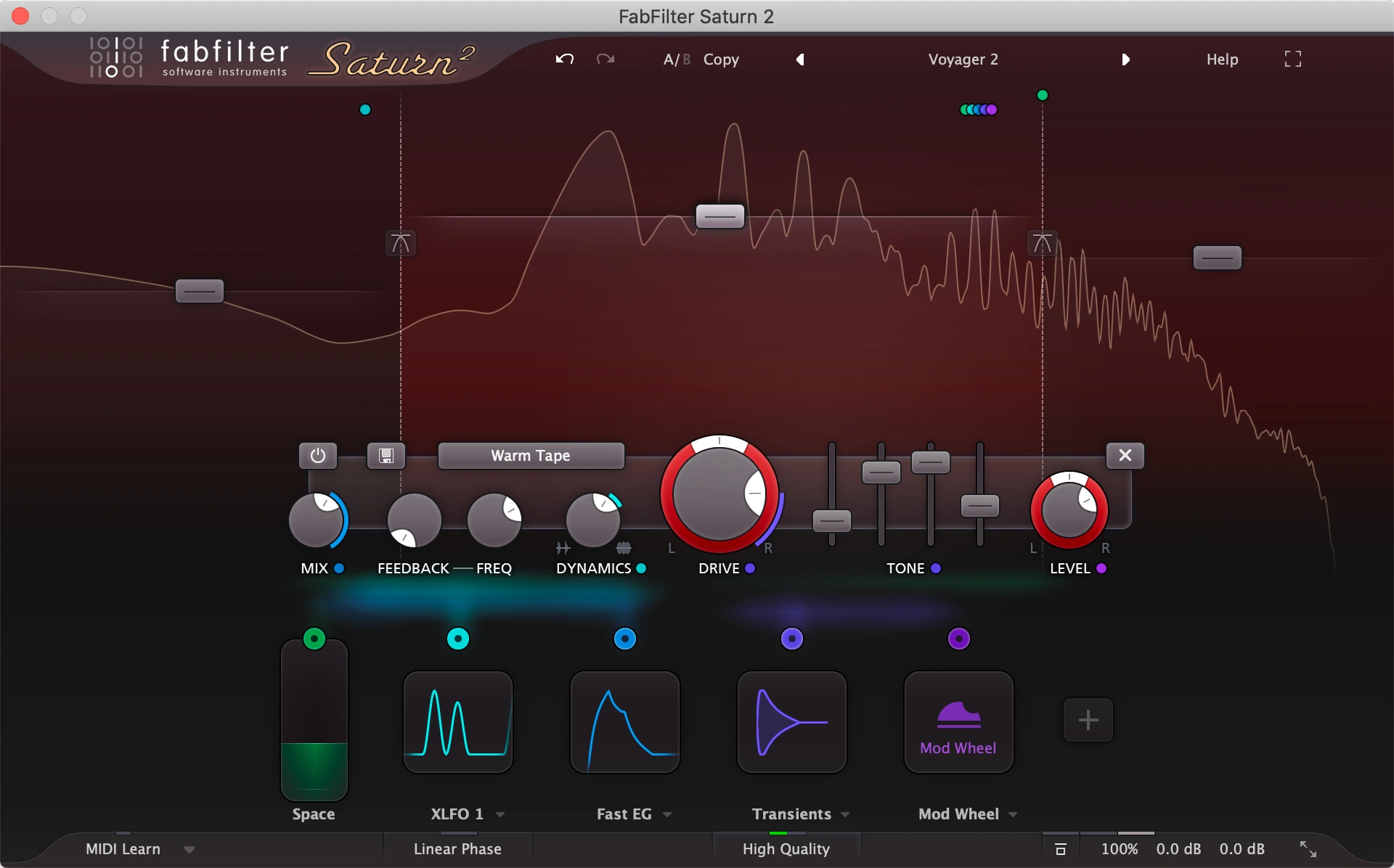
Saturn 2 gives you up to six frequency bands. Each can have its own distortion style, drive, wet/dry mix, feedback, dynamics, tone and level settings.
You can begin with one band and a restrained style, then split the signal when a particular area needs different treatment. That makes it a useful candidate for a bass that needs more upper character without the same amount of drive across the whole sound.
The styles cover tube, tape, transformer and amplifier-inspired processing, alongside more destructive options. A familiar label is a starting point for listening; it does not guarantee that the setting suits every source.
Solo a band briefly to understand what you are changing, then return to the full signal and the mix. A band that sounds exciting alone may be too prominent once the vocal or snare returns.
For bass: check the foundation after adding harmonics
Saturn 2 would be our first trial for a bass with a specific frequency problem. Start with modest full-band processing. If the low end loses its shape before the upper sound becomes useful, try treating those areas separately.
There is no universal crossover frequency to copy. Move the split while listening to the notes in the actual part, including its lowest and highest pitches. You want a consistent bassline, not one impressive note.
Thermal can also target frequency ranges through its stage controls. Try it when you want to transform a synth bass into a more animated part, then inspect the processing if the movement disrupts its weight or position.
Check the result with the kick and at a quiet level. If the bass becomes easier to hear but crowds everything else, reduce the processing before boosting more frequencies. Our kick and 808 guide covers the broader relationship.
For drums: keep the hit you liked in the first place
Thermal is worth auditioning when a loop needs a second identity: a rougher fill, a narrower verse texture or a moving accent at the end of a phrase. Save the original and compare the variation in the arrangement.
For a more controlled drum-bus treatment, Saturn 2 is our first trial. You can adjust a band's blend and dynamics as well as its drive, giving you several ways to change the balance of the processed signal.
Begin without extra modulation. Listen to the attack, sustain and cymbal tone. If the snare loses impact, a brighter or louder distorted version is not automatically an improvement.
Match the output level when comparing. Distortion can change the balance and dynamics enough that the louder version feels more exciting even when it weakens the groove.
For vocals: decide between a main-chain colour and an effect
For a small amount of main-vocal character, we would try a restrained Saturn 2 setting and judge complete phrases. Listen to consonants and sibilance, not just the body of held notes.
For an obvious texture, Thermal's preset and macro approach can be a useful starting point. Try a duplicate vocal or an effect return so you can place that character around the main performance.
Keep the words understandable at the intended level. If a distorted layer competes with the lead, change its timing, tone or amount before assuming another processor will make it sit.
For a deliberately narrow phone-style sound, our telephone vocal effect guide gives you a more focused starting point. For unwanted bite in the main vocal, see how to fix harsh vocals.
Both can move: compare how you build the modulation
Thermal's central XY presentation is an attractive way to perform an assigned sound, but Saturn 2 also supports XY controllers. Its modulation sources include tempo-synced XLFOs, envelope generators, envelope followers and MIDI sources.
We would choose Thermal for a patch we enjoy steering through its macros. We would favour Saturn when we already know which parameter should move and want to build that relationship in its modulation system.
A useful test is to make one subtle variation that you would leave running under a musical part. If every movement demands attention, reduce its range. Save the more dramatic version for a moment where the track can make room for it.
Quality settings and low-end checks
Saturn 2 offers optional oversampling to reduce aliasing from its distortion processing, with a CPU tradeoff. It also has a linear-phase option for its crossovers and oversampling filters. Those controls can be useful, but higher settings are not a substitute for choosing the right amount of drive.
Compare quality settings in your own project and check playback as well as rendering. We have not run a controlled CPU or latency comparison between these plugins.
With either product, recheck the low end and mono balance after adding width or several processing stages. Preserve a version without the extra treatment so you can decide whether the change still helps after a break.
Price and overlap: what are you missing?
Compare current checkout totals in USD, including tax and the exact licence. Check any applicable bundle or account offer before buying another full product.
If you already own Saturn 2, try its more creative styles and modulation before buying Thermal for “more distortion.” Thermal needs to add a workflow or character you want to use regularly.
If Thermal already gives you useful results, Saturn needs a more specific reason: its multiband layout, per-band controls or processing options. Buying both is easier to justify when each repeatedly handles a different job.
For other choices, read Thermal vs Dist COLDFIRE and Decapitator vs Saturn 2.
A controlled patch comparison
Save one useful patch in each plugin before adding movement. Match final output level, then mute any additional effects so you can hear the distortion contribution. In Thermal, inspect which stages and parameters the chosen macros control; in Saturn, limit the first modulation assignment to one audible parameter.
For a bass, compare the lowest and highest notes after each change. Driving the upper region can create harmonics outside it, so a crossover does not by itself guarantee a clean final spectrum. Thermal’s Refilter offers a way to constrain a stage’s processed output; check the whole result with the kick.
Conclusion
Thermal is worth trialing for performed macro movement and layered effects. Saturn 2 is worth trialing for deliberate per-band saturation and modulation. Choose the workflow that makes a useful patch easier to revise; neither is restricted to only subtle or only extreme distortion.
Sources
This is editorial buying advice based on documented functions, rather than a matched listening test. Sources checked 2 November 2026: Output's Thermal overview, stage-processing documentation and XY control guide; and FabFilter's Saturn 2 overview, band controls, modulation guide and quality and output controls.


