


A vocal can sound balanced in the verse and disappear when the chorus arrives, even after compression. Waves Vocal Rider is worth considering when small, repeated level moves take more time than the creative decisions in your mix. We would use it to build a restrained first pass, then finish the important words by hand. If one or two phrases are the only problem, ordinary clip gain and automation may already be enough.
This review explains the documented controls and the workflows we would try. The examples are suggested starting points rather than results from a hands-on listening test. U.S. pricing and product information were checked on November 17, 2026.
Waves Vocal Rider: the useful details
| Decision | What Vocal Rider offers | Our buying advice |
|---|---|---|
| Main job | Automatic vocal gain riding | Useful for repeated small level moves |
| Control | Target, detection and movement limits | Start with a restrained range |
| Music reference | Instrumental sidechain and Music Sensitivity | Test the exact routing in your host |
| Editing | Write and Read Rider fader automation | Use the generated pass as an editable starting point |
| What it does not do | Pitch correction or noise removal | Identify the actual recording problem first |
| U.S. offer checked November 17, 2026 | $29.99; stated regular price $199 | Confirm the current offer before buying |
What does Vocal Rider actually do?
Vocal Rider changes gain while the vocal plays. Its moving Rider fader raises or lowers the track within limits you choose. That makes it useful when the delivery is broadly right but individual phrases keep falling forward or backward in the arrangement.
It does not correct pitch, remove room sound or decide which word carries the lyric. Think of it as assistance with repeated level adjustments. You still choose the vocal's overall position, how much movement is appropriate and which moments should remain deliberately quiet or loud.
A useful way to judge it is to ask whether a listener can follow the performance without your attention being pulled toward the fader. A motionless level meter is not the goal. A whisper and a shout should not necessarily become equally forceful, particularly when that contrast is part of the song.
For the wider chain, our guide to making vocals sit in the mix explains how level, tone, compression and effects work together. Vocal Rider addresses one part of that process.
The interface: Target, detection and the moving fader
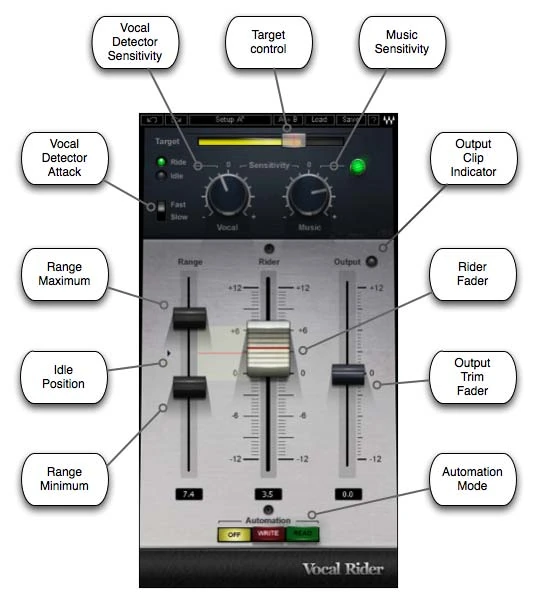
The upper section handles detection and the reference level. The lower section shows the permitted movement, the actual ride and the final output trim. Keeping those jobs separate makes troubleshooting easier: first establish what the plugin recognizes, then limit what it is allowed to do.
Set Target with the whole arrangement playing
Target establishes the reference around which riding operates. It is not a streaming loudness target or a guarantee that the vocal will reach a particular LUFS value. Start with the vocal roughly balanced against the track, then move Target while listening to a representative phrase.
Our suggestion is to include both a quiet line and a strong line in the loop. If you tune the behavior around the loudest word alone, you can end up solving the wrong problem. If the entire performance is simply too quiet, make a sensible rough balance before expecting automatic riding to establish the mix for you.
Use Vocal Sensitivity to distinguish the performance
Vocal Sensitivity changes the detector's response to the vocal and surrounding noise. Watch the Ride/Idle indication during words and gaps. Our first check would be whether quiet words are recognized and whether the detector remains active when the singer has stopped.
Do not compensate for a noisy recording by allowing ever larger upward moves. If a breath, headphone spill or room noise starts to become a new foreground element, reduce the available boost and inspect the recording. Editing an isolated distraction is often more predictable than asking detection to solve every event.
Limit Range before chasing individual words
The Range limits bound the Rider fader's upward and downward movement. A conservative first exercise is approximately 3 dB in either direction. That is our suggested restriction, not a recommended setting from Waves and not a promise that every vocal needs the same range.
Listen before widening it. If the fader repeatedly presses against a boundary, inspect the affected phrase. One extreme line may need a clip-gain edit. A recording with large changes throughout may justify a broader ride, but the decision should follow the performance rather than the size of the meter movement.
Attack and Idle change the feel of the ride
Attack offers Fast and Slow behavior. Compare them on the beginnings of words rather than deciding that faster must be better. Our first pass on a connected sung phrase would use Slow; we would then compare Fast if brief syllables remain difficult to follow.
The Idle position is where the fader rests without detected vocal activity. Listen to the first word after a pause. A large change between the resting position and the active ride can make the entrance feel different from the middle of the phrase. Keep the resting position sensible and audition the gap as part of the loop.
Where should Vocal Rider go in the chain?
Waves' quick-start instructions place it last on the vocal or vocal group. That is a sensible default when the job is maintaining the vocal's final position after tone and dynamics processing. Get the compression and EQ broadly right, insert Vocal Rider afterward and listen to its contribution in context.
For a first setup, we would keep delay and reverb on separate return tracks. That gives you a clear dry vocal to ride and an independent effects balance to adjust. If the plugin is placed after an inserted reverb, the detector receives that processed signal; judge the result deliberately rather than assuming the placement is equivalent.
Before compression is a different experiment
Placing a gain-riding processor before a compressor changes what reaches the compressor. That can be useful, but it is a different job from finishing the vocal's position in the mix. Do not move the plugin earlier and assume that the same target and range will produce the same outcome.
Our preferred comparison would use two saved chains: one with a modest pre-compressor ride, and one with Vocal Rider after the established compression. Match their final levels and listen to how the compressor responds to loud words. Choose the order that solves your actual problem with fewer corrections afterward.
If you need the compressor's tone or peak control, keep that processor in the discussion. Our Waves CLA-2A review covers a separate approach to smoothing the performance.
Using the instrumental sidechain
Vocal Rider can use an external instrumental reference. Feed the music without the vocal to its sidechain input, then use Music Sensitivity to adjust how strongly instrumental changes influence the ride. This is different from routing a kick into a compressor to create pumping.
Our first test would use a section where drums and guitars enter around an otherwise similar vocal phrase. Balance the vocal first with a restrained range. Add the music reference, then compare whether the lyric remains clear across that transition without becoming unnecessarily loud in the smaller section.
- Create or identify an instrumental bus that excludes the lead vocal and vocal returns.
- Use the host's sidechain routing to send that reference into Vocal Rider. Waves' guide describes a post-fader music feed.
- Confirm that the signal arrives at the plugin before adjusting Music Sensitivity.
- Make a small sensitivity change and compare the same verse-to-chorus transition.
- Check for an accidental second audible route of the music, then compare with the sidechain disconnected.
The exact routing controls depend on the DAW. A named bus in a tutorial is not enough to prove that the plugin is receiving it. If changing Music Sensitivity seems unrelated to the arrangement, inspect the route before widening Range or changing several controls together.
Do not include the lead vocal in its own music reference. The purpose of the exercise is to compare the vocal with the backing arrangement. A cleanly organized session makes that relationship easier to understand and easier to revise later.
A practical pass on an uneven sung vocal
Choose eight bars containing a soft line, a louder answer and a short gap. Keep a copy of the original performance and start from a rough mix where you can already hear the song. Make any obvious repair first: an isolated shout, a handling noise or a silent clip with distracting background sound.
Insert Vocal Rider after the main tone and dynamics processing. Keep its automation mode Off while learning the behavior. Restrict the ride, set Target against the mix and adjust Vocal Sensitivity until the quiet line is detected without constant activity through the pause.
Now compare Attack. Listen to the beginning of the soft line, the end of the loud line and the first word after the gap. If the result becomes less expressive, reduce the permitted movement before trying to force the performance into a narrower level band.
Finally, bypass and level-match the comparison using Output where appropriate. A louder vocal can seem clearer even when its phrasing has become less natural. Our decision would be whether fewer words disappear and whether the emotion of the performance survives.
What we would try on rap and spoken vocals
On rap, check whether riding preserves the deliberate emphasis on accented words. For speech, listen through the pause into the first quiet syllable: the Idle position and detection can make that entrance more noticeable than a level meter suggests. Edit isolated difficult breaths or entrances manually before widening the permitted range.
Writing and editing the Rider fader automation
Vocal Rider's Off, Write and Read modes describe the Rider fader's automation behavior. Off still permits automatic riding; it does not mean the plugin is bypassed. Write sends movements to the host, and Read follows the written lane rather than generating a fresh ride.
Waves' automation guide also requires the host to record the Rider Fader parameter. Do a short test in a saved copy of the session before recording an entire song. The guide notes that the interface should remain open while writing and that host Write/Latch modes can replace existing automation.
- Save a new session version and identify the automation lane for the plugin's Rider Fader.
- Enable recording of that parameter in the DAW and select the appropriate host writing mode.
- Choose Write inside Vocal Rider, keep its window open and play a short section.
- Stop and confirm that the intended lane contains the movements.
- Return the host and plugin to Read, then replay the section.
- Edit a phrase by hand and confirm that playback follows your change.
The last check matters more than a moving graphic. You want to know that the written lane is controlling the intended parameter and that your edits survive the next pass. Host support varies; Waves specifically lists a writing limitation for GarageBand.
Once the test works, record the remaining pass and make deliberate edits around phrase entrances, endings and important lyrics. We would treat the generated lane as a first draft of the movement, not a reason to stop listening.
Vocal Rider versus compression and manual automation
Choose compression for the envelope and density you want, then assess what level movement remains. Manual automation is preferable for a few intentional changes; Vocal Rider becomes useful when repeated balancing would take a long pass. A written ride still needs editorial decisions about which words should come forward.
Limitations that matter before buying
Automatic level control cannot determine the intended emphasis of a performance. It also cannot separate a vocal from noise already recorded on the same track. Allowing more gain can make an unwanted sound more obvious alongside the wanted word.
The music reference needs correct routing, and automation writing depends on host support. If either feature is your main reason to buy, test it in your exact DAW. A successful insert is only the first part of that check.
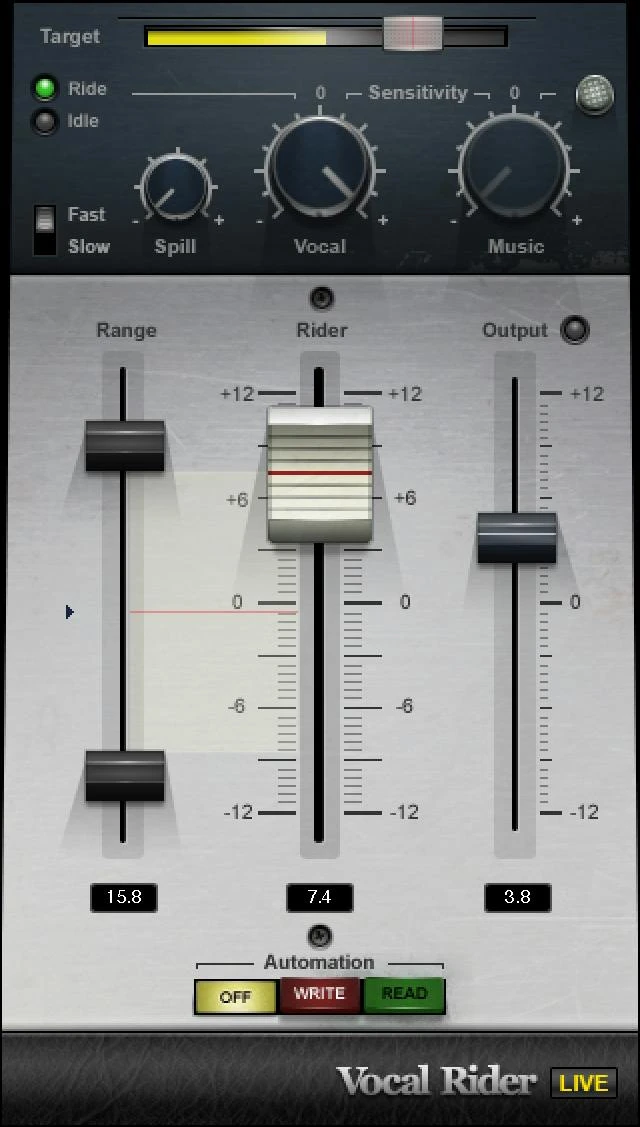
The Live components add a Spill control for stage-noise detection. Do not look for it in every studio component or assume that it is a noise-removal effect. The product image below shows the Live variant; the annotated figure earlier shows the studio controls.
Price, licensing and value
Waves listed Vocal Rider at $29.99 against a stated regular price of $199 when checked on November 17, 2026. Treat the lower figure as the checked offer, not a permanent price or a guaranteed checkout total. Use the button to see the current purchase options.
For perpetual licenses, Waves includes one year of its Update Plan. The owned product remains yours after coverage expires; future updates and plan benefits are a separate consideration. If you already subscribe to Waves Creative Access, check your included products before buying another license.
At the checked price, our buying question would be how often you face a long vocal pass that needs many modest movements. If that happens weekly, saving part of that repetitive work can justify a specialist tool. If you finish one short vocal a month, learning manual automation may be the better next step.
We would skip it for now if the main problem is bad pitch, a noisy room, harsh tone or an unfinished recording. Those are different jobs. Our harsh-vocal guide and vocal plugin buying guide can help identify the missing part of your chain.
Level riding and pitch correction
Vocal Rider changes level, not pitch. Its automation Off mode still allows internal riding; use bypass to compare the full effect and Read to follow a recorded pass.
No. Vocal Rider works on level. For pitch correction, see our AutoTune versus Melodyne comparison.
Conclusion
Vocal Rider earns its place when it replaces a repetitive first automation pass with a shorter set of edits. Trial the sidechain and writing workflow in your own DAW before buying. If the fader fights the performance or requires constant repair, keep the manual ride.
Sources and editorial basis
Documented features and routing were checked against the Vocal Rider user guide, Waves' automation and sidechain guide, Waves' vocal-riding explanation, supported hosts and the Update Plan terms. Price checked on the Waves product listing on November 17, 2026. Interface images are supplied by Waves; exercises and buying judgments are SoundShaper's suggested workflow.


