
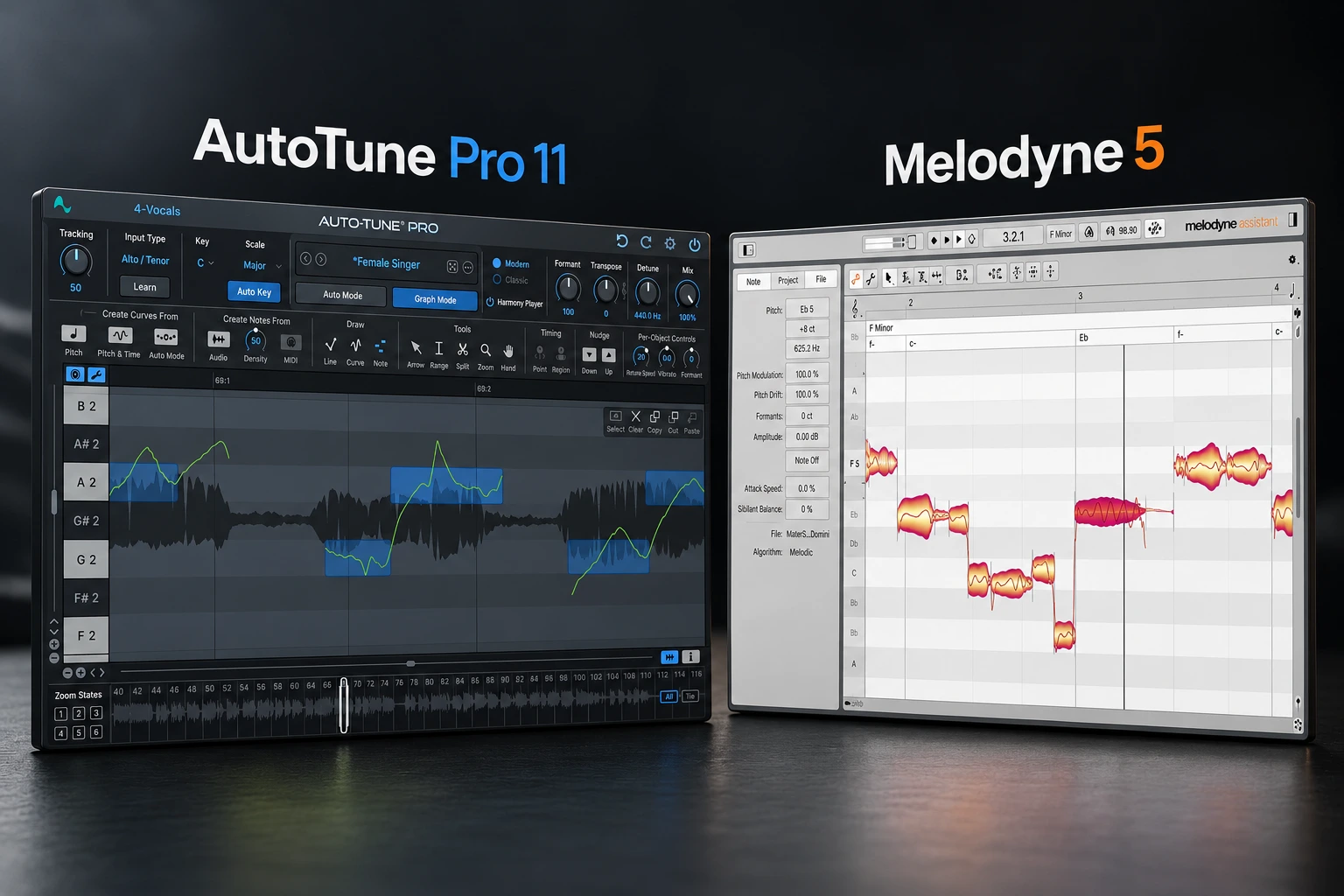

Pitch correction can mean two different jobs: shaping the vocal while it is being performed, or repairing individual notes after the recording is finished. AutoTune is our starting choice for the first workflow, especially when the tuning effect is part of the sound. Melodyne makes more sense when you want to inspect a recorded performance and edit notes in detail afterwards. Both tools overlap, so the better choice depends more on how you work than on which brand is “better.”
There is an important overlap: AutoTune Pro 11 also offers manual editing in Graph Mode, and Melodyne has macros that can correct groups of notes. The decision is about your preferred workflow and the tools in the edition you buy.
Our starting advice is simple: identify whether you need to hear tuning during the performance, repair a few notes afterwards, or do both. Then choose the smallest toolset that solves that job.
AutoTune vs Melodyne: the quick answer
| Your main goal | Our starting choice | What to check |
|---|---|---|
| Hear tuning while singing | An appropriate AutoTune edition | Latency in your complete recording setup |
| Create an obvious tuned rap or pop effect | AutoTune’s automatic workflow | Key, scale, retune behavior and the chosen edition |
| Fix a few notes after recording | Melodyne essential or your existing editor | Whether basic pitch and timing edits are enough |
| Edit pitch drift, vibrato and phrasing in detail | Trial Melodyne assistant alongside Pro 11 Graph Mode | The controls and editing process you prefer |
| Edit notes inside a piano or guitar chord | Melodyne editor or studio | DNA support; it is not included in essential or assistant |
| Stay within a small budget | Use your existing tuner or pitch editor first | What your DAW, bundles or previous purchases already include |
For the hands-on comparison, we focus on AutoTune Pro 11 and Melodyne 5 assistant, while explaining where the simpler AutoTune edition and Melodyne essential may be enough. A basic automatic tuner and a flagship editing suite are different purchases.
First, untangle the current product names
As of 18 October 2026, Antares offers a streamlined product called AutoTune, AutoTune Advanced for advanced automatic tuning, and AutoTune Pro 11 with Graph Mode for manual work. The product previously marketed as AutoTune 2026 was renamed AutoTune on 24 September 2026.
Melodyne 5 comes in essential, assistant, editor and studio. Moving up changes the available tools and workflows. It does not mean you need the largest edition for one lead vocal.
SoundShaper opinion: shop by the feature you need. The words “Advanced,” “Pro” and “studio” are not reliable shortcuts for deciding which product suits your session.
When AutoTune makes more sense
You want tuning to be part of the performance
Automatic tuning can let a singer hear the corrected vocal while recording. That is particularly relevant when the transitions between notes are part of the sound you are trying to create.
For a melodic rap hook, we would begin with the correct key and scale, then adjust how quickly the pitch moves toward the target. Faster correction can make the effect more obvious; slower or more permissive settings may preserve more movement.
Do not assume a preset knows the melody. A song can contain notes outside the selected scale. If a phrase keeps moving to an unwanted note, review the target notes before increasing the correction.
You want both automatic and manual options
AutoTune Pro 11 includes Graph Mode, where you can edit recorded notes and tune their behavior individually. It also offers ARA2 integration in specified compatible hosts, reducing the need to track audio into Graph Mode manually.
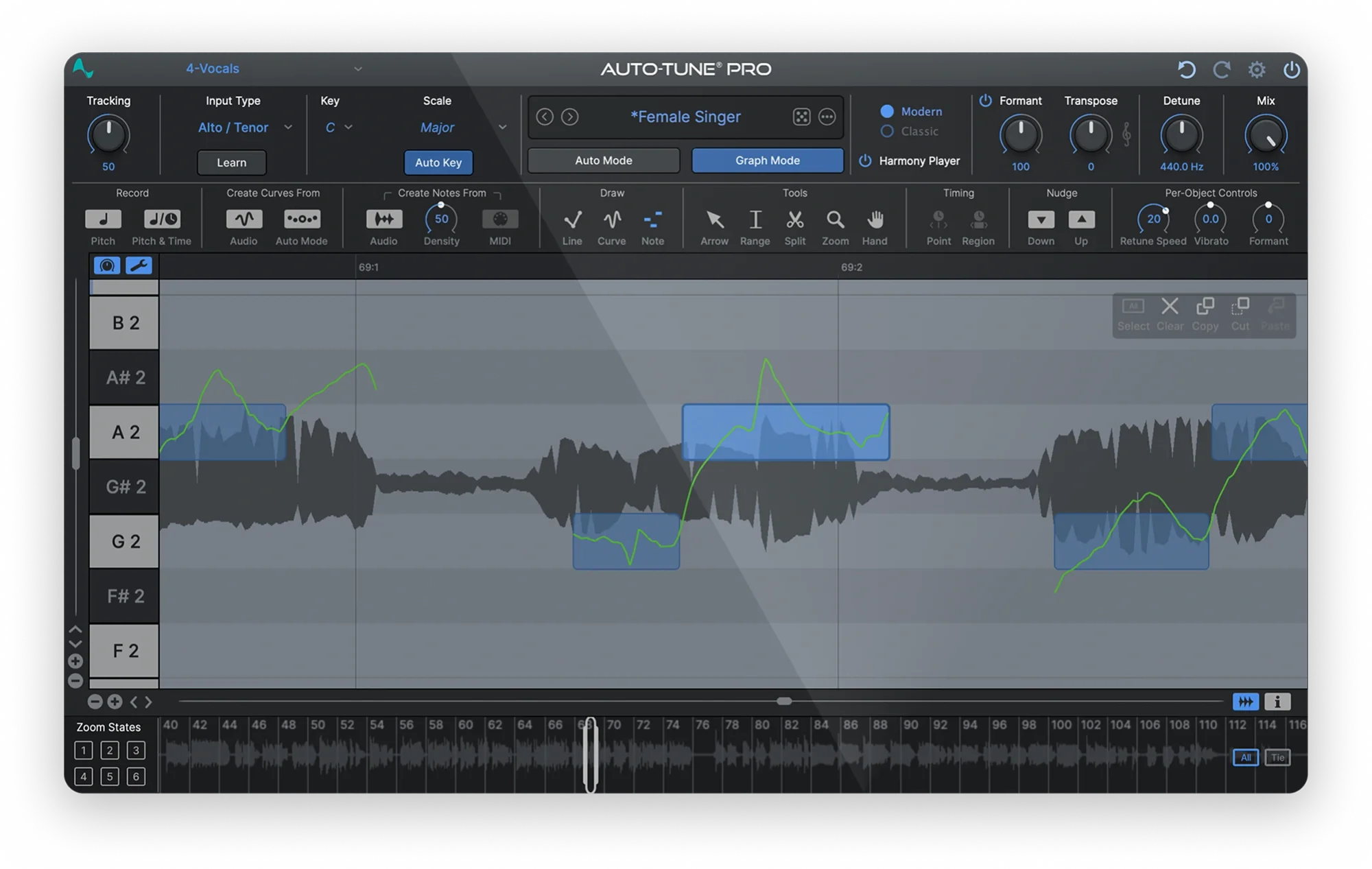
This matters if you like the automatic sound but want to intervene on a few difficult phrases. We would trial that route before buying a second editor just because you assume AutoTune cannot make detailed corrections.
Choose AutoTune first if: hearing the tuned sound during writing or recording is central to your music.
Do not pay for Pro 11 just for the name: compare the streamlined and Advanced editions if automatic tuning is all you need. Check the current feature matrix for the exact controls you want.
When Melodyne makes more sense
Melodyne displays detected notes as editable objects. The workflow invites you to inspect a recorded phrase and decide what to change, rather than only set a general correction behavior.
For a singer-songwriter recording, our starting point would be to leave most of the performance alone. Move the few notes that distract from the song, then check the entrances, sustained portions and endings separately.

Melodyne assistant provides detailed controls for pitch, timing, vibrato, formants and other aspects of a monophonic performance. Essential offers a smaller set of basic pitch and timing edits, which may be enough if your corrections are occasional.
Melodyne also has correction macros. You can work on a selection of notes together instead of moving every note individually. We would still listen through the edited phrase afterwards.
Choose Melodyne first if: most of your tuning happens after recording and you enjoy making decisions directly on the detected notes.
Keep your budget if: an editor you already own makes the required changes comfortably. Another interface only helps when it removes an actual obstacle.
Natural vocals: neither plugin guarantees the result
AutoTune can make subtle corrections, and Melodyne can create obvious effects. Calling one “robotic” and the other “natural” is too simple.
For a natural result, listen for what matters musically. A slow slide into a note may be intentional. Vibrato may belong to the performance. A sustained note that drifts away from the harmony may need attention even if its opening is correct.
Melodyne separates pitch modulation and drift into different editing concepts in its larger toolsets. Reducing both completely can flatten the movement that makes a vocal convincing. That is a reason to edit selectively, rather than aim for perfectly straight lines.
SoundShaper opinion: we would choose a tool by how easily it lets us preserve the parts we like. A clean display is not the goal; a convincing phrase in the song is.
Which one would we choose for your music?
Trap, melodic rap and heavily tuned pop
We would start with AutoTune when the correction itself is part of the identity of the vocal. Record a clean source while monitoring the effect where your routing allows it, so you retain the option to revise the tuning.
If automatic correction repeatedly chooses an unwanted destination, edit the troublesome phrase or revisit the performance. Applying more of the same correction may make the problem more obvious.
Acoustic, singer-songwriter and exposed lead vocals
We would start by trying Melodyne’s editing workflow for a small number of deliberate corrections. Pro 11’s Graph Mode is also worth including if you already own it or prefer its controls.
Do not correct every visible deviation. Compare with the accompaniment and keep the original nearby. Some movement that looks untidy can sound right.
Electronic vocal chops and creative production
Decide whether the task is a live tuning effect, a change to a recorded melody, or simply sample transposition. A vocal chop that only needs a pitch shift may not require either purchase.
For the surrounding processing, see our vocal plugin guide. Pitch correction is one part of the chain, not a replacement for tone, dynamics and effects decisions.
Do you need both AutoTune and Melodyne?
Sometimes. One approach is to repair a few difficult notes with an editor, then use automatic tuning for the desired effect. That is a workflow to test, not a requirement for professional vocals.
Start with one tool and finish a song. Add a second only when you can name what the first leaves unresolved. Pro 11 already covers automatic and manual correction, while Melodyne may already handle all the post-recording edits you need.
When testing a two-stage chain, bypass each stage separately. If both are strongly moving the same notes, simplify the settings and check whether the extra processing is helping.
Which Melodyne edition should you buy for vocals?
• Essential: begin here if basic pitch, timing and duration changes solve your problem. Check whether a previous purchase already supplied a licence.
• Assistant: our first edition to trial for detailed work on a single lead vocal. It provides the full note-editing toolkit for monophonic material.
• Editor: consider it when you also need DNA editing of individual notes within polyphonic instrument recordings.
• Studio: consider it when its multitrack workflow is useful to your editing sessions.
Essential and assistant do not provide DNA note editing inside chords. Also, polyphonic instrument editing is not a promise that a mixed song can be separated into clean singers and instruments.
Some bundles include Melodyne essential. Confirm the edition and licence in your account before purchasing again. A separate retailer checkout gift can also change, so read the terms attached to the actual offer.
Price and licence: compare the same kind of purchase
Antares offers perpetual licences and subscription access. Compare the edition, billing interval and ongoing cost, rather than comparing a single monthly payment with the full price of Melodyne.
On 18 October 2026, Plugin Boutique displayed €246.93 for the full Melodyne 5 assistant licence. That is a regional storefront snapshot, not a guaranteed sale price. Currency, tax and offers can change the checkout total.
Existing Melodyne owners should compare the eligible upgrade route with the full licence. For AutoTune, check the current purchase page and any account-specific loyalty offer. We have not verified a fixed promotional deadline for either product.
Our budget advice: buy for a repeated job. If you only correct a few notes each month, use your existing pitch editor or an included Melodyne essential licence first.
FL Studio, ARA and recording latency
For AutoTune in FL Studio, follow our pitch-correction setup guide. Antares currently lists FL Studio support, including VST3 on Windows and macOS.
ARA integration is separate from basic plugin compatibility. Antares lists specific hosts for Pro 11’s ARA2 workflow. Celemony also documents host-specific ARA support. A tutorial that loads a whole region instantly in another DAW may not match your setup.
Without the relevant ARA integration, Melodyne’s plugin workflow can involve transferring the audio passage into the editor before editing. Test the actual capture, playback and export process in your DAW before purchasing.
For recording, the total delay also depends on your audio interface, driver, buffer and other plugins. Do not interpret a plugin’s low-latency claim as the round-trip delay of your complete system. See our FL Studio latency guide for that setup.
Antares’ current Pro 11 page lists macOS 14 or later and Windows 10/11; it highlights the 11.6 update. Celemony lists Melodyne 5 in VST3, AU, AAX and standalone formats, with Apple Silicon native support from version 5.2. Check the current requirements of both the plugin and your DAW.
A useful trial test before buying
1. Choose one representative vocal. Include a long note, a slide, a fast phrase and a note that genuinely distracts from the harmony.
2. Set a musical goal. Decide whether you want a clear tuning effect or a correction that draws little attention.
3. Try AutoTune’s automatic workflow. Verify the key and scale, then adjust the correction while listening to the whole phrase.
4. Try the same passage in Melodyne. Change only what you hear as a problem. If available, compare Pro 11 Graph Mode as well.
5. Check the edition you plan to buy. Melodyne’s 30-day trial covers studio functionality and allows comparison with smaller editions. Do not assume every trial feature belongs to essential.
6. Save, reopen and export. Confirm that the workflow behaves properly in a real project before committing.
Our free pitch-correction guide is a useful starting point if your current budget does not justify either purchase.
SoundShaper opinion
We would start with AutoTune for a performance built around automatic tuning, and with Melodyne for deliberate editing after recording. If you need manual tuning and already have Pro 11, learn Graph Mode before assuming you need another product.
For Melodyne buyers focused on one vocal line, we would trial assistant before paying for editor or studio. If essential already performs the few changes you need, keep using it.
These are workflow recommendations based on official product documentation. We have not performed a controlled listening, latency or CPU comparison, so we are not claiming that one engine always sounds better.
Frequently asked questions
Is Melodyne better than AutoTune for natural vocals?
Melodyne is worth trying if you prefer selecting and editing individual notes. AutoTune can also make subtle corrections, and Pro 11 provides Graph Mode. The recording and the edits matter more than a blanket brand ranking.
Can AutoTune edit notes manually?
AutoTune Pro 11 can, through Graph Mode. Do not assume every product carrying the AutoTune name includes that workflow.
Can Melodyne create a hard-tuned effect?
It can produce deliberately flattened pitch movement, but we would start with AutoTune for a workflow built around hearing automatic correction during performance.
Is Melodyne essential enough for vocals?
It can be enough for basic pitch and timing corrections. Assistant adds more detailed control when you need to work on aspects such as vibrato, drift and formants.
Conclusion
Choose the workflow before the brand. AutoTune is our starting point for automatic tuning as part of the performance. Melodyne is our starting point for inspecting and reshaping recorded notes. Test the overlap, use licences you already own, and buy a second tool only for a clear role.
Some links in this article are affiliate links. If you buy through them, SoundShaper may earn a commission at no extra cost to you.
Sources and editorial basis
Product information checked on 18 October 2026 against the AutoTune edition comparison, Pro 11 features, current AutoTune naming, Melodyne editions, Melodyne compatibility, pitch modulation and drift documentation, audio transfer documentation and the linked Plugin Boutique listing. Recommendations and trial exercises are SoundShaper’s editorial judgment.
![[background image] image of recording equipment (for a musician & band)](https://cdn.prod.website-files.com/68efa70811edd8e5af30a90d/6ad5421eaf14ef1dbac4dfa8_TAIP%20Review.webp)
![[background image] image of recording equipment (for a musician & band)](https://cdn.prod.website-files.com/68efa70811edd8e5af30a90d/6ad5413cb1504db30162273f_Phoscyon%202%20Review.webp)
![[background image] image of recording equipment (for a musician & band)](https://cdn.prod.website-files.com/68efa70811edd8e5af30a90d/6ad5403dd747f3fbbe4286ab_Chordjam%20Review.png)