
Producers need autotune plugins for vocal pitch correction in 2025. This article lists options that cost nothing and receive updates this year. We test each plugin for tracking with monitoring and for mixdown. We measure tuning accuracy, latency behavior, and control over key, scale, and MIDI. Setup notes give step by step settings in the DAW. After reading this article, you will know exactly which free autotune plugin fits your needs and exactly how to use it.
Latency is the delay between a singer’s input and what comes back in the headphones. Two things create it: your system buffer and the tuner’s analysis window (look-ahead). Pitch-correction needs a brief slice of audio to identify the fundamental; a larger window gives steadier, more accurate detection, but it adds delay. This is why pushing a plugin’s retune speed makes notes snap faster yet doesn’t remove the underlying latency—the algorithm still needs time to decide where the note should go. For tracking, aim for a round-trip latency under roughly 10–12 ms (e.g., a 64–128 sample buffer at 44.1/48 kHz, minimal look-ahead, no linear-phase processors before the tuner). For mixing, allow the plugin more look-ahead; the correction will sound cleaner and less “twitchy,” and latency no longer matters because you’re not monitoring through it.
Formants are the resonant parts of the voice that tell the ear “this is a human, not a pitch-shifted toy.” When you correct aggressively, the vowel shape can rise with the pitch, causing the “chipmunk” artefact. A plugin with formant control preserves the original vowel resonances while you move the pitch, so you can use stronger correction without changing the apparent vocal size.
Key/scale and MIDI guidance decide where the tuner is allowed to land. Locking the true key/scale immediately reduces false hits; disabling out-of-scale notes tightens it further. For melodic hooks or talk-sing parts, a MIDI-driven mode lets you feed an exact target melody, which is often cleaner than asking the algorithm to guess during runs and slides.
Stability and UI speed matter because pitch-correction sits on almost every vocal. The best free tools load quickly, keep settings obvious (key, scale, speed, amount, formant), report latency correctly to the host, and behave predictably on long sessions. If a plugin feels erratic on sibilants or sustains, it will cost you takes and time—choose the one that stays out of the way.
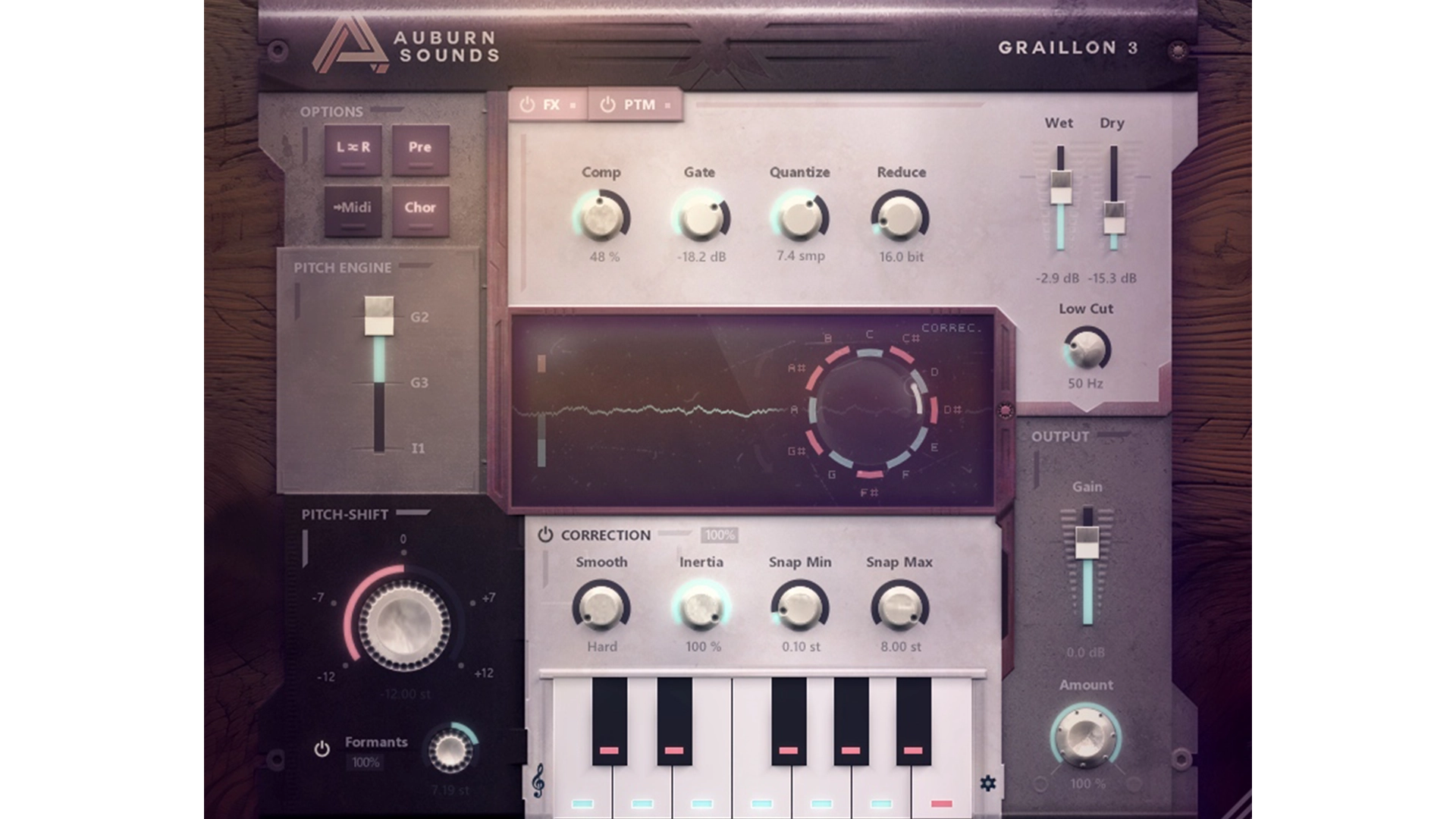
Graillon 3 Free is a real-time autotune plugin from Auburn Sounds with scale lock, correction depth and speed controls, formant preservation, and three selectable pitch engines (G2, G3, I1). It also ships with a compact vocal toolset, compressor, gate, chorus, preamp, and bitcrusher, so you can stabilize level and tone before or after tuning inside one window. The v3 series adds formant shifting, “Snap Min/Snap Max” for vibrato tolerance and jump range, an Inertia control to keep chosen notes stable, and improvements to internal latency compensation.
Download Graillon 3 Free Edition
Auburn Sounds is an independent developer based in Grenoble. Auburn Sounds has also released other plugins like Panagement, Couture, Renegate, Lens, Inner Pitch, and Selene, plus earlier tools GFM Koch, GFM Psypan, and GFM Distort.
Graillon’s design starts with a choice of three pitch engines. G2 maintains the earlier Graillon behaviour for sources that already tracked well in version 2. G3 improves detection on higher notes and reduces correction slips across a wider range. I1 routes tuning through the Inner Pitch shifter, which yields a more natural shift on complex or bass-heavy material; it suits mix work where a slower engine is acceptable. Picking the engine per vocal limits detector errors before any stylistic settings come into play.
Control over artefacts sits in a small group of parameters that shape both feel and audibility. Smooth sets the transition speed between notes, Inertia keeps the voice from jumping off target during slides, Snap Min allows a defined amount of vibrato to pass without being flattened, and Snap Max caps how far the algorithm can leap, preventing octave mistakes. Used in sequence, these controls let you set hard snapping for hooks or restrained movement for leads without rewriting the line.
Formant handling is built in rather than bolted on. Enabling Formant preserves the vowel resonances when correction depth increases; Formant Amount adjusts how strongly that preservation is applied; Formant Shift corrects perceived size when register changes alter tone. The net effect is consistent timbre even when notes are pulled into place.
Graillon also includes a compact vocal toolset so the tuner receives a stable signal. A compressor and gate prepare level and noise floor, chorus and preamp assist with placement during rough balances, and the bitcrusher in the Free Edition adds texture without leaving the plugin. This keeps the workflow contained: set the engine, dial the artefact controls, maintain formants, and finish the pass with basic conditioning inside one window.
We use Graillon Free for most lead and hook tuning. Our default is G3 with low Smooth, modest Inertia, Snap Min set to protect vibrato, and Formant at a low amount. We avoid I1 for live cue mixes due to speed, and switch to MIDI-guided correction elsewhere when a line needs strict, note-for-note control.
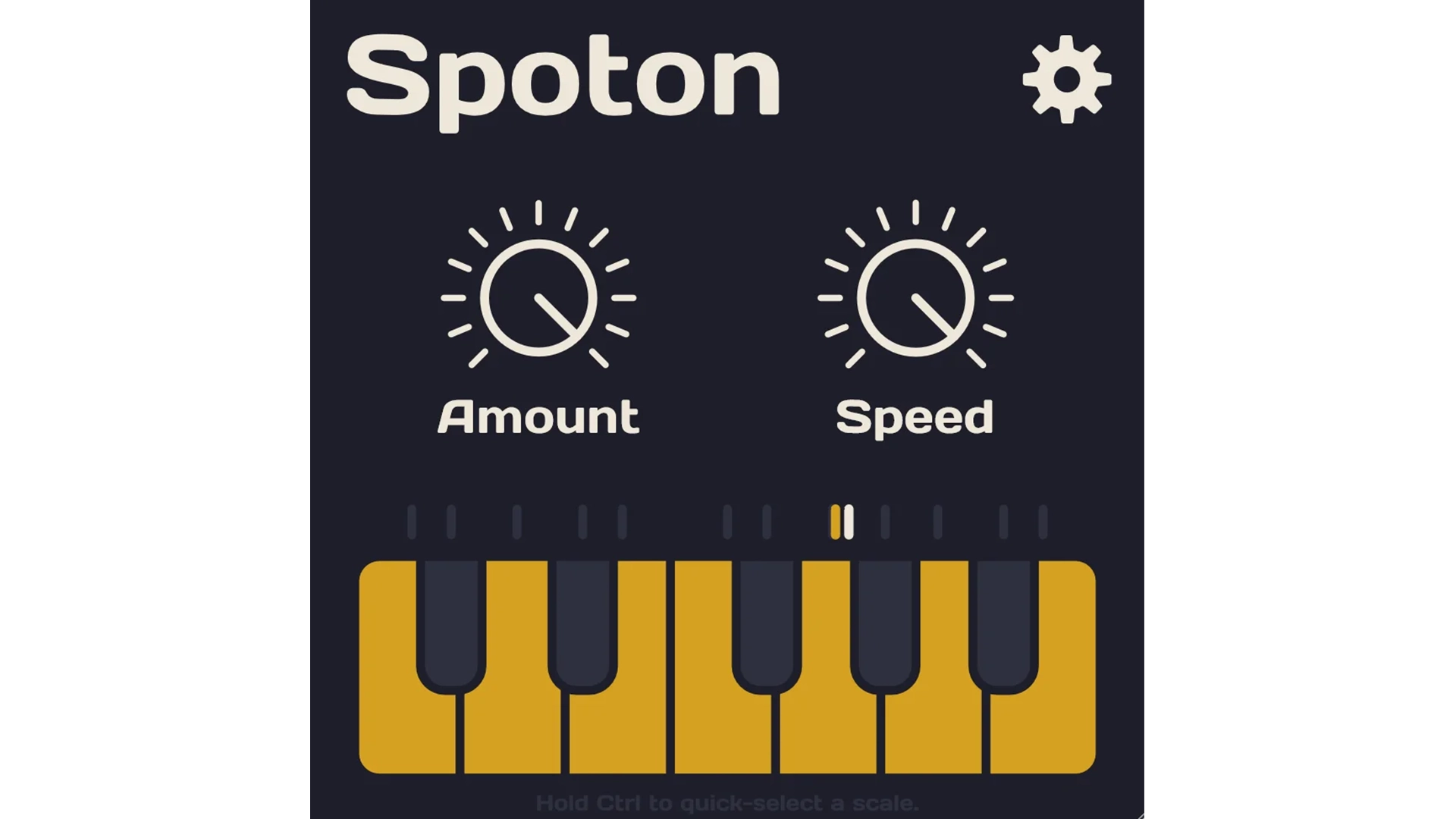
Spoton is an automatic vocal tuning plugin that focuses on fast setup and low-latency correction. The interface centers on two controls for correction depth and speed, plus a keyboard for setting the scale. Individual target notes can be enabled, disabled, or automated, so the tuner only lands on notes that belong in the line you’re correcting. That keeps the workflow direct during tracking and quick when you need to lock a hook without rewriting the melody.
Download Spoton
Sixth Sample is an audio-software developer that publishes compact, task-focused plugins and keeps the control set lean to speed up workflow. The company’s catalog includes Cramit, a free multiband compressor with a built-in distortion stage, and Deelay, a free, collaboration-built delay with diffusion, modulation and other sound-design features developed together with Integraudio. Spoton extends that line into pitch-correction.
The design removes friction in three places. First, scale selection sits at the bottom of the window, so you lock the song’s key in seconds and avoid false targets. Second, the “Amount” and “Speed” controls map directly to how much the pitch moves and how quickly it gets there, which makes it easy to move between a tight, effect-forward sound and a more relaxed correction style without hunting through submenus. Third, per-note targeting lets you exclude passing tones that keep getting misread, or include only the two or three anchor notes that define a hook. Combined with the plugin’s low-latency behavior, this keeps monitoring responsive for the singer while maintaining stable correction during takes.
We use Spoton when the priority is speed and a reliable cue mix. It goes first on scratch leads and toplines because setup takes seconds: set the key, set Amount and Speed, disable any stray notes, and record. For dense arrangements or long melismas we still move to a tool with formant control or MIDI-guided tuning, but for day-to-day sessions where a clean guide and tight hooks are the goal, Spoton earns its place.

Vox Tune Auto Pitch is a Free Auto Tune Plugin for real-time vocal pitch correction. You set the song’s key and scale, adjust a single Smooth control to govern how quickly notes settle, and use the on-screen keyboard to include or exclude specific targets so the tuner only lands where it should. The download is available for 64-bit Windows and macOS in VST3 and AU, and the developer recommends a clean, monophonic vocal for best results.
Download Vox Tune Auto Pitch
Vox Samples positions itself around fast, accessible tools for vocal work and basic mixing. Alongside this Free Auto Tune Plugin, the catalog includes Drift Pitch, a free vibrato effect, and Mud Cleaner Boom Reducer, a utility aimed at controlling low-end build-up. The brand’s product pages and announcements emphasize simple setup and short paths from install to usable results.
What makes Vox Tune effective is the narrow focus. Locking the correct key and scale reduces false targets from the start; trimming the allowed notes on the keyboard tightens it further when a line contains passing tones or talk-sing phrasing. The Smooth control then sets the transition behavior faster for firm, effect-forward hooks, slower for restrained cleanup during mixdown. That combination keeps setup quick during tracking and limits artefacts when you ease settings for sustained phrases. Independent roundups echo this use case: rapid correction for guides and hooks rather than deep, note-by-note editing.
We use Vox Tune when speed is the priority and the session needs a tuned cue within minutes. It is our pick for hooks, doubles, and scratch leads where direct key/scale locking and per-note targeting solve most problems. If a part requires formant shaping or strict MIDI-guided lines, we switch to a tool designed for that level of control; for day-to-day “get it in tune now,” this Free Auto Tune Plugin earns a place in the chain.
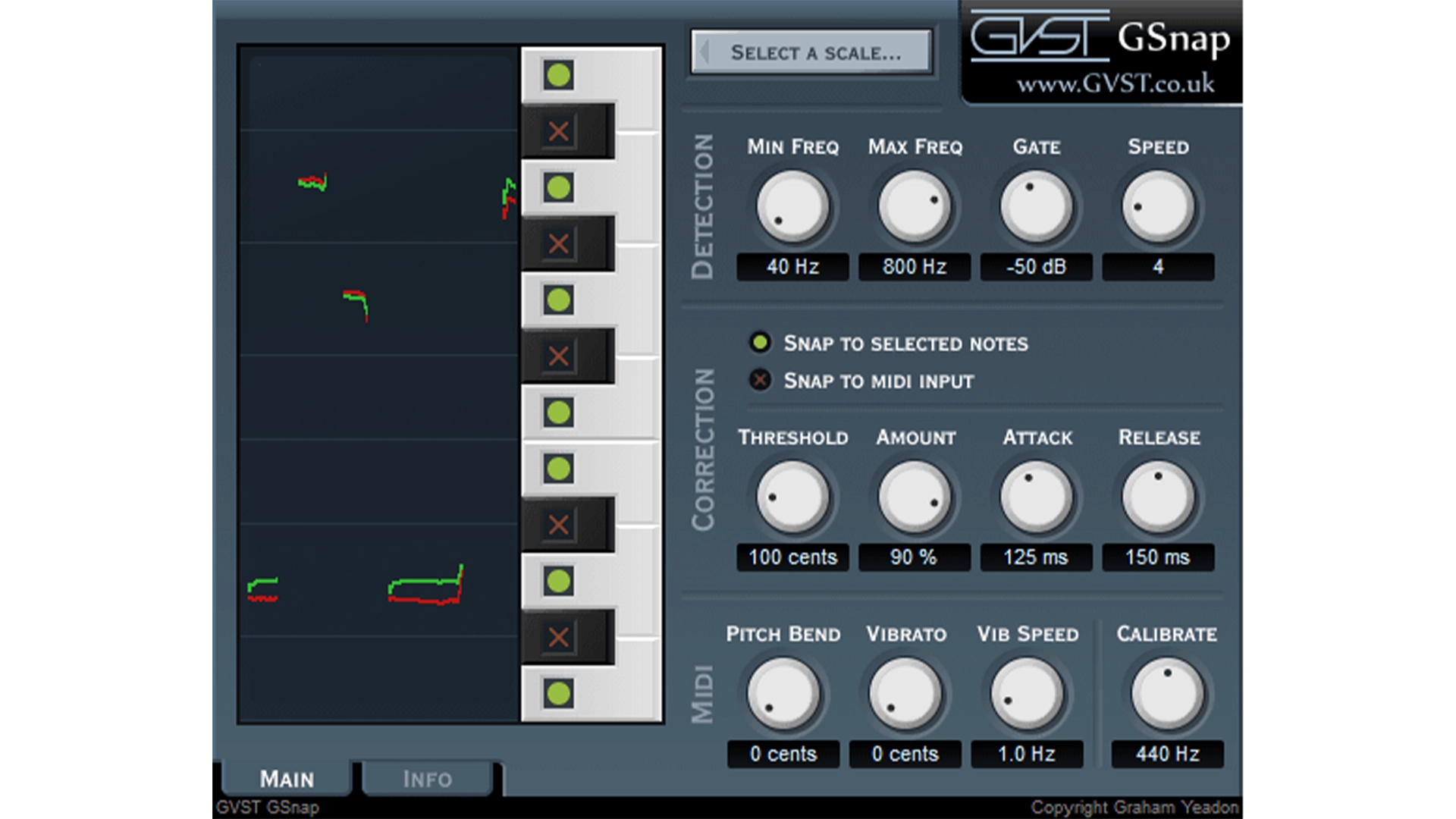
GSnap is a Free Auto Tune Plugin for VST hosts. It corrects monophonic vocals in real time and can run in two modes: a fixed-scale mode that snaps to selected notes, and a MIDI-driven mode that follows notes you play from a keyboard or sequence. The interface groups controls for detection (Min/Max Freq, Gate, Speed) and correction (Threshold, Amount, Attack/Release), with a live display that shows detected vs. corrected pitch, so you can see what the tuner is doing while you listen.
Download GVST
GVST is the project of developer Graham Yeadon, who maintains a collection of free effects and instruments built to be simple and efficient for everyday use. The site has long provided GSnap alongside utilities like GGate, GTune, and others in a consistent, lightweight toolkit for producers.
GSnap’s fixed mode lets you define the target notes directly on the on-screen keyboard. The Threshold control then sets how wide each snap zone is, so you can cover a full diatonic scale or narrow correction to two or three hook notes. If a performance needs strict guidance, switch to MIDI mode and “play” the melody; GSnap snaps the vocal to the nearest depressed MIDI note, which is useful for talk-sing lines and fast runs that confuse auto-mode. The Speed parameter trades detection speed for confidence, while Gate prevents background noise from triggering the detector. There is also Calibrate for alternate tunings (e.g., A=435–442). For the effect sound, a forced key with fast Attack produces the stepped, robotic tuning; for cleaner correction, widen Threshold sparingly and lengthen Attack/Release. Note that the manual flags some UI differences on Mac/Linux ports (the “Select Scale” shortcut may be unavailable), but the core keyboard selection still covers scale setup.
We reach for GSnap when a session needs a Free Auto Tune Plugin with MIDI-guided tuning and a clear visual of what the detector is doing. Our setup is: place GSnap early in the chain, route a MIDI track with the target notes, push Threshold high in MIDI mode to force strict targets, then back off Amount and lengthen Attack/Release for leads that should keep some movement. Keep other effects after GSnap so detection stays clean, as GVST and roundups recommend. On dense, highly expressive vocals we move to a tool with formant controls, but for MIDI-locked hooks and quick pitch fixes, GSnap remains a solid free option.

KeroVee is a Free Auto Tune Plugin for Windows VST hosts that corrects monophonic vocals in real time. It was designed explicitly for the “autotune effect,” with a scale-based mode for snapping to allowed notes and a MIDI mode that follows notes from a keyboard or sequence. Later updates added a pitch graph, a Chord mode for multiple allowable targets, master tuning (A=430–450 Hz), and separate mixing of the original signal, the tuned output, and a one-octave “subtone.” The engine can also blend two transposed/formant-tweaked correction paths with the dry signal.
Download KeroVee
g200kg (“Music & Software”) is an developer with a long-running catalog of freeware tools and instruments, including the RoVee voice-changer (a cut-down variant of KeroVee), the Kamioooka modular synth, and utility apps like SkinMan and VSTGUI helpers. The site maintains download pages and version history for these releases.
KeroVee’s workflow is direct. In scale mode, you set the permitted notes on the keyboard and adjust speed/amount to govern how tightly the voice is pulled. For strict lines, MIDI mode lets you “play” the melody; KeroVee snaps to the nearest depressed MIDI note, which is effective for talk-sing phrases and fast runs that confuse auto-mode. Chord mode widens targeting when a phrase needs more than one allowable note at a time, while master tuning and calibration cover sessions that don’t sit at A=440. If you want the stepped, robotic character, force a tight scale with fast attack; if you need subtle clean-up, ease the speed and widen thresholds so vibrato and small drifts survive. The ability to mix two transposed/formant-tweaked correction paths with the dry signal gives additional tone-shaping without leaving the plugin.
We use KeroVee when a session needs a Free Auto Tune Plugin with fast MIDI-guided tuning and tight control over target notes. It locks hooks quickly and remains useful for experimental hard-tune effects thanks to the transposed/output blending. The 32-bit Windows restriction is the trade-off; on cross-platform projects we switch to a current 64-bit tool, but on a Windows rig that can host it, KeroVee still earns its spot.

AutoTalent is a Free Auto Tune Plugin for real-time vocal pitch correction. The original algorithm, released by Tom Baran as a LADSPA plugin, snaps a monophonic signal toward allowed notes (“snap to scale”) and can also pull nearest to semitone. It includes formant correction and a formant warp control to reduce chipmunk-style artefacts, plus an LFO/vibrato section and options that let you repurpose it as a pitch-shifter or faux-doubling tool.
Download Autotalent
Oli Larkin first ported Tom Baran’s open-source tuner to VST/AU, and he’s known more broadly for a small but influential catalogue: VirtualCZ (a CZ-series synth recreation), Endless Series v3 (Shepard-tone based multi-FX), and pMix (a preset-interpolation host and plug-in chainer). Larkin also maintains iPlug2, a C++ framework used to build cross-platform audio plug-ins and Web Audio Modules, work he documents across his site and repositories.
Michael Donovan later produced the AutoTalent, based on Larkin’s code and released under GPL-2 on GitHub. Donovan’s GitHub profile also lists DComp, an Audio Unit compressor, and a JUCE-based Audealize plug-in developed with the Interactive Audio Lab—projects that show an ongoing focus on practical DSP tools for music production. Together, Larkin’s original VST/AU work and Donovan’s 64-bit port keep this Free Auto Tune Plugin usable on current hosts.
The strength of Autotalent is its direct signal path and limited scope. You define the scale (or explicitly allow notes) so the detector has a narrow target set; the algorithm then corrects pitch toward those destinations with smoothing between transitions. Formant correction preserves vowel resonance at stronger settings, and formant warp gives an extra handle when a register shift changes perceived size. The built-in LFO lets you restore controlled vibrato after heavy correction. In practice this covers two common needs for a free tuner: hard, stepped tuning for hooks via a tight scale and fast response, and restrained cleanup on leads by easing correction and transition smoothing.
We keep Autotalent in the toolbox for sessions that need a Free Auto Tune Plugin with source-available code and a minimal feature set—especially on Linux or when a lightweight macOS AU is sufficient. Our setup is simple: define the real scale, set moderate smoothing, enable formant correction, and add a touch of LFO only if the take lost vibrato during correction. For strict, note-by-note lines or broader format/host support we’ll move to a current free tuner, but as a lean, open option Autotalent still earns a place.
Free autotune plugins in 2025 cover tracking and mix work without paid licenses. Pick the tool that matches the session. Use Graillon 3 Free as the default auto-mode for most vocals. Use Spoton for low-latency tracking and simple setup. Use GSnap when a line needs MIDI-guided tuning. Use Vox Tune Auto Pitch when key/scale locking with per-note targeting is enough. Use KeroVee on Windows 32-bit rigs or for hard-tune experiments. Use Autotalent when an open-source build or lightweight AU is required.
Keep the workflow simple. Set the real key and scale, disable out-of-scale notes, and place the tuner early in the chain. For tracking, run a small buffer; for mixdown, allow more look-ahead to reduce artefacts. Use formant controls where available to keep vowels stable. If the part needs strict notes, drive the tuner with MIDI.
If you need a starting point: Graillon 3 Free for general use, Spoton for cue mixes, GSnap for MIDI lines. This map gets you to a Free Auto Tune Plugin that fits the task, and it gives clear steps to use it well.

![[team] image of team member (for a mobile gaming)](https://cdn.prod.website-files.com/68efa70811edd8e5af30a90d/690abaa8987a07a672c4cd2c_channels4_profile.jpg)
![[background image] image of recording equipment (for a musician & band)](https://cdn.prod.website-files.com/68efa70811edd8e5af30a90d/6aa35b3b03d3771388765f76_Main%20Image.png)
![[background image] image of recording equipment (for a musician & band)](https://cdn.prod.website-files.com/68efa70811edd8e5af30a90d/6aa35785b8608362620d46e3_Main%20Image.png)
![[background image] image of recording equipment (for a musician & band)](https://cdn.prod.website-files.com/68efa70811edd8e5af30a90d/6aa351f638777f809800a4ff_Main%20Image.png)