
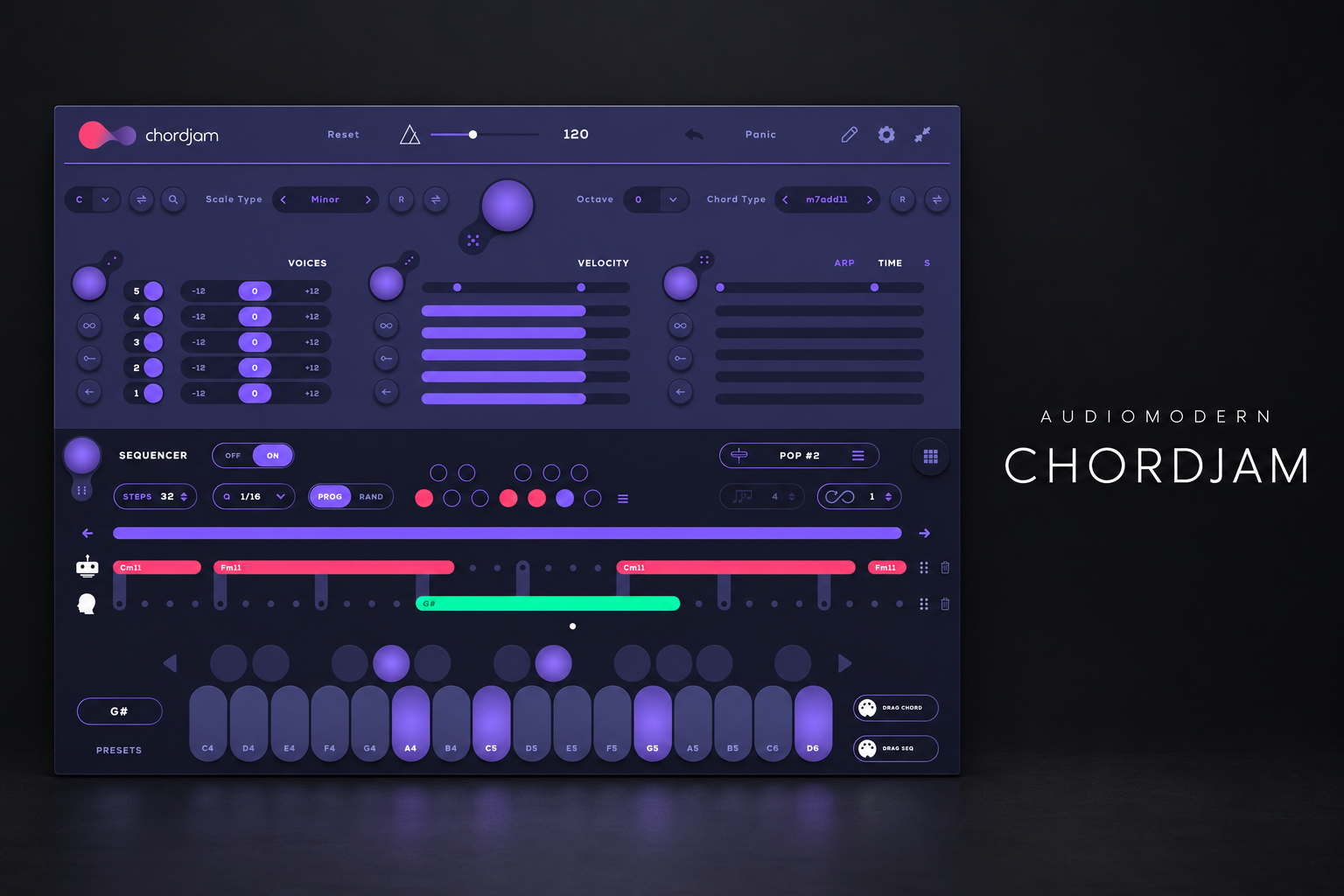

Audiomodern Chordjam is worth considering if you want to explore chord voicings and progression ideas without drawing every note first. Its main appeal is guided variation: you set a musical direction, try different performances and keep the MIDI that gives you a useful starting point.
That can help a producer who has a beat and a sound but keeps getting stuck on the harmony. If you already write the chords you want quickly, it needs to offer more than another way to browse possibilities.
This review explains the workflow, the FL Studio routing and how we would evaluate a purchase. Our assessment is based on Audiomodern's documentation, rather than a hands-on test.
What is Chordjam?
Chordjam is a MIDI chord and progression tool. It provides scale and chord choices, voicing controls, a sequencer and adjustable variation in timing and velocity. You can drag individual chords or patterns as MIDI into your project.
Its role is to generate and shape musical instructions. Route those instructions to the synth, piano or sampler you want to hear. If that distinction is new, our MIDI vs audio guide explains why changing the receiving instrument changes the sound without changing the notes.
The useful question is whether this way of working leads you towards a part you want to finish. More possible chords do not automatically make a better song. A memorable progression often needs a clear rhythm, a good register and enough space for the lead.
Who should try it?
| Your workflow | Potential value | What to check |
|---|---|---|
| You start with drums | Explore harmony around an existing groove. | Can you choose a direction without losing momentum? |
| You play simple chords | Compare alternative voicings and performances. | Do the changes serve your melody? |
| You write ambient music | Explore evolving harmonic patterns. | Does the movement still have a musical destination? |
| You need an exact progression | Use the controls to build and refine a specific idea. | Would drawing or playing it be faster? |
| You have a tight budget | Try the demo against your existing piano-roll workflow. | Does it solve a recurring problem? |
Guided randomization works best with limits
Start with a key, a simple sound and a short section. Then decide which part of the idea you want to vary: the chord shape, how its notes are spaced, or the way they are played.
The manual describes separate Voices, Velocity and Time sections. You can set variation ranges and lock sections against randomization. Infinity controls can introduce repeated variation.
Our advice is to keep the harmony steady while evaluating performance changes. Small timing differences might make an electric-piano part feel less rigid. Large differences might turn the same chord into a noticeably staggered gesture. Neither is automatically better; compare them against the beat.
Likewise, velocity changes only help if the receiving instrument responds in a useful way. Try a sound you know well, so you can hear whether the generated performance is expressive or simply inconsistent.
Once a phrase works, save it before exploring further. An appealing variation is easier to judge when you can return to the previous version.
A four-bar workflow you can actually finish
Here is the exercise we would use during the trial. The goal is one complete musical sketch, rather than an afternoon of unrelated progressions.
1. Choose a familiar instrument. Use a plain piano, electric piano or restrained synth patch.
2. Set the musical direction. Choose a key and chord character that fit the mood you want.
3. Build a short progression. Leave room for the drums and a possible melody.
4. Change one aspect. Compare voicing first, then timing or velocity, keeping earlier choices available.
5. Export a useful version. Drag the MIDI into the receiving instrument's piano roll.
6. Edit it yourself. Adjust the register, note lengths and final chord to make the phrase lead somewhere.
After export, sing or play a simple melody over the loop. If every bar feels crowded, remove a note or shorten a chord before searching for a more elaborate progression.
For R&B, try separating the bass line from the upper chord voices. For house, compare long chords with shorter, rhythmically placed stabs. For cinematic music, test whether a slower harmonic rhythm leaves more room for the sound to develop. These are arrangement decisions you can make with the same MIDI starting point.
How to route Chordjam in FL Studio
Audiomodern's manual gives a straightforward method: match Chordjam's MIDI output port with the receiving synth's MIDI input port. Image-Line documents these controls in the plugin Wrapper.
1. Load Chordjam in the Channel Rack.
2. Open its Wrapper settings and set the MIDI output port to an unused number, such as 2.
3. Load a compatible VST instrument on another channel.
4. Open that instrument's Wrapper settings and set its MIDI input port to the same number.
5. Trigger Chordjam and confirm that the receiving instrument plays.
Use a simple patch for the first check. If you hear nothing, confirm that the port numbers match, the receiving channel is audible and the instrument works when played directly. The matching-port method is for plugins exposing those routing controls; do not assume every native FL Studio instrument uses the same setup.
For a simpler alternative, export the MIDI and place it in the target instrument's piano roll. That also lets you edit the progression directly once the idea is worth keeping.
MIDI export is where the idea becomes yours
Export matters because it gives you a clear point to move from exploration to arrangement. Keep one version as generated, then duplicate it and make a few deliberate edits.
Check the bottom notes first. They may overlap the range of your bass part. Then inspect the top line: those notes can act like a second melody, even when you think of the part as background chords.
Listen to the join between the last and first bar. A loop can contain individually attractive chords but still restart awkwardly. Change the final chord length, leave a small gap or simplify the last voicing before generating another pattern.
Save both the Chordjam session and the exported MIDI. If you later change the sound, you can keep the musical decisions and revisit the performance separately.
What about MPE and gliding chords?
Audiomodern's version 1.5 feature description includes MPE and polyphonic portamento for gliding between chords. Treat that as a separate compatibility check during the demo.
The receiving instrument must support and be configured for the relevant MPE messages. A patch responding to ordinary notes does not prove that the expressive routing is correct. Confirm the behaviour with your exact host and instrument before making it a reason to buy.
For a first session, get ordinary chord triggering and MIDI export working. Add expressive features when you have a part that benefits from them.
Chordjam, Scaler and your piano roll
Our Riffer 4 vs Scaler 3 comparison explores related MIDI-tool buying decisions. Use it to clarify whether your main need is melodic pattern generation, help exploring harmony or a different composition workflow.
Chordjam belongs on the shortlist when you want to perform and vary chords within a constrained system. Your piano roll remains the practical option when you already know the notes and want precise edits.
Do not judge any of these tools only by how impressive a generated loop sounds through a large preset. Compare the MIDI using the same plain instrument, then put the preferred idea into your track.
Price, trial and requirements
Plugin Boutique displayed €49.40 on 18 October 2026. Check the current price for your location, since tax, currency and offers may change it.
Audiomodern offers a Windows and Mac trial. The desktop requirements listed on the product page are macOS 10.12 or higher or Windows 10 or higher, with internet needed for delivery and activation. The licence allows activation on three computers per serial code.
Desktop formats listed include VST, VST3, AU and AAX, alongside a standalone version. The iPad edition is a separate listing, so check the edition included in your purchase. Test live routing, MIDI export and project recall in your normal host during the trial.
SoundShaper opinion
We would try Chordjam if getting from a beat to a useful chord part is a regular obstacle. Its strongest case is the combination of constrained variation and editable MIDI output.
We would judge it by whether you finish a short sketch faster and still want to use the result the next day. If the tool mostly encourages more browsing, set tighter limits or return to playing and drawing a few simple chords.
Frequently asked questions
Does Chordjam replace music theory?
You still decide which chords, register and rhythm work with the song. Use the exported notes to study the differences between the versions you prefer.
Can it control my synth?
It sends MIDI to a receiving instrument. Host routing and supported plugin formats determine the setup, so test your exact combination.
Can I edit the generated chords?
You can drag chords and patterns as MIDI into your DAW, then edit the notes using its normal MIDI tools.
Conclusion
Chordjam is worth a demo for producers who want a more exploratory chord-writing workflow. Choose a clear direction, keep a useful variation and turn the exported MIDI into a finished phrase. Buy it when that process helps you write parts you want to keep.
Sources: Audiomodern product information, Chordjam basic manual, Image-Line Wrapper documentation and the Plugin Boutique listing. Details checked 18 October 2026.
![[background image] image of recording equipment (for a musician & band)](https://cdn.prod.website-files.com/68efa70811edd8e5af30a90d/6ad5421eaf14ef1dbac4dfa8_TAIP%20Review.webp)
![[background image] image of recording equipment (for a musician & band)](https://cdn.prod.website-files.com/68efa70811edd8e5af30a90d/6ad5413cb1504db30162273f_Phoscyon%202%20Review.webp)