
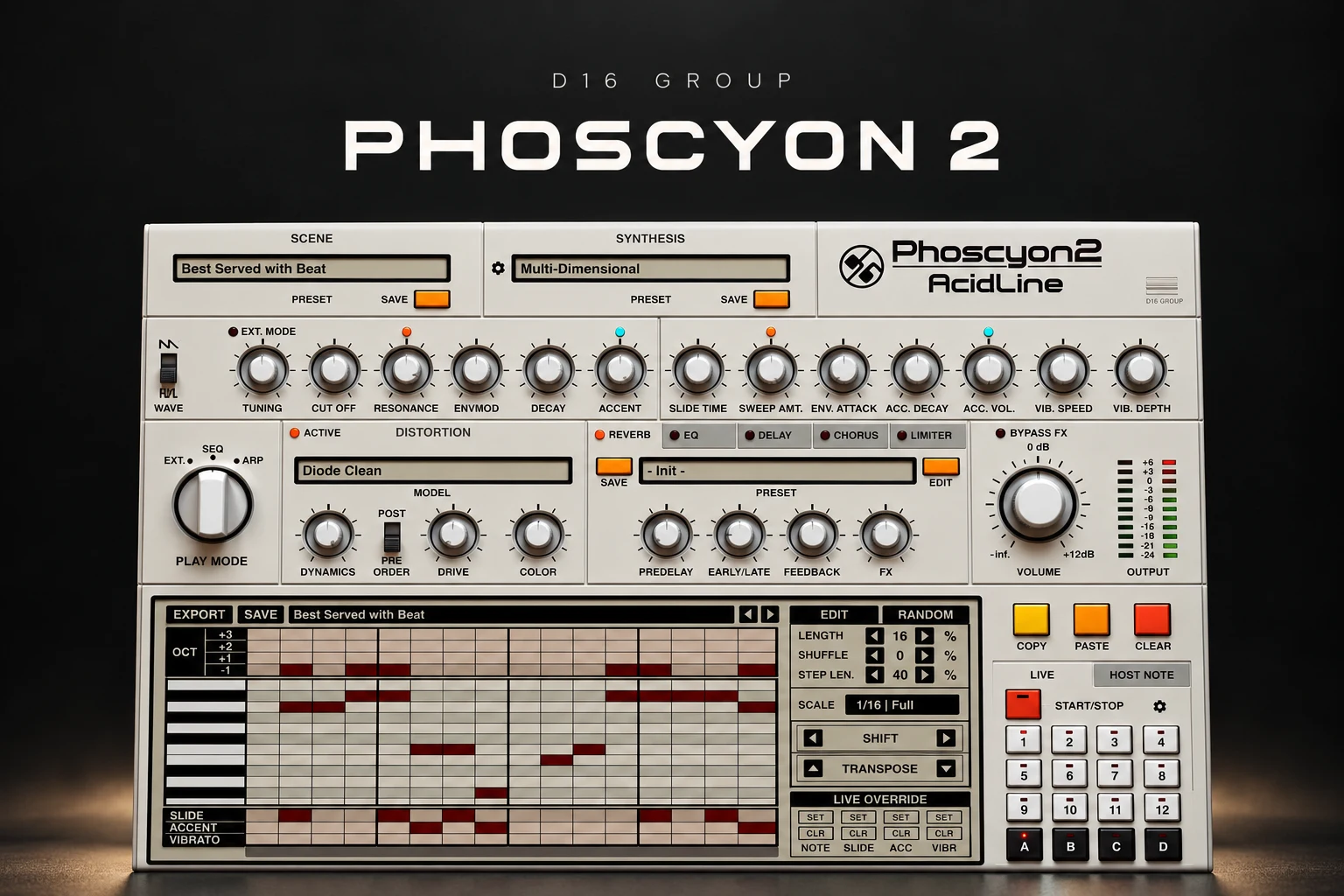

Phoscyon 2 is worth considering if acid basslines are a regular part of your music and you want a dedicated 303-style workflow. Its attraction is the combination of a focused synth, an editable sequencer and effects that let you develop a short riff into a performance.
For techno, acid house and some trance productions, that is a clear job. If you mainly need broad preset coverage, chords or many different types of synthesis, start by considering a more general instrument.
This review covers the buying decision, pattern workflow and useful details for FL Studio users. It is a documentation-based assessment; we have not conducted a hands-on hardware comparison or listening test.
What is Phoscyon 2?
Phoscyon 2 is D16's software interpretation of the Roland TB-303 concept, with an expanded synth section, sequencer, arpeggiator and effects. It generates its own sound, so you can start with notes and build a riff without loading an acid-loop sample.
Its focused design is the reason to audition it. A bassline can change dramatically through its pattern of short notes, accents and slides, even before you develop the tone across a section.
Do not judge the instrument only by one long filter sweep. Make a pattern that supports your drums, then check whether you still like it with the filter relatively closed. A useful riff should give you somewhere to start and somewhere to go.
Who should put it on the shortlist?
| Your music | Where we would try it | Buying priority |
|---|---|---|
| Acid house | A central repeating riff with selective accents and slides. | Pattern editing and live control. |
| Techno | A moving line around a steady kick and percussion groove. | Rhythm, tone and effects in context. |
| Trance | An acid layer that adds movement between larger lead phrases. | Whether it leaves room for the main hook. |
| Experimental electronic | Pattern variations and changing distortion treatments. | How easily you can capture a useful performance. |
| General songwriting | A specific bass or lead colour. | Whether a dedicated instrument fills a real gap. |
Start with the rhythm, then add slides
A practical first exercise is a short pattern using only a few pitches. Place it against a simple drum groove and make the rhythm work before adding more notes.
Try removing a step where the pattern feels crowded. Repeat a note where you want a stable pulse. Then change the octave of one event and listen to how that affects the phrase. Small edits are easier to judge when you keep the rest of the pattern steady.
Once the rhythm has a clear shape, add one slide and one accent. Play several loops before making the next change. You are listening for a stronger phrase, not trying to activate every available attribute.
Our starting point for house would be a restrained pattern with enough space for the kick and clap. For a denser techno track, try giving the riff its own rhythmic role rather than copying every kick hit. Leave room to increase activity later in the arrangement.
Internal sequencer or your DAW's piano roll?
Phoscyon provides External, Sequencer and Arpeggiator play modes. External mode accepts notes directly from the host; Sequencer mode plays its stored patterns.
The internal sequencer is worth exploring if you want to build the articulation and pattern together. You can keep the riff in one place while trying changes to the sound. If you already prefer editing MIDI in your DAW, External mode gives you another route.
The manual identifies Phoscyon as monophonic. In External mode, overlapping notes create slides according to Slide Time, while velocity above an adjustable threshold creates accents.
That matters when transferring an idea from a general-purpose synth. A block of chord notes will not become a polyphonic acid part. Simplify the MIDI to a single line, then use overlap and velocity deliberately.
A useful FL Studio pattern test
1. Load Phoscyon 2 and select External mode. Start with a restrained sound so the note behaviour is easy to hear.
2. Draw a short single-note phrase. Keep most notes separate at first.
3. Overlap one pair. Adjust Slide Time and compare that moment with the notes separated.
4. Change selected velocities. Check the accent threshold in the plugin's MIDI settings.
5. Add the drums. Decide whether the articulated notes improve the groove.
6. Develop the tone over several bars. Keep the underlying pattern available so you can separate sound changes from note changes.
Use normal MIDI note overlap for this documented External-mode behaviour. Do not rely on FL Studio's native slide-note feature as a substitute for the instrument's own MIDI handling.
Before writing a long arrangement, save and reopen the project and confirm that the pattern and sound return as expected. If the plugin is not appearing in your instrument list, our FL Studio VST detection guide covers the installation checks.
Effects: make the riff fit before making it louder
D16 includes 19 distortion models and reorderable effects including EQ, delay, chorus, reverb and a limiter. These offer several ways to develop a pattern without immediately building a separate plugin chain.
Begin with the core sound. Then add distortion and reduce the output if necessary before comparing it with bypass. A louder riff can seem more exciting while taking too much space from the drums.
Next, audition delay with the full groove playing. Listen for whether the repeats help the rhythm or create another pattern that competes with it. Introduce reverb when the track needs a sense of space, and check the effect when the next section starts.
For an eight-bar build, record a few passes of controlled tone changes. Pick one that supports the transition and edit it if needed. You do not have to leave every movement live until the final mix.
Randomization and MIDI export
The built-in randomizer lets you choose which notes and attributes change, with density control. Treat it as a way to generate variations around an idea you already like.
Keep the rhythm fixed while trying pitch changes, or preserve the notes while exploring different accents. If you change everything together, it becomes harder to understand why one variation works better.
The Export panel offers both a MIDI file and Phoscyon's native pattern format. The manual also lets you set accented and non-accented velocities for the MIDI export.
Keep a native pattern copy when preserving the instrument's own setup matters. If you send the MIDI to another synth, compare the result as a new interpretation: receiving instruments can respond differently to overlaps, velocity and articulation.
Phoscyon 2 vs a general synth or an acid sample
Choose Phoscyon for a recurring acid-writing workflow. A general synth makes more sense as a first purchase when you need a wider range of instruments. Our Serum vs Vital comparison explores that broader buying decision.
A ready-made acid loop is a sensible option when it already fits the track. An instrument becomes more attractive when you want to change the pitches, rhythm and articulation independently. Compare those needs before paying for another plugin.
If the real goal is an 808-focused bass workflow, our SubLab XL review covers a different kind of purchase. The word “bass” alone is too broad to make these tools interchangeable.
Price, demo and compatibility
Plugin Boutique displayed $119 on 18 October 2026. Treat this as a dated reference and check the current currency, tax and offers for your location.
D16 provides a demo. The manufacturer's current requirements list Windows 7 or newer and Mac OS X 10.13 through macOS 26, with Intel and Apple Silicon listed for Mac. Formats include VST2, VST3 and AAX, plus AU on Mac. A compatible host is required.
The linked changelog begins with version 2.1.0, including AAX Arm64 support and a dark interface theme. Use the current installer and check your exact host during the demo.
We have no measured CPU figures for this review. Test the sound, effects and quality settings you intend to use in a normal project, rather than assuming a simple bassline means negligible processing demand.
SoundShaper opinion
We would shortlist Phoscyon 2 when writing and performing acid lines is a repeat part of your production. The focused combination of pattern articulation, synthesis and effects gives it a clear purpose beside a broad synth collection.
We would make the demo goal one complete section: a riff that works against the drums, develops over time and leaves room for the rest of the song. That is stronger purchase evidence than enjoying a preset in isolation.
Frequently asked questions
Can Phoscyon 2 play chords?
It is monophonic. Use it for a single line and choose another instrument for polyphonic chord parts.
Can I write notes in my DAW?
Yes. External mode accepts host MIDI notes. Check overlap and velocity settings when programming slides and accents.
Is it a standalone application?
D16 lists a compatible host as a requirement. Plan to use it inside a supported DAW.
Conclusion
Phoscyon 2 deserves a demo if you want a dedicated 303-style instrument for acid, techno or house. Build a strong short pattern, shape its accents and slides, then develop the sound in context. Buy it when that workflow helps you finish lines you want in your tracks.
Sources: D16 product information and current requirements, Phoscyon 2 manual, official changelog and the Plugin Boutique listing. Details checked 18 October 2026.
![[background image] image of recording equipment (for a musician & band)](https://cdn.prod.website-files.com/68efa70811edd8e5af30a90d/6ad5421eaf14ef1dbac4dfa8_TAIP%20Review.webp)
![[background image] image of recording equipment (for a musician & band)](https://cdn.prod.website-files.com/68efa70811edd8e5af30a90d/6ad5403dd747f3fbbe4286ab_Chordjam%20Review.png)