


Choose Transit 2 if you want several effects to move together through a transition or performance gesture. Choose ShaperBox 3 if you want to draw the movement directly, build precise rhythmic patterns or process different frequency bands separately. Both go beyond those starting points, so the decision should come from the work you actually need to finish.
For example, a build that gradually filters a synth, adds delay and increases distortion is a natural Transit task. A bass that needs a carefully shaped dip around each kick is a natural ShaperBox task. You can explore crossover territory in both, but those examples expose their different approaches.
Quick Comparison
| Buying question | Transit 2 | ShaperBox 3 |
|---|---|---|
| Central idea | Link effect parameters to a shared motion source | Draw modulation shapes for individual Shapers |
| Our first use | Builds, transitions and coordinated effects movement | Custom ducking, gates and detailed rhythmic processing |
| Following audio | Follower and external Sidechain motion modes | Audio triggering plus envelope followers on supported Shapers |
| Frequency control | Depends on the selected effects and their controls | Three-band processing across the Shaper effects |
| What to check before buying | Whether the shared motion workflow suits the intended effect | Whether the offer contains one Shaper or the complete bundle |
Transit 2: move a chain with one main control
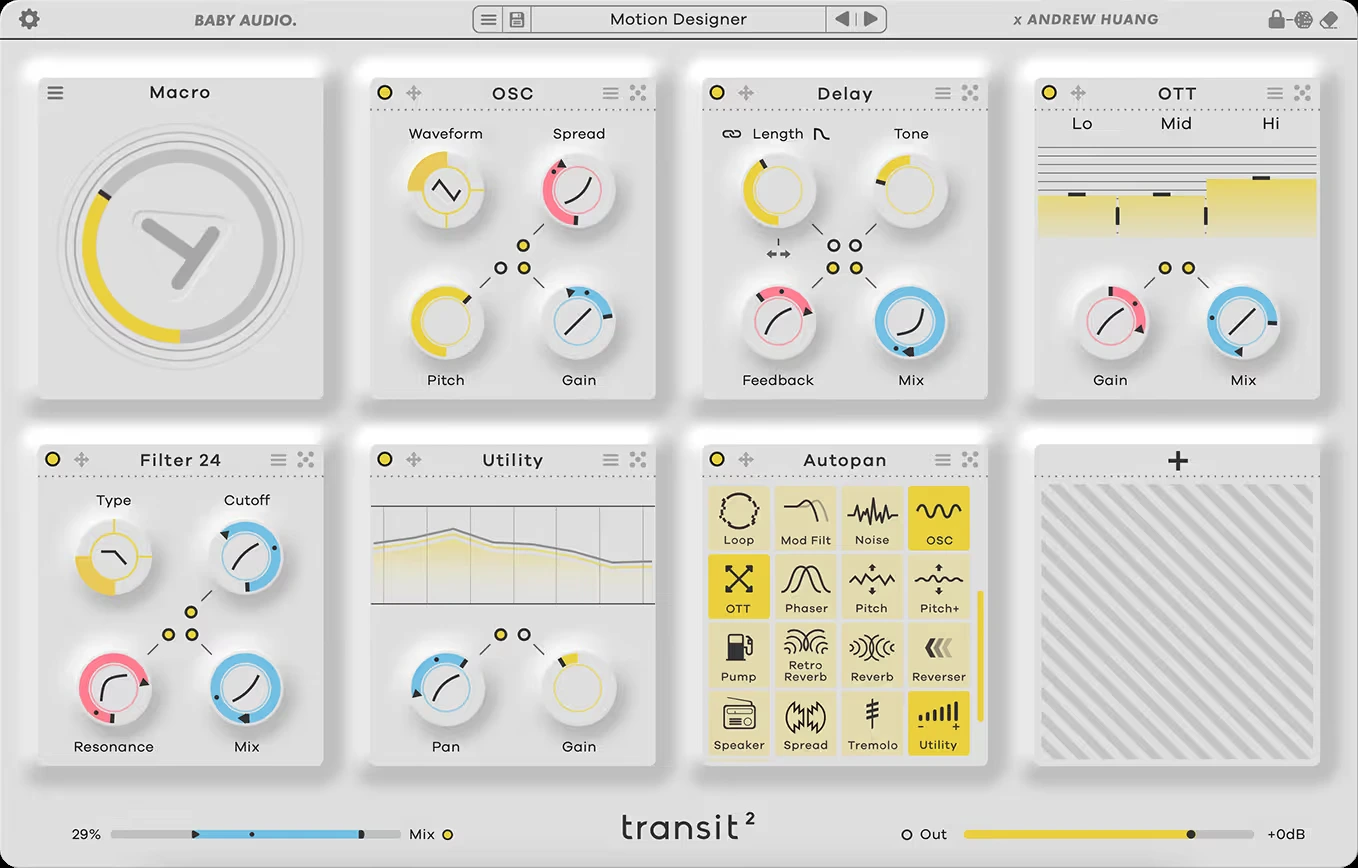
Transit 2 lets you build a chain using up to seven effect modules from a collection of 28. Parameters can stay fixed or follow the selected motion source. In Macro mode, one main control moves the parameters you have linked.
Each linked parameter has its own range and direction. A rising macro can open a filter while reducing another effect's mix, rather than simply turning everything up together.
Build a two-bar transition with a filter and delay. Link the filter cutoff to the macro and set its two endpoints; link delay mix with a different range. Then change the parameter’s motion slope so the delay enters later while the filter moves throughout. One macro does not require all linked parameters to progress at the same rate.
Keep checking the first beat after the transition. A dramatic build can feel impressive on its own yet leave the chorus smaller than expected. Make sure the effect returns to the intended state and that any remaining tail supports the arrival.
Our Transit 2 review covers its wider motion workflow.
ShaperBox 3: draw the movement you want to hear
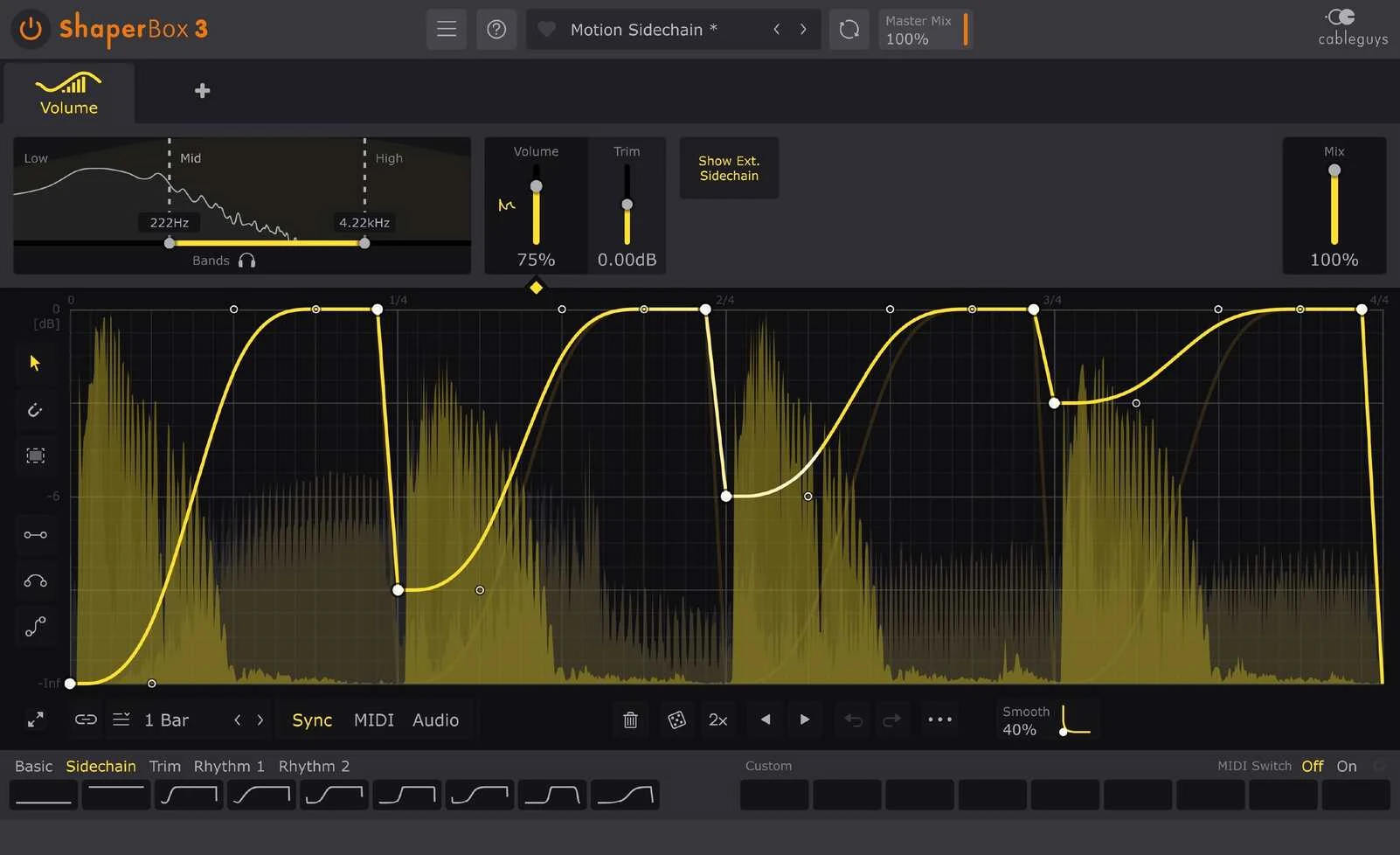
ShaperBox puts a curve editor at the centre of the work. Draw how an effect should move, set its length and choose how the pattern runs or restarts.
VolumeShaper is a clear example: you can design a short dip, a held section and a gradual recovery, then relate that shape to the kick. Filter, pan, width, time and other Shapers apply the wider approach to different jobs.
Three-band processing adds another reason to choose it. You may want deeper movement in the bass and less change in the upper part of a sound. Start with full-band processing and split it only when you can hear a reason.
The curve editor also makes revision explicit. If the bass returns too late, change that part of the curve. If a gate interrupts the wrong note, adjust the pattern against the phrase. You are editing the timing of the result directly.
The ShaperBox 3 review looks at its broader mixing and sound-design uses.
Transit is more than a transition knob
Transit 2 has six motion modes: Macro, LFO, Follower, Sidechain, Gate and Sequencer. The shared-control idea remains, but you can drive it in different ways.
Use an LFO for repeating movement, or Follower when the effects should respond to the incoming audio's intensity. Sidechain takes that control from another source in the session. Gate offers immediate triggered motion; Sequencer can launch a transition aligned with the DAW grid.
Still, keep the shared motion source in mind. Giving several effects different ranges along the same movement is a different working method from drawing separate rhythmic shapes for each task.
ShaperBox is more than a looping gate
ShaperBox can sync to the project, restart patterns from MIDI notes or trigger them from audio transients. An external sidechain lets another track provide the audio trigger. Supported Shapers also have envelope followers for level-dependent movement.
These controls serve different purposes. A transient trigger restarts a shape when a hit is detected. A follower responds to the signal's level over time. Choose the response that fits the musical idea instead of treating every reactive effect as the same type of sidechain processing.
For a filter that should open on stronger drum hits, an envelope follower is worth trying. For an exact shape that should begin again at each hit, investigate triggering. Test a passage with quiet hits, strong hits and gaps.
The same distinction matters for bass ducking. A repeating dip may work with a regular kick, but an irregular pattern needs the setup to follow the actual arrangement. Our FL Studio sidechain guide explains the basic routing relationship.
Which would we use for a build or transition?
Transit 2 would be our first trial for a coordinated sweep across several effects. Start with two modules, link a few useful parameters and automate the main movement. Add another effect only if the transition needs a separate change.
In Sequencer mode, launch the transition from the DAW grid and check its end state. For a one-off build, confirm that Loop is off; for repeating motion, test the return to the first step as carefully as the rise. Automate a reset where needed so the chorus does not inherit an unintended filter or wet level.
ShaperBox becomes attractive when the transition contains a precise sequence: a particular gate, time effect or pitch movement that you want to draw and revise. Try one effect before stacking several patterns.
Which would we use for bass, loops and everyday movement?
ShaperBox 3 would be our first trial when detailed curves or separate frequency bands are central to the job. VolumeShaper's ducking is a practical starting point; filter movement or a brief time-based fill can follow when the track needs them.
Transit is worth trying when you want the whole effects chain to behave like a playable instrument. A filter, modulation effect and delay can respond together rather than being adjusted in separate automation lanes.
Neither approach needs to run through the whole song. Save a stronger variation for the end of a phrase, or use a quieter version beneath the main part. Constant motion can make important arrangement changes harder to notice.
If the goal is only straightforward pumping, our Kickstart 2 vs ShaperBox 3 comparison covers a smaller purchase decision.
Price: compare the actual licences
Do not compare Transit 2 with the cheapest price you find for one individual Shaper and assume it is the complete ShaperBox bundle. Check which effects the licence includes.
Existing Cableguys users should check their account upgrade options. Existing Transit owners should check their applicable upgrade route. Compare current U.S. totals, tax and included products before paying.
If you already own either tool, complete one useful transition and one subtle movement effect with it first. You may discover that a saved starting preset solves the recurring problem without another purchase.
Conclusion
Transit 2 is our shortlist choice for shaping several effects through a shared performance or transition. ShaperBox 3 is our shortlist choice for direct curve editing, precise rhythmic patterns and multiband control.
Try both on the same unfinished section. Keep the version you would leave in the song, then change the arrangement and see how easy the effect is to revise. That is a better buying test than comparing the most dramatic factory presets.
For another rhythmic multi-effect option, read ShaperBox 3 vs Infiltrator 2.
Sources
This is editorial buying advice based on documented features, rather than a matched listening or CPU test. Sources checked 2 November 2026: Baby Audio Transit 2, its user manual, and Cableguys' ShaperBox 3 overview, VolumeShaper guide, FilterShaper Core features and ShaperBox manual.
Editorial review: November 17, 2026. Prices are dated references; check the current regional checkout.


