


Buy Kickstart 2 if you mainly want fast sidechain-style ducking. Shortlist ShaperBox 3 if you want to draw your own curves, shape separate frequency bands and use rhythmic effects beyond volume. Both come from Cableguys, but they ask you to make a very different-sized purchase.
For a bassline that simply needs to move around a regular kick, Kickstart can be enough. ShaperBox becomes easier to justify when you can name another task: a different envelope for the upper bass, a rhythmic filter pattern or a time-based fill. Buying the larger tool only to load the same pumping curve can leave much of its value unused.
Quick Comparison
| Buying question | Kickstart 2 | ShaperBox 3 |
|---|---|---|
| Main job | Focused volume ducking and pumping | Volume shaping plus a broader creative effects environment |
| Curve design | Sixteen supplied curves with timing adjustments | Freely editable curves |
| Frequency control | Low-band ducking option | Three bands with separate shaping controls |
| Following the kick | Tempo sync, audio or MIDI triggering | Tempo sync and audio/MIDI triggering options |
| Best buying reason | You want a small, quick sidechain tool | You need deeper volume control or several kinds of rhythmic processing |
Kickstart 2: the small purchase with a clear job
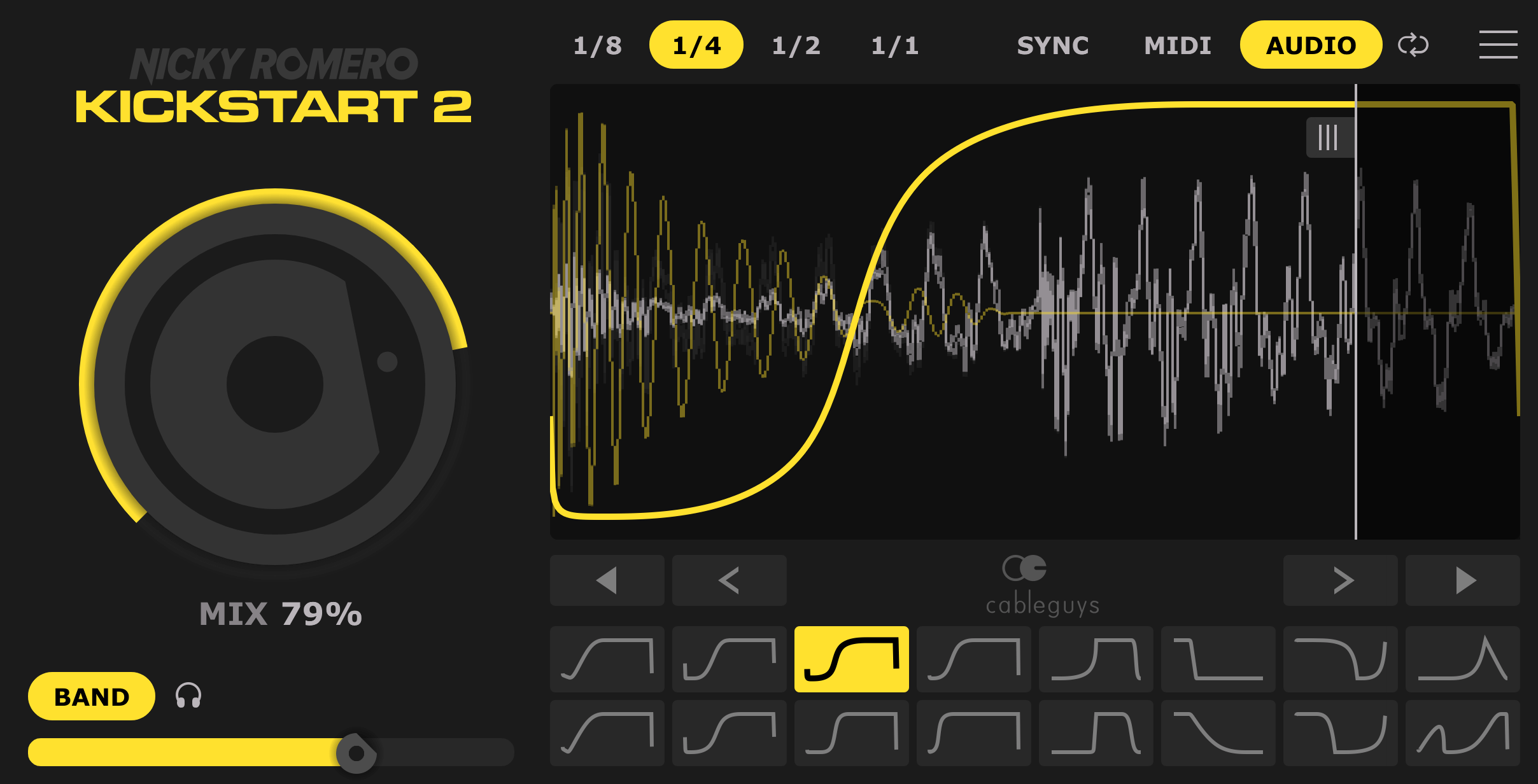
Kickstart’s approach is straightforward. Put it on the track you want to duck, select a curve and adjust how much of that movement you hear. For kick-and-bass work, that usually means inserting it on the bass rather than the kick.
The preset curves are useful when you want to reach a familiar shape quickly. A shorter recovery can let the bass return sooner; a longer one can create more obvious pumping. The timing needs to fit the sound and arrangement, rather than a rule about which curve is professional.
The Mix control also matters. Full ducking is an effect choice, not the required starting point. If the bass loses too much weight, reduce the amount before abandoning the plugin or adding another layer.
Kickstart is a sensible candidate if these are the decisions you make repeatedly. It is less suitable when you already know the precise envelope you want to draw and keep reaching the limits of the supplied shapes. Our Kickstart 2 review goes into its focused workflow.
ShaperBox 3: the difference begins with the curve editor
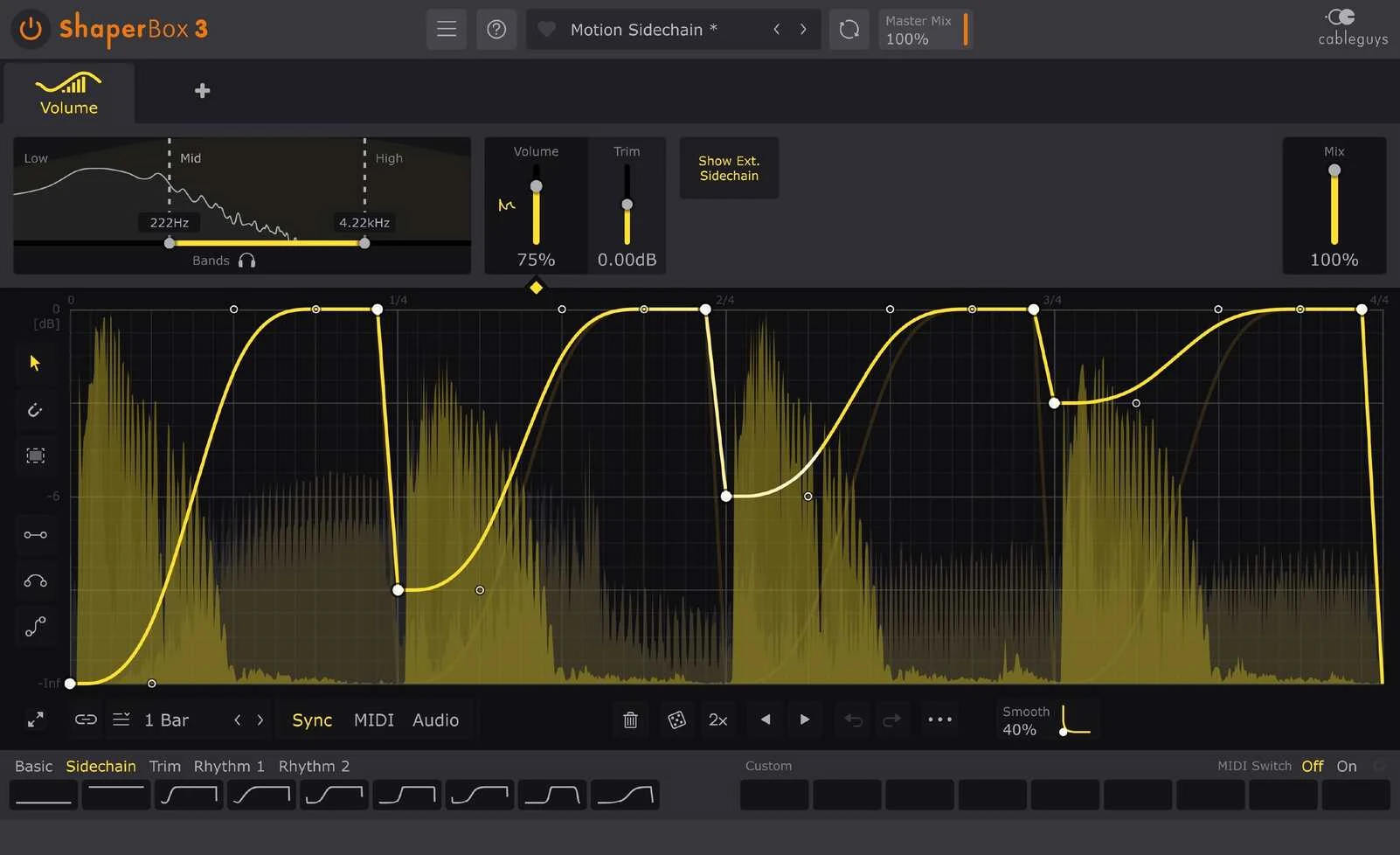
VolumeShaper lets you draw the level change directly. That is useful when the envelope you want is more specific than choosing a preset and sliding its timing.
For example, you might want a fast initial dip, a short hold and a more gradual return. Or you may want a repeating gate with a different shape over a longer musical phrase. The advantage is being able to make that design explicitly, rather than repeatedly searching for the nearest preset.
To test the editor, draw one short dip with a flat hold before the recovery. Change only the hold length until the kick’s low end clears, then adjust the recovery to meet the next bass note. A curve that works on a sustained note may cut the attack of a shorter one; check both before saving your default.
The full ShaperBox 3 review covers the wider environment. Here, the relevant question is which of those extra controls you would use often enough to choose it over Kickstart.
Multiband ducking: one of the clearest reasons to go deeper
Kickstart 2 can focus its ducking on the lower frequencies, leaving more of the upper bass present. That can be enough when your main conflict sits below the harmonic character of the sound.
ShaperBox offers three-band processing, with separate shaping control for each band. That gives you a more detailed way to treat the low foundation, the middle of the sound and its upper texture.
Consider a bass with a sub layer and a bright attack. You may want the low frequencies to stay out of the kick’s way for longer while letting the upper character return quickly. If that is a repeated need in your music, separate band control has a clear purpose.
Begin with full-band ducking before splitting the signal. If the full-band version works, there is no reason to make the setup more complicated. Also listen for changes around the crossover region and judge the result in the mix. Frequency-selective processing can preserve useful detail, but it can also preserve the part that is masking the kick.
Irregular kick patterns: both need the right routing
A repeating tempo-synced dip is convenient for a regular pattern. When the kick skips a beat or adds another hit, audio triggering can follow the actual rhythm instead.
Both products offer audio-triggered operation. Your DAW must route the intended trigger to the appropriate sidechain input. Switching to the audio mode without supplying that signal does not complete the setup.
Test a pattern containing a gap, a double hit and a change near the end of the bar. Listen to the bass through all three. You want the level changes to follow the arrangement rather than create movement where the kick is absent.
If you are learning the routing in FL Studio, our stock sidechain guide is a useful starting point. Understanding the connection makes it easier to judge either plugin.
When ShaperBox earns its extra scope
The current ShaperBox 3 package includes effects for volume, filtering, time, drive, panning, width and more. The product has expanded over its lifetime, so check the current bundle contents rather than relying on an old module list.
The useful attraction is applying related rhythmic ideas to different aspects of a sound. You might shape volume to leave space for the kick, then create a filter movement for one transition. On another track, you could make a time-based variation at the end of a phrase.
Also distinguish the ShaperBox host, an individual Shaper licence and the complete bundle. Compare the product you are actually buying. A lower price for one module is not the same offer as a package containing the current set of effects.
Price: compare the job, not only the discount
The official Kickstart site lists the full license at $16. Plugin Boutique lists ShaperBox 3 at a promotional $89 against a regular $99 reference. Check the current checkout price and the exact bundle contents before buying.
There is a useful middle option: buy VolumeShaper on its own inside the ShaperBox host. Cableguys displayed it at €19, reduced from €29, on November 17, 2026. That buys custom volume curves and three-band control without paying for the full effects bundle. Compare prices in the same currency before deciding.
If you already own a Cableguys product, check your account for the applicable upgrade route. Existing owners should compare that offer before buying another full package. If you already own ShaperBox with VolumeShaper, try building a simple default ducking preset before buying Kickstart for the same job.
Could you keep using stock tools?
Yes. Sidechain compression and volume automation can already make space between kick and bass. A paid shaper mainly changes how you create and revise the movement.
Take a current project and make the same result with your DAW’s tools. Then decide whether the extra convenience is worth the purchase. If the low end is still unclear, inspect the source sounds, notes and timing before expecting a different interface to solve everything.
Our kick and 808 guide covers that broader balance. For another dedicated shaping option, read Kickstart 2 vs Duck 2.
Conclusion
Kickstart 2 is our default recommendation for a producer who wants quick ducking and has no specific need for custom curves. It gives a small, understandable purchase a clear job.
ShaperBox 3 is the stronger shortlist choice when separate band envelopes, precise curve design or several types of rhythmic processing are already part of your workflow. Identify those jobs first, then compare the current price. Most producers do not need to buy both at the same time.
Sources
Kickstart 2: official features and prices; Kickstart 2 manual; Cableguys: ShaperBox 3; ShaperBox 3 manual. Product details and displayed offers checked 2 November 2026.
Source: Cableguys VolumeShaper features and current individual licence.
Editorial review: November 17, 2026. Prices are dated references; check the current regional checkout.


