
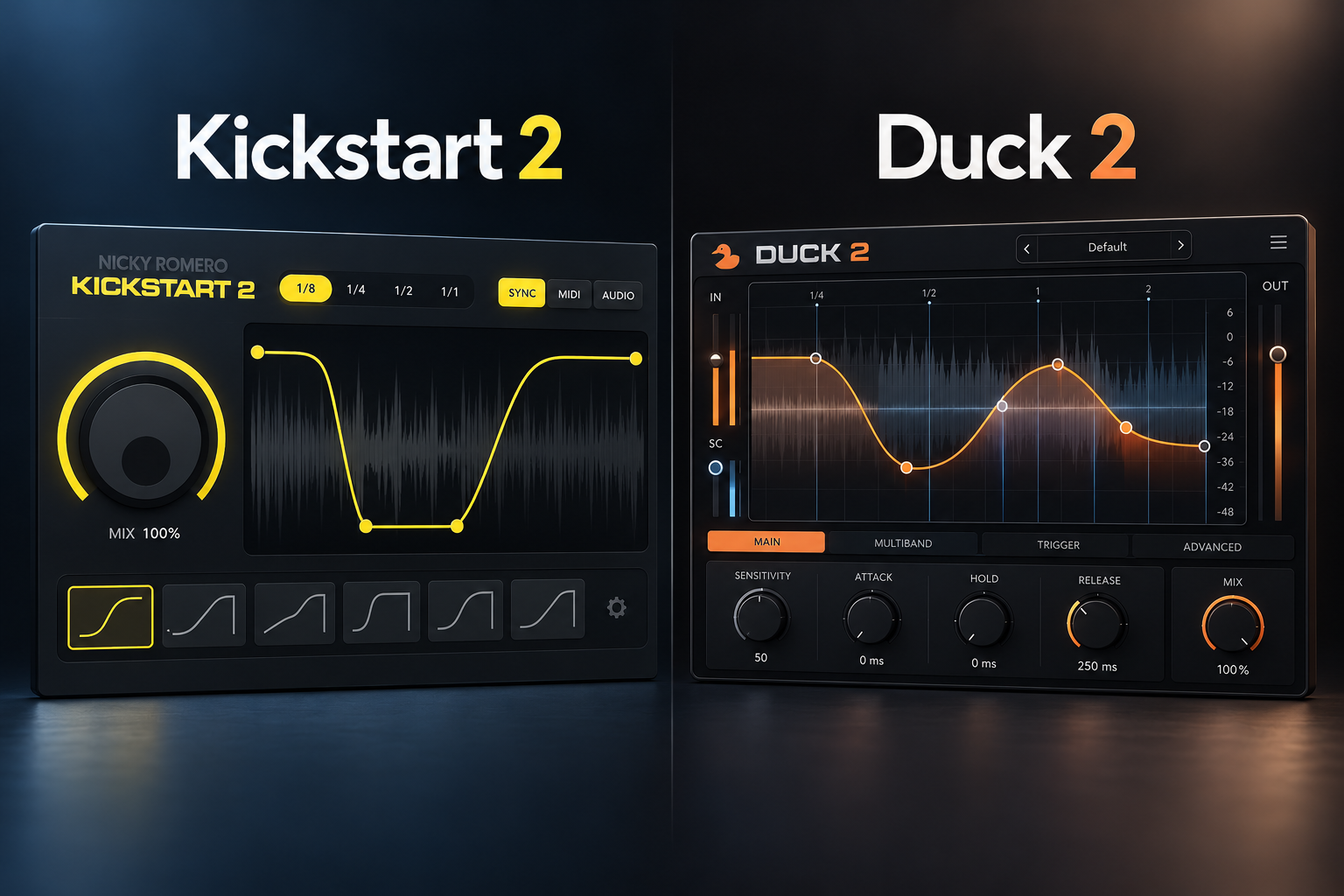

Sidechain ducking can be a quick way to make room for a kick, or a much more detailed rhythmic effect. Kickstart 2 is the better fit when you want fast, repeatable kick-and-bass ducking with minimal setup. Duck 2 makes more sense if you want to draw custom envelopes, work across three bands or use ducking creatively. If your DAW's stock compressor already gives you the control you need, you may not need either plugin.
Kickstart 2 vs Duck 2: quick comparison
Store currencies differ, and taxes or promotions can change checkout prices. Compare the price shown in your own region before purchase.
Why choose Kickstart 2?
Kickstart 2 by Nicky Romero and Cableguys is designed to make one track dip in volume so another, usually the kick, can cut through. Insert it on your bass, synth or pad, choose a curve and adjust the Mix control. It is especially useful when you want to get a straightforward pumping effect without configuring a compressor.
Its 16 preset curves, adjustable curve length, waveform view, audio triggering and multiband functionality are enough for a wide range of modern dance music. Audio triggering matters because it allows the ducking to follow actual kick hits instead of reducing volume at every quarter-note beat.
SoundShaper tip: use the shortest reduction that lets the kick through. If the bass does not recover until too late, the groove loses weight and energy.
Why choose Duck 2?
Devious Machines Duck 2 uses an editable multi-segment volume envelope. You can synchronize it to the beat, trigger it using audio or MIDI, and shape the response in greater detail. Its three-band processing lets you use different envelopes for low, middle and high frequencies.
This is useful for producers who work with changing drum rhythms, want carefully controlled low-frequency ducking or enjoy rhythmic gates and tremolo effects. Duck 2 also includes more than 200 presets, envelope import and synchronization groups between instances.
That flexibility brings an extra decision: you need to know what envelope you want. A complicated shape is not automatically cleaner than a simple curve.
House, techno and EDM: which works best?
For four-on-the-floor house, Kickstart 2 is our first choice. Load it on the bass, start with a simple pump curve and change the strength until the kick is clear without the bass sounding weak. It covers the basic task quickly.
Duck 2 becomes more attractive in techno and electronic sound design when a detailed rhythmic shape is central to the track. You can create gates for synth pads and separately shape different frequency bands. If all you need is the classic ducking sound, this extra flexibility may be unnecessary.
Trap, drill and hip-hop: what about 808s?
An 808 may play long notes, slides and changing rhythms. Fixed beat-synced pumping can create unwanted dips where there is no kick. Use audio-triggered ducking in either plugin when you want the movement to follow actual kick hits.
Kickstart 2 is enough for most straightforward 808 arrangements. Duck 2 is worthwhile when you need a more custom shape or independently controlled low and upper-frequency response. Do not duck the entire 808 aggressively without listening to its sustain.
Also read How to Layer 808s in Your Beats.
How to set up sidechaining with Kickstart 2
- Add Kickstart 2 to the track you want to duck, not the kick.
- Pick a curve that matches the kick's length and the groove.
- Select tempo sync for a repeating pattern or audio triggering for actual kick hits.
- Adjust the curve timing and Mix strength while the kick and bass play together.
- Compare the processed track with bypass at similar loudness.
How to use Duck 2
- Place Duck 2 on your bass, pad or other target track.
- Choose beat-synced looping or an audio/MIDI trigger, depending on the arrangement.
- Draw the drop and recovery with the multi-segment envelope editor.
- If needed, split the signal into up to three bands and design each band's reduction.
- Listen for pumping artifacts and adjust the curve in the full mix.
Is multiband ducking important?
If a kick and bass clash mainly in the sub frequencies, frequency-selective ducking can let upper bass harmonics stay audible. Kickstart 2 has a multiband sidechain option; Duck 2 offers three bands with separate envelopes. Start full-band and only add complexity if you hear a clear benefit.
Can you sidechain for free?
Yes. A stock compressor with external sidechain input, or manually drawn volume automation, can achieve the core ducking effect. FL Studio users can use Fruity Limiter or automation. Choose a paid volume-shaping plugin when the speed or creative control saves you enough time to justify the purchase.
Prices, supported systems and demo limitations
As checked on 18 October 2026, the official Kickstart site lists €14 / $16. It supports 64-bit VST2, VST3 and AAX hosts on Windows 7–11 and VST2, VST3, AU and AAX on macOS 10.15 or later, including Apple Silicon. Check current support for your DAW and operating system.
The Devious Machines site lists Duck 2 at £29.99, and its downloads page identifies version 2.0.30. Duck 2 offers a 14-day fully functional demo with saving disabled, meaning plugin settings may not persist when you reopen your project. Check the official download page for the latest compatibility requirements.
SoundShaper opinion
We recommend Kickstart 2 to most beginner and intermediate producers. It solves the main sidechain problem quickly, supports audio triggering and costs less at the prices checked. It is a sensible first purchase if your DAW's existing tools feel too slow.
We recommend Duck 2 to producers who regularly draw custom volume shapes. Its three-band envelopes and creative rhythm tools are concrete reasons to choose it. The feature advantage matters most for complex sound design, not for a standard house pump.
These recommendations are based on confirmed product features and workflow tradeoffs rather than claims of original hands-on testing.
FAQ
Does Kickstart 2 work with irregular kick patterns?
Yes. Its audio triggering can follow actual kick hits instead of repeating a fixed four-on-the-floor pattern.
Is Duck 2 only for sidechaining?
No. It also supports rhythmic gating, tremolo and envelope-based sound design.
Which is better for FL Studio?
Kickstart 2 for fast pumping; Duck 2 for custom shaping. Fruity Limiter or volume automation is enough for many basic sidechain tasks.
Do I need both?
Most producers do not. Buy the one whose workflow solves a repeated problem; you can always expand later.
Final verdict
Choose Kickstart 2 for affordable, fast sidechaining. Choose Duck 2 for deeper envelope control, three-band shaping and creative volume effects. Choose your DAW's stock tools when the budget matters more than convenience.
Sources: Kickstart 2 official · Duck 2 official · Duck 2 downloads.
![[background image] image of recording equipment (for a musician & band)](https://cdn.prod.website-files.com/68efa70811edd8e5af30a90d/6ad525ca541f84cd109a4180_Repro-5%20vs%20Prophet-5%20V.png)
![[background image] image of recording equipment (for a musician & band)](https://cdn.prod.website-files.com/68efa70811edd8e5af30a90d/6ad5249509c44abef3dec403_Diva%20vs%20Pigments%207.png)
![[background image] image of recording equipment (for a musician & band)](https://cdn.prod.website-files.com/68efa70811edd8e5af30a90d/6ad5234388e811ebd04ea1f7_Battery%204%20vs%20XO.png)