
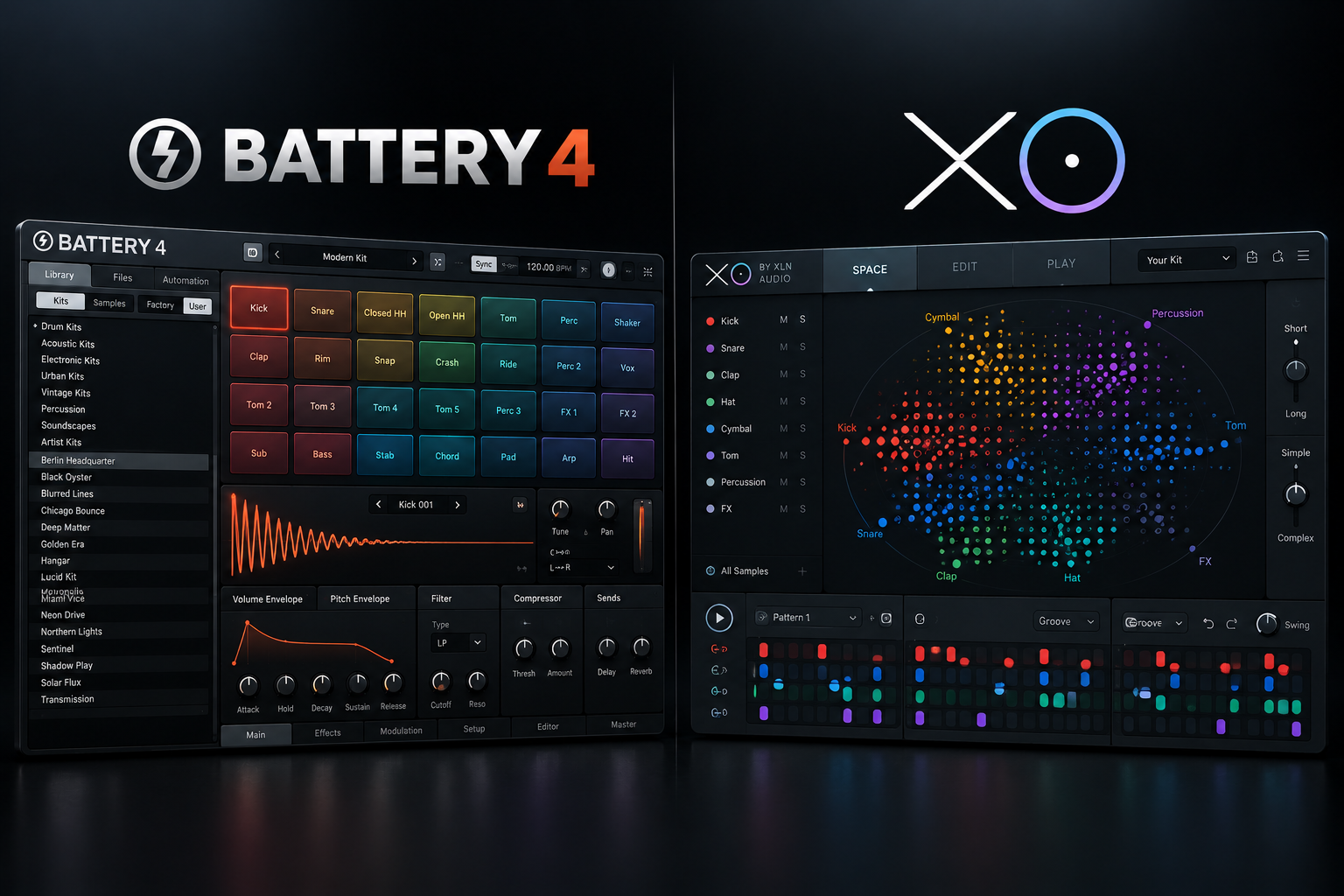

A drum plugin should help you turn ideas into beats, but searching through hundreds of kick and snare files can slow down a session. Battery 4 and XO solve this problem from different directions. Battery 4 is a detailed drum sampler for building kits, shaping individual hits and assigning them to pads. XO focuses on discovering sounds from your sample folders and combining them into grooves. If you like editing drums deeply, Battery is the more natural choice; if you spend too much time looking for the right samples, XO may improve your workflow more.
Battery 4 vs XO: quick comparison
| Feature | Battery 4 | XO |
|---|---|---|
| Core strength | Deep drum sample editing and kit design | Visual sample discovery and beat creation |
| Library workflow | Browser and organized kit/cell layout | XO Space groups one-shots by sonic similarity |
| Processing | Per-cell envelopes, filters, effects and routing | Sample editing, groove tools and drum sequencing |
| Beat sequencing | Usually sequence the kit from your DAW | Integrated beat sequencer with groove templates |
| Best for | Custom kits and detailed one-shot processing | Finding samples and sketching fresh patterns |
| Free trial | 30-minute sessions and seven selected kits | 10-day trial from XLN Audio |
What is Battery 4?
Native Instruments Battery 4 is a drum sampler built around a flexible grid of cells. Load one-shots into cells, set their pitch and envelopes, apply filters or effects and route different hits to suitable outputs. The color-coded kit layout makes it practical when you want a clear collection of kicks, snares, hats and percussion.
Battery 4 is particularly appealing if sound editing is part of your process. You can make detailed changes to an individual sample instead of simply swapping it for another file. Its library includes electronic and urban drum sounds, with additional expansion libraries available separately.
SoundShaper advice: choose Battery 4 when you already know what samples you want and need control over how they play. Producers who use pad controllers or build kits from scratch will appreciate its cell-based workflow.
What is XO?
XLN Audio XO is designed to explore a large library of one-shot drum samples. Its XO Space groups sounds by similarity, so you can move between related kicks, snares or hats without memorizing file names and folder locations. You can then turn selections into kits and build patterns in XO's sequencer.
XO includes factory sounds and presets, groove templates, a similarity list, favorites and drag-and-drop export for audio or MIDI. Its most distinctive advantage is the discovery workflow, not simply the size of its included sample library.
SoundShaper advice: choose XO if your drive is full of sample packs and you regularly lose time finding the right sound. The map makes it easier to compare samples quickly, while the internal sequencer lets you test them in context.
Which one is better for hip-hop, trap and drill?
For trap and drill, both can work well. XO is useful for searching through many short kicks, claps, snares and hats until a combination fits the groove. Battery is useful once you want careful processing, layering and a consistent custom kit.
For an 808-based beat, remember that long melodic 808 lines are often best handled in a dedicated instrument or your DAW's sampler. Neither Battery nor XO is automatically the best tool for every pitched bass part.
Which one is better for house and techno?
XO's sequencer and fast sample swapping are helpful when trying out house and techno drum grooves. You can audition similar kicks and hats while keeping the basic rhythm. Battery is the stronger option when you want highly customized processing on each drum, or elaborate routing through your mixer.
For live-feeling acoustic drum performances, consider a specialized drum instrument rather than assuming either one-shot tool will replace a detailed acoustic drum library.
How each plugin fits into FL Studio
Battery 4 workflow
- Load Battery 4 as a plugin instrument in FL Studio.
- Create a kit or load an existing one.
- Assign your kick, snare, hats and percussion to cells.
- Trigger the cells with MIDI notes or a controller.
- Adjust envelopes, effects and routing before exporting the beat.
XO workflow
- Point XO toward your sample folders and allow it to analyze compatible one-shots.
- Explore XO Space for sounds similar to the one you want.
- Choose a set of kick, snare and percussion samples.
- Build a pattern with the internal sequencer and adjust the groove.
- Drag audio or MIDI into your DAW if you want to continue arranging there.
Does XO replace Battery 4?
For some producers, yes. If your main job is finding drums and making straightforward patterns, XO may cover most of what you need. But it does not duplicate Battery's full per-cell sampling and routing workflow. You might even use XO to discover sounds and another sampler to process them deeply.
Do you need either if you have FL Studio?
Not necessarily. FL Studio already provides samplers, the Channel Rack, piano roll sequencing and a broad range of effects. You can organize your samples with the Browser and build strong beats without buying a dedicated drum plugin.
Buy XO when searching your library is the repeated bottleneck. Buy Battery when the editing and kit-design process is the limitation. If neither problem exists, keep using the tools you know.
Price, versions and trial limitations
On 18 October 2026, Plugin Boutique displayed Battery 4 at $199. Native Instruments lists Windows 10 and 11 and supported macOS versions for Battery 4, with VST3 and other supported plugin formats. Its demo includes seven selected kits and runs for 30 minutes per session; kits made in the demo cannot be reopened without activation.
XLN Audio's release notes identify XO 1.8.10, released 7 August 2026. XO offers a 10-day free trial. Check the current regional price and plugin compatibility at checkout instead of treating a promotional offer as permanent.
The purchase buttons above reuse verified Plugin Boutique tracking destinations already found in existing SoundShaper articles. These links may earn SoundShaper a commission.
Related SoundShaper articles
Read Battery 4 vs Atlas 2 to compare Battery with another drum-library tool. Our Atlas 2 vs XO article explores visual drum-sample browsing, and best free drum plugins offers budget-friendly starting points.
SoundShaper opinion
We prefer XO for producers with a huge, messy sample collection who mainly want to make beats faster. Its similarity-based map, groove tools and drag-and-drop workflow address a real production problem. We prefer Battery 4 for producers who carefully build and process drum kits. Cell-level editing and routing are concrete reasons to choose it over a discovery-oriented tool.
These recommendations are based on documented features and intended workflows, not invented personal tests or measured performance claims.
Frequently asked questions
Does Battery 4 have a built-in sequencer like XO?
Battery's main workflow is triggering drum cells from your DAW or controller. XO includes its own dedicated beat sequencer.
Can XO use my own samples?
Yes. It analyzes compatible one-shot files from your folders and organizes them by sonic similarity.
Which is easier for beginners?
XO can be faster for browsing and starting a beat. Battery provides more detailed sample and kit editing, which takes some practice.
Are both compatible with FL Studio?
They support common plugin workflows, subject to the specific operating system and plugin format. Confirm the latest requirements before buying.
Final verdict
Choose Battery 4 for detailed kit building and drum processing. Choose XO for fast sample discovery and beat creation. Stick with your DAW's stock samplers if your current workflow already works. Spend money on the bottleneck that actually slows you down.
![[background image] image of recording equipment (for a musician & band)](https://cdn.prod.website-files.com/68efa70811edd8e5af30a90d/6ad532001f619a451720a81e_6ad531d144bf4757a103150f_trackspacer-review.webp)
![[background image] image of recording equipment (for a musician & band)](https://cdn.prod.website-files.com/68efa70811edd8e5af30a90d/6ad525ca541f84cd109a4180_Repro-5%20vs%20Prophet-5%20V.png)
![[background image] image of recording equipment (for a musician & band)](https://cdn.prod.website-files.com/68efa70811edd8e5af30a90d/6ad5249509c44abef3dec403_Diva%20vs%20Pigments%207.png)