

If your kick gets buried when the bass starts, sidechain compression is one way to give it room. In FL Studio, you can do this with Fruity Limiter: send the kick to the bass track as a sidechain, load Fruity Limiter on the bass, switch to COMP and select the kick as its input source. The compressor then turns the bass down in response to the kick. You can keep that movement subtle or make it part of the groove.
This guide starts with the stock-plugin method, then explains how to listen for useful settings and when a dedicated ducking plugin makes sense. You do not need to buy another plugin to follow the main steps.
Before you start: choose what should move
For this example, the kick has priority and the bass moves out of its way. Think of them as two separate roles:
- Trigger: the kick tells the compressor when to react.
- Target: the bass is the sound you want to turn down.
Sidechain routing carries a control signal to the destination without adding that source to its normal audible mix. It is different from simply turning up an audio send.
Begin with a short loop containing both sounds. Choose a section where you can hear the clash clearly. If the kick and bass already work together, there is no need to duck them just because the technique is common.
How to sidechain kick and bass in FL Studio
1. Put kick and bass on separate Mixer tracks
Assign each sound to its own Mixer insert. Name them Kick and Bass so you can follow the route. Play the loop and check that each meter follows the expected sound. A shared instrument insert will not give you the independent control this example needs.
2. Create the sidechain route from kick to bass
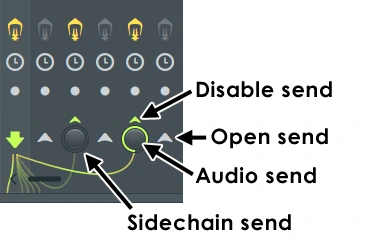
Select the Kick Mixer track. Right-click the routing switch at the bottom of the Bass track and choose Sidechain to this track. Keep the kick's audible route to the Master active. Avoid the option ending in only for this example, as it can remove that audible Master route.
Keep the sidechain send level at 0%. Raising it also sends audible kick audio through the bass track, which is unnecessary here.
3. Load Fruity Limiter on the bass
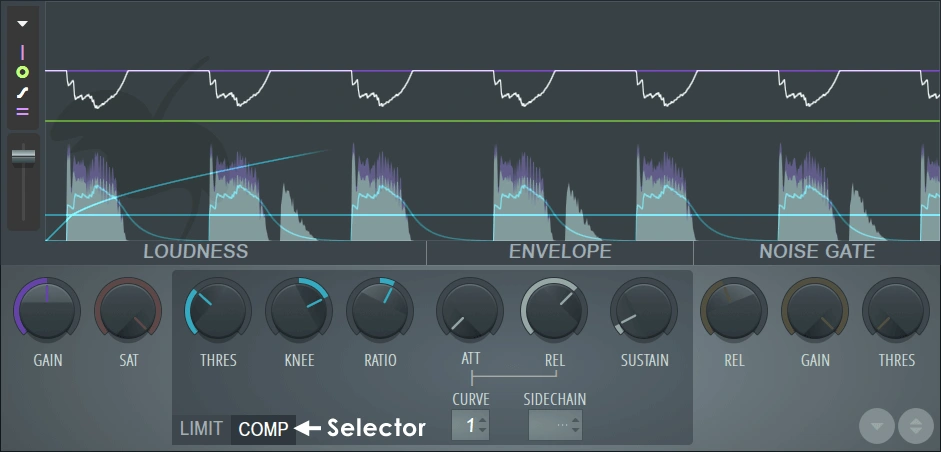
Add Fruity Limiter to a Bass effects slot and open COMP. Right-click its SIDECHAIN selector and choose Kick by name. Do not assume the source will always be number 1.
4. Make the compressor respond
Raise Ratio above 1:1 and lower Threshold until the kick causes reduction. The white gain envelope shows the compressor's movement.
For compressor-only use, set the LIMIT section's CEIL to maximum and its ATT to minimum, then return to COMP. Leave makeup gain unchanged while learning the ducking behaviour.
5. Shape the dip, then reduce it
Adjust compressor Attack for the start of the dip and Release for the recovery. Very short release settings can distort bass. These are separate from the LIMIT section's attack control, which affects limiter look-ahead.
First make the duck obvious enough to recognise. Then back it off until the kick comes through while the bass still supports the track. Check the full mix before deciding that more reduction is better.
Suggested starting settings
These are SoundShaper starting points for an experiment, not universal presets or manufacturer recommendations. Your kick level, bass tone and rhythm will change the result.
| Control | Try first | Listen for |
|---|---|---|
| Ratio | 4:1 | Enough movement to recognise the effect |
| Compressor attack | Around 1–5 ms | A clearer kick without an unpleasant dip |
| Release | Around 80–150 ms | Bass recovery that fits your pattern |
| Threshold | Lower gradually while the loop plays | Start with a small dip; no fixed dB value fits every trigger |
| Final depth | Less than your first obvious test | Separation while keeping the bass present |
For a sustained 808, pay attention to the note between kicks. If it never feels fully present, try a shorter recovery or less ducking. For a short bass stab, listen for whether you are removing most of the note instead of only clearing its overlap with the kick.
There is no need to force release to an exact note length. Use timing values as a starting point and follow the groove. Our kick and 808 mixing guide covers the wider decisions around sample choice, note length and balance.
Why is sidechain not working?
The kick is missing from the source list
Check the route direction: Kick must send to Bass, where Fruity Limiter is loaded. Reopen the source selector after creating the route. A connection pointing the other way will not supply the intended input.
The kick disappeared
Inspect Kick's Master routing. Restore its audible output if you accidentally chose an exclusive route. The aim is an audible kick plus a separate control-only connection to Bass.
The bass does not seem to dip
Check that the loop contains actual kick hits, Bass's effects are enabled and you selected the intended source. Then temporarily exaggerate the effect to make the test easy to hear. Return to a musical amount once you confirm the setup.
The kick suddenly sounds doubled or louder
Check for an unwanted audible Kick-to-Bass send. A pure sidechain link has its send level at 0%. Also check whether the kick is reaching the Master through an additional bus.
The bass pumps too much or sounds weak
Start by reducing the depth. Compare a smaller dip with a quicker recovery instead of changing several controls at once. If a large amount is necessary, audition a shorter kick or simplify the overlapping bass part.
The bass clicks or crackles
Try less aggressive timing and less reduction. Compare bypassed playback to establish whether the problem follows this processing. If clicks occur throughout the project even with the effect bypassed, use our FL Studio crackling guide to investigate the wider audio setup.
Subtle separation versus obvious pumping
For subtle separation, the test is whether you can follow the kick more easily without feeling the bass disappear. Turn your screen away and compare short sections. A graph reacting on every beat is not proof that the balance improved.
For obvious pumping, judge the recovery as part of the rhythm. Listen to the way the bass returns against hats, claps and chords. A deeper dip might fit a house groove while distracting from a sparse rap beat.
Check sections where the kick stops. A useful effect should fit the arrangement, including breaks and transitions, rather than only the loop you used during setup.
When should you use Duck 2 or Kickstart 2?
Dedicated volume shapers make sense when you want a repeatable ducking curve that you can see and adjust directly. They offer a different workflow from a compressor responding to a detector level.
Duck 2 lets you draw volume envelopes, split processing into up to three bands and use tempo, MIDI or audio-based triggering. We would consider it when curve editing or separate low-end shaping is a recurring task.
Kickstart 2 offers preset ducking curves, an adjustable Mix control and audio triggering for patterns beyond a regular four-on-the-floor beat. It is another option if you prefer choosing and adjusting a shape over setting compressor behaviour.
Compare the workflows in our Kickstart 2 vs Duck 2 guide. With a tempo-synced repeating curve, check breaks carefully: the volume movement can continue when no audible kick is playing. Select a suitable trigger mode or automate the effect when needed.
What if you only want certain frequencies to duck?
Sometimes lowering the whole bass changes more of the sound than you want. You may prefer to retain its upper harmonics while making a little room in a competing area.
That is a reason to audition frequency-selective processing. Trackspacer uses a sidechain-driven inverse EQ curve, while FUSER offers conflict analysis and editable dynamic nodes. Read our Trackspacer review and FUSER review if this is the specific limitation you are encountering.
Start with the stock compressor before deciding you need those alternatives. A small whole-signal adjustment may already give you the balance you wanted.
SoundShaper opinion
We would learn the Fruity Limiter method first. It makes the trigger-and-target relationship clear, and it gives you a useful baseline for judging any paid alternative.
Our main advice is to avoid making sidechain depth the first answer to every low-end problem. Get the samples, timing and levels close first. Then use ducking for one clear purpose: a more readable kick, a particular bounce or a controlled moment of overlap.
Buy another tool when you can describe what your current workflow is missing. A visual curve editor or frequency-selective reduction can be valuable; buying one before you understand the problem makes it harder to judge that value.
Frequently asked questions
Do I need a paid plugin to sidechain in FL Studio?
No. The main method in this guide uses Fruity Limiter. Paid tools are optional workflow choices.
Should I sidechain every bass to the kick?
No. Listen to the pair first. Different sounds, note lengths and arrangements need different amounts of space, and some need no ducking at all.
Can I use the same idea for vocals?
Yes. Try the vocal as the trigger and a competing instrument as the target. Start gently and check that the backing part remains convincing between phrases. Our vocal mixing guide explains the surrounding balance decisions.
Conclusion
For kick-to-bass sidechain compression, keep the kick as the trigger and process the bass. Establish the route, select the source in Fruity Limiter and shape a small, useful dip before trying stronger pumping.
The right setting is the one that supports the rhythm and leaves both sounds with a clear role. Once that is working, dedicated shapers and unmasking tools become easier to evaluate.
Sources
Controls and routing checked on 23 October 2026 against Image-Line's Fruity Limiter documentation and Mixer documentation. Alternative-plugin features checked against the official Duck 2, Kickstart 2, Trackspacer and FUSER pages. Cover artwork is an editorial illustration, not an FL Studio screenshot.
![[background image] image of recording equipment (for a musician & band)](https://cdn.prod.website-files.com/68efa70811edd8e5af30a90d/6adbdffd1258b281fa64d9e8_6adbdfe06748b62dcaeff101_vintageverb-vs-pror2-cover-v2.webp)
![[background image] image of recording equipment (for a musician & band)](https://cdn.prod.website-files.com/68efa70811edd8e5af30a90d/6adbdd6f7d47fb086e52b147_6adbdd4e3cb3e94d421e55da_how-to-fix-harsh-vocals.webp)
![[background image] image of recording equipment (for a musician & band)](https://cdn.prod.website-files.com/68efa70811edd8e5af30a90d/6adbd8f9d34e0624a55714e1_6adbd8e12694d8b251e72784_decapitator-vs-saturn-2-corrected.webp)