
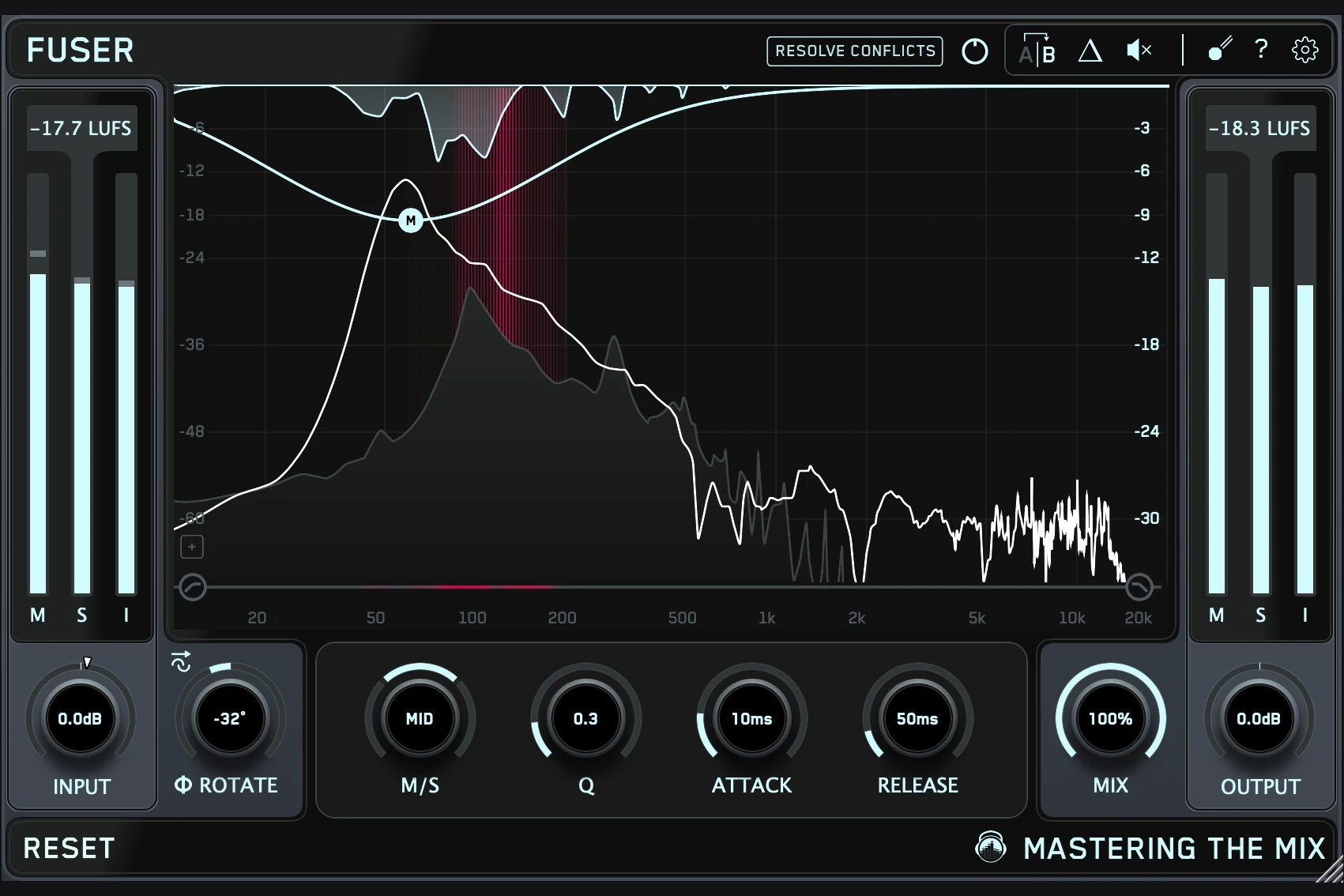

Mastering The Mix FUSER is worth auditioning when two parts sound good separately but compete in the mix. It combines frequency-selective sidechain ducking with conflict detection and phase tools, making it particularly relevant to kick-and-bass separation and vocals fighting with instruments.
The buying decision comes down to how often you face that problem. If a small fader move, a different sample or a simple EQ cut solves it, you may already have everything you need. FUSER becomes more interesting when you want controlled movement in specific frequency areas and a faster way to find a starting point.
This assessment is based on the manufacturer documentation and current product listing. We have not carried out a hands-on listening test or CPU benchmark.
First check: is masking actually the problem?
A kick that disappears under a bass line might be masked, but the cause could also be an overly long kick, a busy bass pattern or an unsuitable pair of sounds. Before buying a plugin, mute the bass and ask whether the kick has the character you want in the first place.
Do the same with vocals. If the lead is unclear even when the backing track is muted, ducking the instruments will not fix the recording, pronunciation or vocal processing. If it becomes clear immediately when a piano or synth is muted, selective ducking is a more relevant experiment.
Our suggested order is: check the sound choice, set the balance, simplify unnecessary overlap, then decide whether the remaining clash needs processing. This gives you a specific job for FUSER instead of asking it to repair the entire mix.
How FUSER creates space
For sidechain unmasking, place FUSER on the sound that should move out of the way and feed the priority sound into its sidechain. For example, put it on the bass and use the kick as the trigger. Resolve Conflicts provides an automatic starting point.
The idea is to reduce selected areas of the supporting sound when they compete. This differs from making a permanent EQ cut: the supporting part can retain more of its original balance between the moments that trigger the processing.
The visual conflict display distinguishes mid and side information. Manual nodes let you shape the processing rather than accepting every automatic decision.

Kick and bass: preserve weight while checking the attack
For a trap beat, start with a short section containing several different bass notes. A setting that works on one sustained 808 may behave differently when the bass moves through the scale.
1. Decide what needs priority. Do you want a clearer kick attack, a more audible bass note, or simply less low-end buildup? Choose one goal first.
2. Put FUSER on the supporting part. If the kick needs priority, process the bass and send the kick to the sidechain.
3. Use Resolve Conflicts as a starting point. Listen to the combined result before adding more processing.
4. Reduce the intervention if the bass loses its role. A visible reduction is not proof that the groove has improved.
5. Check the recovery. Listen between kick hits. The bass should return in a way that supports the rhythm you intended.
6. Test another section. Include the busiest passage and a quieter one before committing.
For house and EDM, intentional pumping may be part of the sound. If you want the whole bass to breathe with the kick, conventional sidechain compression or volume shaping may be the more direct choice. Frequency-selective ducking is useful when broad pumping changes more of the sound than you want.
If your 808 already contains a strong kick-like attack, consider whether layering another long kick helps. Our 808 layering guide explores that wider production decision.
Vocals and instruments: duck the competition
A useful vocal experiment is to process the instrument or instrument bus that masks the lead, using the vocal as the sidechain source. Start with the obvious competitor, such as a dense piano, rather than immediately processing the entire backing track.
Compare a busy lyric with a gap between phrases. You want enough room for the words while the instruments still feel convincing when the singer pauses. If the accompaniment audibly changes colour on every syllable, try less processing or a simpler arrangement.
Also check breaths, ad-libs and reverb tails in the trigger signal. Ask whether they should be making space in the backing track. A useful response to the main lyric can become distracting if every quiet detail causes unnecessary movement.
For more context on the tools surrounding that decision, see our vocal mixing plugin guide. FUSER addresses competition between parts; it should have a defined place alongside your vocal EQ, dynamics and effects.
The controls worth learning before you buy
Each node has Q, attack, release and mid/side adjustment. Delta monitoring lets you hear what the dynamic processing removes. Gain Stage Fix accounts for DAW fader settings that would otherwise distort the level relationship assumed by the analysis.
Start by learning the timing. If the reduction arrives too slowly for the clash, the attack may still disappear. If recovery is too slow, the supporting instrument may stay reduced after the priority sound has finished. Avoid copying fixed millisecond settings without listening to your pattern.
Use Delta to investigate whether the processing follows the intended events. Then leave Delta mode and judge the complete mix again. The removed signal can explain what is happening, but the remaining music determines whether the decision works.
The manual states that Mix adjusts overall dynamic processing without changing gain or phase adjustments. That matters when comparing settings: reducing Mix does not undo every type of change FUSER can make.
Phase Analyze is a separate reason to audition FUSER
FUSER includes phase rotation analysis for layered signals. It also offers Phase Match, which the manufacturer notes can introduce audible artifacts.
Treat this as a separate test from frequency ducking. First compare the layers with the dynamic processing held constant. Listen to the combined attack, sustain and low-end weight, then check the rest of the pattern. Keep a version of the original settings so you can return to it easily.
For a bass line with changing pitches, audition multiple notes. Do not assume that an impressive result on one kick hit proves the whole arrangement is better. If the layers already work together, leaving the phase controls alone is a valid decision.
FUSER versus EQ, sidechain compression and Trackspacer
A sound is too loud throughout the song: A fader move or automation.
A sound has too much energy in one area all the time: A static EQ adjustment.
The entire bass should duck rhythmically: Broadband sidechain compression or volume shaping.
One part masks another during overlaps: Sidechain dynamic EQ or an unmasking tool such as FUSER.
Layered sounds become weaker together: Investigate the sample choice, timing and phase relationship.
If you are choosing between dedicated unmasking plugins, read our Trackspacer review alongside this one. FUSER's conflict detection, editable nodes and phase tools give you specific features to compare during a trial. We are not claiming one sounds better without a controlled listening comparison.
Already own a dynamic EQ with an external sidechain? Try solving the same problem with it before purchasing another tool. The useful upgrade may be speed and convenience rather than access to a completely new technique.
Price, trial and system requirements
Plugin Boutique displayed FUSER at €69.38 when checked on 20 October 2026, with a free trial option. Check the current price in your currency and compare relevant bundles only if you would use their other products.
The current product pages list macOS 10.15 or later, native Apple Silicon support and Windows 10 or later. The listed formats are 64-bit VST3 and AAX, plus Audio Unit on Mac. The manual also contains older system information, so use the current installer requirements and trial to confirm your setup.
For FL Studio, confirm that the sidechain signal reaches the plugin before judging the processing. If the plugin is missing from the browser, our VST scanning troubleshooting guide is a useful first step.
SoundShaper opinion
FUSER is most compelling for producers who already hear the clash but want a more convenient way to control it. The automatic starting point can reduce setup work, while the manual controls let you adapt the result to the song.
For a beginner with a limited budget, we would prioritise sound selection, balance and basic sidechain techniques first. For someone regularly mixing dense beats, layered synths or vocals against busy instruments, FUSER deserves a trial on a real project.
Our buying test would be three short comparisons: kick and bass, vocal and instrument, and a pair of layered sounds. Keep it only if it solves a recurring problem more comfortably than your existing tools. The value is a clearer decision and a useful result, not another graph reacting to the music.
Conclusion
FUSER combines guided unmasking with detailed dynamic control and phase tools. That makes it worth considering when competing parts repeatedly slow down your mixes.
Give it one clear task, compare the result in context and keep the processing only while both sounds still serve the song. If a simpler move gets you there, use that instead.
Sources
Details checked against the official FUSER product page, FUSER manual, manufacturer phase guide and Plugin Boutique listing.
![[background image] image of recording equipment (for a musician & band)](https://cdn.prod.website-files.com/68efa70811edd8e5af30a90d/6adbdffd1258b281fa64d9e8_6adbdfe06748b62dcaeff101_vintageverb-vs-pror2-cover-v2.webp)
![[background image] image of recording equipment (for a musician & band)](https://cdn.prod.website-files.com/68efa70811edd8e5af30a90d/6adbdd6f7d47fb086e52b147_6adbdd4e3cb3e94d421e55da_how-to-fix-harsh-vocals.webp)
![[background image] image of recording equipment (for a musician & band)](https://cdn.prod.website-files.com/68efa70811edd8e5af30a90d/6adbd8f9d34e0624a55714e1_6adbd8e12694d8b251e72784_decapitator-vs-saturn-2-corrected.webp)