
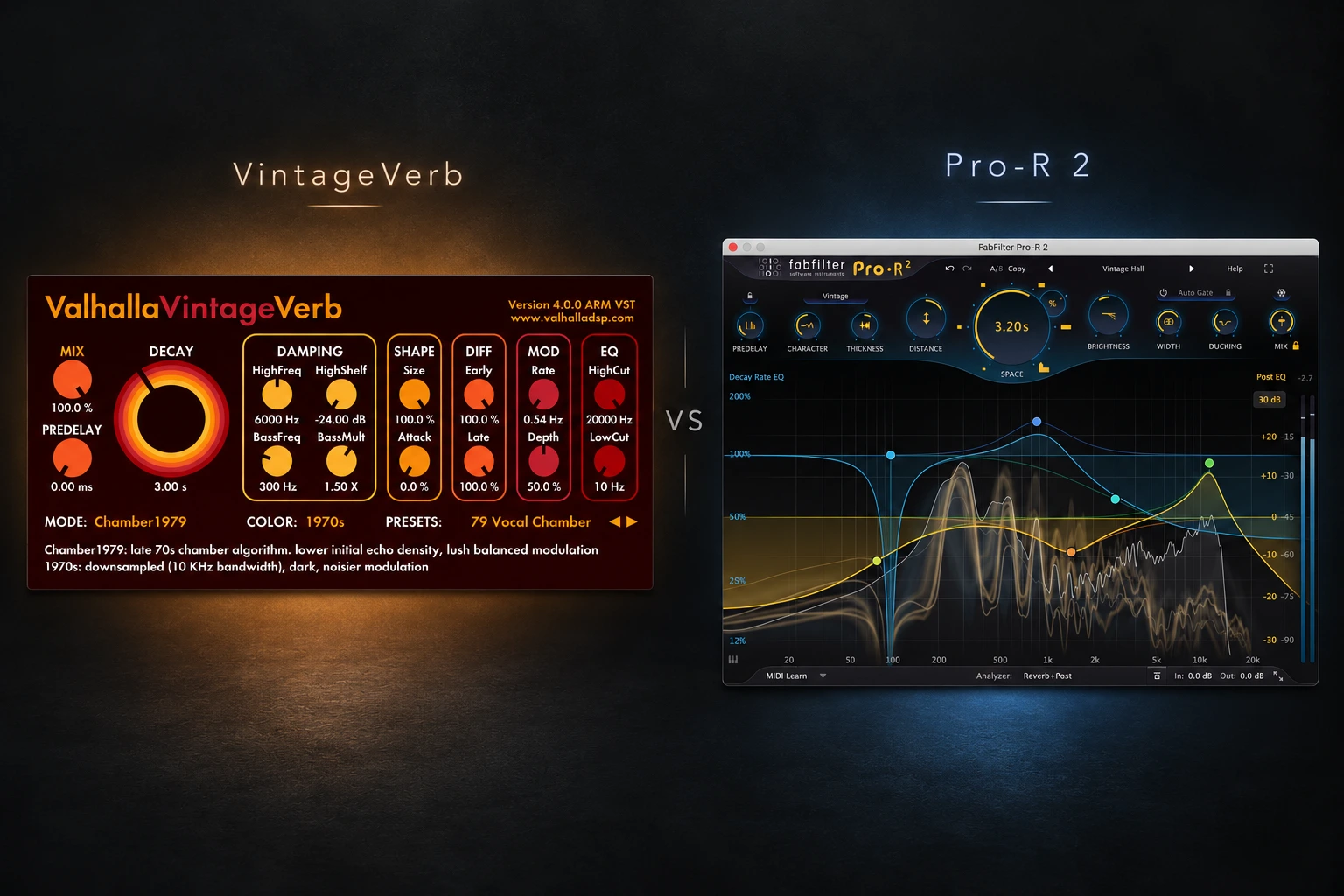

A reverb can sound impressive on its own and still make a finished track harder to mix. Valhalla VintageVerb and FabFilter Pro-R 2 both cover a wide range of spaces, but they encourage different ways of working. VintageVerb is our first choice for exploring reverb character through different algorithms and colour settings. Pro-R 2 is the stronger fit when you want detailed control over how the tail decays across the frequency spectrum, plus built-in ducking.
The decision is not simply vintage versus modern. Pro-R 2 has Vintage and Plate styles, while VintageVerb can produce clear, contemporary spaces. This comparison focuses on the documented controls and practical buying choices; it does not present a controlled listening test or CPU benchmark.
VintageVerb vs Pro-R 2: quick comparison
| Feature | VintageVerb | Pro-R 2 |
|---|---|---|
| Starting point | Choose a reverb mode and Color | Choose a style and shape Space |
| Reverb types | Halls, plates, rooms, chambers and more | Modern, Vintage and Plate styles |
| Tail shaping | Damping, shape, diffusion and modulation controls | Frequency-specific Decay Rate EQ |
| Output tone | High-cut and low-cut controls | Six-band Post EQ |
| Vocal ducking | Use a separate ducking setup | Integrated Ducking control |
| Our buying focus | Algorithm character and hands-on tweaking | Detailed tail shaping and mix integration |
Why choose Valhalla VintageVerb?
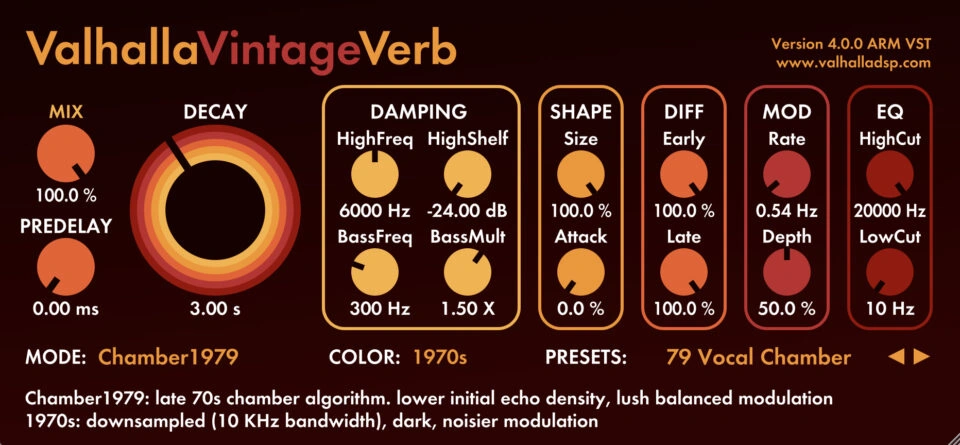
VintageVerb offers 22 reverb modes and three Colors: 1970s, 1980s and Now. Its modes include different halls, plates, rooms and chambers, alongside more unusual options. Mode chooses the algorithm; Color is another part of its sound design, rather than just a theme for the interface.
The main controls cover decay, predelay, damping, shape, diffusion, modulation and output filtering. You can start with a mode that suggests the space you want, then change how the tail builds, moves and fades.
We would choose this approach if browsing different reverb characters is part of the creative process. It gives you a clear way to compare alternatives before spending time on smaller adjustments. You do not need to understand every control before deciding whether an algorithm suits the track.
Why choose FabFilter Pro-R 2?
Pro-R 2 combines Modern, Vintage and Plate styles with a Space control, Decay Rate EQ and Post EQ. It also includes Ducking, Thickness, Auto Gate and Freeze, plus surround and immersive-audio support.
The useful distinction for everyday mixing is the separation between the reverb's decay behaviour and its output tone. You can shorten the tail in one frequency area without shortening everything, then use a separate EQ curve to adjust the final reverb signal.
We would trial Pro-R 2 first if you regularly like the overall space but struggle to make one area of its tail fit. Its visual editing is especially relevant when you prefer shaping a response directly over switching between algorithms.
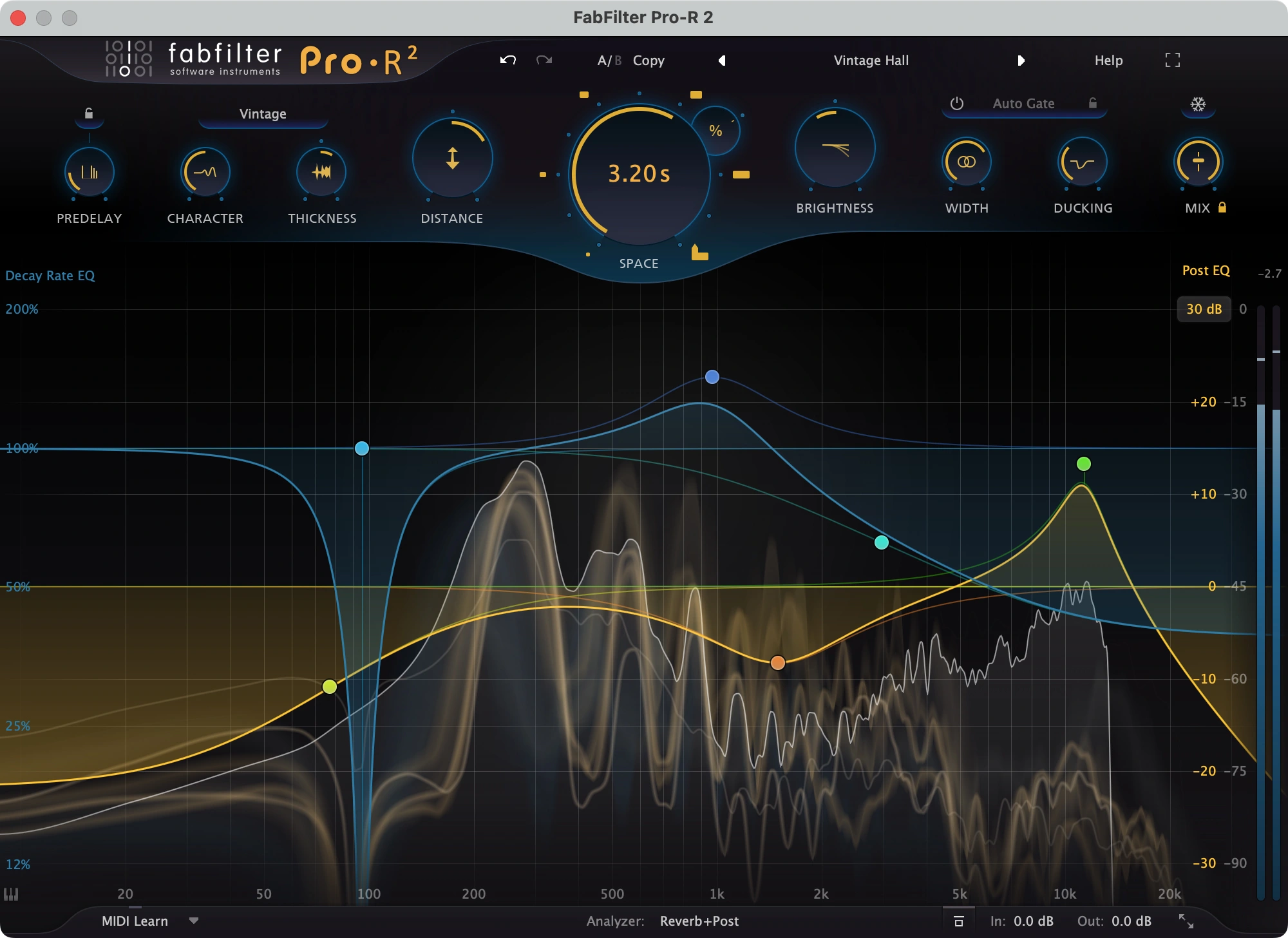
Decay Rate EQ is different from EQ after a reverb
This is the Pro-R 2 feature we would pay particular attention to during a trial. Decay Rate EQ changes how long different frequencies remain in the tail. Post EQ changes the tonal balance of the final reverb output.
For example, imagine a long hall that feels right above the vocal but leaves too much low-mid energy hanging between phrases. An output EQ cut can reduce that energy. Shortening the low-mid decay is a different adjustment: that part of the tail stops lingering as long.
Neither approach is automatically better. Try the change that matches the problem you hear, then check the complete mix again. If a simple high-pass filter or shorter overall decay solves it, there is no reason to make a more complicated curve.
VintageVerb also gives you damping and shaping controls, so this is not a choice between having control and having none. Pro-R 2's advantage is the particular way its frequency-specific decay editing is presented.
Vocals: character, clarity and ducking
For a vocal comparison, start with the same phrase and create a similar broad effect in each plugin. Keep the dry vocal unchanged. Compare the amount of reverb you hear, rather than assuming identical knob values create equivalent results.
With VintageVerb, try a plate, chamber or hall that suits the performance. Set the tail length, then adjust predelay and damping while listening to the words. A dark, long tail and a bright, short tail solve different creative problems, so decide which role the effect should have first.
With Pro-R 2, begin with the style and Space setting. Then explore Ducking if the effect covers the lyric. Its ducking follows the plugin's input, allowing the reverb to move back during active input and become more apparent in the gaps.
VintageVerb can be placed in a separate reverb-return chain with a sidechain compressor after it when you want a comparable ducking technique. That takes more routing than a built-in control, but it may already be part of your template. Our FL Studio sidechain guide explains the trigger-and-target relationship behind that setup.
Our choice: VintageVerb when finding a particular reverb character is the priority; Pro-R 2 when integrated ducking and detailed tail editing are recurring needs. For the wider balance, see how to make vocals sit in the mix.
Drums: check the groove after the tail
A useful drum trial includes both isolated hits and a full pattern. The tail after a snare may sound exciting alone but become too dense when every hit contributes to it.
With VintageVerb, compare a short room or plate before trying a larger hall. Listen to the build-up after the initial hit as well as the final decay. Use the same loop when comparing modes so the rhythm stays familiar.
With Pro-R 2, try the Plate or Modern style, then check whether decay shaping helps keep the lower part of the tail from crowding the pattern. Auto Gate is another documented option worth exploring for deliberately cut-off effects.
Do not make the purchase decision from the biggest preset. Check the backbeat, hat detail and low-end space at the return level you would actually use in a track.
Our choice: audition VintageVerb for the range of algorithm characters; audition Pro-R 2 if frequency-specific decay or a built-in gate addresses your mixing problem.
Ambient and synths: listen through the chord change
For ambient material, a longer audition tells you more than one impressive chord. Play a progression, stop the source and listen to what remains. Then hear how the previous tail interacts with the next chord.
VintageVerb's hall, cathedral and modulated modes give you several directions to explore. Pro-R 2 also supports large spaces and includes Freeze for sustained reverb textures. Both deserve a trial if long tails are central to your production.
Our test would be to create one spacious pad and one shorter contrasting texture. Check whether the reverb adds movement you enjoy without washing away the harmony. If everything becomes equally distant, changing the send level or arrangement may help more than choosing another reverb.
For another ambient-focused option, read our Eventide Blackhole review. You may prefer a dedicated creative effect to a general mixing reverb, depending on the job.
How to compare them fairly in your DAW
- Use the same source. Pick one vocal phrase, one drum loop and one sustained instrument part.
- Set up separate returns. For a conventional send-effect comparison, set each reverb's Mix to fully wet and compare one return at a time.
- Match the broad effect. Bring the apparent tail length and wet level reasonably close before judging smaller differences.
- Change one thing at a time. Separate decisions about tone, timing and modulation.
- Listen in the full arrangement. Include gaps, transitions and the busiest passage.
- Save the useful results. Compare the settings you would keep, not just the factory presets that first caught your attention.
If the reverb adds too much density, try less send level, a shorter tail or a more suitable tone before replacing the plugin. Our muddy mix guide covers the wider sources of low-mid buildup.
Price, trials and existing owners
Check VintageVerb's current price and demo on Valhalla DSP's official website. For Pro-R 2, compare the full licence at Plugin Boutique or FabFilter, and check whether an existing-owner offer applies to you. An upgrade listing is not a full licence for a new buyer.
The useful value question is how often the extra workflow solves something your current tools make awkward. If you already have reverb, EQ and a sidechain compressor, you can cover many mixing situations. Pro-R 2 may bring those decisions into a more convenient interface.
We would not buy both immediately. Start with the one whose workflow matches your main task, then identify a genuine gap before adding another. We also cannot name a CPU winner without testing the same workload on the same system; use the demos in your own projects if performance is a deciding factor.
SoundShaper opinion
We would start with VintageVerb when the main goal is finding a reverb character that inspires the track. Its mode-and-Color approach gives you a direct way to explore different directions and then refine the result.
We would choose Pro-R 2 when a detailed mixing workflow matters more: shaping different parts of the decay, adjusting output EQ and keeping a vocal clear with integrated ducking. Those are concrete reasons to prefer its approach beyond the appearance of the interface.
Neither choice needs to replace the other in every session. A producer can prefer VintageVerb for one creative space and Pro-R 2 for a more specific adjustment. Buy the one that repeatedly helps you finish the job you actually do.
Frequently asked questions
Is Pro-R 2 only for clean, realistic reverb?
No. It also includes Vintage and Plate styles. Its appeal is not limited to natural room simulation.
Can VintageVerb work on modern pop vocals?
Yes. Its name describes its inspiration, not a restriction on genre. Try a suitable mode, tail length, predelay and return level in the actual arrangement.
Does Decay Rate EQ replace normal EQ?
No. It changes how the tail decays at different frequencies. Output EQ changes the tonal balance of the reverb signal. They address related but different decisions.
Conclusion
Choose VintageVerb for a character-focused workflow built around different reverb algorithms and Colors. Choose Pro-R 2 for visual decay shaping, integrated output EQ and ducking.
Try both on the same material, compare them in context and keep the effect at a useful level. The better purchase is the one whose controls help you reach the space your track needs.
Sources
Features checked on 24 October 2026 against the official VintageVerb page, Valhalla's VintageVerb 4.0 update notes, the Pro-R 2 product page, and FabFilter's main controls, Decay Rate EQ and Post EQ documentation. Screenshots: Valhalla DSP and FabFilter. The pictured settings illustrate the interfaces, not matching presets or a listening comparison.
![[background image] image of recording equipment (for a musician & band)](https://cdn.prod.website-files.com/68efa70811edd8e5af30a90d/6adbdd6f7d47fb086e52b147_6adbdd4e3cb3e94d421e55da_how-to-fix-harsh-vocals.webp)
![[background image] image of recording equipment (for a musician & band)](https://cdn.prod.website-files.com/68efa70811edd8e5af30a90d/6adbd8f9d34e0624a55714e1_6adbd8e12694d8b251e72784_decapitator-vs-saturn-2-corrected.webp)