
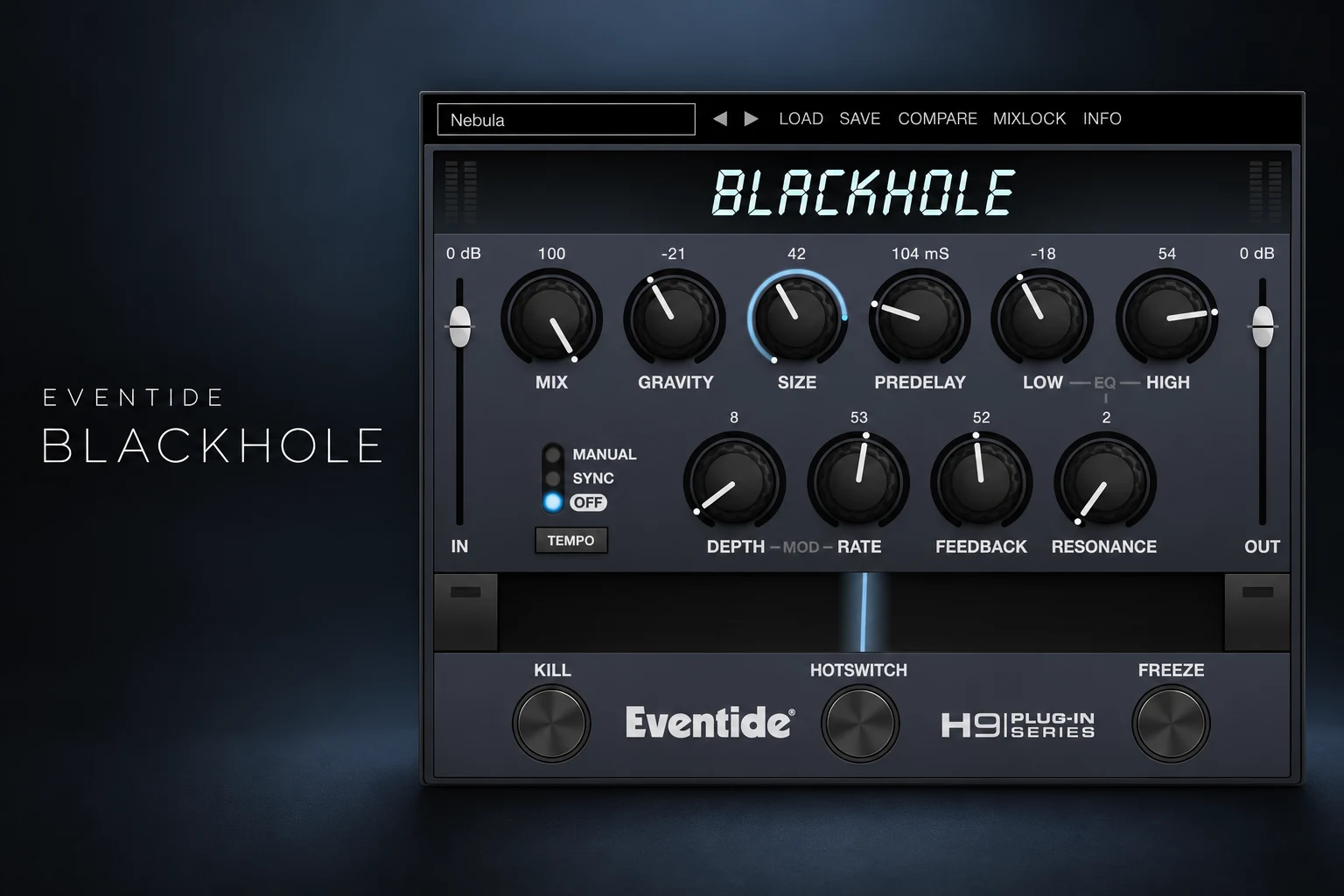

Eventide Blackhole is worth considering if you want reverb to become part of the composition. Its strongest reason to join your setup is creating sustained backgrounds, unusual swells and transitions from a simple instrument or vocal source.
For everyday room placement, start with the reverb you already know. Blackhole becomes a more interesting purchase when you want to explore the shape and movement of the tail itself.
This review covers the standard desktop Blackhole plugin, including Gravity, Freeze and its performance controls. Our assessment uses Eventide's product information and user guide; we have not conducted a hands-on listening test.
What is Eventide Blackhole?
Blackhole is an algorithmic reverb with roots in Eventide's hardware processors. Eventide positions it for both large, unusual spaces and more restrained ambience. Its mono and stereo options make it relevant to normal music sessions, without requiring a surround setup.
The practical appeal is the chance to turn a short event into a longer musical part. A guitar note can feed a background texture; a chord can establish the atmosphere before the drums arrive. Whether that helps depends on the notes, timing and arrangement you feed into it.
Think of the effect return as another part to arrange. Decide when it enters, what harmony it carries and when it needs to disappear. That approach gives a large reverb a clearer purpose than simply making every sound feel bigger.
Is it a good fit for your music?
| Your work | Where we would audition it | Main decision |
|---|---|---|
| Ambient and film cues | Sustained drones, sparse piano and evolving backgrounds. | Does the tail add movement without obscuring the harmony? |
| Post-rock and guitar music | Held notes, swells and transitions between sections. | Can the original performance remain expressive? |
| Electronic production | Breakdowns and a separate atmosphere around a synth. | Does the return leave room when the groove resumes? |
| Pop and R&B | Selected vocal moments or an intro texture. | Does it support the lyric and the next phrase? |
| Natural acoustic mixes | Occasional creative accents. | Would a familiar room or plate do the everyday job more directly? |
Gravity: more useful than the name suggests
Gravity handles Blackhole's decay behaviour. Its positive range provides forward reverb; its negative range produces an inverse, reverse-reverb-like response. Size adjusts the virtual space.
Audition those controls separately. Hold Size steady, compare a few Gravity positions and listen to how the tail develops after a short sound. Then change Size while keeping the behaviour you preferred. You will learn more from those small comparisons than from moving every knob at once.
Inverse behaviour is worth trying on a sound that needs a sense of swelling movement. Do not assume it places a reverse effect before the original note. If you specifically need a swell leading into a downbeat, print the result and arrange the audio around that destination.
For a piano part, listen through the next chord rather than stopping after the first impressive tail. Reverb can make a single chord seem complete while creating a harmonic clash once the progression moves on.
Freeze vs Infinite: an important difference
The manual distinguishes two ways of sustaining the effect. Infinite feedback continues to accept incoming audio, while Freeze holds the existing reverb and prevents new input from entering it. The Freeze button also sets the relevant feedback and modulation state.
That distinction matters musically. Use a frozen texture when you want a stable background to play over. Explore the infinite setting when you want incoming material to keep contributing. For infinite duration through the Feedback control, the manual specifies setting either modulation Depth or Rate to zero.
Start at a comfortable return level and watch the output as you experiment. A texture that stays present for a long time needs its own space in the arrangement. Judge it with the bass and lead playing, rather than only through headphones in solo.
Make a drone from one short chord
This is the first exercise we would use in the demo. Choose a chord that belongs to the section where the drone will play.
1. Create an effects return. Send a piano, synth or guitar to Blackhole and set its Mix fully wet.
2. Feed it a short chord. Leave silence afterwards so you can hear the tail clearly.
3. Shape the response. Adjust Gravity and Size until the texture has a useful shape. Keep the return quiet enough to judge comfortably.
4. Engage Freeze at a useful moment. Listen to what is held, then repeat the capture if the texture is too dense or uneven.
5. Record the wet return. Capture enough material to arrange a separate audio layer.
6. Give it an ending. Fade or edit the print before a conflicting chord or a section that needs more impact.
For an electronic breakdown, try introducing the printed drone before the lead returns. Reduce it as the drums re-enter. The contrast between the open section and the focused groove may be more effective than leaving the atmosphere equally loud throughout.
For guitar music, preserve a dry performance alongside the effect. That lets you decide whether the part needs a clear attack, a background wash or a transition between the two.
Ribbon and Hotswitch: treat the effect as a performance
The Ribbon morphs between programmed settings for several controls. Hotswitch jumps between two configurations. These give you ways to shape an effect across a phrase.
Start by changing only two parameters between the endpoints. A restrained opening state and a larger closing state are easier to evaluate than two unrelated extremes. Move between them while the track plays, then decide whether the change builds the section or distracts from it.
Our suggested experiment is an eight-bar transition. Keep the original instrument steady and let the effect develop over the final two bars. Compare that version with a simple return-volume fade. If the simpler move communicates the transition better, use it.
Blackhole vs Blackhole Immersive
Check which product you are buying. This review and its purchase buttons refer to the standard Blackhole plugin.
Blackhole Immersive is a separate product designed for surround and immersive workflows, including Dolby Atmos. Eventide also added mono and stereo support to Immersive, so the distinction is broader than whether it can load on a stereo track.
For a normal stereo song, begin by auditioning the standard version. If your work involves multichannel delivery, compare Immersive's routing and channel controls against your required format. Do not choose an edition from the name alone, and check the exact licence included in any bundle you own.
Do you need another creative reverb?
If you want echoes and reverb together, our Baby Audio Spaced Out review explores that combined workflow. If you want to reshape audio through granular processing, see our Output Portal review.
For this purchase, the useful comparison is your current route to a sustained atmosphere. Can your existing reverb hold a texture you like? Can you print and arrange a tail that already works? Try those options before deciding that a new processor is necessary.
Blackhole earns its place if the demo helps you create backgrounds or transitions you keep using. A folder full of impressive experiments is less valuable than one finished arrangement that benefits from the effect.
Price, demo and system requirements
On 18 October 2026, the Plugin Boutique listing displayed $53.90 against a displayed regular price of $108.90, with a promotion listed until 1 November. This is a dated price reference, not a guaranteed offer. Currency, tax and location affect the checkout amount.
Eventide offers a 14-day demo. The desktop product page lists Windows 10 or later and macOS 10.14 or later, with Intel and Apple Silicon support on Mac. Formats include VST2, VST3 and AAX, plus AU on Mac.
An iLok account is required, but a physical dongle is not. Eventide names FL Studio among its tested hosts. Use the demo to check your exact system and normal session load; we have no measured CPU or latency results for this assessment.
SoundShaper opinion
We would shortlist Blackhole for producers who compose with reverb tails. Gravity, Freeze and the performance controls give you several concrete things to explore beyond choosing another ambience preset.
We would make the purchase depend on a finished musical example: one drone, guitar layer or transition that works in context. For a producer who mainly needs subtle room placement, the case is weaker unless the demo reveals a result their current tools do not provide easily.
Frequently asked questions
Is Blackhole only for huge reverb?
Eventide describes both restrained and extreme uses. Audition the smaller settings too, especially if your arrangements are already dense.
Does Freeze keep recording new notes?
Freeze stops new audio from entering the held reverb. Infinite feedback is the different setting to explore when you want new material to continue contributing.
Is Blackhole Immersive included?
The standard product listing is a separate purchase. Check the exact bundle or licence description before assuming another edition is included.
Conclusion
Blackhole deserves a demo when you want sustained textures and expressive reverb transitions. Feed it useful musical material, shape the tail and arrange the result with a clear beginning and ending. Buy it when those experiments become parts you want in your tracks.
Sources: Eventide Blackhole product information, Blackhole user guide, Eventide's Immersive update documentation and the Plugin Boutique listing. Details checked 18 October 2026.
![[background image] image of recording equipment (for a musician & band)](https://cdn.prod.website-files.com/68efa70811edd8e5af30a90d/6ad5421eaf14ef1dbac4dfa8_TAIP%20Review.webp)
![[background image] image of recording equipment (for a musician & band)](https://cdn.prod.website-files.com/68efa70811edd8e5af30a90d/6ad5413cb1504db30162273f_Phoscyon%202%20Review.webp)
![[background image] image of recording equipment (for a musician & band)](https://cdn.prod.website-files.com/68efa70811edd8e5af30a90d/6ad5403dd747f3fbbe4286ab_Chordjam%20Review.png)