
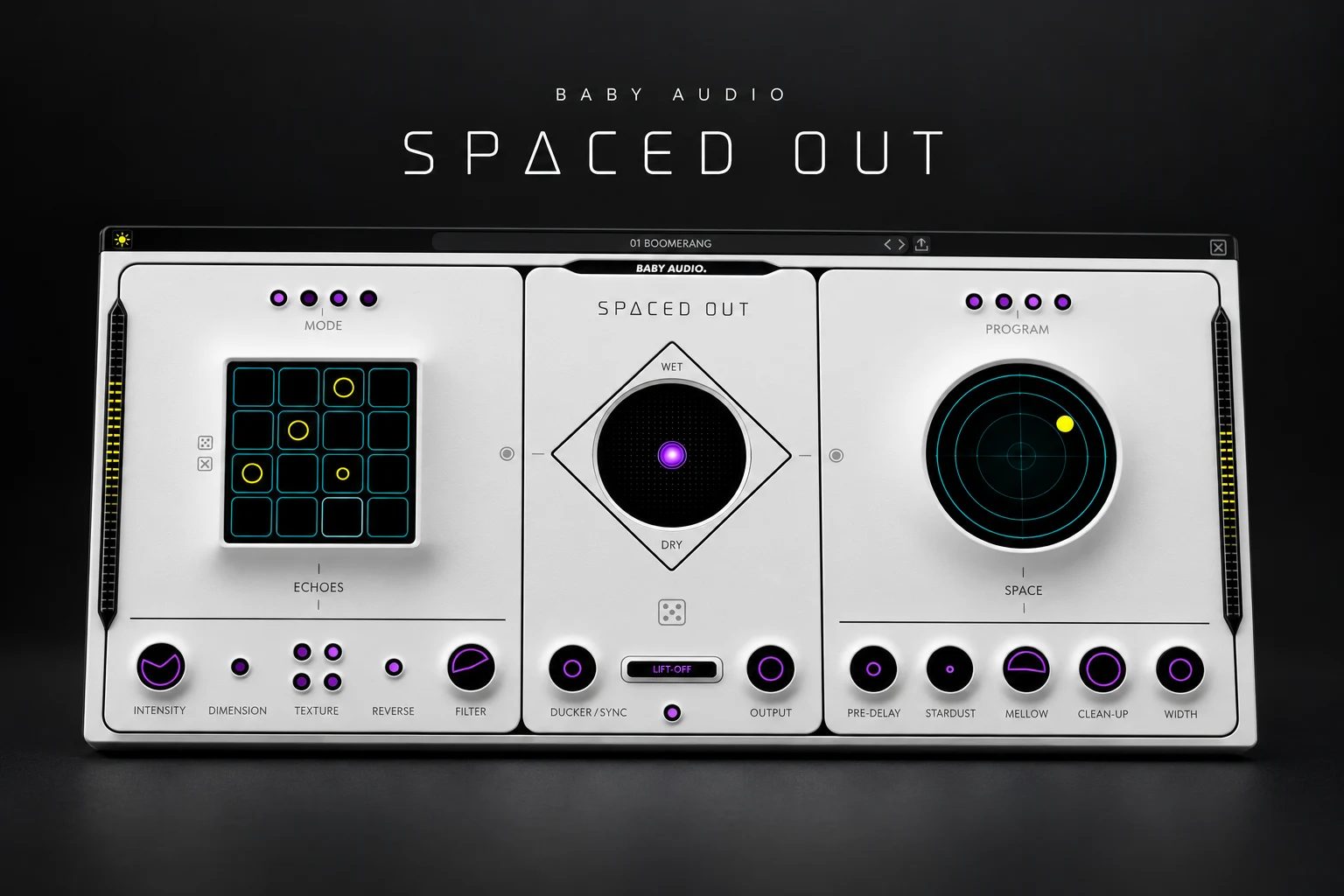

Baby Audio Spaced Out is worth considering if you want rhythmic echoes and spacious, moving effects in a single creative workflow. Its strongest use case is turning a vocal phrase, simple synth or guitar part into something that contributes atmosphere and rhythm to the arrangement.
If you only need a short room or a straightforward repeat, your existing effects may already do the job. The buying question is whether Spaced Out helps you create interesting combinations faster.
This review explains its approach, suggests practical ways to audition it and helps you decide where it fits beside other effects. This is a documentation-based assessment, not a hands-on listening test.
What does Spaced Out actually do?
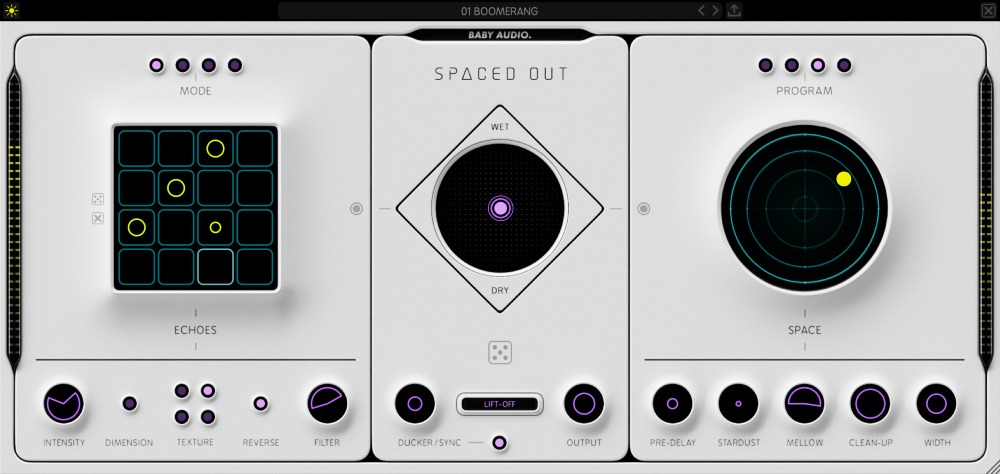
Spaced Out combines delay, reverb and modulation. Its Echoes section has a tempo-synced 16-step sequencer, while Space handles the reverb. A central XY control blends the two effects and the wet/dry balance.
That layout encourages you to shape a complete effect rather than build a chain one plugin at a time. The attraction is especially clear when the effect becomes part of the hook: a vocal repeat answering the singer, or a sustained atmosphere filling a gap between notes.
Baby Audio also provides a Generate randomizer. We would use it to find a direction, then edit the result around the song. An unexpected setting can start an idea, but the arrangement should decide whether you keep it.
Who is it best suited to?
| Production style | Where we would try it | What to watch |
|---|---|---|
| Ambient and cinematic | Turning sparse notes into a moving background. | Long tails can hide chord changes. |
| Alternative R&B and pop | Vocal throws, ad-libs and spaces between phrases. | Keep the main lyric easy to understand. |
| House and electronic | Rhythmic echoes on stabs, plucks and percussion. | Repeats should support the groove. |
| Trap and hip-hop | A separate atmospheric layer around a lead or sample. | Protect the kick, bass and vocal focus. |
| Dry acoustic recordings | Occasional creative treatments. | Try a simpler reverb first for natural room placement. |
The delay sequencer is the first feature to explore
A normal delay can provide all the rhythm a part needs. A sequenced approach becomes useful when you want a more deliberate reply to the original performance.
Start with a short, clearly phrased sound. Create a sparse pattern and play it against the drums. Leave enough silence to hear the relationship between the original note and its echoes. Adding more steps is easy; finding the few that make the groove better is the interesting part.
The listed timing modes include Straight, 2x, Dotted and Triplet. Texture options include Clean, Wonky Tape, Lofi and Hazy, alongside reverse playback and filtering. Compare these after the rhythm works, so you can tell whether you prefer the pattern or just the change in tone.
For a busy lead, audition the effect in a section where the next phrase arrives quickly. A repeat that sounds impressive on its own can become an unwanted second melody when the singer returns.
Building a vocal throw without washing out the verse
Our suggested first demo project is a single vocal throw at the end of a line. It makes the timing and clarity of the effect easy to judge.
1. Create a separate effects return. Route a send from the vocal and set the return to fully wet. Confirm that the original vocal is still coming through its normal route.
2. Choose one phrase ending. Automate the send so only the intended word or short phrase feeds the effect.
3. Shape the echoes first. Find a simple pattern that leaves space for the next line.
4. Introduce the reverb. Add enough space to connect the repeats without blurring their rhythm.
5. Balance the return in context. Listen with the beat playing, then check the next vocal entrance.
Spaced Out includes a ducker that reduces the wet signal while the dry signal plays. That is worth exploring when an effect competes with the original performance. It does not decide which words deserve a throw; send automation still gives you direct control over that musical choice.
Do not feel obliged to process the lead throughout the entire song. One well-placed effect in the transition to the chorus may contribute more than a constant wash behind every word.
Using Space on synths and guitars
The reverb side uses a circular control for changing length and modulation behaviour, with four space programs. Stardust adds shimmer, and other controls address predelay, tone, density and width.
We would audition it on a part with room around the notes: a slow guitar figure, electric piano chords or a simple synth pluck. First ask what the track is missing. Is the part too exposed, does the transition feel empty, or would a repeating atmosphere create a useful connection between sections?
For a pad-like layer, try recording the effect return to audio. Keep the original instrument available, then arrange the printed texture as a separate part. You can trim its beginning, fade the end and leave deliberate gaps instead of letting a long tail run through every change.
Check the last chord before a new section. A beautiful sustained effect can carry the previous harmony into the next one. Shortening or editing the tail may solve the problem more directly than adding another processor.
Spaced Out vs EchoBoy, Portal and stock effects
Choose based on the kind of result you keep trying to make. Buying another effect makes more sense when its workflow fills a recurring gap.
For a purchase centred on delay, read our Soundtoys EchoBoy review. For granular transformations, our Output Portal review covers a different creative direction. Spaced Out belongs on your shortlist when the combined echo-and-space workflow is the main attraction.
Already own a capable delay and reverb? Build a return with those first. Try a few rhythmic repeats, filter the result and add a reverb after the delay. You may reach a sound that serves the song perfectly. Compare how easily you can reshape that chain against the Spaced Out demo.
For a limited budget, our best free delay plugins guide offers other starting points. Spend money when the new workflow helps you finish parts, rather than simply giving you another collection of presets to browse.
Price, trial and compatibility
Plugin Boutique displayed €88.26 when checked on 18 October 2026. Currency, taxes and promotions may change that amount, so check the price shown for your location.
Baby Audio's downloads page lists Spaced Out v1.7 and offers installers that run in trial mode until activated. Use the trial on a real session before purchasing, and check its current restrictions before planning an export.
The product page lists 64-bit VST, VST3, AU and AAX formats, Windows 10 or newer, and macOS 10.11 or newer with native Apple Silicon support. FL Studio is among the named supported hosts. Check your exact operating system and host version against current guidance.
During the trial, test several instances in your normal project and save, close and reopen it. We have no measured CPU figures for this review; the useful performance check is whether your own session remains comfortable to work in.
SoundShaper opinion
We would try Spaced Out for a producer who repeatedly builds elaborate vocal throws or atmospheric synth returns. The combination of a visible echo pattern and an integrated space section gives the purchase a specific purpose.
We would be less eager to buy it for routine room ambience or simple delay duties. Start with a finished musical idea and compare the demo against your usual chain. Keep the option that gets you to an effect you want to use with less interruption.
Frequently asked questions
Is Spaced Out a reverb or a delay?
It combines both, with modulation and a mixer that blends their contribution. Evaluate the combined workflow as well as either effect in isolation.
Can I use it for vocals in FL Studio?
Baby Audio lists FL Studio as a supported host. Try a separate effects return and automate the send for selected phrases.
Do I need it if I already own good effects?
Only if the demo reveals a useful advantage for your work. Existing tools remain a sensible choice when they already make the sounds you need.
Conclusion
Spaced Out is worth a demo for rhythmic echoes, vocal throws and atmospheric layers. Test it on a sparse source and in a busy arrangement. If its combined workflow helps you shape effects that improve the song, it has a clear place in your setup.
Sources: Baby Audio product information, official downloads and version listing and the Plugin Boutique product listing. Details checked 18 October 2026.
![[background image] image of recording equipment (for a musician & band)](https://cdn.prod.website-files.com/68efa70811edd8e5af30a90d/6ad5421eaf14ef1dbac4dfa8_TAIP%20Review.webp)
![[background image] image of recording equipment (for a musician & band)](https://cdn.prod.website-files.com/68efa70811edd8e5af30a90d/6ad5413cb1504db30162273f_Phoscyon%202%20Review.webp)
![[background image] image of recording equipment (for a musician & band)](https://cdn.prod.website-files.com/68efa70811edd8e5af30a90d/6ad5403dd747f3fbbe4286ab_Chordjam%20Review.png)