
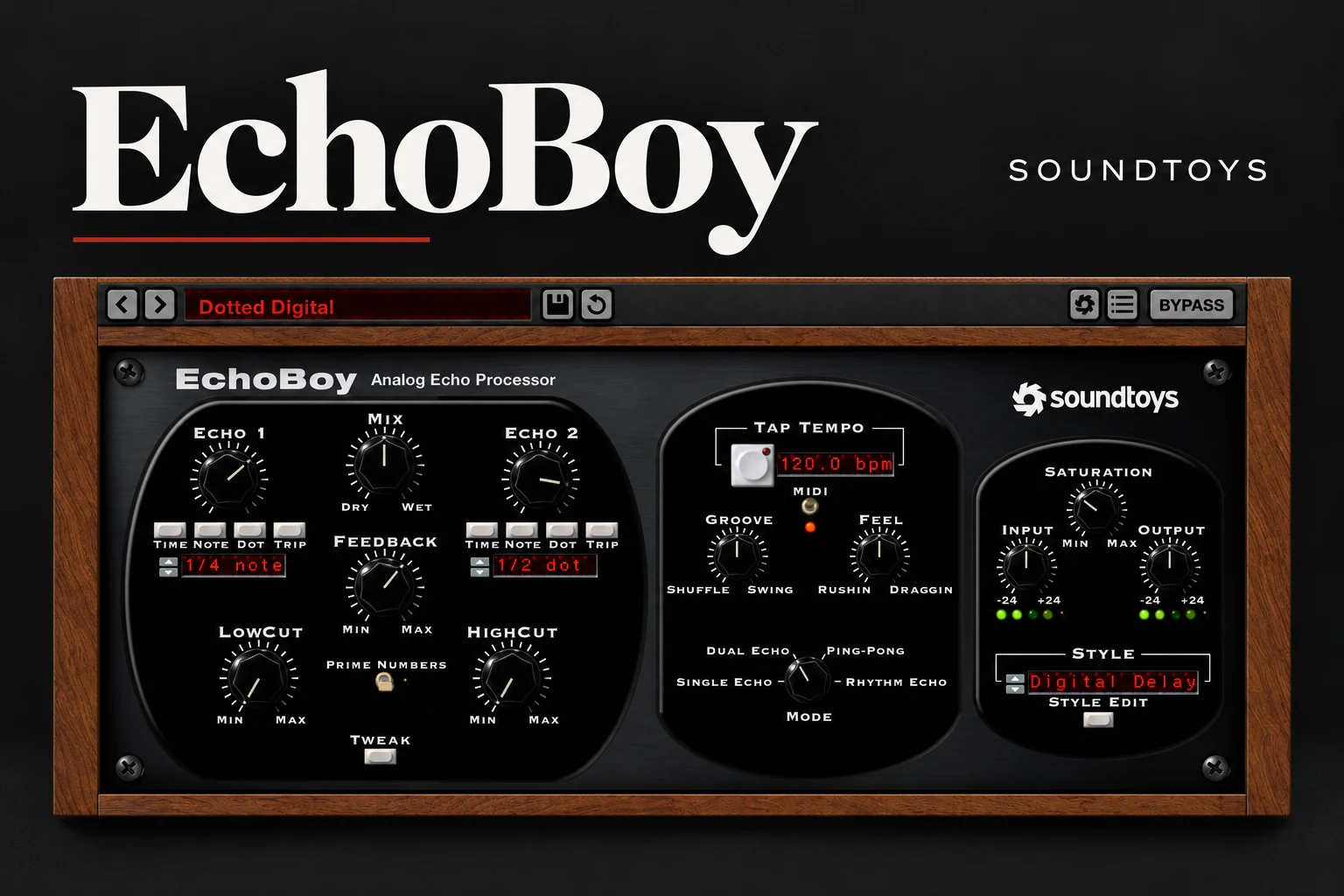

EchoBoy is still worth considering if delay is an important part of your vocal sound or songwriting. Its appeal is the combination of echo character and rhythmic control: choose a style, shape the repeats and decide how they sit around the beat. We would shortlist it for pop, R&B, hip-hop and creative electronic production. For occasional, clean repeats, your existing delay may already cover the job.
The useful question is not whether EchoBoy can add an echo. It is whether its workflow helps you create a more convincing part. This review explains what to audition before buying.
What makes EchoBoy different from a basic delay?
Soundtoys provides 30 echo styles, including tape, analog-pedal and digital-inspired options. EchoBoy also has Single Echo, Dual Echo, Ping-Pong and Rhythm Echo modes. The last of these supports patterns with up to 16 taps.
Its Groove and Feel controls move beyond choosing a note value: you can introduce shuffle or swing, or make echoes rush or drag against the beat. The Style Editor adds deeper control over saturation, wobble and diffusion.
Our reason to consider it is that timing and texture can be part of the same musical decision. A perfectly spaced, bright repeat and a darker echo that sits slightly behind the beat can suggest very different moods, even when both start from the same vocal.
Choose the delay job before the preset
These are SoundShaper starting suggestions, not tested presets or universal settings. Adjust them to the tempo, performance and space in your song.
How we would build a vocal delay
Start on a send
Create a delay return, insert EchoBoy and set Mix to fully wet. Feed the vocal into that return with a send, keeping the original vocal on its own channel. This makes it easier to adjust or automate the echo level independently.
If you insert EchoBoy directly on the vocal instead, use its Mix control to balance the original and delayed signals. A fully wet setting on the only vocal path would remove the direct vocal from that path.
Find a repeat that fits the gap
Loop a complete phrase, including the start of the next line. Begin with a simple synced timing and low Feedback. Bring up the send until the echo is obvious, then reduce it until the lead feels clear again.
Do not judge the tail only during silence. A delay that sounds beautiful after one word may cover the first syllable of the following line. Shorten it, reduce the repeats or automate the send if that happens.
Choose character after timing
Once the rhythm works, compare a cleaner style with a more colored one. Decide whether the echo should sound like a clear answer to the singer or sit further behind the performance. Try reducing unnecessary low end and brightness rather than immediately turning the return down.
SoundShaper advice: for an intimate R&B verse, audition a restrained, darker repeat. For an indie vocal that needs a more obvious personality, try a short slap. Let the arrangement decide how noticeable the effect should be.
Use throws for selected words
A delay throw sends a chosen word or phrase into the effect. Automate the send up for that moment, then return it to its earlier level while allowing the existing echo to decay.
This is a strong option for rap and pop when a constant delay makes the verse too busy. Start with the last word of a line and listen to the reply it creates. If there is no gap for it, choose a different word or leave the throw out.
Groove, Feel and Rhythm Echo: who benefits?
If a delay only needs to underline the tempo, stay with a simple mode. The deeper timing controls become more interesting when the repeats are almost a second musical part.
For house or funk-influenced production, audition a little swing against the actual drums. For a slower hip-hop track, compare a repeat that sits behind the beat with a strictly timed one. Make one small change at a time so you know whether it helps.
Rhythm Echo is worth exploring for sparse plucks, percussion and sound-design passages. Begin with only a few taps. If you build an elaborate pattern before the song has room for it, the delay can become another arrangement problem.
EchoBoy vs EchoBoy Jr.
EchoBoy Jr. is the streamlined sibling, with seven echo styles and Normal, Wide and Ping-Pong operation. Soundtoys currently lists it as included with EchoBoy and the Soundtoys 5 bundle, rather than sold individually.
Our advice is to use Jr. when you want a quick character delay with fewer decisions. Open the full EchoBoy when the extra echo modes, style editing or rhythmic detail are part of the goal. More controls are useful only when they help the song move forward.
Is it an upgrade over Fruity Delay 3?
FL Studio's Fruity Delay 3 already offers tempo sync, filtering, distortion, modulation and diffusion. It also supports mono, stereo and ping-pong delay models. EchoBoy should therefore earn its place through the way you use its styles and timing controls, not through a claim that stock delay is incapable of character.
Before buying, make one vocal throw, one short slap and one synth echo in your existing delay. Then try the same jobs in EchoBoy. Compare the finished parts in the song and notice how quickly you reach something you would keep.
For a tighter budget, our free delay plugin guide is a better starting point than buying a premium effect simply to follow a familiar name.
Where EchoBoy may be the wrong purchase
Also keep Feedback under control while experimenting. EchoBoy can self-oscillate at high settings, with a substantial rise in level. Start quietly and lower Feedback if the repeats keep building.
Price, trial and system support
As checked on 18 October 2026, Soundtoys lists EchoBoy at $199. It is also available on Plugin Boutique. Compare the current local checkout price and any applicable bundle or account offer before buying; promotions and taxes vary.
Soundtoys offers a 30-day collection trial. Its current activation guide allows a trial activation code to be stored on your computer without a physical iLok USB key or a free iLok.com account. Use the current purchase instructions when registering a paid licence.
The current product requirements list macOS 10.15 or later and Windows 10 or later, with 64-bit VST2, VST3, AU and AAX formats. Apple Silicon is supported; ARM-based Windows machines are not. Soundtoys' compatibility guide includes FL Studio 2025.1 or higher.
Check the trial in your exact host, especially if you use an older DAW release. A supported plugin format alone does not guarantee support for every host version.
SoundShaper opinion
EchoBoy makes the strongest case for producers who treat delay as part of the performance. If you regularly build vocal throws, guitar echoes or rhythmic synth parts, its combination of styles and timing options gives you a clear reason to audition it.
We would be less quick to recommend it to someone who only wants a little space behind a vocal. Learn to choose timing, filter the return and automate the send first. Those decisions remain valuable whichever delay you use.
At the standard price, we would want evidence from several of your own songs that the workflow earns its place. If it mainly duplicates results you already reach comfortably, keep the money for a more useful gap in your setup.
Frequently asked questions
Is EchoBoy a reverb?
It is primarily a delay. Some styles and diffusion settings can produce a more spread-out, reverb-like texture, but choose it for the kind of repeats and timing control you need.
Should I use 100% wet on vocals?
Use fully wet on a separate delay return. When EchoBoy sits directly on the vocal track, set Mix to retain the amount of dry vocal you want.
Is EchoBoy Jr. included?
Soundtoys currently lists EchoBoy Jr. as included with EchoBoy. Check the product contents when purchasing or activating your licence.
Can I use EchoBoy in FL Studio?
Yes, on a compatible system. The current Soundtoys support list includes FL Studio 2025.1 or higher. Try it in your own setup before purchasing.
Conclusion
Buy EchoBoy for its echo character and musical timing workflow, once you know those features add value to your songs. It is a strong candidate for vocal-led production and rhythmic sound design. If your stock delay already delivers the parts you want, there is no need to replace it.
Editorial basis: documented product features and practical workflow recommendations; no hands-on listening test is claimed. Sources: EchoBoy product information, user manual, EchoBoy Jr., compatibility, trial guide, Plugin Boutique and Image-Line's Fruity Delay 3 documentation. Product details checked 18 October 2026.
![[background image] image of recording equipment (for a musician & band)](https://cdn.prod.website-files.com/68efa70811edd8e5af30a90d/6ad5421eaf14ef1dbac4dfa8_TAIP%20Review.webp)
![[background image] image of recording equipment (for a musician & band)](https://cdn.prod.website-files.com/68efa70811edd8e5af30a90d/6ad5413cb1504db30162273f_Phoscyon%202%20Review.webp)
![[background image] image of recording equipment (for a musician & band)](https://cdn.prod.website-files.com/68efa70811edd8e5af30a90d/6ad5403dd747f3fbbe4286ab_Chordjam%20Review.png)