
Delay plugins are essential for creating space, depth, and movement in modern musicproduction. This article covers the best free delay options available in 2025, tested forsound quality, CPU efficiency, and real-world workflow. We evaluate each plugin fortracking, mixing, and creative sound design. After reading this guide, you will knowexactly which free delay plugin fits your needs and how to use it effectively in your productions.
Sound quality separates usable delays from great ones. Digital delays offer pristine, transparent repeats that stay clean across multiple feedbacks. Analog and tape emulations add warmth, saturation, and high-frequency rolloff that can make echoes sit naturally in a mix without fighting for space. The best delays give you control over this character through built-in filtering, saturation stages, or modulation that shapes the tone of the repeats.
When evaluating a delay, listen to how the echoes decay—do they stay clear or turn muddy? Does the plugin maintain stereo imaging, or do the repeats collapse to mono? These details determine whether a delay enhances your track or clutters it.
A solid delay needs tempo sync for rhythmic patterns, precise time control in milliseconds for doubling and slapback, and a feedback parameter that can push into self-oscillation without exploding. Wet/dry mix control is non-negotiable, allowing you to blend the effect without printing it to the track. Ping-pong and stereo modes create width and movement. Filters—low-cut, high-cut, and tone shaping—let you carve out frequency space so the delays complement rather than compete with the dry signal. Modulation options like chorus, flutter, and wow add movement and character, turning a simple echo into an evolving texture.
Latency matters during tracking. A delay with high latency will throw off a vocalist’s timing in the headphones, making takes feel sluggish. For mixing, latency is irrelevant, so you can use more CPU-intensive algorithms with longer look-ahead for cleaner results. CPU usage determines how many instances you can run in a project. A lightweight delay can sit on every vocal, synth, and drum bus without choking your system. Preset libraries speed up workflow, offering starting points for common tasks like vocal slapback, dub echo, or rhythmic synth delays. Interface clarity keeps you focused on the music rather than hunting through submenus.
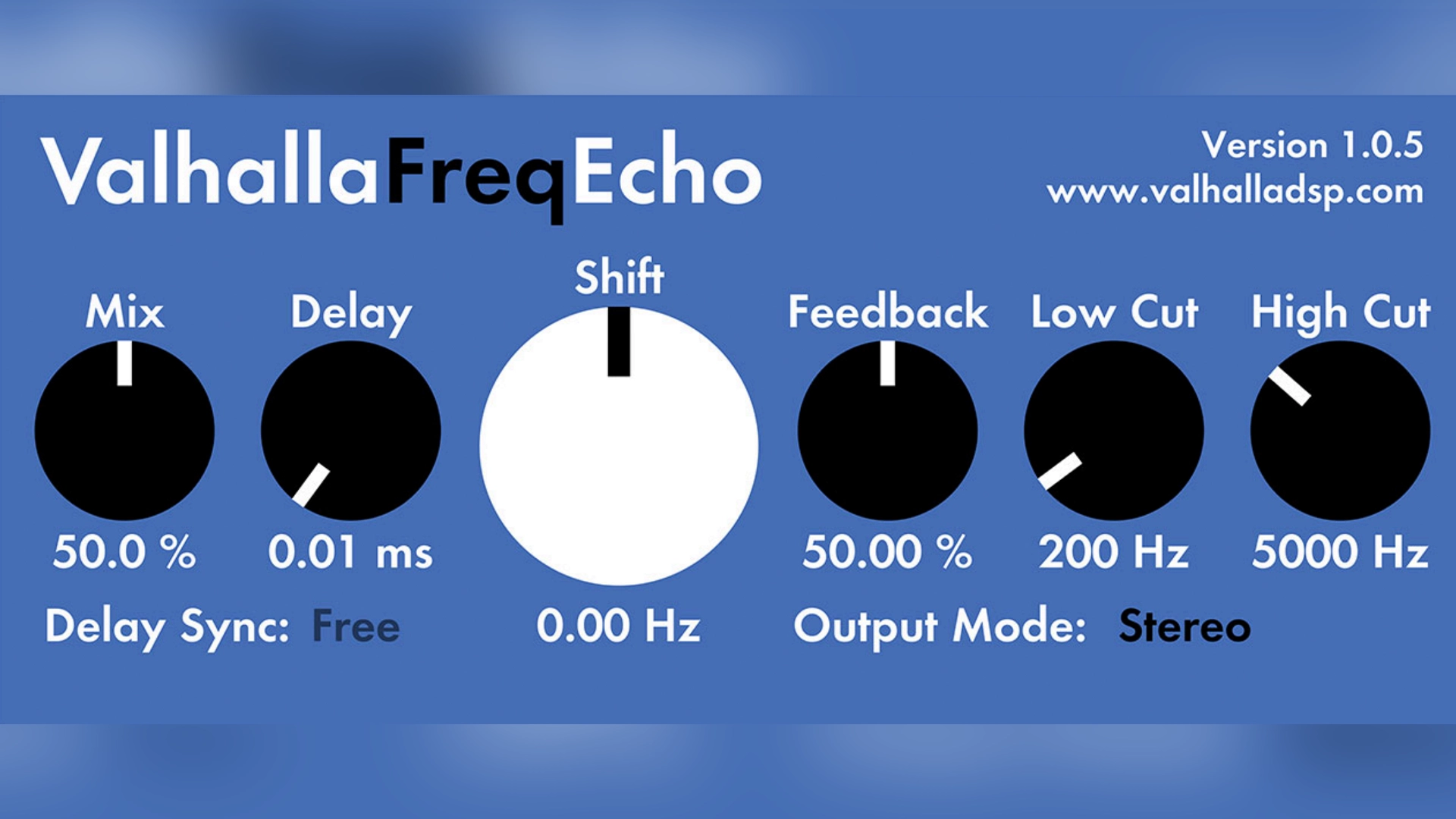
Valhalla Freq Echo is a frequency-shifting delay plugin that combines a Bode-style frequency shifter with analog echo emulation. Unlike standard delays that simply repeat the input signal, Freq Echo shifts the pitch of the echoes up or down, creating effects that range from subtle chorusing and double tracking to wild and evolving soundscapes. The plugin is free, cross-platform, and built by Valhalla DSP, a developer known for high-quality reverb and delay tools.
Valhalla DSP has built a legendary reputation among producers for creating powerful, high-quality reverb and delay plugins with clean interfaces and surprisingly affordable prices. Known for their lush and atmospheric reverbs like Valhalla VintageVerb and Shimmer, their free offering, Freq Echo, is no exception to their standard of quality. It’s a testament to their confidence that they give away a tool this creative and useful.
Freq Echo isn’t your standard delay. It’s a frequency-shifter combined with an analog-style echo. This means that instead of simply repeating the input signal, it can also shift the pitch of the echoes up or down, creating everything from subtle chorusing and phasing to wild, psychedelic glissandos and endless, evolving soundscapes. The core of the plugin is a Bode-style frequency shifter, which provides a smooth, continuous pitch change that sounds distinctly different from traditional pitch shifting.
It’s incredibly versatile. With the delay time set to zero, it functions as a pure frequency shifter for unique phasing and flanging effects. As you increase the delay and feedback, it transforms into a dub-style echo that can self-oscillate in a controlled, musical way. The modulation section, with controls for shift amount and rate, is where the real magic happens, allowing you to create swirling, detuned textures that can bring a static sound to life. The plugin includes delay times up to 4 seconds, non-linear filtering, and alias-free saturation for warmth.
We reach for Valhalla Freq Echo when we want a delay that does more than just repeat. It’s our go-to for creating atmospheric pads, strange vocal effects, and ear-candy for synth leads. It’s a sound designer’s dream, capable of turning a simple sine wave into a complex, evolving texture. While it might not be the first choice for a clean, transparent vocal delay in a pop track, it excels at adding character and movement. For any producer working in electronic music, ambient, or experimental genres, Freq Echo is an absolutely essential download.

TAL-Dub-3 is a characterful delay plugin designed with warm, saturated echoes in mind. It’s not a direct tape delay emulation, but it captures a similar spirit with built in saturation, non-linear filtering, and a focus on vibe over clinical precision. The plugin is free, lightweight, and developed by Togu Audio Line, a prolific creator of freeware synths and effects.
Togu Audio Line, or TAL, is a name that any producer who has searched for free plugins will recognize. For years, they have been creating some of the most respected and widely used freeware synths and effects, including the legendary TAL-U-No-LX (a Juno- 60 emulation). Their plugins are known for their warm, analog character and straightforward interfaces. TAL-Dub-3 is one of their standout free delays, designed with a specific, characterful sound in mind.
While many free delays aim for digital clarity, TAL-Dub-3 is all about vibe. It’s not a direct tape delay emulation, but it has a similar spirit, with a focus on warm, saturated echoes that sit beautifully in a mix. The built-in alias-free saturation stage is a key part of its sound, allowing you to drive the input for a gritty, textured delay that can make a sterile sound feel organic. The non-linear 6dB low-pass and 3dB high-pass filters are perfect for shaping the delay tails, letting you carve out space and prevent the echoes from clashing with the dry signal.
It’s incredibly easy to use, with a simple layout that encourages tweaking. You can sync the delay time to your DAW’s tempo or set it manually up to 4 seconds. The feedback control can be pushed into self-oscillation for classic dub-style effects. The ping-pong mode provides instant stereo width, making it great for adding movement to synths and vocals. The input drive control adds saturation and warmth, while the filters shape the tonal character of the repeats.
We love TAL-Dub-3 for its simplicity and character. When we need a delay that adds warmth and texture without overcomplicating things, this is one of the first plugins we reach for. It’s fantastic on vocals for creating a classic slapback or a long, trailing echo. It’s also a great choice for synths, guitars, and even drums, especially in genres like lo-fi, hip-hop, and of course, dub. While it may not have the pristine quality of a high-end digital delay, its character is its strength. For producers looking for a free delay with an analog soul, TAL-Dub-3 is a must-have.
Analog Delay is a bucket-brigade device (BBD) delay emulation that captures the warm, dark character of vintage hardware delays. It’s free, simple to use, and developed by Analog Obsession, a prolific creator of analog-modeled plugins supported through Patreon.
Analog Obsession is a one-person operation that has gained a massive following in the production community for creating a huge catalog of high-quality analog emulation plugins, all available for free. Supported through Patreon, the developer is incredibly prolific, constantly updating existing plugins and releasing new ones. The plugins are known for their warm, analog character and are often modeled after classic hardware units.
Analog Delay is a fantastic emulation of a bucket-brigade device (BBD) delay, known for its warm, dark, and slightly degraded repeats. Unlike pristine digital delays, BBD delays have a distinct character that comes from the signal being passed through a series of capacitors. This process naturally rolls off high frequencies and adds a touch of saturation, making the echoes sit back in the mix without getting in the way. Analog Delay captures this character beautifully.
The interface is simple and intuitive, with controls for time, feedback, and mix, as well as a switch for enabling a built-in chorus effect on the delay trail. This makes it incredibly easy to dial in everything from a subtle slapback to a long, evolving echo. The low CPU usage means you can use multiple instances in a project without worrying about performance issues. The warm, vintage tone is perfect for adding character to vocals, guitars, and synths.
We love Analog Delay for its instant vintage vibe. It’s perfect for adding a touch of warmth and character to vocals, guitars, and synths. It’s not a do-it-all delay – it doesn’t have tempo sync or advanced modulation options – but that’s its strength. It’s a character piece, and it does that one thing exceptionally well. When we want a delay that sounds like it came from a classic piece of hardware, Analog Delay is one of our top choices. It’s a must-have for any producer looking to add some analog flavor to their tracks.
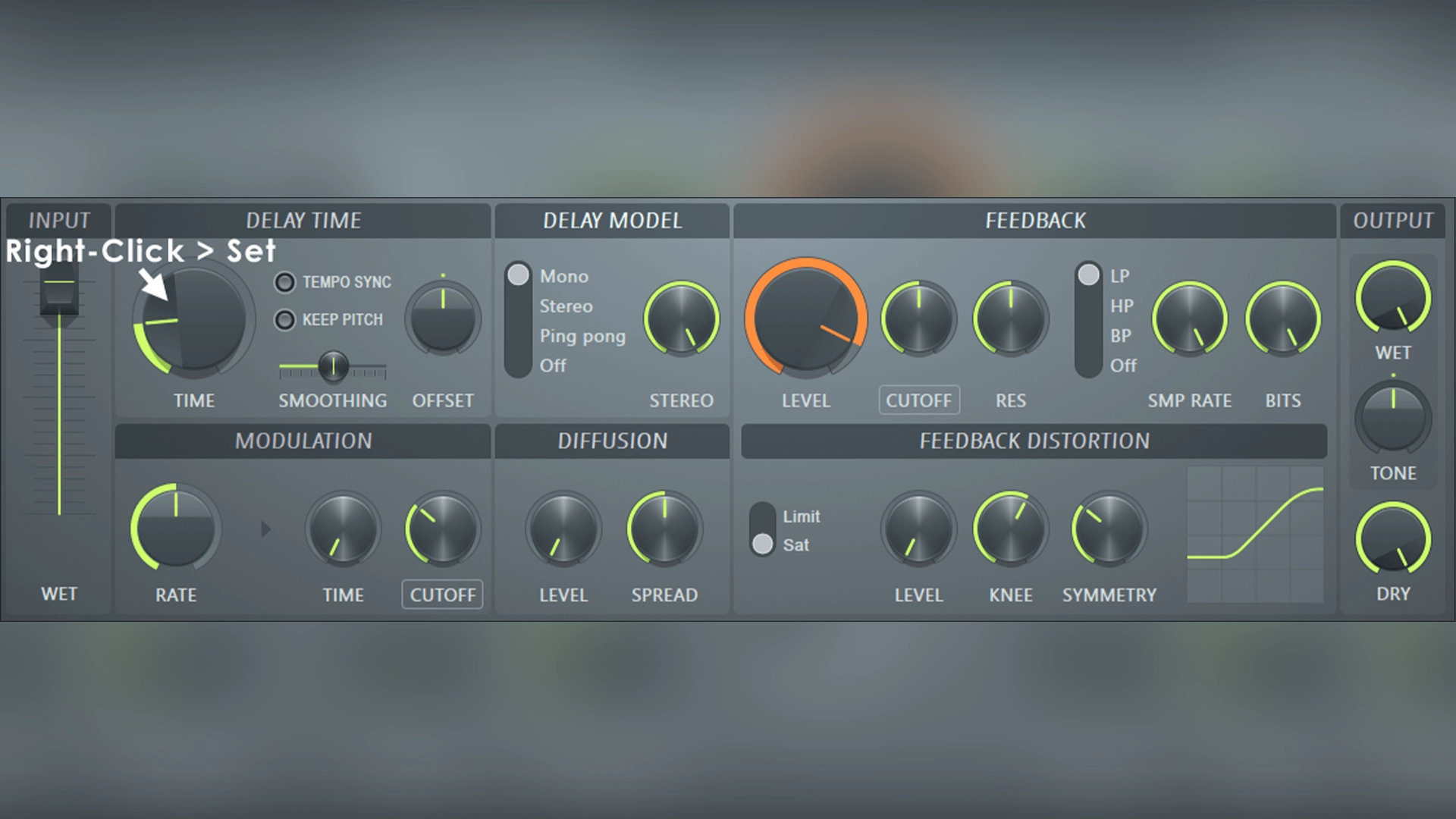
Fruity Delay 3 is a feature-packed delay plugin built into FL Studio. It’s an advanced “analog-style” delay with tempo sync, filtering, distortion, diffusion, and modulation. For FL Studio users, it’s free and already installed.
For anyone producing music in FL Studio, the stock plugins are often the first tools you learn. Image-Line, the developers behind the iconic DAW, have built an impressive suite of effects over the years. While some older plugins have a reputation for being basic, Fruity Delay 3 is a modern, powerful, and surprisingly versatile delay that can compete with many third-party offerings. If you’re an FL Studio user, you already have it.
Fruity Delay 3 is a feature-packed “analog-style” delay that goes far beyond simple echoes. It includes standard controls like tempo-synced time, feedback, and wet/dry mix, but its real strength lies in the extra sound-shaping options. It has built-in filtering (low-pass and high-pass), distortion, and even a diffusion setting that can smear the delays into a reverb-like texture. The modulation section allows you to add subtle movement or wild pitch variations to the echoes.
One of its most powerful features is the ability to operate in different stereo modes, including ping-pong for classic bouncing delays and a “Stereo” mode that allows you to set different delay times for the left and right channels. This makes it easy to create wide, complex rhythmic patterns. Because it’s a native FL Studio plugin, its automation is tightly integrated with the DAW, making it simple to create dynamic, evolving delay effects throughout a track. The plugin also includes a sample rate control for lo-fi effects and precise tempo sync for rhythmic delays.
We believe every FL Studio producer should master Fruity Delay 3 before looking for third-party alternatives. It’s a workhorse plugin that can handle almost any delay task you throw at it. We use it for everything from clean, rhythmic delays on synths to saturated, distorted echoes on vocals. The built-in filtering and distortion are great for
shaping the tone of the delays without needing extra plugins. While it might not have the unique character of a dedicated tape emulation, its versatility and tight integration with the FL Studio workflow make it an invaluable tool. Don’t sleep on this stock plugin – it’s more than just a “stock” plugin.
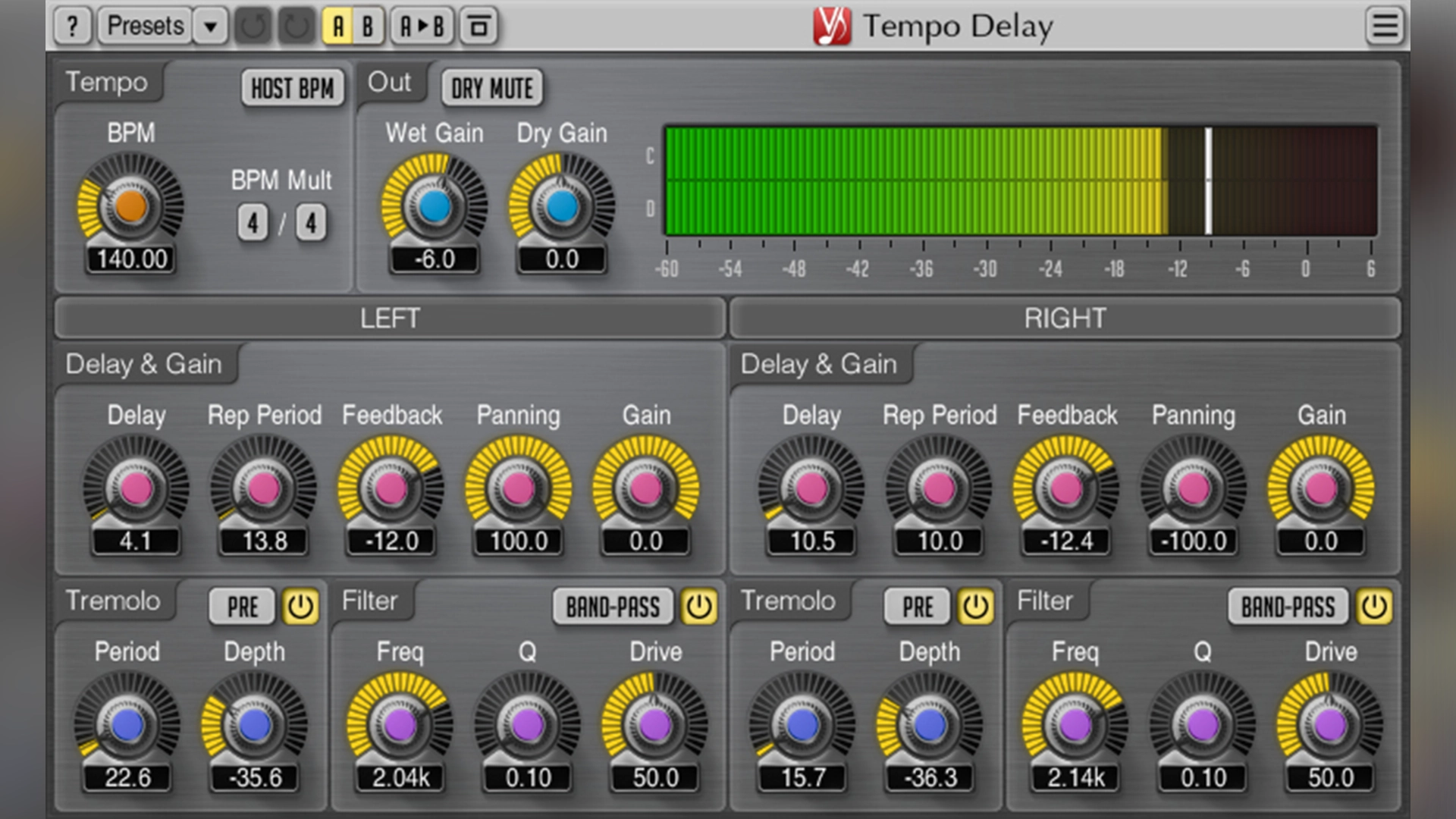
Voxengo Tempo Delay is a multi-feature stereo delay with tempo sync, separate left/right delay lines, integrated tremolo, and filtering. It’s free, highly configurable, and designed for producers who want surgical control over rhythmic delays.
Voxengo has earned a reputation in the audio community for creating technically precise, highly functional, and often free plugins. Developer Aleksey Vaneev offers a wide range of tools, from EQs and compressors to specialized metering and routing utilities. Their plugins are known for their no-nonsense interfaces and deep feature sets. Tempo Delay is their flagship free delay, and it’s a perfect example of their design philosophy: powerful, flexible, and a little bit complex.
Voxengo Tempo Delay is a multi-feature stereo delay that offers an incredible amount of control. As the name suggests, it’s built around tempo-synced delay times, but it goes much further than that. It features separate delay lines for the left and right channels, each with its own syncopation and panning controls. This allows for the creation of complex, rhythmic, and wide stereo patterns that are difficult to achieve with simpler delays.
Where it truly stands out is in its integrated effects. Each channel has its own tremolo and filter section. The tremolo can add rhythmic volume modulation to the echoes, while the filter section lets you shape the tonal character of the repeats. This means you can create delays that not only echo in time but also evolve in texture and space. It’s like having a delay, a filter, and a tremolo all in one plugin. The plugin supports up to 64-bit processing and offers precise control over delay time, repetition, and panning for each channel.
We see Voxengo Tempo Delay as the perfect tool for producers who love to get surgical with their effects. If you’re the kind of person who wants to control every aspect of your delay, this is the plugin for you. It’s fantastic for creating intricate, syncopated synth lines, wide vocal echoes, and rhythmic percussion patterns. The interface can be a bit intimidating at first, but the level of control it offers is unmatched by most free delays. While it might be overkill for a simple slapback, it’s an incredibly powerful tool for sound design and creative mixing. For anyone who wants to go deep on rhythmic delays, this is an essential download.
With so many great free options, the right choice comes down to what you’re trying to achieve in your track. Here’s how we think about it in a real session.
For modern pop, trap, and R&B vocals, you often need two types of delay: a subtle slapback to add thickness and a longer, more atmospheric echo for tails and throws.
For the slapback, a clean digital delay like Fruity Delay 3 or a simple BBD-style delay like Analog Delay is perfect. Set a short delay time (60-120ms), no feedback, and tuck the wet signal just underneath the dry vocal. For longer, atmospheric echoes, a character delay like TAL-Dub-3 can add warmth and vibe, while Valhalla Freq Echo is perfect for creating wild, pitch-shifted throws on the last word of a phrase.
This is where creative delays shine. A simple synth arp can become a complex rhythmic pattern with a plugin like Voxengo Tempo Delay, using its separate left/right delay times and panning. For big, evolving pads, Valhalla Freq Echo is unmatched, creating a sense of movement and space that a standard delay can’t replicate. For gritty, lo-fi synth leads, the saturation in TAL-Dub-3 can add the perfect amount of dirt.
Delay is a secret weapon for adding groove and bounce to drums. A simple 1/8th note delay on a hi-hat, with the wet signal panned to the side, can create instant rhythmic complexity. Fruity Delay 3 is great for this kind of bread-and-butter work. For adding a dub-style echo to a snare hit, TAL-Dub-3 is the obvious choice. And for creating unique percussive textures, try sending a single drum hit to Valhalla Freq Echo and automating the shift and feedback controls.
Too much feedback is tempting for long, evolving echoes, but it can quickly turn your mix into a muddy mess. If you want a long delay tail, try using a lower feedback setting and automating the wet/dry mix instead. Bright, unfiltered delays can clash with the dry signal, especially on vocals. Use the built-in filters in your delay plugin (or a separate EQ) to roll off the high and low frequencies of the echoes, helping them sit behind the main sound.
For rhythmic delays, it’s almost always best to sync the delay time to your project’s tempo. A delay that’s slightly out of time can make your track feel sloppy and unprofessional. Different sounds call for different types of delay. A clean digital delay might be perfect for a pop vocal, but a gritty tape echo might be better for a lo-fi guitar. Build a small collection of your favorite free delays and learn when to use each one.
If you only download one plugin from this list, make it this one. It’s the most unique, creative, and inspiring free delay we’ve ever used. It’s a sound design tool, a character effect, and a solid echo all in one. It’s not always the right choice for a simple, clean delay, but it’s the one that will surprise you and lead to new creative ideas.
When you need warmth, grit, and vibe, TAL-Dub-3 delivers. It’s the perfect antidote to sterile, digital sounds. It’s simple to use, sounds fantastic, and sits in a mix beautifully. For any producer working in hip-hop, lo-fi, or electronic music, this is an essential tool for adding that elusive analog character.
For FL Studio producers, this is a no-brainer. It’s a versatile, feature-packed delay that can handle almost any task. It’s clean when you need it to be, and can get gritty and weird when you want it to. Master this plugin, and you’ll find yourself reaching for third-party delays less and less.
Delay is one of the most powerful tools we have as producers for creating space, depth, and movement. And as this list proves, you don’t need to spend a dime to get professional-quality results. Each of these plugins offers a unique flavor and a powerful feature set. Our advice? Download two or three that catch your eye, spend an afternoon experimenting with them in your own projects, and get a feel for how they respond. The best delay is the one you know inside and out. Happy producing!
![[team] image of team member (for a mobile gaming)](https://cdn.prod.website-files.com/68efa70811edd8e5af30a90d/690abaa8987a07a672c4cd2c_channels4_profile.jpg)
![[background image] image of recording equipment (for a musician & band)](https://cdn.prod.website-files.com/68efa70811edd8e5af30a90d/6aa35b3b03d3771388765f76_Main%20Image.png)
![[background image] image of recording equipment (for a musician & band)](https://cdn.prod.website-files.com/68efa70811edd8e5af30a90d/6aa35785b8608362620d46e3_Main%20Image.png)
![[background image] image of recording equipment (for a musician & band)](https://cdn.prod.website-files.com/68efa70811edd8e5af30a90d/6aa351f638777f809800a4ff_Main%20Image.png)