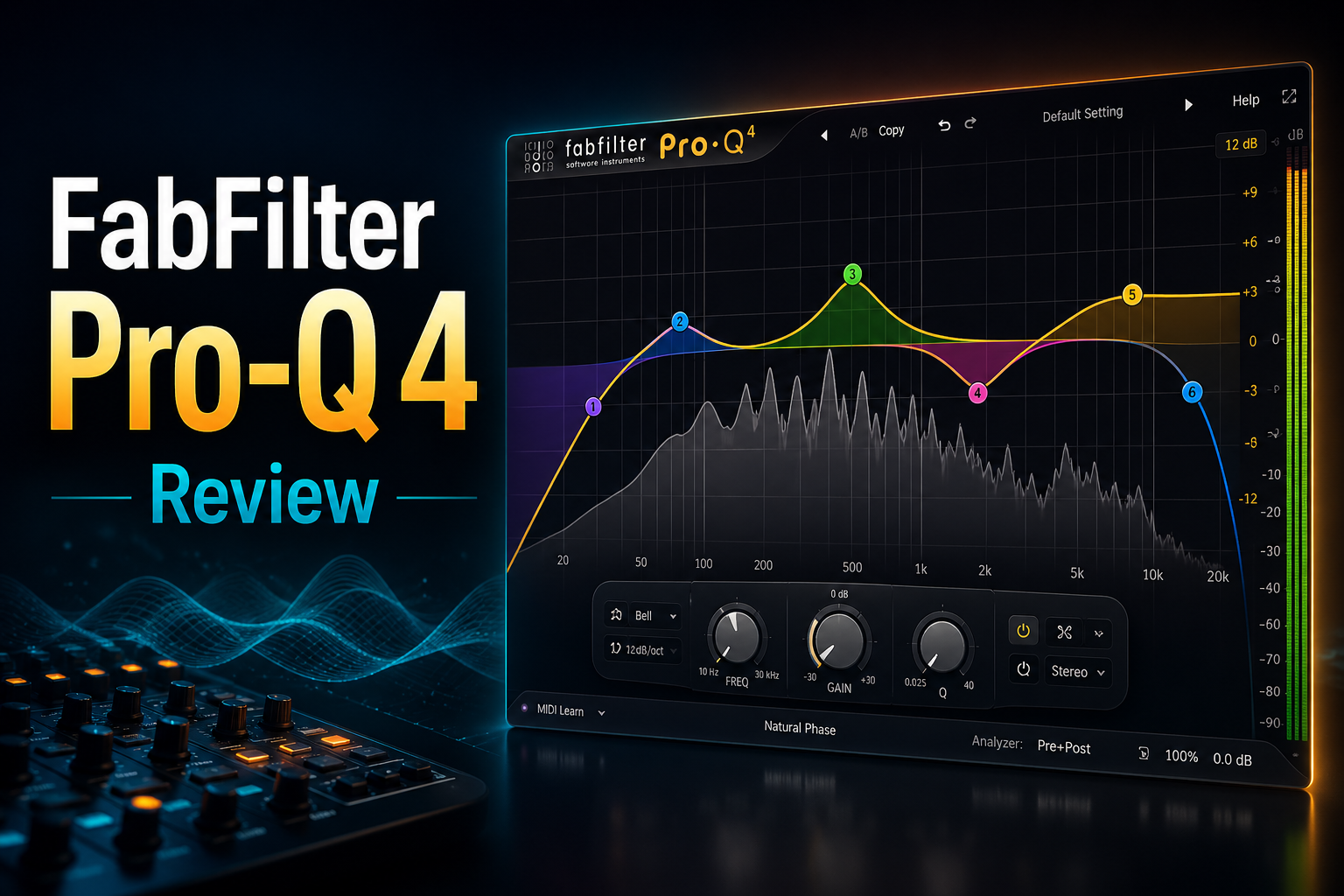
FabFilter Pro-Q 4 is one of the most expensive EQ plugins you can add to your collection, especially when almost every modern DAW already includes a capable EQ for free.
So why do so many producers and mixing engineers still pay for it?
The answer is not simply sound quality. Pro-Q 4 is largely about doing detailed EQ work faster. Its interface combines up to 24 EQ bands with dynamic processing, per-band stereo and mid/side control, multiple phase modes and an extremely visual workflow.
But those features come at a premium price.
If you only make occasional EQ adjustments, your stock plugin may already be enough. If you spend a lot of time mixing, however, the speed and flexibility of Pro-Q 4 can make a much bigger difference.
In this FabFilter Pro-Q 4 review, we’ll focus on the question that matters before buying:
Does Pro-Q 4 actually improve your workflow enough to justify paying for an EQ plugin in 2026?
FabFilter Pro-Q 4 is worth it if EQ is a major part of your mixing workflow and you care about speed, precision and flexibility.
Its biggest advantage is not that it can make EQ moves your stock plugin cannot. It is that Pro-Q 4 makes detailed EQ work faster and easier to manage, especially once you start using dynamic bands, mid/side processing, spectral tools and multiple instances across a mix.
For producers who only make simple high-pass cuts or occasional tone adjustments, the price is much harder to justify.
But if you mix regularly and want one EQ that can handle surgical correction, dynamic control, stereo shaping and mastering work, Pro-Q 4 is still one of the strongest all-round options.
Best for serious mixing and mastering workflows: Pro-Q 4.
Less necessary if your stock EQ already covers everything you need.
Pro-Q 4 stands out because it combines precision EQ with a workflow designed to stay fast even when the processing becomes complex.
You can create up to 24 bands, switch individual bands between stereo, left/right or mid/side processing, turn bands into dynamic EQ, and choose between Zero Latency, Natural Phase and Linear Phase modes.
But the bigger reason to buy Pro-Q 4 is how quickly those tools are accessible.
You can click directly on the spectrum to create a band, drag it into position, adjust the shape visually and move into more advanced processing only when you need it. Features such as Spectrum Grab, EQ Match and the new EQ Sketch workflow are all designed to reduce the amount of time spent navigating menus.
Pro-Q 4 also goes beyond traditional EQ with Spectral Dynamics, which can react more selectively to problematic frequencies instead of moving an entire EQ band up or down.
That combination is what separates it from many stock EQs.
A stock EQ may be able to make the same basic cuts and boosts, but Pro-Q 4 gives you more ways to solve difficult problems without slowing down your workflow.
The main reason to buy Pro-Q 4 is not more EQ — it is faster access to deeper EQ control.
This is probably the biggest reason to buy Pro-Q 4 instead of simply sticking with your DAW’s stock EQ.
The interface is built around the spectrum itself. Click where you hear a problem, create a band and drag it into place. More advanced controls only appear when you actually need them, which keeps simple EQ moves fast instead of surrounding you with unnecessary parameters.
Pro-Q 4 also adds EQ Sketch, letting you draw a rough EQ curve directly across the display. The plugin automatically creates bands to follow that shape, giving you a quick starting point that you can fine-tune afterwards.
The new Instance List can save even more time in larger mixes. It lets you access and edit Pro-Q 4 instances across multiple tracks from a single window instead of repeatedly opening individual plugin windows.
None of these features are essential for making an EQ cut.
Their value is that they can turn dozens of small EQ decisions across a mix into a much faster and more organized workflow.
That is where Pro-Q 4 starts to justify its premium price.
Best reason to upgrade from a stock EQ: speed and workflow, not basic EQ functionality.
This is where Pro-Q 4 starts to offer much more than a basic stock EQ.
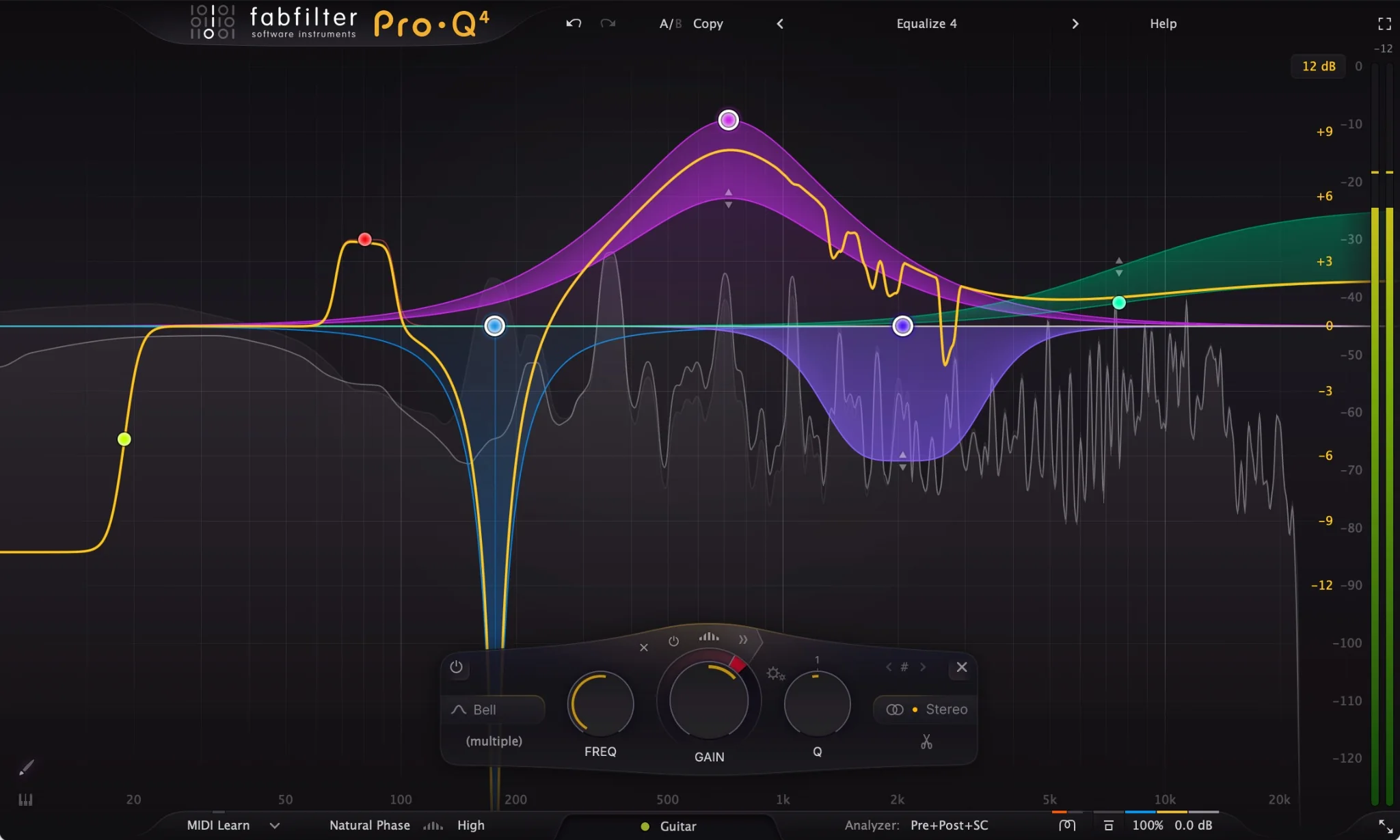
Any bell or shelf band can be turned into a dynamic EQ band, so instead of applying the same cut or boost all the time, Pro-Q 4 can react only when that frequency range becomes too strong or too weak. Version 4 also adds more control over attack, release and sidechain triggering.
That is useful for problems that are not constant.
For example, you can tame vocal harshness only when it becomes noticeable, control an aggressive hi-hat without permanently dulling it, or reduce low-mid buildup only when it crosses a certain level.
The bigger addition in Pro-Q 4 is Spectral Dynamics.
Instead of moving an entire EQ band, Spectral mode reacts only to the individual frequencies inside that band that cross the threshold. This makes it useful for controlling resonances and harshness in a more selective way without cutting the whole frequency range.
That means Pro-Q 4 can cover jobs that might otherwise require a separate resonance suppressor or spectral processing plugin.
For buyers, this is one of the strongest arguments for paying for Pro-Q 4 instead of relying entirely on a basic stock EQ.
Best reason to choose Pro-Q 4 for corrective EQ: dynamic and spectral processing are built directly into the normal EQ workflow.
Two of Pro-Q 4’s most useful workflow upgrades are EQ Sketch and the Instance List.
EQ Sketch is designed for speed. Instead of creating every EQ band one by one, you can draw a rough curve directly across the spectrum and let Pro-Q 4 build the bands for you.
That is especially useful when you already know the general shape you want.
For example, you can quickly sketch a broad low-end cut, add some presence in the upper mids and soften the top end, then fine-tune the individual bands afterwards.
The Instance List is even more useful once a project becomes larger.
It lets you see and access multiple Pro-Q 4 instances across your session from one place, which can make it much easier to compare tracks, spot frequency conflicts and move between EQ decisions without opening every plugin window separately.
Neither feature changes what EQ fundamentally does.
What they change is how quickly you can make and manage EQ decisions across a full mix.
That is exactly where Pro-Q 4 starts to feel less like a normal EQ plugin and more like a workflow tool.
Best workflow upgrades in Pro-Q 4: EQ Sketch for speed and Instance List for managing larger mixes.
Pro-Q 4 gives you much more control over where an EQ move is applied, which becomes especially useful on buses and masters.
Individual bands can work in Stereo, Left, Right, Mid or Side mode, so you do not have to process the entire signal in the same way.
That means you can clean up low-end information in the center while leaving the sides untouched, reduce harshness only in the stereo information, or shape individual channels without loading another EQ.
Pro-Q 4 also gives you several processing modes depending on what the situation requires.
Zero Latency is the practical choice for most normal mixing work.
Natural Phase is designed to offer a more analog-style phase response while keeping latency relatively low.
Linear Phase can be useful when phase relationships are especially important, although it introduces additional latency and can create pre-ringing in some situations.
You do not need to switch modes constantly.
For most tracks, Zero Latency or Natural Phase will already cover the job. The advantage is simply having the deeper options available when a mix or mastering situation actually needs them.
Best part of Pro-Q 4’s stereo workflow: precise control over both frequency and where that processing happens in the stereo field.
Pro-Q 4 is especially useful during mixing because it can handle both quick tonal shaping and detailed corrective EQ without changing plugins.
For simple moves, you can create broad boosts or cuts in seconds. For more difficult problems, the same instance can handle dynamic EQ, spectral processing, mid/side adjustments and narrow resonance control.
That makes it practical across almost an entire session.
On vocals, you can clean up low-end buildup, control harsh frequencies dynamically and shape presence without stacking several separate processors.
On drums, Pro-Q 4 can help remove resonances, tighten the low end or create space between competing elements.
On synths, guitars and other instruments, the spectrum display and flexible band controls make it easy to see where frequencies are overlapping and make targeted adjustments quickly.
The real benefit is consistency.
Instead of switching between different EQ plugins depending on the problem, Pro-Q 4 can stay as your main EQ throughout the mix.
That saves time and makes the workflow easier to learn because the same controls are available everywhere.
Best use in mixing: one flexible EQ that can move from simple tone shaping to detailed corrective work without slowing you down.
Pro-Q 4 also makes a lot of sense on the master bus because it gives you very fine control without forcing you into a complicated mastering workflow.
Broad tonal adjustments are easy to make with gentle shelves and wide bell curves, while smaller problems can be handled with narrow cuts, dynamic bands or Spectral Dynamics.
Mid/side processing is especially useful here.
You can make subtle changes to the center and sides separately, which can help rebalance low-end focus, clean up harsh stereo information or make small tonal adjustments without affecting the entire mix equally.
The different phase modes also give you more flexibility when mastering.
For many situations, Natural Phase is a practical option. Linear Phase can be useful when you specifically want to preserve phase relationships, while Zero Latency remains available for simpler work.
The main advantage is control.
Pro-Q 4 lets you make small, precise mastering moves without needing a separate EQ for every type of problem.
Best use in mastering: subtle tonal shaping, dynamic problem solving and precise mid/side control.
Pro-Q 4 can be used throughout a full mix, but CPU usage depends heavily on how you configure each instance.
Simple EQ moves in Zero Latency mode are relatively straightforward, while features such as Linear Phase processing, Spectral Dynamics and more complex setups can require additional processing power.
That makes Pro-Q 4 easy to scale with the job.
You can keep most instances simple for everyday mixing, then use the heavier processing modes only on tracks or buses that actually need them.
The bigger practical advantage is workflow.
Because Pro-Q 4 can handle basic EQ, dynamic processing, spectral control and mastering work inside the same plugin, you may need fewer separate EQ tools across a project.
For larger sessions, that consistency can be just as valuable as raw CPU performance.
Best practical advantage: one EQ workflow that can stay simple when you need speed and become much deeper when a difficult problem appears.
The biggest drawback is simple: it is expensive for an EQ plugin.
If your DAW already includes a good parametric EQ, you can still make the same basic cuts, boosts, shelves and filters without spending extra money.
That means Pro-Q 4 only becomes worth the price if you actually benefit from its faster workflow and more advanced tools.
It can also be overkill for beginners.
Features such as dynamic EQ, Spectral Dynamics, mid/side processing and multiple phase modes are powerful, but they are not necessary for every mix. If you mainly make simple EQ moves, a cheaper plugin may already cover everything you need.
Another downside is that Pro-Q 4 is designed primarily for precision and flexibility rather than obvious analog character.
If you specifically want a colorful vintage EQ that adds saturation and personality, Pro-Q 4 may not be the most exciting choice.
So the value depends heavily on how often you use EQ.
Biggest weakness: Pro-Q 4 is difficult to justify if you only need basic EQ functionality.
For basic EQ work, probably not.
Most modern DAWs already include a capable parametric EQ that can handle high-pass filters, low-pass filters, shelves, bell curves and simple corrective cuts without costing anything extra.
That means Pro-Q 4 does not justify its price by doing basic EQ better.
Its value comes from everything around those basic moves.
Features such as dynamic EQ, Spectral Dynamics, mid/side processing, advanced phase modes, EQ Match, Spectrum Grab, EQ Sketch and the Instance List can make difficult EQ work faster and easier to manage.
If you only make a few simple EQ adjustments in each project, your stock EQ is probably enough.
If you mix regularly and find yourself doing detailed frequency work across many tracks, Pro-Q 4 can save time every session.
That is the real buying decision.
You do not need Pro-Q 4 to EQ a track. You buy it because it can make serious EQ work faster, cleaner and easier to manage.
FabFilter Pro-Q 4 currently costs $199, which is a significant amount for an EQ plugin when your DAW probably already includes one for free.
That price only makes sense if you will actually benefit from the workflow.
If you mix regularly, Pro-Q 4 can replace several smaller tools by combining standard EQ, dynamic EQ, spectral processing, mid/side control, EQ matching and advanced phase options inside one interface.
That can make it valuable long term because you are not buying an EQ for one specific job. You are buying something that can stay on vocals, drums, buses and masters across almost every project.
There is also a strong reason to buy through Plugin Boutique rather than directly from FabFilter. Pro-Q 4 currently qualifies for free software gifts with purchase, so you may be able to add another plugin to your order at no additional cost.
Existing Pro-Q owners should also check their upgrade pricing before buying a completely new license, as FabFilter offers discounted upgrades for previous versions.
At $199, Pro-Q 4 is difficult to recommend for someone who only makes basic EQ moves.
For producers and engineers who use EQ constantly, however, the time saved across hundreds of mixing decisions can make the price much easier to justify.
Best value for frequent mixers: Pro-Q 4.
Harder to justify if you only need basic EQ occasionally.
Choose FabFilter Pro-Q 4 if EQ is something you use constantly and you want one plugin that can handle almost every EQ task in your workflow.
It makes the most sense for producers, mixing engineers and mastering engineers who regularly work with vocals, drums, instruments, buses and full mixes and want to move quickly between simple EQ moves and more advanced processing.
Pro-Q 4 is especially valuable if you use features such as dynamic EQ, mid/side processing, Spectral Dynamics or detailed stereo control on a regular basis.
You should probably skip it if you only use EQ occasionally or mainly make simple cuts and boosts. In that case, your stock EQ may already be enough.
It is also less compelling if you are specifically looking for a strongly colored analog-style EQ rather than a clean, precise and highly flexible tool.
Choose Pro-Q 4 if you want a premium EQ you can use across almost every mix.
Skip it if basic stock EQ tools already cover your workflow.
FabFilter Pro-Q 4 is expensive for an EQ plugin, but it earns its price through workflow, flexibility and speed.
You are not buying it because your stock EQ suddenly becomes unusable. You are buying it because Pro-Q 4 makes advanced EQ work much easier to handle across an entire mix.
Dynamic EQ, Spectral Dynamics, mid/side processing, multiple phase modes, EQ Sketch and the Instance List all add up to a workflow that can save time again and again.
For producers who only make basic EQ moves, Pro-Q 4 is probably unnecessary.
For anyone who mixes regularly and wants one EQ that can handle corrective work, tonal shaping, stereo control and mastering, it remains one of the strongest premium options available.
Our pick: worth it for serious mixing and mastering workflows.
![[team] image of team member (for a mobile gaming)](https://cdn.prod.website-files.com/68efa70811edd8e5af30a90d/690abaa8987a07a672c4cd2c_channels4_profile.jpg)
![[background image] image of recording equipment (for a musician & band)](https://cdn.prod.website-files.com/68efa70811edd8e5af30a90d/6aa35b3b03d3771388765f76_Main%20Image.png)
![[background image] image of recording equipment (for a musician & band)](https://cdn.prod.website-files.com/68efa70811edd8e5af30a90d/6aa35785b8608362620d46e3_Main%20Image.png)
![[background image] image of recording equipment (for a musician & band)](https://cdn.prod.website-files.com/68efa70811edd8e5af30a90d/6aa351f638777f809800a4ff_Main%20Image.png)