
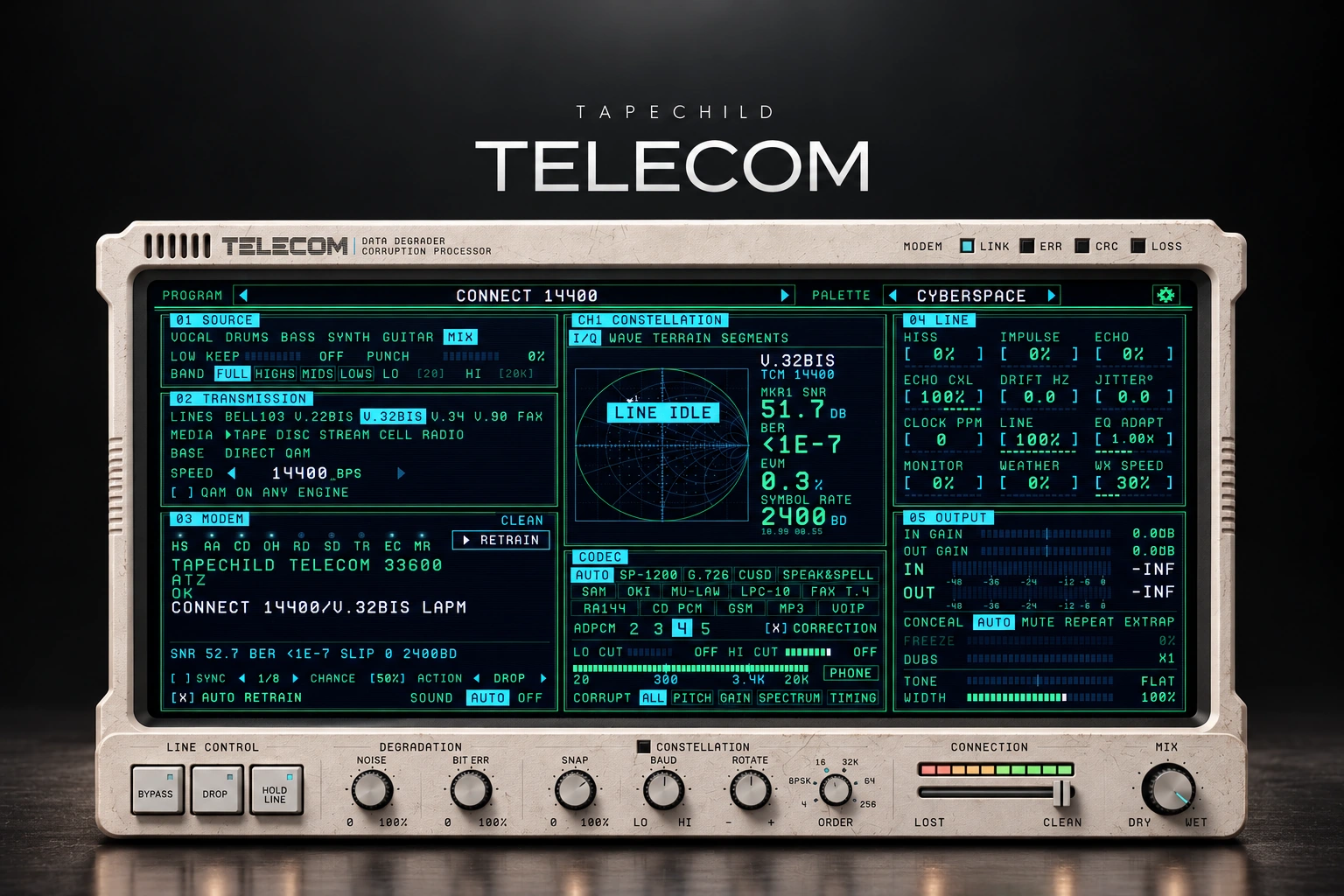

Tapechild TELECOM is an effect for making audio sound like it is passing through a phone, radio or damaged digital connection. It is worth considering when you want more than a simple filtered vocal.
Our view: its most useful role is adding contrast. A broken ad-lib behind a clean lead or a short damaged drum fill gives the effect a clear job. We would be more selective about putting it across a whole song.
This review is based on Tapechild's product information. The tips below are suggested ways to use it, rather than results from our own listening tests.
What does TELECOM do?
Tapechild says TELECOM encodes your audio, sends it through a simulated connection and decodes what remains. It offers 13 engines and 14 codecs, covering paths such as modems, phones, radio, tape, disc and streaming.
A codec is a way of storing or sending digital audio. Different codecs change the sound in different ways. The engine represents the path the audio travels through, while damage to that path adds interruptions and other changes.
You do not need to understand the technical history to use the idea. Start with the sound you want: a distant reply, a rough drum loop or a connection that breaks up before the chorus.

Start with a sound, then add the damage
AUTO chooses a codec to match the selected engine. You can also choose other combinations.
Our tip is to compare a few options on the same short phrase. Keep the performance unchanged so you can hear what the effect adds.
Once you like the general sound, increase the damage slowly. There is a difference between an interesting texture and a phrase that no longer makes sense. Where you stop depends on the job of that part.
A main vocal needs to carry the words. A background effect can be much harder to recognise. Decide which one you are making before choosing the most extreme setting.
Vocals: try an ad-lib before the main lead
For a first vocal experiment, we recommend a short answer phrase or ad-lib. Leave the main lead clean. This makes it easier to hear whether the processed part adds something useful.
1. Pick a few words. Choose a phrase that works on its own.
2. Choose its role. Should it sound distant, broken or robotic? Start with one clear idea.
3. Play it with the lead. Set the supporting part's volume while the full vocal plays.
4. Check the words. If listeners need to understand the phrase, make sure the effect does not hide its meaning.
5. Check the next section. A long or noisy effect should not cover the first important word or drum hit that follows.
Our advice is to keep selected phrases on a separate track. You can change the effect without changing your whole lead chain. See how to make vocals sit in the mix for the wider balance.
Drums: use it to make a fill stand out
A short drum fill is another good place to explore. Keep the main beat as a reference, then process the last few hits of a phrase.
Listen to the rhythm as well as the texture. If the snare or kick becomes harder to follow, reduce the damage or try processing only the higher percussion.
Our suggested starting point is one processed fill every four or eight bars. Returning to the clean beat gives the effect some contrast. Constant damage can become tiring when every hit has the same busy texture.
Compare at a similar volume. A louder fill may seem more exciting simply because it is louder.
Bass: keep the low notes clear
TELECOM includes LOW KEEP to leave the sub clean while processing the sound above it. Band selection lets you choose which frequency range receives the damage.
This is a useful feature to look at if you want more texture without losing the bass line's weight. Still, judge the result with the kick playing.
Try both a held note and a quicker phrase. An effect that works on a long note may blur the start of shorter ones. Turn down the treatment if the rhythm becomes less clear.
For the basic low-end balance, our kick and 808 guide covers the decisions to make first.
Transitions: make the clean return count
TELECOM has tempo-synced failures, a DROP trigger, noise, bit errors, echo, drift and jitter. These give you several ways to disturb a sound.
Our tip is to use the effect on the final phrase before a chorus or drop, then return to clean audio on the first beat. Keep that first hit clear.
Start with a short transition. You may only need one interruption to make the next section feel different. Extending the effect across a whole build is a separate choice.
If you record the processed result as audio, check the edit points. A good texture still needs to start and stop in the right place.
Do you need TELECOM if you own other lo-fi effects?
Only if it adds something you will use. We would not buy another plugin just because it offers more ways to make audio dirty.
If your goal is cassette-style sound, read our RC-20 vs SketchCassette II comparison. For another approach to reducing audio quality, see our Decimort 2 review.
TELECOM is more interesting when the connection itself is part of the effect: broken calls, interruptions and unstable playback. That is the reason we would put it on a shortlist. We have not run a listening comparison to name a winner.
For a simple telephone vocal, try an EQ first. Cutting the low and high frequencies may already give you the sound you need.
Price and compatibility
On 25 October 2026, Tapechild listed TELECOM at $69. It supports macOS 11 or later on Intel and Apple Silicon, and Windows 10/11 64-bit.
Formats include VST3 and standalone, plus AU on Mac. One licence covers both platforms. Installers are available in your Tapechild account.
In FL Studio, use the VST3 version. If it does not appear, follow our plugin scanning guide.
SoundShaper opinion
What we like about TELECOM is the room it gives you to get creative with effects on vocals and instruments. You can take a familiar part and give it a different character, from a phone-style vocal to a rougher, broken texture on a synth or guitar.
Our tip: try it on a short vocal phrase or a simple instrument part first. Explore a few effects, then listen with the rest of the track playing. Keep the setting that adds something to the song, rather than choosing the most extreme sound.
We see TELECOM as a creative extra rather than an essential mixing tool. It deserves a closer look if unusual vocal effects, rough fills and digital transitions are already part of your music.
We would skip it if you only want a narrower vocal once in a while. Your existing EQ and distortion may cover that. Buy it for the extra types of movement and interruption, rather than expecting it to improve every sound you put through it.
Conclusion
TELECOM is worth considering for producers who want broken phone, radio and digital textures. Its strongest role is giving a specific part a different character from the clean sounds around it.
Start with one phrase, keep the important words and hits clear, and listen in the full track. An effect earns its place when it helps the song.
Sources
Product details checked against the official Tapechild TELECOM page and FAQ on 25 October 2026.
![[background image] image of recording equipment (for a musician & band)](https://cdn.prod.website-files.com/68efa70811edd8e5af30a90d/6ae28f3ffeabaf5b76db2580_6ae28f255000f820b159a320_crystalline-review-cover.webp)
![[background image] image of recording equipment (for a musician & band)](https://cdn.prod.website-files.com/68efa70811edd8e5af30a90d/6ae28e7e5d1572089570ac87_6ae28e5eead33b2db2a18b5f_transit-2-review-cover.webp)
![[background image] image of recording equipment (for a musician & band)](https://cdn.prod.website-files.com/68efa70811edd8e5af30a90d/6ae28d603a57759da71022d6_6ae28d41f6af13c91dee9c76_drumazon-2-review-cover.webp)