
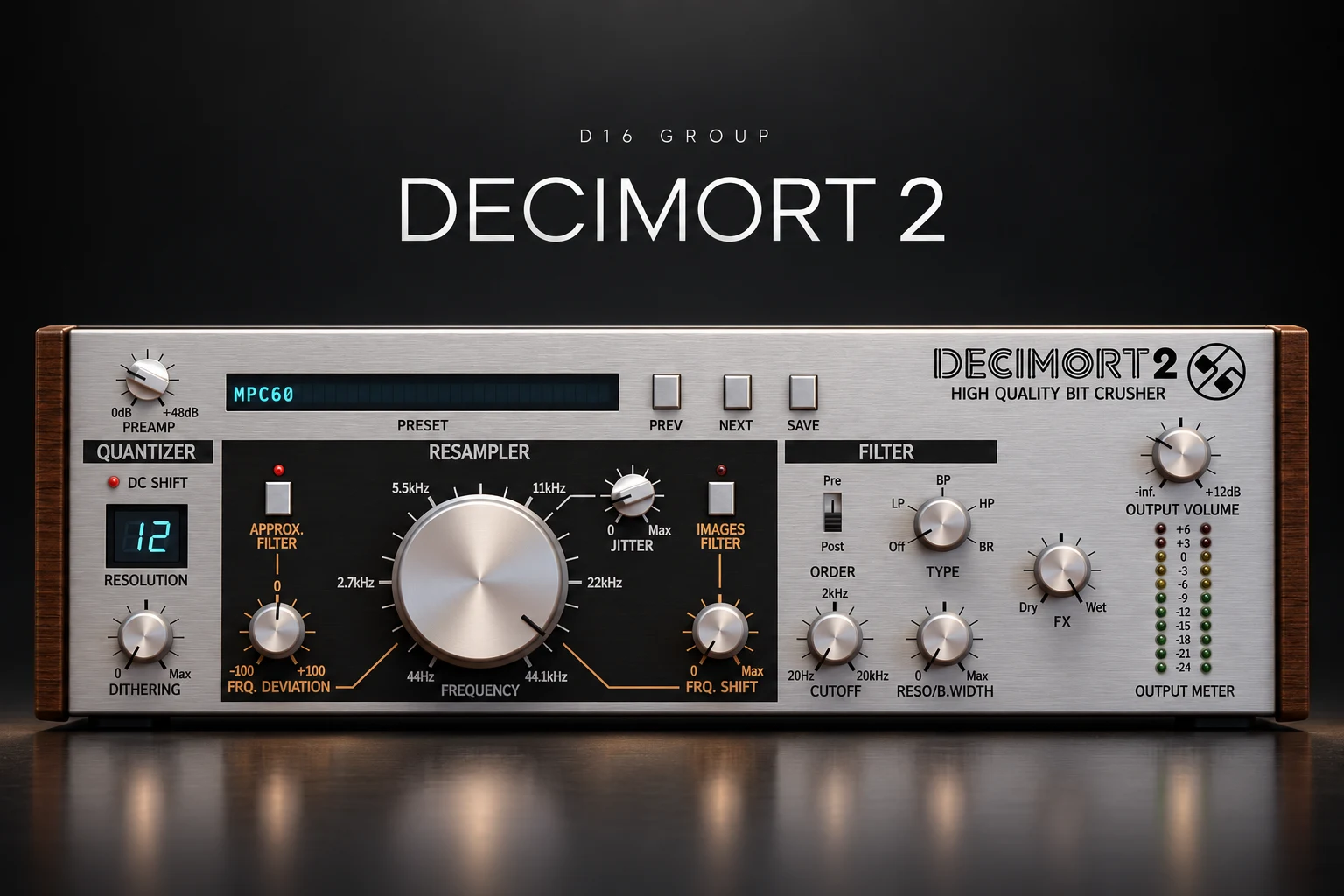

Decimort 2 is worth considering if you want more control over the digital grit of drums, loops and melodic samples. Its appeal is the ability to shape bit reduction, resampling and filtering separately, rather than accept whatever character a single lo-fi preset gives you.
For boom bap, textured house or deliberately rough electronic sounds, that is a useful reason to try it. If your stock bitcrusher already creates the result you want, the purchase needs to earn its place through better control or a workflow you prefer.
This review focuses on practical buying decisions and a drum-loop exercise you can try yourself. It is based on D16's documentation and current product information, rather than our own hands-on listening test.
What is D16 Decimort 2?
Decimort 2 is a bitcrusher and sample-rate reduction effect inspired by the coloration of older sampling systems. D16 includes quantization, controllable dithering, jitter and filters around the resampling stage.
It processes audio coming into it. You still need a source, such as a drum loop, synth, bass or recorded instrument. Think of it as a way to change that source's texture before you arrange or mix it.
The strongest buying case is a recurring need for a particular kind of roughness. A darkened drum break, a brittle percussion layer and a worn melodic loop are different jobs. Being able to separate the decisions helps you audition each one more deliberately.
Bit depth and sample rate: change one at a time
Bit-depth reduction changes the precision used to represent the signal's level. Sample-rate reduction changes its representation over time. They are related parts of digital audio, but they need not produce the same kind of coloration.
In Decimort, Resolution handles quantization, while Frequency controls resampling. The manual also describes two quantization behaviours selected through DC Shift.
For a useful first comparison, leave one section alone while exploring the other. Lower the resolution gradually and pay attention to quieter details, fades and room sound. Then restore it and explore the resampler. You will have a clearer idea of which process contributes the texture you like.
The resampling frequency inside this effect is separate from your DAW project's sample rate. You do not need to change your session settings to create this coloration. For recording and export decisions, see our music-production sample rate guide.
Why the filters matter
More crunch is not always the missing ingredient. Sometimes you want a narrower, softer texture; sometimes you want the extra edge to remain audible.
Decimort offers an optional Approximative filter before resampling and an Images filter after it. A separate resonant multimode filter can sit before or after the degradation stages. The interface also provides an FX blend and output level.
That gives you a sensible way to compare texture and tone. First find a resampling setting that changes the sound in an interesting way. Then compare the filter options without changing everything else. Listen for whether the result feels intentionally shaped or simply less clear.
On a melodic loop, check the relationship with the vocal. A darker loop might create useful contrast, but it might also lose the detail that made the sample appealing. On percussion, check whether the attack still gives the groove its character.
A drum-loop workflow for boom bap and lo-fi
Use a loop with a kick, snare and some quieter detail. That lets you hear whether the processing helps the main hits while damaging the space between them.
If the kick loses the weight you need, try a cleaner kick on its own channel while processing the rest of the break. You do not have to preserve every part through the same treatment. The quieter percussion or room detail may be the material that benefits most.
For a more obvious effect, print a processed loop and use it for an intro or breakdown. Let the cleaner drums return with the next section. That gives the degradation a role in the arrangement without making the entire track depend on it.
Jitter and dithering: audition them with a clear question
Jitter introduces random variation in resampling timing. Dithering adds noise before quantization to change its artefacts. They provide further ways to adjust the processing.
Use a short loop and change one control while leaving the rest steady. Ask whether the result improves the sound you are trying to build. If you cannot identify a benefit in context, there is no need to add more variation simply because the option exists.
Listen through the quietest part of the phrase. Noise and distortion that seem minor during a loud hit can become more obvious as a sound fades. That may suit the track, but it should be an intentional choice.
Decimort 2 vs RC-20 and saturation
Our shortlist would depend on the problem you want to solve. Choose a starting point before opening another set of presets.
See our RC-20 vs SketchCassette II comparison for broader retro-effect buying advice. If the sound mainly needs drive, our Soundtoys Decapitator review explores another direction.
Decimort is most convincing as a purchase when you want to keep refining the sampling texture itself. If all you need is a little darkness, try an EQ change first. If the groove feels flat, revisit levels and dynamics before assuming older-sounding audio will fix it.
Price, demo and current compatibility
On 18 October 2026, Plugin Boutique displayed $29 against a regular price of $59, with the offer listed until 20 October. Treat that as a dated reference. Check the current price, currency and tax for your location before buying.
D16 provides a demo. Use it on your actual sources, and check the current demo restrictions before relying on it for an export.
The official product page lists Windows 7 or newer and Mac OS X 10.13 through macOS 26, with Intel and Apple Silicon listed for Mac. Supported formats are VST2, VST3 and AAX, with AU also available on Mac. A compatible host is required.
D16's linked changelog currently begins with version 2.3.2. It records native Apple Silicon support in the 2.3 series and an earlier fix for VST3 producing no sound in FL Studio. Use the current installer when evaluating the plugin.
Check the manufacturer's current requirements rather than relying on an older reseller specification. We have no measured performance results for this review, so test several instances in your normal project before committing to a purchase.
SoundShaper opinion
We would shortlist Decimort 2 for producers who repeatedly shape drum breaks and samples with digital degradation. The reason to buy is control over the process, particularly when a basic bitcrusher reaches an effect you almost like but cannot refine easily.
We would judge the demo using one drum loop and one melodic source. Save a few variations, compare them at similar levels and return to the full mix. If the differences help you finish a part, the purchase has a clear purpose. If your stock effects already get you there, keep using them.
Frequently asked questions
Does Decimort 2 load and slice samples?
It is an audio effect. Use your sampler or DAW to load and arrange the source, then route that audio through Decimort.
Do I need to export at a low sample rate?
No. Use the plugin for coloration and keep your delivery settings appropriate for the project. The internal resampling effect is a separate decision.
Will a preset reproduce an entire hardware sampler?
Evaluate the tone it gives your source. A coloration effect does not recreate every part of a hardware instrument's sampling, sequencing and performance workflow.
Conclusion
Decimort 2 deserves a demo if shaping digital grit is a regular part of your production. Explore resolution and resampling independently, use the filters with purpose and compare the result in the full track. Buy it when that extra control improves the samples you actually use.
Sources: D16 product information and current requirements, Decimort 2 user manual, official changelog and the Plugin Boutique listing. Details checked 18 October 2026.
![[background image] image of recording equipment (for a musician & band)](https://cdn.prod.website-files.com/68efa70811edd8e5af30a90d/6ad5421eaf14ef1dbac4dfa8_TAIP%20Review.webp)
![[background image] image of recording equipment (for a musician & band)](https://cdn.prod.website-files.com/68efa70811edd8e5af30a90d/6ad5413cb1504db30162273f_Phoscyon%202%20Review.webp)
![[background image] image of recording equipment (for a musician & band)](https://cdn.prod.website-files.com/68efa70811edd8e5af30a90d/6ad5403dd747f3fbbe4286ab_Chordjam%20Review.png)