
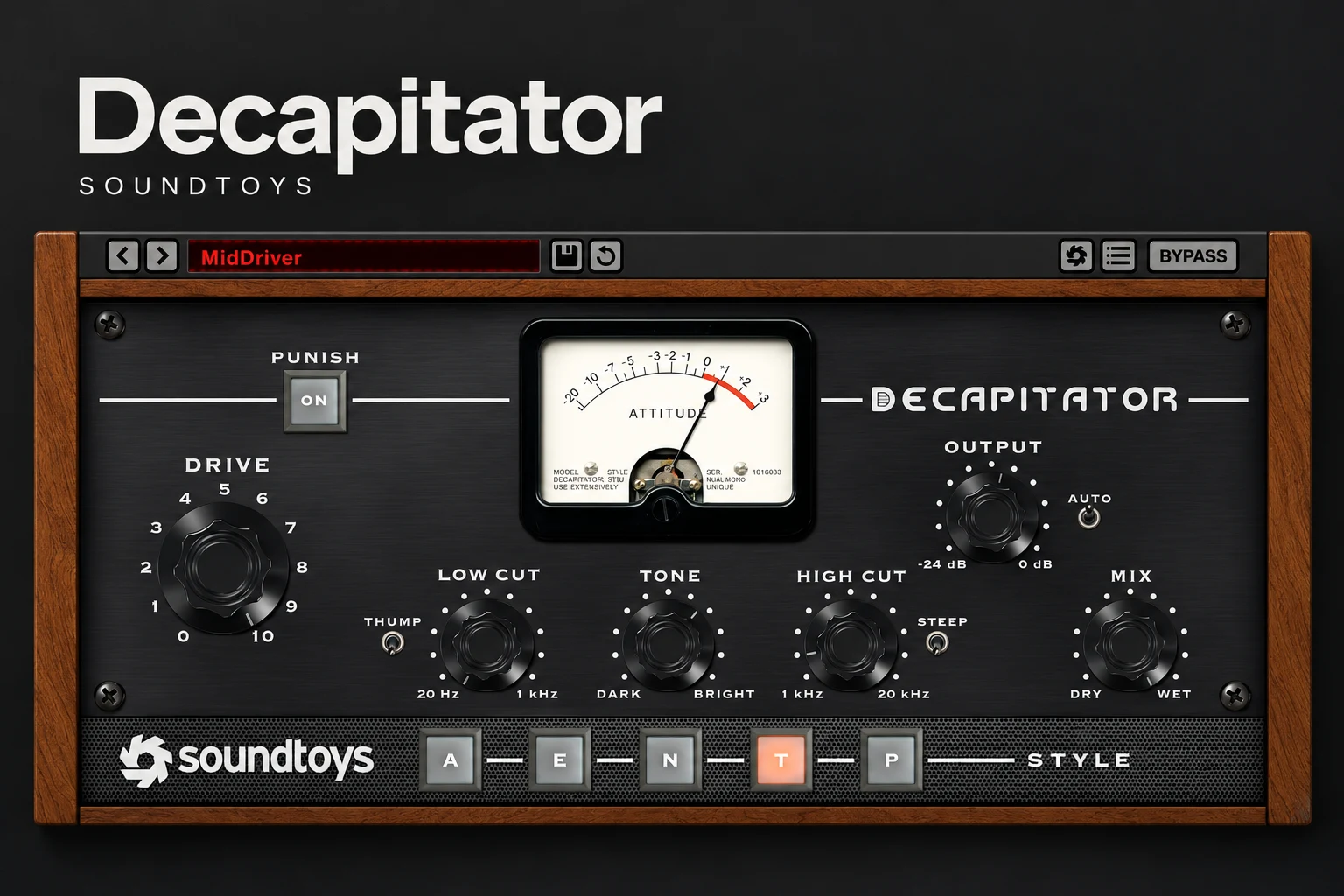

Soundtoys Decapitator is worth considering if you want a focused saturation plugin for adding weight, edge or obvious distortion to individual sounds. We would shortlist it for drums, bass and creative vocal processing. If you need detailed multiband control, or you are still exploring your DAW's distortion tools, try those options before buying.
The buying question is not whether every track needs analog warmth. It is whether Decapitator helps you get a specific sound faster than the tools you already have. This review gives our editorial recommendations from the documented features, rather than claiming hands-on listening tests.
What is Decapitator?
Decapitator is a saturation and distortion effect from Soundtoys. It provides five hardware-inspired styles, tone shaping and a dry/wet Mix control. Drive sets how hard you push the selected model, while Punish adds a further 20 dB of gain into the saturation stage.
Think of it as a character processor. It changes the texture of an existing vocal, drum, bass or instrument recording. It does not generate an instrument, tune a performance or replace a complete mixing chain.
The five styles: what do A, E, N, T and P mean?
The letters refer to different hardware inspirations. They are starting points for auditioning a tone, rather than quality levels.
SoundShaper advice: play the same short passage and switch styles at similar perceived loudness. Choose the one that supports the part. A style that makes a snare exciting may be too coarse for a close, intimate vocal.
Where we would use Decapitator
Drums: more body without losing the groove
For rock, boom bap or gritty electronic drums, start with the snare or a drum bus. Bring up Drive until the character is easy to hear, then pull it back. If the attack loses too much definition, reduce the amount of processed signal with Mix.
Judge the kick and cymbals separately within the full loop. A setting that adds welcome density to the snare can make the overheads tiring. In that case, process the snare alone rather than forcing one setting onto the whole kit.
808s and bass: character before more level
For trap and electronic bass, audition saturation when the bass has enough low end but lacks definition in the song. Check the result on both your main speakers and a smaller playback system. Listen for whether the line becomes easier to follow without turning the whole bass up.
Keep an ear on long notes and slides. An exciting isolated growl may compete with the vocal once the chorus arrives. Our preference is to find the minimum useful amount and keep a clean comparison available.
If the problem starts with the source or arrangement, read our guide to layering 808s before adding more processing.
Vocals: attitude as an arrangement choice
Decapitator is a candidate for a rough rap ad-lib, a distorted chorus layer or a deliberately narrow backing vocal. For a clean lead, begin much more cautiously. Listen to consonants, breaths and sibilance, since the extra edge may draw attention to details you wanted to soften.
Try a stronger effect on a separate vocal layer before applying it across the main performance. That gives you an arrangement decision: keep the lead natural and bring in grit at selected moments.
Synths and sampled instruments: change the texture
For lo-fi hip-hop, indie and darker electronic music, try it on a sound that feels too smooth beside the rest of the track. Do not assume a vintage-looking plugin has to sound soft or warm. Choose the amount of dirt that fits the record.
A simple setup that avoids the louder-is-better trap
The controls have different positions in the signal path: Low Cut and Tone affect the signal before saturation, while High Cut shapes it afterwards. That is why changing the filters can alter more than the final brightness.
What are the main limitations?
It is a focused, full-band processor. The documented interface does not provide crossover bands with separate drive settings or a modulation matrix. If you want different distortion on the sub, midrange and treble, decide whether a different workflow would be more practical.
Character is not the same as correction. We would not buy it to remove room noise, repair clipped recordings or balance a vocal's level. Solve those problems with the relevant recording, editing and mixing tools.
Heavy settings deserve a fair comparison. If the extra excitement disappears when you match playback levels, reconsider whether you need the processing. More density is not automatically a better drum groove or a clearer bassline.
Decapitator vs the distortion you already own
For FL Studio users, Fruity WaveShaper is a useful starting point if it is available in your edition. It offers an editable transfer curve, Pre and Post level controls, a Mix control and selectable oversampling. It takes a different approach from Decapitator's named hardware-inspired styles.
We would buy Decapitator for the convenience of choosing and shaping a character, rather than expecting paid saturation to improve every sound. If WaveShaper already gives you the texture you want, there is no need to replace it.
Also separate saturation from peak control. If your actual task is catching drum peaks or choosing a master-bus limiter, read our soft clipper vs limiter guide first.
Price: single plugin or Soundtoys bundle?
On 18 October 2026, Soundtoys lists Decapitator at $199, while Plugin Boutique displays a $59 promotion, advertised through 20 October. These are dated price observations, not a promise that the offer remains available. Check the button below for the current local price and checkout total.
Decapitator is also included in Soundtoys 5. Before buying it separately, check whether you already own the bundle and compare any relevant account upgrade offers. Our recommendation is to buy the single plugin when it solves a specific need; consider the bundle only if you expect to use several of its effects.
Trial, activation and FL Studio compatibility
Soundtoys offers a 30-day trial of its collection. Its current trial guide uses an activation code and allows computer activation without a physical iLok USB key or a free iLok.com account. Follow the current registration instructions for a purchased licence; do not assume older trial instructions still apply.
The current product page lists 64-bit VST2, VST3, AU and AAX formats, macOS 10.15 or later and Windows 10 or later. Apple Silicon is supported; ARM-based Windows machines are not.
Soundtoys' compatibility page explicitly lists FL Studio 2025.1 or higher. If you use an older FL Studio release, that does not prove the plugin cannot run, but the trial is the sensible way to check your exact setup.
SoundShaper opinion
Decapitator belongs on the shortlist when you want a small set of clear character choices. The appeal is the direct workflow: select a style, push it, adjust the tone and blend it into the song.
For drum-heavy hip-hop, rock and creative vocal production, we would audition it on three real project problems before deciding. At a promotional price, a focused purchase may make sense. At the standard price, we would be more demanding about how often it improves your workflow and whether a bundle is better value.
Beginners should feel no pressure to buy it. Learn how input level, distortion and output level interact in the tools you already own. That knowledge makes any later saturation purchase easier to judge.
Frequently asked questions
Is Decapitator good for vocals?
It is worth auditioning for deliberate grit and vocal texture. For clean leads, use restraint and compare in the full mix. It does not replace tuning, de-essing or level control; our vocal plugin guide covers those separate jobs.
What does the Punish button do?
It adds 20 dB of gain into the saturation stage. Treat it as a strong creative option and recheck the output level when switching it on.
Do I need an iLok USB dongle for the trial?
No. Soundtoys' current trial guide supports activation on your computer without a physical USB key.
Does buying Decapitator include all Soundtoys effects?
No. The individual Decapitator licence and the Soundtoys collection are different purchases. Check exactly which product is in your basket.
Conclusion
Choose Decapitator if you want a direct way to explore saturation on drums, bass, vocals and instruments. Its five styles and straightforward shaping controls give it a clear purpose. Try it against your existing distortion at matched loudness, buy for the results you repeatedly prefer, and leave it out of tracks that already sound right.
Sources: Soundtoys product information, Decapitator manual, compatibility guide, trial instructions, the Plugin Boutique listing and Image-Line's Fruity WaveShaper documentation. Product details checked 18 October 2026.
![[background image] image of recording equipment (for a musician & band)](https://cdn.prod.website-files.com/68efa70811edd8e5af30a90d/6ad5421eaf14ef1dbac4dfa8_TAIP%20Review.webp)
![[background image] image of recording equipment (for a musician & band)](https://cdn.prod.website-files.com/68efa70811edd8e5af30a90d/6ad5413cb1504db30162273f_Phoscyon%202%20Review.webp)
![[background image] image of recording equipment (for a musician & band)](https://cdn.prod.website-files.com/68efa70811edd8e5af30a90d/6ad5403dd747f3fbbe4286ab_Chordjam%20Review.png)