
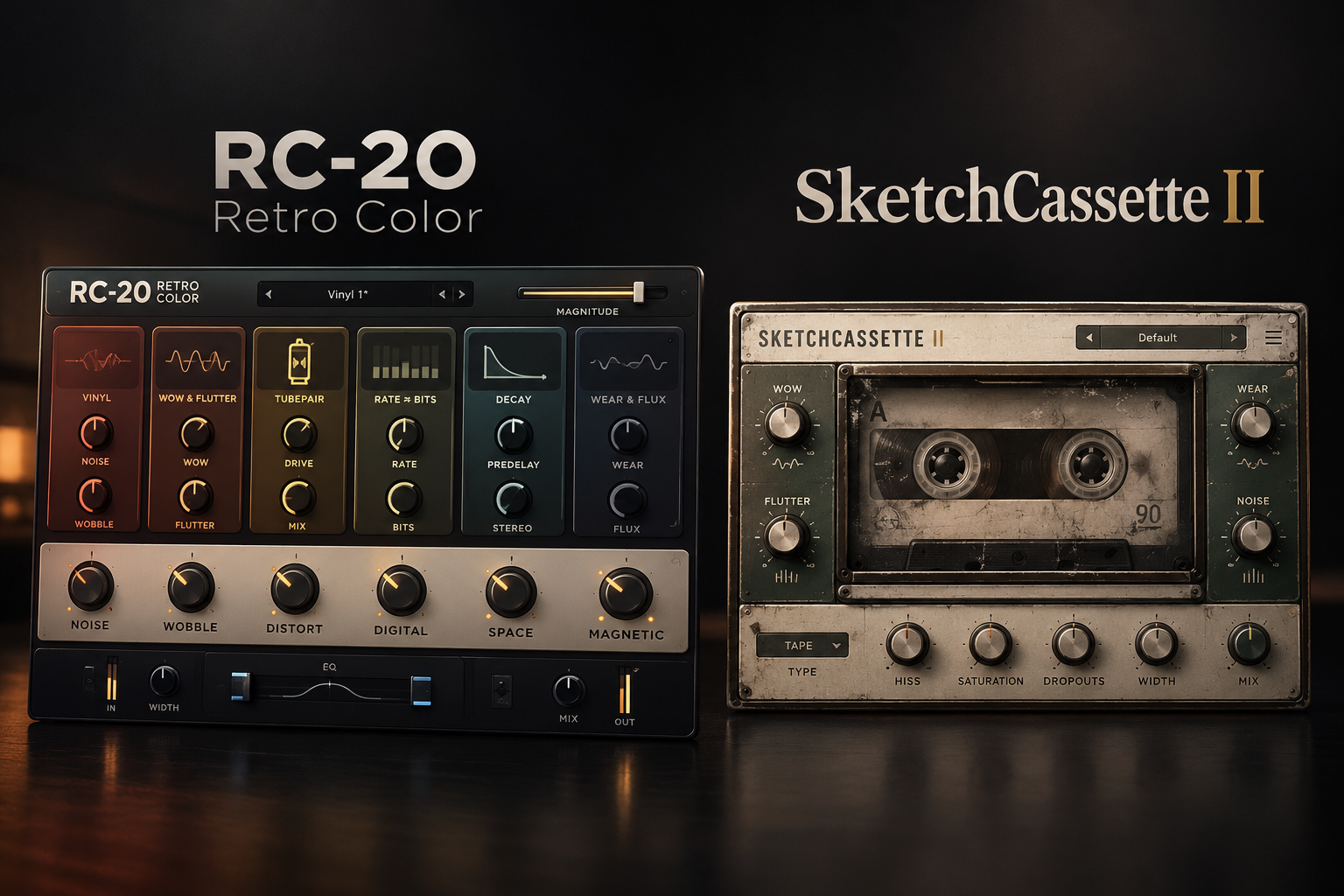

Vintage texture can turn a clean loop into something with personality, but not every lo-fi plugin gives you the same kind of control. RC-20 Retro Color combines several types of degradation, ambience and modulation in one effect, while SketchCassette II concentrates on the quirks of cassette recordings. If you want a flexible all-round texture tool, we would start with RC-20; if convincing cassette-style instability is the main attraction, SketchCassette II deserves the first demo. The better purchase depends on how you make music and which effects you already own.
RC-20 vs SketchCassette II: quick comparison
| Buying question | RC-20 Retro Color | SketchCassette II |
|---|---|---|
| Main focus | Six complementary vintage-effect modules | Detailed cassette-machine degradation |
| Texture tools | Noise, Wobble, Distort, Digital, Space and Magnetic | Tape profiles, age, saturation, hiss, dropouts, wow and flutter, noise-reduction compression |
| Best workflow | Presets and a global Magnitude control | Fine-tune tape-specific behavior |
| Developer price checked 18 Oct 2026 | $99 standalone, or $4.99/month for 20 months rent-to-own | $36 standalone |
| Our first choice | Versatile texture for multiple styles | Cassette-focused lo-fi and tape movement |
Those are official US-dollar store prices, not guarantees of your local checkout total. Deals and taxes may change.
What makes RC-20 different?
XLN Audio RC-20 Retro Color brings six modules together. Noise adds hiss or crackle; Wobble introduces pitch instability; Distort adds saturation; Digital degrades resolution; Space creates ambience; and Magnetic simulates tape-related level irregularities. You can combine them or leave some switched off.
One of its most practical features is the Magnitude slider, which scales the overall effect. That helps when an interesting preset is too extreme for the arrangement. RC-20 is built for moving quickly between subtle character and deliberately obvious lo-fi processing.
SoundShaper advice: choose RC-20 when you regularly produce lo-fi hip-hop, textured pop, ambient music or sample-based beats and want different flavors from one plugin. Start with a preset that is close to your goal, disable modules you do not need, then reduce the overall amount until the original instrument still cuts through.
What makes SketchCassette II different?
Aberrant DSP SketchCassette II concentrates on the way cassette tape can change a recording. Its 12 tape type and quality profiles, continuously adjustable Age control, two saturation modes, tape hiss, dropouts, and detailed wow and flutter controls let you shape the illusion of worn, unstable tape.
It also provides tempo-synced modulation, a flutter FM mode, flanging and noise-reduction encoding compression. The result is a more targeted tool than RC-20, with deeper attention to cassette-specific behavior rather than a collection of unrelated vintage effects.
SoundShaper advice: choose SketchCassette II if the main thing you want is an old four-track cassette character, from gentle imperfections to unstable, damaged recordings. At $36 on the developer site, it is also the less expensive standalone option at the prices checked.
Which is better for lo-fi hip-hop and boom bap?
Both can suit sample-based music. If you like adding vinyl-style crackle, digital grit and roomy ambience to different instruments, RC-20 covers more ground in one window. A piano loop might use small amounts of wobble and noise, while drums could benefit from restrained distortion or Digital processing.
For a beat designed to sound like it was bounced repeatedly through a cassette recorder, SketchCassette II is a more focused choice. Tune its tape quality, age and modulation instead of stacking several effects just to produce tape-specific movement.
Neither plugin turns an uninspiring loop into a strong musical idea. Get the chord progression, drum pocket and sample selection working before adding heavy degradation.
Which is better for vocals, guitars and synths?
Vocals
For a washed-out vocal intro or a deliberately aged background layer, RC-20 is convenient because it can combine modulation, distortion and reverb. SketchCassette II is useful for the narrower goal of a worn cassette vocal. Keep a clean version available if intelligibility matters.
Guitars and keys
On Rhodes, guitars or piano, a little wow and flutter can introduce movement. RC-20 suits a quick preset-based approach; SketchCassette II offers more focused cassette detail. Avoid so much pitch instability that chords become distracting.
Synths and pads
RC-20's module variety makes it an attractive sound-design tool for transitions and evolving layers. SketchCassette II makes more sense when you specifically want tape wear and subtle drift. For a clean modern lead, sometimes neither effect improves the part.
Practical settings to try
Subtle vintage keys with RC-20
- Load RC-20 on a keyboard track and start with a gentle preset.
- Turn down or disable modules that introduce unnecessary hiss.
- Use Wobble sparingly so chords retain their pitch.
- Adjust the Magnitude slider while listening in the full mix.
- Bypass the plugin to confirm the character is helping rather than simply making the part quieter or less clear.
Aged cassette loop with SketchCassette II
- Try a tape profile that moves the tone toward your reference.
- Increase Age and wow/flutter gradually, rather than starting at their extremes.
- Add hiss or dropouts only if the production calls for audible wear.
- Balance saturation and tape filtering against clarity.
- Compare dry and processed audio in the arrangement, not just solo.
Pricing, versions and compatibility
As checked on 18 October 2026, XLN Audio lists RC-20 at $99 or a 20-month rent-to-own plan at $4.99 per month. Its release notes identify version 1.5.2, dated 8 October 2026. XLN lists macOS 10.13 or later, Windows 10/11 and 64-bit VST, AU and AAX formats, with FL Studio among supported hosts.
Aberrant DSP lists SketchCassette II at $36 and offers version 2.3 demos for Windows and macOS. Windows requires version 10 or later and supports VST3/AAX; macOS requires 10.13 or later, supports Intel and Apple Silicon, and offers AU/VST3/AAX. Its demo has a brief audio dropout every 45 seconds and cannot save custom user presets, although settings are retained. Those limitations matter if you plan to test it in a real project.
Promotions, regional taxes and version requirements can change. Check the developer's latest installer and checkout screen before purchasing.
Do you need either plugin?
Not necessarily. A stock saturator, subtle chorus or pitch modulation, an EQ filter and a low-level noise sample may create much of the character you want. Free tools can be enough for occasional lo-fi processing.
Aberrant DSP also offers Lofi Oddity at no cost. It is a useful first stop if you want unusual degradation but do not yet know whether you need a paid tape workflow.
For a broader look at RC-20's strengths and limitations, read our RC-20 Retro Color review.
SoundShaper opinion
RC-20 is the stronger all-round purchase for a producer who wants several types of retro texture in one interface. Its six-module design and global intensity control make it adaptable across drums, keys, vocals and transitions.
SketchCassette II is our value pick for dedicated cassette character. It costs substantially less at the checked developer prices and includes detailed tape profiles, dropout and wow/flutter controls. Paying more for RC-20 makes little sense if your only goal is cassette emulation.
These are editorial judgments based on documented controls and workflow differences, not claims of original controlled listening tests.
FAQ
Can RC-20 create cassette-style sounds?
Yes. Its Wobble, Noise, Distort and Magnetic modules can build worn-tape-style textures. SketchCassette II simply puts more emphasis on detailed cassette behavior.
Is SketchCassette II only useful for lo-fi beats?
No. Subtle tape movement and saturation can suit guitars, synths, drums or ambient effects when used intentionally.
Which one works in FL Studio?
Both offer Windows VST3 support. Check your operating-system version and plugin architecture before downloading.
Is RC-20 worth the higher price?
It may be if you regularly use its digital degradation, reverb, noise and modulation together. If you primarily need cassette sound, SketchCassette II offers a cheaper focused workflow.
Final verdict
Choose RC-20 for flexible, multi-effect retro coloring. Choose SketchCassette II for detailed cassette character at a lower price. Try free DAW effects first if you only need occasional tape warmth or wobble. The best lo-fi sound is the one that helps the arrangement, not the one with the most audible degradation.
Sources: XLN Audio RC-20 · RC-20 release notes · SketchCassette II developer page.
![[background image] image of recording equipment (for a musician & band)](https://cdn.prod.website-files.com/68efa70811edd8e5af30a90d/6ad525ca541f84cd109a4180_Repro-5%20vs%20Prophet-5%20V.png)
![[background image] image of recording equipment (for a musician & band)](https://cdn.prod.website-files.com/68efa70811edd8e5af30a90d/6ad5249509c44abef3dec403_Diva%20vs%20Pigments%207.png)
![[background image] image of recording equipment (for a musician & band)](https://cdn.prod.website-files.com/68efa70811edd8e5af30a90d/6ad5234388e811ebd04ea1f7_Battery%204%20vs%20XO.png)