


Choose Phase Plant if you want to decide how a synth is built as you design each patch. Choose Pigments 7 if you prefer a ready-made layout for combining sound engines, shaping movement and turning a patch into a playable part. Both cover basses, leads, pads and experimental textures. The better purchase depends on which workflow helps you get a useful sound into your track.
There is no useful rule that Phase Plant is only for aggressive electronic music or Pigments is only for atmospheric sounds. You can take either in both directions. A better question is what you want to do after loading an empty patch: assemble the building blocks, or start shaping an instrument whose main sections are already in place?
Quick Comparison
| Buying question | Phase Plant | Pigments 7 |
|---|---|---|
| How do you build a patch? | Add and arrange generators, processing and modulation | Choose sound engines within a defined synth layout |
| What makes it appealing? | Control over the structure of the sound | Visual modulation, varied engine choices and integrated sequencing |
| How are effects handled? | Three Snapin lanes; Essentials included, premium additions sold separately | Built-in effects across insert and send buses |
| Where would we start? | Custom layered basses and patches with specific routing needs | Playable hybrid sounds, evolving pads and sequenced ideas |
| What should you check before buying? | Whether the desired patch uses extra premium Snapins | Whether the workflow adds enough to a synth you already own |
Phase Plant: build the instrument around the sound
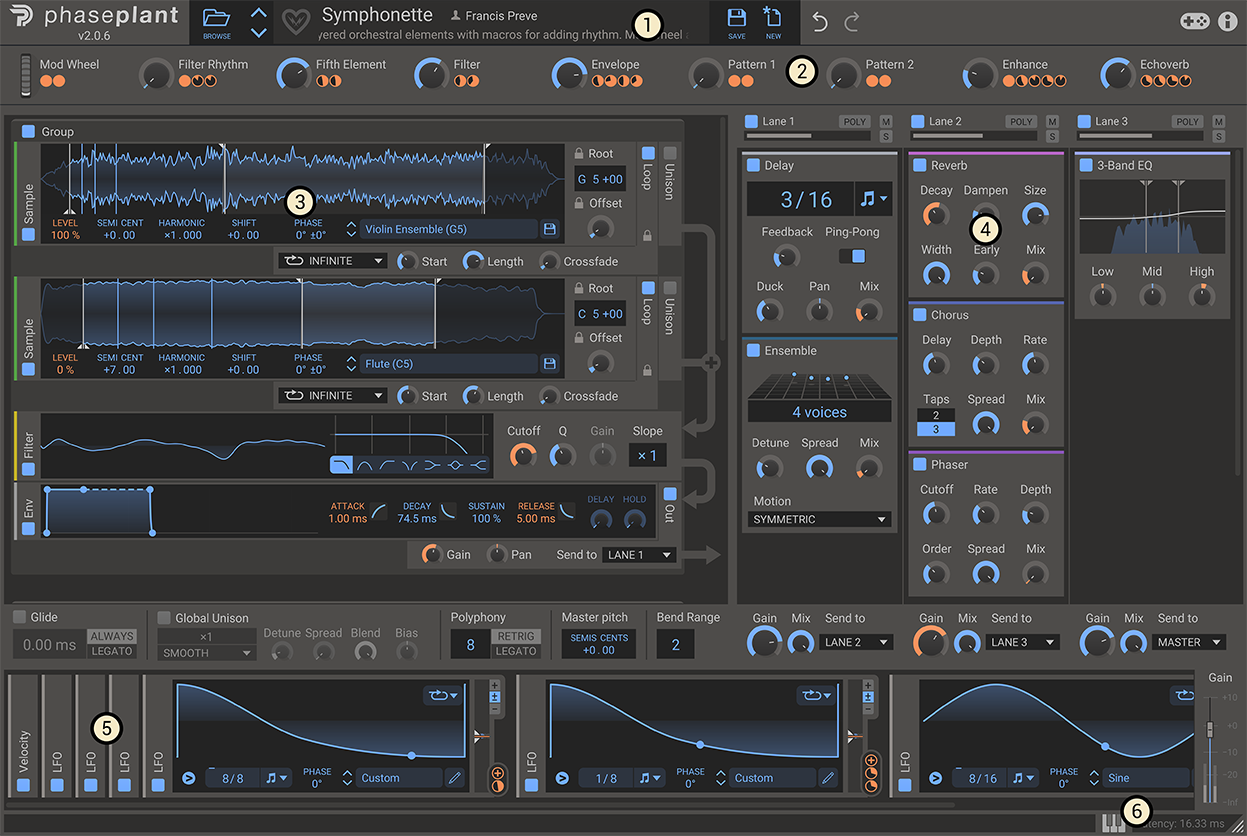
Phase Plant gives you an open generator area rather than a fixed row of identical oscillator slots. Add analogue oscillators, wavetables, sample players, granular generators or noise, then arrange and process them to suit the patch.
Imagine a bass with a clean low layer and a rough upper layer. You may want the low layer to stay steady while the upper sound changes over a bar. Phase Plant's modular approach is appealing when defining those relationships is part of the idea, rather than something you want to work around later.
It also supports audio-rate modulation between generators. That makes it worth investigating if your sound design regularly involves one source changing another source's frequency, phase or amplitude. You do not need to use every option in every patch.
Start with one generator and add the next only when you can explain its job. A second layer that makes a bass sound bigger on its own may simply crowd the kick in a mix. Our kick and 808 guide is useful when the real problem is the arrangement or low-end balance.
The tradeoff is having more structural decisions to make. If you enjoy a consistent panel and reach for the same few controls, an open layout may slow you down. Our Phase Plant review looks more closely at that buying decision.
Pigments 7: shape the sound within a familiar layout
Pigments lets you combine two main sound engines alongside a Utility engine, with filters, modulation and effects arranged in established sections. Its synthesis options include virtual analogue, wavetable, sample, granular and harmonic approaches.
The attraction is having different starting points in the same instrument. You might combine a clear pitched source with a moving sample texture, then use modulation to change their balance. The architecture gives that experiment a defined place to happen.
Colour-coded modulation and drag-and-drop assignment help you follow what is controlling a parameter. That is useful when reopening an unfinished patch: you want to understand why the sound moves before adding another modulation source.
Pigments also includes a sequencer and arpeggiator. We would give these real weight if you like discovering a musical part while designing its sound. If you already write every note in your DAW, that feature may matter much less.
What Pigments 7 adds to the comparison
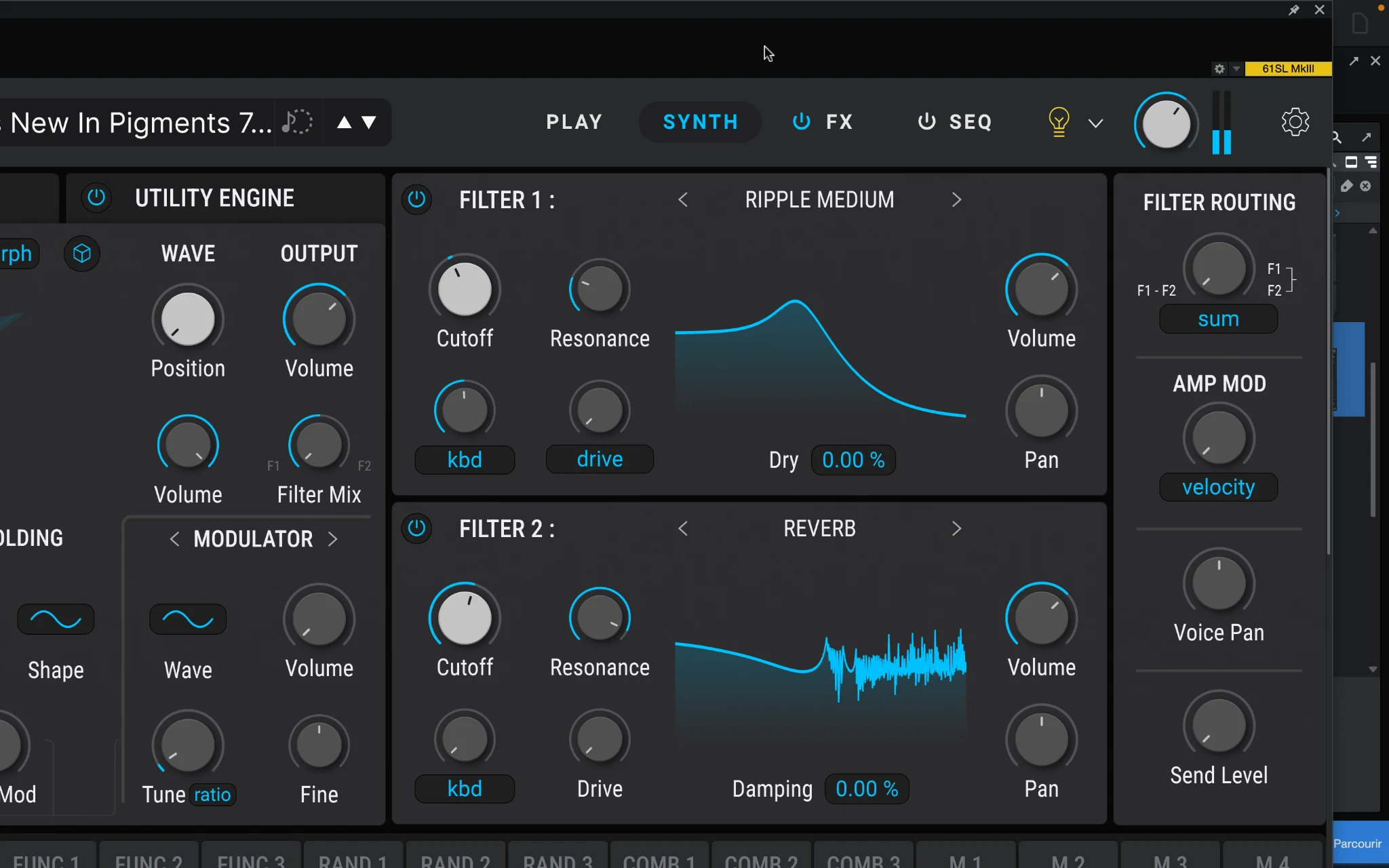
Do not judge Pigments 7 only by an old description of Pigments as a colourful wavetable synth. Version 7 adds the Rage, Ripple and Reverb filters, the Corroder effect, a redesigned Play page and workflow changes.
These additions give you more ways to change a sound's character inside the existing layout. The Reverb filter, for example, is intended for timbral shaping; it is not simply a replacement for putting a long reverb tail on the output.
Pigments 7 also adds audio-rate FM options to its Classic Filter. That matters because “Phase Plant can do FM” is too broad a reason to dismiss Pigments. The more useful distinction is how much freedom you need over the connections and structure of a particular patch.
For the wider version update, read our Pigments 7 review. For this purchase, focus on the controls you expect to use regularly.
Bass, pads and sequences: where would we start?
For a layered bass with a specific design
We would start with Phase Plant when the idea already includes separate layers, different processing paths or detailed interactions between generators. Write down the job of each layer first. That gives its modular structure a purpose.
For a straightforward bass, try both with one source, a filter and an envelope. The larger patch is not automatically the better one. Pick the version that supports the groove without needing constant repairs elsewhere in the mix.
For an evolving pad or playable texture
Pigments would be our first shortlist choice if you want to combine engine types, explore modulation and keep returning to a playable patch. Begin with a dry sound that works, then add movement and space.
Phase Plant remains a strong candidate when the pad needs a more unusual structure. Neither instrument makes a texture useful simply by making it complex. Check how the attack, release and movement fit the chord changes.
For a pattern that helps write the track
Give Pigments' sequencer and arpeggiator a proper trial if the pattern itself is part of the attraction. Record a short idea, then judge whether it survives with the other instruments playing.
If you already have a detailed MIDI part, audition both synths with that same part instead. This keeps the comparison focused on the sound and editing workflow rather than which factory sequence is more exciting.
Effects and price: compare the complete purchase
Phase Plant includes Kilohearts Essentials, so buying the base synth does not leave you without effects. Premium Snapins are separate purchases. Check what a bundle actually contains before treating two different offers as equivalent.
There is an important detail for preset users: Kilohearts says presets using premium effects you do not own remain functional. Editing those particular effects is restricted, although assigned macros can still control them. That is different from having unrestricted access to the effects themselves.
Pigments includes its own effects section, with insert and send buses. If you want a single instrument with its processing already available, that can make the purchase easier to assess.
On 17 November 2026, Kilohearts lists Phase Plant at $99 on sale against its $199 regular price. That developer offer need not match the linked retailer. Compare checkout totals in the same currency, including tax, account offers and extras you need. We would rather buy the synth that solves a recurring problem at a fair price than choose an unfamiliar workflow because its discount looks larger.
Already own Serum 2, or one of these synths?
You may not need another instrument. Before buying, identify something you repeatedly struggle to build with your current synth. “More sounds” is less useful than a specific need such as a different routing approach or an integrated sequencing workflow.
If Serum 2 is already your main instrument, compare that gap with our Phase Plant vs Serum 2 and Serum 2 vs Pigments 7 articles. There is substantial overlap, so owning all three needs a reason beyond their feature lists.
If you already own Phase Plant or Pigments, try completing the same patch in it before shopping. A saved starting preset or a better understanding of modulation can be more valuable than another licence.
Sources
This comparison is editorial buying advice based on documented features, rather than a matched listening or CPU test. Sources checked 2 November 2026: Phase Plant product information, Phase Plant documentation, Kilohearts' purchase and preset FAQ, Arturia's Pigments features, and Arturia's Pigments 7 update guide.
Test the routing difference
For a Phase Plant bass, create a separate sine sub and a brighter mid layer. Send the mid layer through a distortion lane while keeping the sub out of that lane. Mute each layer in turn to check the routing; if bypassing the distortion changes the sub, the paths are not separated as intended.
For Pigments, start with two contrasting engines and use a macro to change the texture without losing the core note. Check each engine alone before adding effects. The point is to find whether its fixed engine layout already covers the changes you need, not to reproduce every possible modular connection.
In both demos, repeat the phrase with overlapping notes and long releases at your normal buffer. Polyphony, unison and processing choices can dominate CPU use; no universal performance winner is assumed.
Conclusion
Phase Plant is the stronger fit when designing the signal path is part of the sound you want. Pigments suits a defined multi-engine layout with integrated sequencing and visual modulation. If you already own Pigments, install its free v7 update before judging whether another synth fills a real gap.
Official reference: Pigments 7 update.


