


Choose Serum 2 if you want its wavetable editing and oscillator workflow at the centre of your sound design. Choose Pigments 7 if combining different synthesis approaches, visual modulation and evolving sequences is the bigger attraction. Both can make basses, leads and atmospheric sounds. The useful difference is how you get from an idea to a patch you can play.
The old comparison of Serum as a wavetable synth and Pigments as the versatile alternative is incomplete. Serum 2 adds sample, multisample, granular and spectral options. Pigments still has its own reasons to appeal, but “it can use samples” is no longer enough to settle this choice.
Quick Comparison
| Buying question | Serum 2 | Pigments 7 |
|---|---|---|
| Starting point | Three main oscillators with selectable synthesis modes | Two main engine slots plus a Utility engine |
| Distinctive attraction | Wavetable editing, oscillator warping and spectral processing | Modal and harmonic engines alongside a broad hybrid palette |
| Rhythmic ideas | Arpeggiator and clip sequencer | Generative sequencer and arpeggiator |
| Workflow priority | Detailed oscillator and modulation design | Color-coded modulation and contrasting engine combinations |
| First buying check | Existing Serum owners should check their upgrade entitlement | Existing Pigments owners get v7 free; others check account offers |
Serum 2: a strong choice when the oscillator is the main event
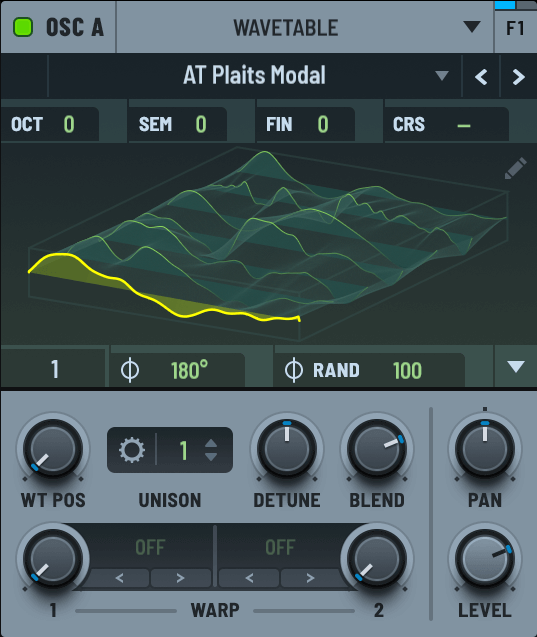
Serum gives you a direct route into shaping the source itself. Its wavetable editor and warp controls make sense when the movement inside a tone is the part you want to design, rather than something you plan to add later with effects.
Think of a bass that needs a steady low foundation and a changing upper texture. Start with a simple note pattern, then explore how the source changes through the phrase. Keep the amount of movement small enough that you can still follow the rhythm. Adding another oscillator is useful only when you know what that layer contributes.
Serum 2’s additional oscillator modes widen that approach. A sample or granular layer can add a different attack or background texture, while spectral processing opens another route into reshaping recorded material. This makes it a broader instrument than the original Serum, not merely an updated preset player.
That breadth also means learning more controls. If you mainly want familiar wavetable sounds, begin with that part of the instrument. You do not have to explore every mode before recording a useful part. Our Serum 2 review looks at the wider package.
Pigments 7: useful contrasts within one patch
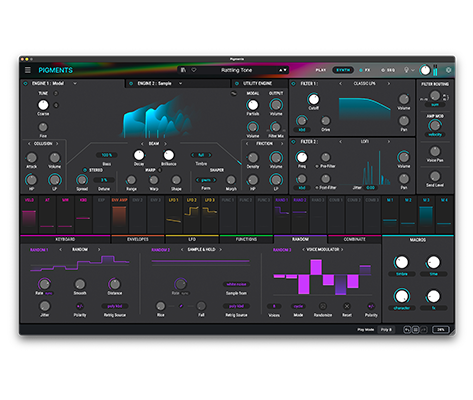
Pigments brings virtual analogue, wavetable, sample, granular, harmonic and modal synthesis into an interface built around combining engines. Its colour coding makes modulation relationships visible as you work.
The modal and harmonic approaches are especially relevant if you want something beyond another conventional oscillator patch. For example, a sustained layer and a more percussive, resonant component can give a keyboard part a clearer identity. You still need to decide which element carries the tune and which provides the texture.
For evolving music, try keeping the notes simple and letting a few parameters change over a longer phrase. A quiet texture that develops slowly can be more useful than a complex pattern that competes with the lead. Pigments’ sequencer and modulation tools make this a sensible direction to investigate.
Version 7 adds filters including Rage, Ripple and Reverb, plus the Corroder effect and interface improvements. Those additions offer more ways to shape the patch, but they are less important to a first purchase than whether the overall layout makes sense to you. See our Pigments 7 review for the version-specific details.
For bass and leads, compare the same musical job
Use a short MIDI bassline with one source and effects disabled. Match amplitude decay and output level, then add one slow timbral movement. In Serum, try a small WT Pos range; in Pigments, select a wavetable engine and keep its movement similarly restrained. Listen with the kick playing.
Next test a real difference: import a recording into Serum’s Spectral mode, then explore a resonant sound with Pigments’ Modal engine. These are not identical processes. Choose the route that supplies a sound you want to use rather than ranking both synths by a generic “warmth” claim.
For pads, textures and sequences, the overlap is larger now
Pigments remains an appealing candidate for composite textures and generative patterns. However, Serum 2’s granular, sample and sequencing tools make it a credible option for those tasks too.
Try a patch behind a chord progression rather than playing a single held note. Let the progression move to its next chord and then its next section. Long releases and complex motion can sound impressive in isolation while making the actual arrangement harder to follow.
In Pigments, investigate whether the engine combinations and sequencer suggest a useful part. In Serum, investigate whether the oscillator modes and clip workflow get you there more naturally. These are workflow recommendations, not a claim that either synth has won a controlled listening test.
What if you already own one?
If you own Serum 1, check Xfer’s Serum 2 upgrade process before paying for another synth. Xfer describes Serum 2 as a free upgrade for Serum 1 owners. Exploring the instrument you already have access to may change the purchase completely.
If you already own Pigments, identify a specific job that feels difficult before buying Serum. “More sound design” is too vague to guide the choice. Wavetable editing you prefer, an existing preset collection or a workflow you want to learn are clearer reasons.
The same applies in the other direction. A Serum owner interested in Pigments should spend time with its distinctive engines and visual modulation rather than buying it for features Serum 2 already covers. For another flexible option, read our Phase Plant vs Serum comparison.
Price, demos and compatibility
Checked 17 November 2026: Xfer lists Serum 2 at $249 USD. Arturia’s displayed offer for Pigments is $99.99 against $199 regular pricing; local tax and personal offers can differ. Existing owners receive the respective Serum 1-to-2 and Pigments-to-7 updates free.
Splice’s Serum plan is $9.99 for 25 payments ($249.75 before tax) after a 3-day trial. Distinguish that from Xfer’s session-limited direct demo and Arturia’s full-synth demo. Test the format supported by your DAW, plus project recall and a realistic voice count.
Conclusion
Choose Serum for its oscillator editing, spectral processing and routing if those are central to your next patch. Choose Pigments for its modal/harmonic options and the way its engine and modulation pages organize the work. The feature overlap is substantial; make a purchase only after a specific editing task favors one workflow.
Sources
Xfer: Serum 2; Xfer: what changed in Serum 2; Arturia: Pigments; Arturia: Pigments 7 additions. Product details checked 2 November 2026.


