
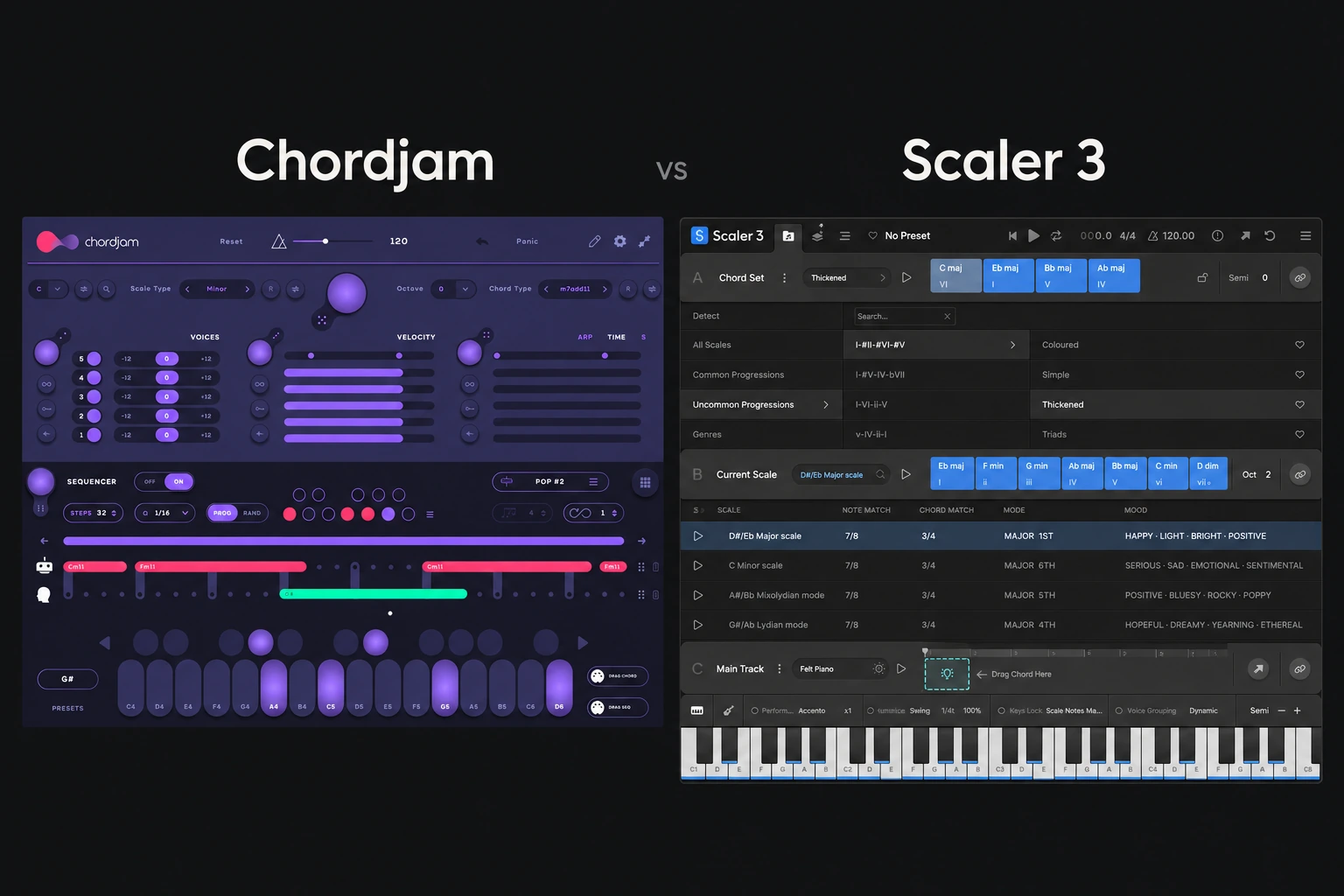

Choose Chordjam if you want to generate and perform chord variations through guided randomization. Choose Scaler 3 if you want a broader environment for exploring harmony, identifying chords and developing several musical parts.
For a producer buying one composition assistant, Scaler 3 is our first demo recommendation because it covers more stages of writing. Chordjam is the more focused candidate when the missing ingredient is variation in the chord performance itself.
This is an editorial comparison based on current Audiomodern and Scaler Music documentation. We have not performed a hands-on routing or listening test. Features were checked on 29 October 2026.
Which problem are you trying to solve?
| Your priority | First demo to try |
|---|---|
| Explore chord relationships and possible next chords | Scaler 3 |
| Vary voicing, timing and velocity within limits | Chordjam |
| Build chord, bass and melody parts in one environment | Scaler 3 |
| Jam with changing chord performances | Chordjam |
| Finish one simple progression you already know | Your existing piano roll may be enough |
These are workflow recommendations, not restrictions. Both products overlap in chord creation and performance, so test the task rather than buying from the longest feature list.
Chordjam: set the boundaries, then explore
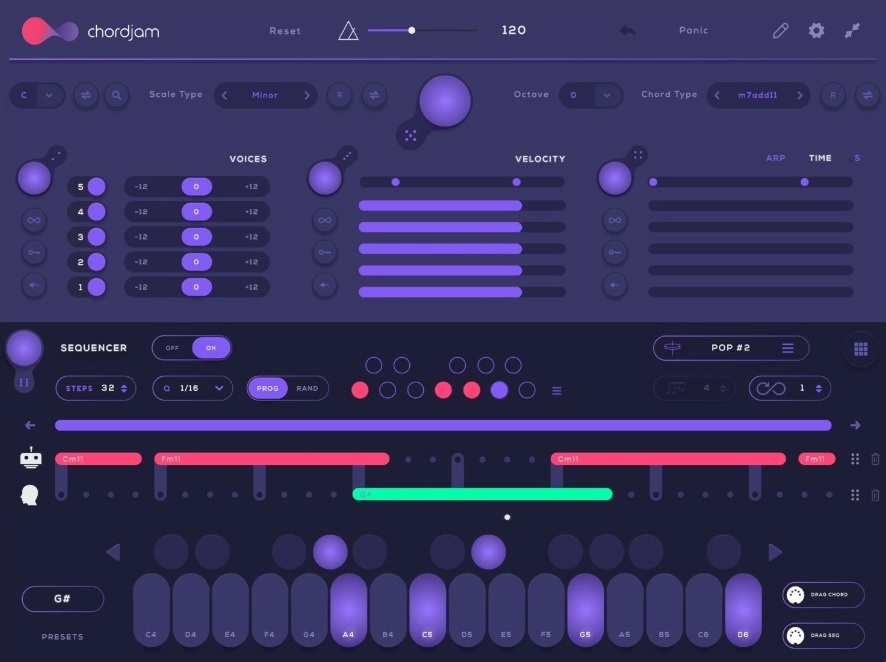
Chordjam builds chords and progression patterns through user-guided randomization. Its tools include voicing controls, timing and velocity ranges, a sequencer, an arpeggiator and performance pads. It can export chords or patterns as MIDI and send MIDI to other instruments.
The manual describes separate randomization for Voices, Velocity and Time, with locks to exclude sections from the main randomization. That gives experimentation a purpose: keep what works and vary a specific part of the performance.
Try it when a progression is harmonically acceptable but feels too rigid. Limit the range of variation, generate a few options and stop when one supports the track. Changing everything at once can make it harder to identify the improvement.
It is especially worth a demo if you enjoy playing with a system and keeping useful accidents. It is less compelling if you already know the exact notes and timing you want to enter.
Read our Chordjam review for the individual buying guide.
Scaler 3: investigate the harmony and develop the parts
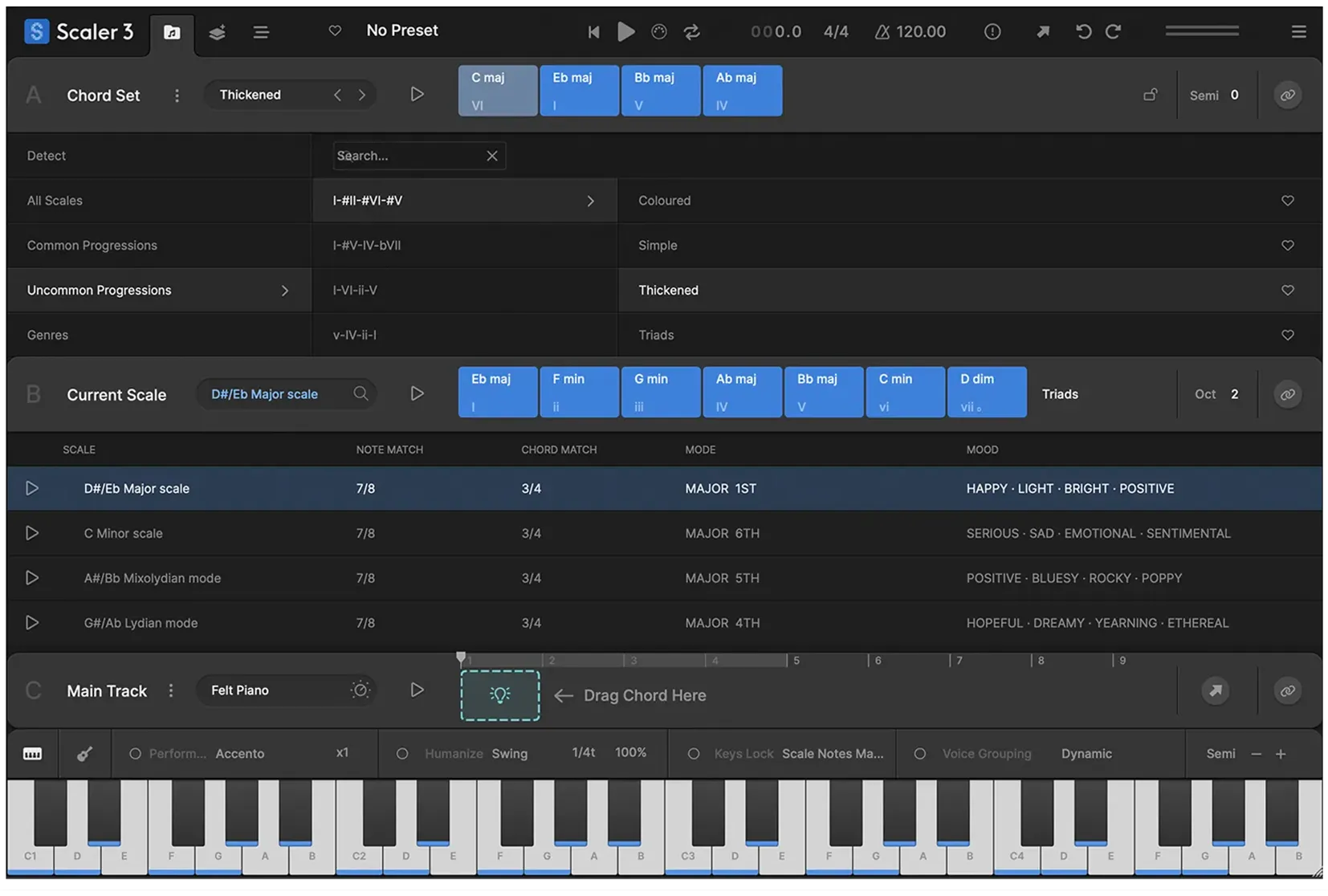
Scaler 3 combines chord sets and suggestions with scale information, audio and MIDI detection, and tools for exploring harmonic alternatives. Its Arrange page provides lanes for chords, melody, bass and phrases, while Motions turn harmony into different performances.
Its broader appeal is being able to investigate several writing questions in one place: which chords fit, what a substitution changes and how supporting parts can relate to the progression.
For a producer who wants help understanding the options, that is a more direct reason to buy than simply generating more notes. Audition a change, listen to how it leads into the next chord and keep the version that supports the melody.
Depth is also a trade-off. If your goal is one quick loop, several pages of harmonic and arrangement options may be more than you need. Give the session a clear destination before exploring.
Our Scaler 3 review covers its wider feature set.
Starting from a blank project
If the difficulty is choosing a harmonic direction, start with Scaler’s demo. Use one simple instrument and compare a small number of progressions. A changing sound preset can make an ordinary progression seem more interesting without improving the writing.
If the difficulty is making a chord pattern feel performed, try Chordjam. Keep the harmonic choices manageable and explore voicing, timing or velocity separately.
In either case, save two or three candidates and move on. A composition assistant should help you make a decision; an endless library of alternatives can postpone it.
Working around an existing melody or sample
Scaler’s detection and harmonic tools are a reason to investigate it when you already have material to work around. Listen to the result rather than treating a displayed key or chord label as the final authority, especially with dense or ambiguous audio.
Do not assume Chordjam has no analysis capability. Audiomodern’s support documentation describes importing audio or MIDI to suggest a scale and key. That is a useful feature, but it does not make every detection or rewriting workflow identical between the two products.
A practical test is to choose a short melody you understand, find a supporting progression and then change one chord. Check whether the new version supports the important melody notes before developing the arrangement.
MIDI routing matters more than the demo video
Before buying, make the plugin drive the instrument you actually use. Confirm that the right notes arrive, the rhythm stays aligned and you can record or export a useful result in your DAW.
Scaler 3 supports external MIDI output and can host third-party instruments and effects. Chordjam offers MIDI output and drag-and-drop MIDI export. The easiest setup still depends on your host and the workflow you prefer.
Capture an idea you like before generating more alternatives. Once it is in the piano roll, edit note length, register and density for the arrangement. A good generated phrase often benefits from a few deliberate changes.
If you are new to this distinction, our MIDI vs audio guide explains what the exported notes contain.
Which one helps beginners learn?
We would start with Scaler when the aim includes learning chord and scale relationships. The useful habit is to explain one decision after each session: why a chord worked, why another created tension or why a different voicing left more space.
Chordjam can also support learning if you inspect the MIDI you keep. Notice which notes moved and how the timing changed the feel. Randomization is most useful when you recognise why a result is worth saving.
Neither plugin replaces listening to complete songs, learning a few progressions or finishing an arrangement. If you already have a progression that works, you do not need a different one just because a generator can produce it.
Price, ownership and buying both
Compare the current checkout prices and check any existing licences or upgrade offers. A broader product can be good value if you use its extra tools; a focused product can be better value if it solves your one recurring problem.
Already own Scaler? Try its performance tools before buying another chord plugin. Already own Chordjam? Consider Scaler when harmonic exploration and arrangement features have a separate role in your work.
For other MIDI buying decisions, see Scaler 3 vs InstaComposer 4 and Riffer vs Scaler.
SoundShaper opinion
Scaler 3 is our broader recommendation for producers who want a composition environment and help exploring harmony. It is the first demo we would try when buying one tool for several writing stages.
Chordjam is our more specific recommendation for producers who want guided variation and a playable chord-pattern workflow. It earns a place when experimenting with performance is what gets an idea moving.
Conclusion
Choose Scaler 3 for a wider harmonic and arrangement toolkit. Choose Chordjam for focused chord-performance experimentation. Try each on an unfinished project and judge the MIDI you actually keep, rather than how many patterns you can generate.
Sources
Audiomodern: Chordjam features and trial; Chordjam manual: randomization controls; Audiomodern support: analysis and triggering; Scaler Music: Scaler 3 features; Scaler 3 user guide. Checked 29 October 2026.
![[background image] image of recording equipment (for a musician & band)](https://cdn.prod.website-files.com/68efa70811edd8e5af30a90d/6ae28f3ffeabaf5b76db2580_6ae28f255000f820b159a320_crystalline-review-cover.webp)
![[background image] image of recording equipment (for a musician & band)](https://cdn.prod.website-files.com/68efa70811edd8e5af30a90d/6ae28e7e5d1572089570ac87_6ae28e5eead33b2db2a18b5f_transit-2-review-cover.webp)
![[background image] image of recording equipment (for a musician & band)](https://cdn.prod.website-files.com/68efa70811edd8e5af30a90d/6ae28d603a57759da71022d6_6ae28d41f6af13c91dee9c76_drumazon-2-review-cover.webp)