
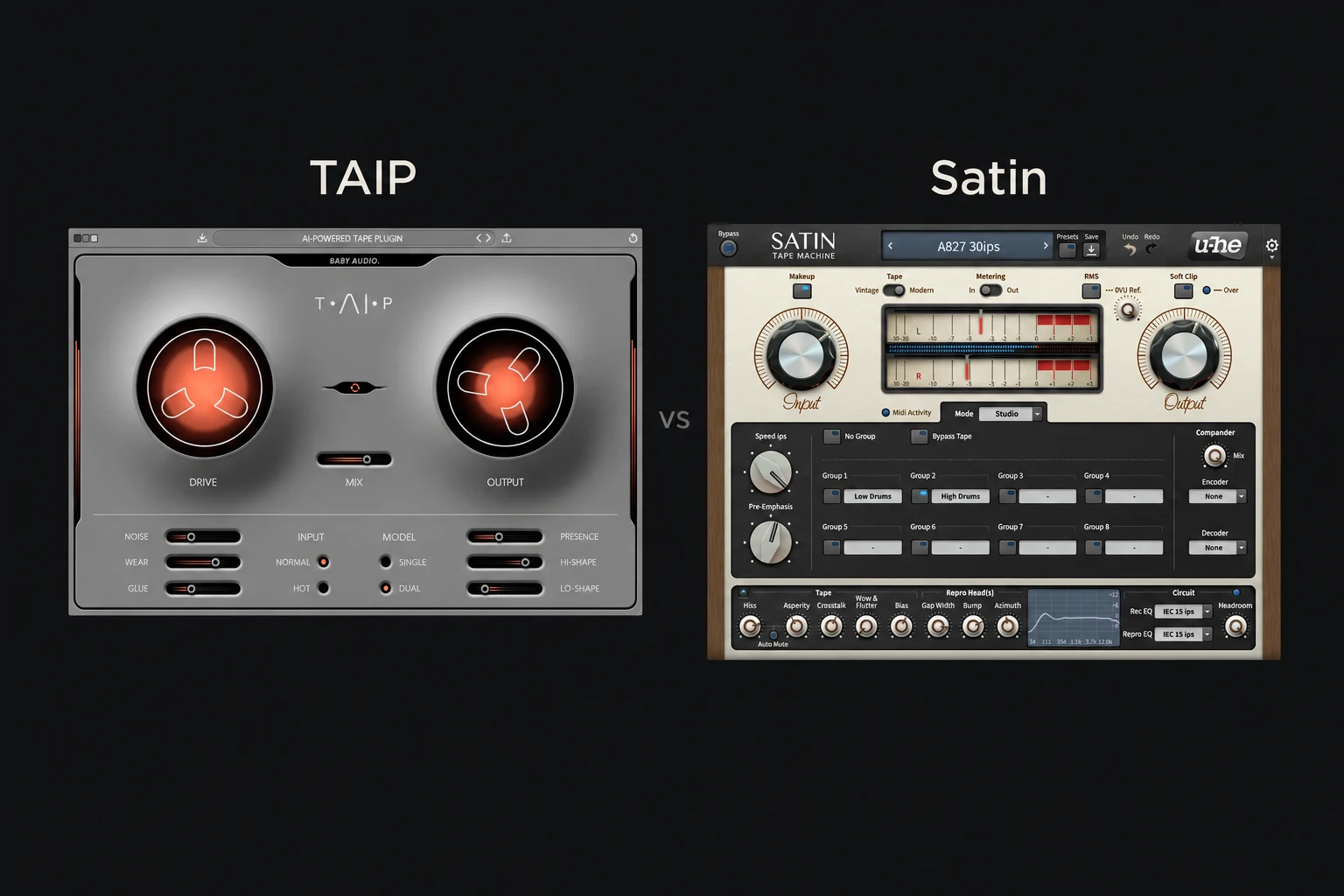

TAIP is the one we would try first for direct tape-style saturation and character. Satin is the one we would try first for a configurable tape-machine workflow, including dedicated delay and flanging modes. The choice is less about which one is “more analogue” and more about the controls you want to use.
Both can colour individual tracks and buses. You do not need to understand every tape-machine setting to use either, and a longer feature list does not automatically make a better purchase.
This comparison evaluates documented features and suggested workflows. We have not run a controlled listening or CPU comparison.
TAIP vs Satin at a glance
| What you need | Our first trial choice | What to check |
|---|---|---|
| A direct way to adjust saturation and compression-like colour | TAIP | Evaluate Drive, Glue and frequency shaping on one bus. |
| Detailed control of a virtual tape machine | Satin | Explore tape speed, circuit choices and the Service panel. |
| Tape delay and through-zero flanging modes | Satin | These dedicated modes are a concrete reason to investigate it. |
| Wear, noise and a less pristine texture | Try either | Choose by the result and the controls you prefer. |
| A tape plugin you already like | Keep it first | Identify a missing capability before adding another. |
Our recommendations concern workflow. They do not mean TAIP can only make obvious effects or Satin can only make subtle ones. Input level and settings matter, and both deserve to be evaluated in the context of a track.
TAIP: shape the character with a focused set of controls
TAIP provides Drive, Auto Gain, a dry/wet blend and separate Noise, Wear and Glue controls. Lo-Shape and Hi-Shape change how strongly different frequency areas saturate, while Presence adjusts high-end attenuation. Single and Dual models offer another way to shape the response.
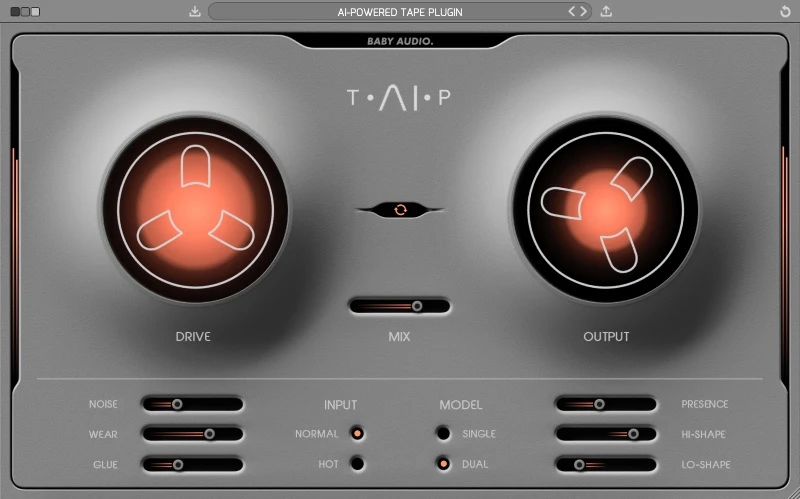
That layout gives us a clear starting point on a drum bus. First decide whether you want a little colour or an obvious effect. Increase Drive gradually, compare at a similar output level and stop when the groove begins losing something you wanted to keep.
We would then audition Glue separately. If the kick and snare lose their contrast, adding more may be working against the track. A setting that makes a loop sound denser can also make it feel less lively.
For bass-heavy material, the frequency-shaping controls are particularly worth evaluating. We would listen to the low end and the upper harmonics as separate questions: does the bass remain controlled, and does the added character help it translate?
Our preference for this approach comes from the names and layout of the controls, rather than a measured claim that TAIP is faster. Try the same task yourself. Our TAIP review covers its feature set and buying advice in more detail.
Satin: configure the tape system
Satin includes Studio, Delay and Flange modes, selectable tape material and circuit settings, and a detailed Service panel. It exposes parameters such as bias, head gap, azimuth, hiss and wow/flutter. Its grouping system lets you coordinate multiple instances.
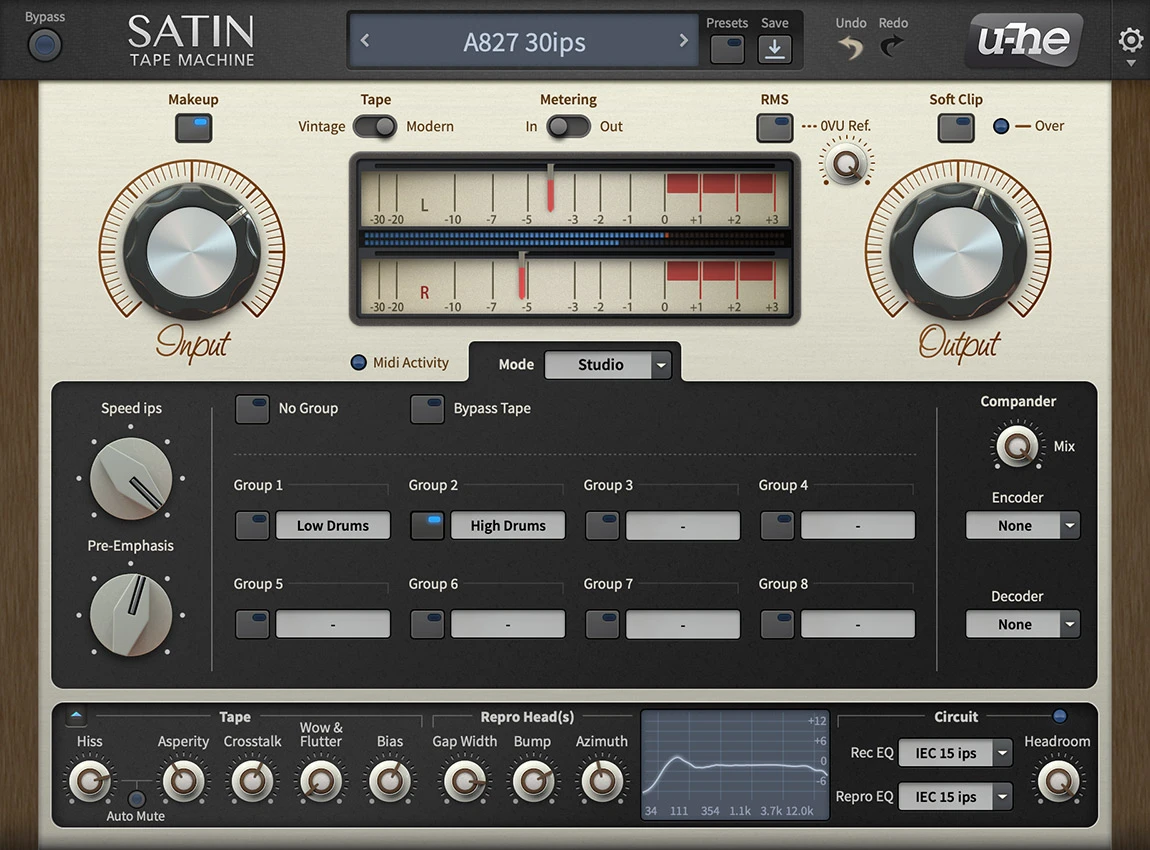
We would investigate Satin when you want to compare different aspects of tape behaviour deliberately. Begin with a suitable preset, save a copy and change one setting. A technical control is useful when it helps you reach a result, not simply because it makes the process feel more authentic.
The dedicated delay and flange modes are an important buying distinction. If you want to explore tape echoes or a through-zero sweep as well as saturation, Satin gives you those jobs inside the same product.
For a vocal delay, we would judge the repeats against the next lyric and the following chord. The most interesting solo setting may not leave enough space. Keep the musical purpose clear before exploring all the routing choices.
For a broader look at its machine-building approach, read our Satin review.
Which should you choose for drums, vocals and the mix bus?
Drums: keep the groove as the reference
TAIP would be our first trial for a focused experiment with saturation and Glue. Satin would be our first trial if we also wanted to explore tape settings or coordinate processing across several tracks.
Use a loop with a clear kick, snare and quieter detail. Compare the initial hit, the body of the sound and the spaces between hits. More density is useful only if it supports the rhythm.
Keep noise and pitch instability restrained during the first comparison. Otherwise you may choose the more obvious effect rather than the saturation behaviour you actually wanted.
Vocals: separate colour from deliberate ageing
On a lead vocal, we would first listen for how processing changes articulation. A softened edge may suit one recording and make another harder to understand. Check the full chorus, rather than judging only a quiet line.
TAIP's Wear control provides a direct way to investigate a worn-machine character. Satin provides more individual machine parameters. We would choose between those approaches according to how much separate control you need.
For an effect layer, you can be more adventurous. Keep a clear lead and process a duplicate phrase or backing part so the texture has a defined role.
Mix bus: either can be too much
Start with small changes and compare the loudest section of the song. Check whether cymbals, vocal consonants and bass still sit where you intended.
We would not pick a universal mix-bus winner from the feature lists. Match levels, use the same passage and keep the version that serves the arrangement. If bypass sounds better, the track may not need a tape effect.
“AI-powered” does not decide the purchase
Baby Audio describes TAIP as using machine learning to model tape behaviour. That describes its development approach; it is not a reason to assume it will make better musical choices for you.
Satin's appeal is its configurable component-based system. We would judge both by the sound you can achieve and your ability to revise it. A modelling method and a long list of settings are explanations of the product, not listening results.
A useful demo comparison
Choose three short passages: a drum bus, an exposed vocal and a full chorus. Give each plugin two targets: subtle colour and a clearly audible creative effect.
First, control the level. Use TAIP's Auto Gain as a starting aid and adjust the final output by ear. For Satin, compare input changes with the output compensated. Do not assume a button guarantees a perfectly matched loudness comparison.
Next, keep the task narrow. Work on saturation before adding wear or hiss. Then explore those characteristics separately.
Finally, make a revision. Try to reduce one unwanted change while keeping the part you liked. That shows whether the controls suit how you work.
Both demos deliberately interrupt the signal: Baby Audio documents periodic silence for TAIP, while u-he documents intermittent crackling for Satin. Keep those demo artefacts separate from your judgment of the processing.
Price, compatibility and existing plugins
Compare the current full-licence prices in the same currency and check any account-specific offers. A discount is useful when the plugin solves a need; it does not make a duplicate tool necessary.
Use each developer's current requirements for your operating system and plugin format. Both require a compatible host for normal plugin use. We have not measured performance, so test a representative project if you expect to use multiple instances.
If you mainly want a wider range of distortion rather than tape behaviour, our Decapitator vs Saturn 2 comparison covers another decision. For more overtly aged textures, see RC-20 vs SketchCassette II.
SoundShaper opinion
Our first recommendation is TAIP for producers who want a focused way to dial in colour, Glue and wear. Its controls give you a manageable set of questions to evaluate on a track or bus.
We would recommend investigating Satin first if tape configuration, coordinated instances or its delay and flange modes are part of the goal. Those are concrete capabilities that can justify its broader workflow.
We would not buy both at once. Learn what one does well in your sessions, then consider the other only when you can describe the missing capability.
Conclusion
Choose TAIP first for direct control of tape-style character. Choose Satin first for configurable machine behaviour and dedicated tape delay and flanging.
Try the same passages, compensate for level changes and judge the result inside the song. The right purchase is the one whose controls help you make the changes you want.
Sources
Checked on 27 October 2026 against Baby Audio's TAIP manual, the TAIP product page, u-he's Satin documentation and product information and the linked Plugin Boutique listings. Screenshots: Baby Audio and u-he. Suggested listening tasks and buying recommendations are SoundShaper's editorial advice.
![[background image] image of recording equipment (for a musician & band)](https://cdn.prod.website-files.com/68efa70811edd8e5af30a90d/6ae28f3ffeabaf5b76db2580_6ae28f255000f820b159a320_crystalline-review-cover.webp)
![[background image] image of recording equipment (for a musician & band)](https://cdn.prod.website-files.com/68efa70811edd8e5af30a90d/6ae28e7e5d1572089570ac87_6ae28e5eead33b2db2a18b5f_transit-2-review-cover.webp)
![[background image] image of recording equipment (for a musician & band)](https://cdn.prod.website-files.com/68efa70811edd8e5af30a90d/6ae28d603a57759da71022d6_6ae28d41f6af13c91dee9c76_drumazon-2-review-cover.webp)