
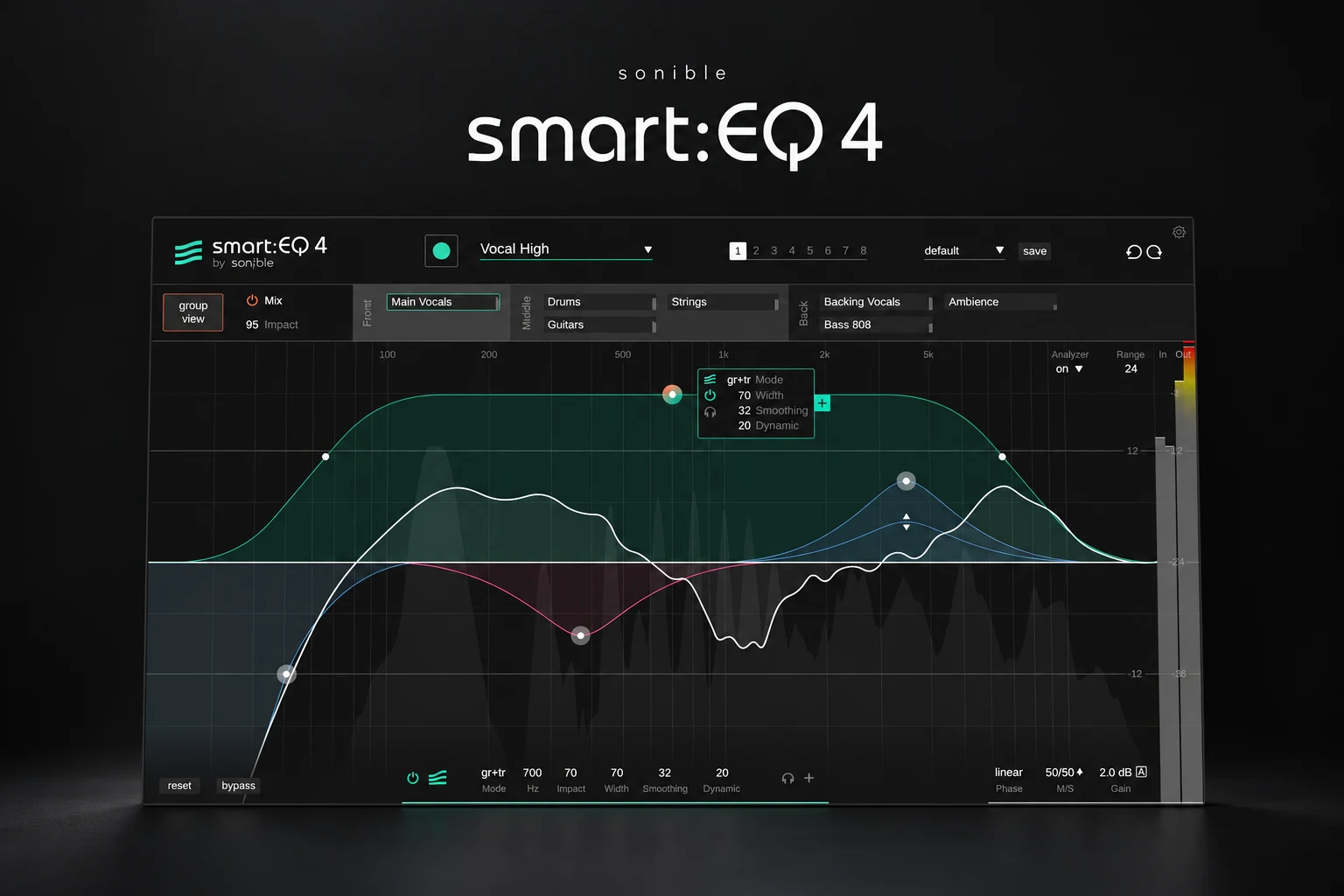

smart:EQ 4 is worth considering if you spend too long balancing the tone of individual tracks and making overlapping parts fit together. Its appeal is the combination of automatic spectral correction and a group workflow in which you decide which elements deserve priority.
That makes it an interesting option for producers mixing their own vocals, beats and electronic tracks. It also raises a fair question: if your DAW already includes an EQ, what are you actually paying for?
This smart:EQ 4 review looks at the workflow, the limits of automatic EQ and the situations where we would consider buying it. Our assessment is based on current product documentation and the manual, rather than a hands-on listening test.
What is sonible smart:EQ 4?
smart:EQ 4 is an equalizer built around sonible's smart:filter. You select a profile, let it analyse audio and adjust the resulting processing. Profiles cover instruments, vocals and mixes; you can also build a target from reference audio.
Its other main feature is communication between instances. You can group up to ten tracks, assign front, middle and back priorities, and control group members from one instance. Conventional EQ bands, dynamic processing and mid/side controls remain available for manual adjustments.
The useful buying distinction is therefore the amount of guidance you want. If you already hear a problem and know the exact move, a familiar EQ may be quicker. If you keep restarting your tonal balance or lose perspective after an hour of mixing, an alternative starting point may be valuable.
Quick buying guide
| Your situation | Our recommendation |
|---|---|
| Vocals keep getting buried | Try a small group containing the vocal and the main competing instruments. |
| You like the tone but need separation | Explore Group mode before applying individual tonal correction. |
| You need one simple EQ cut | Start with your stock EQ. |
| You want a complete automatic mix | Keep expectations realistic: arrangement, levels and musical priorities remain your decisions. |
| You are unsure about the workflow | Use the official 30-day demo on an unfinished project before buying. |
How the automatic EQ fits into a mix
The learning stage deserves more attention than the AI label. Feed the plugin a passage that represents the part you actually need to mix. A quiet introduction may tell you little about a dense chorus. Likewise, an unusually sharp vocal phrase may not represent the singer's normal tone.
After learning, treat the curve as a suggestion. Listen for whether the track has become easier to place, whether its identity survives and whether you still like it at a similar playback level. A darker synth might be doing exactly what the arrangement needs; making it brighter is not automatically an improvement.
The manual describes controls for weighting the affected frequency area, changing processing strength and smoothing the result. Its adaptive behaviour can follow changing material. Start gently and change one control at a time, so you can hear which decision helps.
A good first experiment is a vocal with uneven low-mid weight. Learn a representative section, reduce the processing if the voice becomes too lean, then replay both the verse and chorus. Keep your normal volume rides: tonal correction and vocal level are different problems.
Group processing: the strongest reason to try it
Group mode is most interesting when several individually reasonable sounds become unclear together. Think of a lead vocal competing with a pad and a guitar loop. You can make decisions about their relative importance instead of repeatedly soloing each track and trying to remember the whole mix.
smart:EQ 4 separates three behaviours. Track mode handles the channel's own tonal balance. Group mode focuses on interaction with other group members. Track and Group combines both. The group hierarchy and Group Impact control let you set priorities and adjust the overall influence.
Our starting point would be three related tracks, not every channel in the session. Put the vocal forward, place the accompaniment behind it and compare the group processing with bypass. Listen to the accompaniment during vocal gaps as well: greater vocal clarity is less useful if the rest of the song loses its character.
Also revisit the faders. If dropping the pad slightly solves the problem without a tonal compromise, that is a good result. The goal of the trial is to find an easier route to your mix, not to prove that every conflict needs another plugin.
A practical demo workflow
1. Save a baseline. Make a rough mix using levels, panning and the processing you already understand.
2. Choose one recurring problem. For example, a lead that disappears when the chorus instruments enter.
3. Learn relevant material. Include the busy section rather than judging the result from a sparse loop.
4. Compare the modes. Check whether you need tonal correction, group unmasking or both.
5. Reduce the intervention. Back off until the improvement remains but the sound still feels intentional.
6. Check the whole arrangement. Revisit transitions, quieter passages and the final chorus before committing.
For trap or hip-hop, pay particular attention to the relationship between kick and 808. Do not assume more separation always means a better groove. Check whether the chosen bass notes, kick length or timing are the real cause of the conflict before reaching for spectral processing.
smart:EQ 4 vs Pro-Q 4, Trackspacer and SplitEQ
These tools address overlapping problems from different starting points. Our buying advice is to choose the workflow that matches the decision you keep struggling with.
| Plugin | When we would investigate it |
|---|---|
| smart:EQ 4 | You want suggested tonal balance and a hierarchy for several competing tracks. |
| FabFilter Pro-Q 4 | You want to make detailed EQ decisions yourself. Read our dedicated review before comparing the workflows. |
| Trackspacer | Your main question is how to make room for one source in another. |
| Eventide SplitEQ | You want to approach attack and sustained content separately. |
See our FabFilter Pro-Q 4 review, Trackspacer review and Eventide SplitEQ review for those individual buying decisions. If budget is the main issue, our Pro-Q 4 vs TDR Nova comparison is another useful starting point.
Price, compatibility and things to check
Plugin Boutique displayed €127.93 when checked on 18 October 2026. Treat that as a dated reference: currency, tax and offers can change the checkout price.
The current sonible page lists version 1.1.1, native Apple Silicon support, and VST, VST3 and AAX formats for Windows, with AU also available on Mac. Authorisation can be machine-based or through iLok. Check the current requirements against your own operating system and host before installing.
One important host detail deserves a demo test. Sonible's support guidance says communication between instances relies on shared processes and warns that fully sandboxed DAWs prevent it from working. If grouping is your main reason to buy, confirm that it works in your actual session and host configuration.
The manual also provides minimum-phase and linear-phase options. Test the monitoring delay with your complete chain if you record through it. A plugin that suits mixing may need a different setup during tracking.
SoundShaper opinion
We would put smart:EQ 4 on the shortlist for producers who want a structured second opinion on tonal balance and masking. The group workflow is the feature to evaluate first, because it gives this purchase a clearer purpose beside a normal EQ.
We would spend the demo period on two or three real mixes. Keep it if you reach a sound you prefer with fewer repeated corrections. If you mainly bypass its suggestions and return to a few familiar EQ moves, your existing tools may already suit you better.
Frequently asked questions
Does smart:EQ 4 replace mixing skills?
No. You still choose the focus, judge the balance and decide whether a correction serves the song. Use its suggestions to practise comparisons rather than accepting every curve.
Can I use it on vocals?
Yes. Try it on a representative performance and check the result in the mix. Keep separate attention on editing, level rides and any remaining sibilance.
Should I put it on every track?
Start with the tracks involved in a specific problem. Expand only when the extra processing gives you a benefit you can hear.
Conclusion
smart:EQ 4 is most compelling when you want help establishing tonal balance and managing competing parts as a group. Try the demo with clear musical priorities, compare at sensible levels and keep the processing only where it improves your mix. Buy it for a workflow that proves useful in your sessions.
Sources: sonible product information, smart:EQ 4 manual, sonible sandboxing guidance and the Plugin Boutique listing. Details checked 18 October 2026.
![[background image] image of recording equipment (for a musician & band)](https://cdn.prod.website-files.com/68efa70811edd8e5af30a90d/6ad5421eaf14ef1dbac4dfa8_TAIP%20Review.webp)
![[background image] image of recording equipment (for a musician & band)](https://cdn.prod.website-files.com/68efa70811edd8e5af30a90d/6ad5413cb1504db30162273f_Phoscyon%202%20Review.webp)
![[background image] image of recording equipment (for a musician & band)](https://cdn.prod.website-files.com/68efa70811edd8e5af30a90d/6ad5403dd747f3fbbe4286ab_Chordjam%20Review.png)