
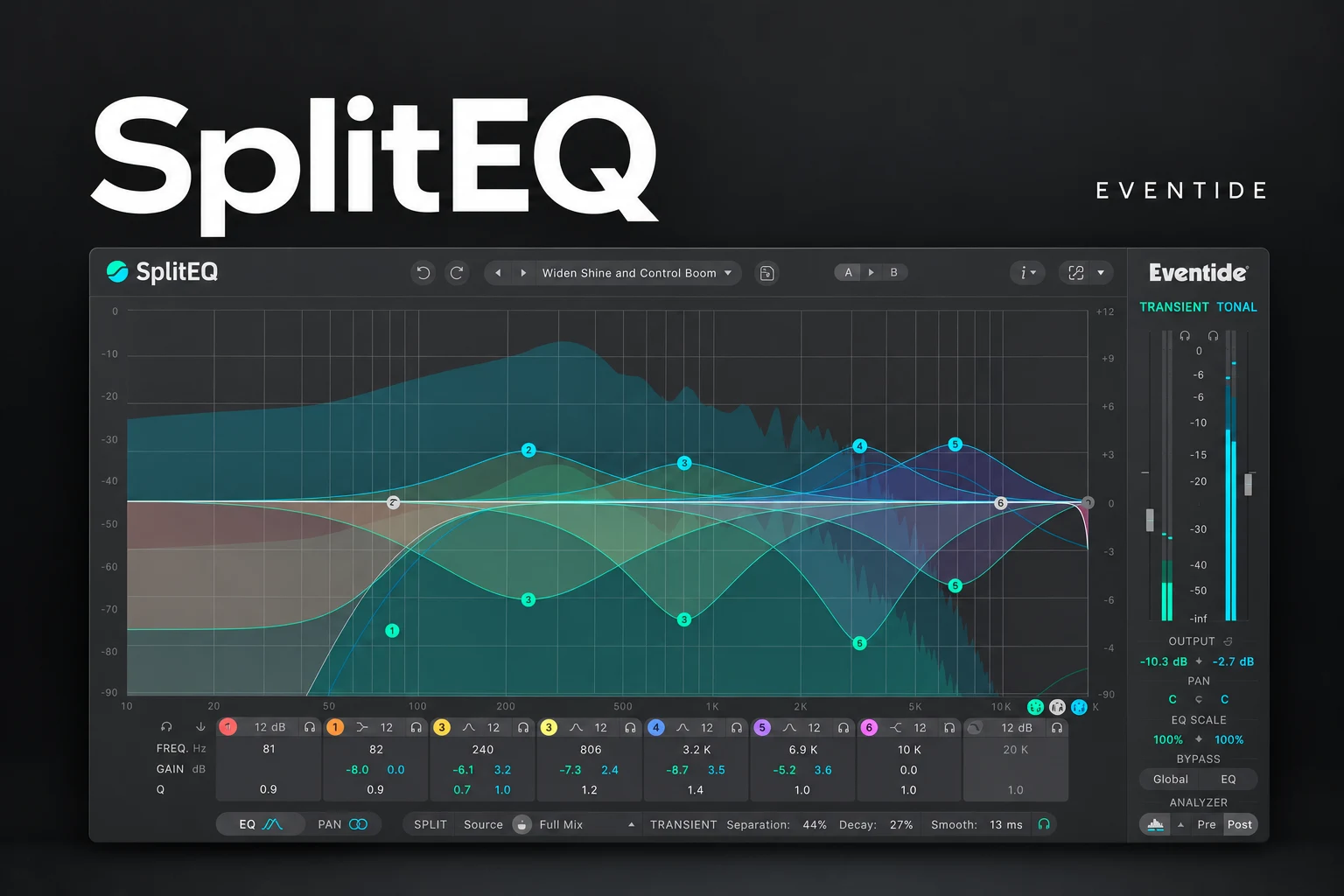

Eventide SplitEQ is worth considering when an EQ move fixes one part of a sound but damages another. A snare might need less ringing without a softer hit, or a guitar might need a gentler pick attack without losing its body. SplitEQ lets you explore those decisions by processing Transient and Tonal components separately.
We would shortlist it for detailed corrective mixing. For ordinary tonal adjustments, a conventional EQ may be quicker and already sufficient. This review explains where the extra approach earns its place, based on documented features and practical recommendations rather than claimed listening tests.
What does SplitEQ actually separate?
Eventide's Structural Split engine analyses the input and creates Transient and Tonal streams. The Transient side includes rapidly changing material such as attacks and noisy events; the Tonal side represents more sustained content, harmonics and ambience.
Those streams feed an eight-band parametric EQ. You can change their frequency balance independently, adjust their output levels and use separate panning options.
Think of the split as an analysis of the audio's behavior. It is not a promise that every snare hit, vocal syllable or background sound becomes an isolated recording. Nor is it a stem separator that extracts a clean drum track from a finished song.
Three mix problems worth trying in the demo
Snare ring competes with the hit
Begin with a section containing several different hits. Listen for the sustained ring you want to reduce, then audition a modest Tonal cut around that region.
The goal is a more useful snare in the arrangement, not the complete removal of every resonance. Some ring may be part of the instrument's identity. Check that quieter hits and fills still feel natural before applying the same setting throughout the song.
SoundShaper advice: compare with an ordinary EQ cut. If the simpler option gives you the right balance, keep it. SplitEQ is interesting when the separate controls give you a result you struggled to reach with that first approach.
Acoustic guitar attack feels too sharp
Try a small Transient adjustment in the area that makes the pick distracting. Then listen to the guitar's body, chord changes and rhythmic position beside the vocal.
A soloed guitar can sound beautifully smooth while becoming too passive in the full song. Keep enough articulation for the performance to remain alive. If the sound needs the same tonal correction from start to finish, an ordinary EQ remains a sensible choice.
A vocal needs body but has distracting plosives or consonants
Eventide lists vocal sibilance and plosives among its applications. We would audition the Transient stream around the specific problem, rather than applying a broad correction to every word.
Check several phrases, especially quieter words and breaths. If you need only targeted de-essing, compare a dedicated de-esser first. If a plosive can be edited cleanly in the recording, that may be a simpler fix than adding more processing.
Our vocal mixing plugin guide helps separate those jobs before you choose another tool.
How to approach the split without guessing
SplitEQ includes auditioning options for the streams and individual bands, plus separate spectrum displays. The underlying split can be adjusted to suit the source rather than treated as a fixed decision.
1. Name the problem. Decide whether the objection is mainly the attack, the sustained sound or both.
2. Choose a representative passage. Include different notes or hits, not just the worst moment.
3. Audition the relevant stream. Check whether the part you want to change is actually prominent there.
4. Make one small EQ move. Avoid correcting several unrelated things at once.
5. Return to the complete signal. A soloed component is useful for diagnosis, but the recombined sound is the result.
6. Listen in the song. Compare bypassed and processed playback at similar loudness.
These are suggested demo exercises, not measured tests. If the separation does not line up with the musical problem, revisit the split settings or choose a different approach.
SplitEQ vs a dynamic EQ
A typical dynamic EQ changes a band's response according to its detector and settings. SplitEQ's central decision is which structural stream you want to adjust at a frequency.
Our recommendation is to identify what makes the unwanted sound different. If a resonance only becomes excessive at certain levels, a dynamic band may be enough. If the conflict is between attack and sustained content, SplitEQ deserves an audition.
There is no requirement to replace your main EQ. Use the more specialized tool when the problem justifies it. Our Pro-Q 4 vs TDR Nova comparison covers a broader EQ buying decision.
SplitEQ vs a transient shaper
We would start with a straightforward transient shaper for a broad change to the feel of a drum: more bite, less attack or a different sense of sustain.
SplitEQ becomes interesting when that change needs to be frequency-selective. For example, you may want to tame a particular part of a pick sound rather than make the entire guitar less percussive. Try both approaches against the same performance and keep the one that solves the problem with fewer unwanted changes.
Stereo tools: keep the musical center in mind
SplitEQ also offers separate Transient and Tonal panning, with L/R and Mid/Side options. That creates another way to explore the spatial balance of a sound.
We would leave those controls alone while solving a basic tonal problem, then investigate them separately if the arrangement needs a wider texture. Check mono playback and keep an ear on the relationship between the lead, bass and drums. Extra width is useful when it supports the song.
The practical limitation: analysis latency
Eventide staff describe SplitEQ as a mixing processor whose structural analysis introduces latency. Your DAW's delay compensation can keep playback paths aligned, but that does not make the processing delay disappear from a live monitoring path.
We would use it after recording when possible. Before buying for a workflow involving live vocals or real-time keyboard performance, test the current version and the entire session's monitoring response.
For the wider FL Studio delay problem, see our latency guide.
Who gets the most value?
Mixers working with recorded vocals, drums and acoustic instruments: worth considering when ordinary EQ changes repeatedly compromise another part of the sound.
Electronic producers: audition it on a specific loop or sample problem. If your synth patch or source selection already fixes the issue, there may be no need for extra corrective processing.
Beginners and producers on a tight budget: learn conventional EQ and level balance first. A specialized processor is easier to judge once you can describe why the usual adjustment falls short.
Price, demo and compatibility
On 18 October 2026, Plugin Boutique displayed SplitEQ at €147.76. Treat that as a dated storefront observation: compare the current local checkout price, any relevant bundle and eligible crossgrade offers before buying.
Eventide's official demo page advertises a 14-day demo, and Plugin Boutique also lists a trial download. Use the current trial on material that presents the specific problems you want to solve.
The listing specifies 64-bit Windows 10 or later and macOS 10.14 or later with Intel and Apple Silicon support. Available formats include VST, VST3 and AAX, plus AU on Mac. Eventide names FL Studio among its tested desktop hosts.
An iLok account and authorization software are required; a physical iLok dongle is not required. Check the current installer and your exact host configuration before purchase.
SoundShaper opinion
SplitEQ has a clear reason to exist beside a normal EQ. Separate structural control is worth exploring when you want to change the frequency balance of an attack without making the same move on the sustained content, or vice versa.
We would buy it for recurring problems that the demo demonstrates it can solve in your sessions. We would not treat it as an automatic upgrade for every channel. Its extra decisions and processing delay make the most sense when they bring a clear benefit to the mix.
Frequently asked questions
Can SplitEQ remove drums from a song?
Do not buy it expecting clean stem extraction. Its Transient and Tonal processing serves a different mixing purpose.
Does it replace my normal EQ?
It can handle EQ duties, but we would keep a conventional EQ for straightforward work and use the split when the source needs it.
Is it suitable for live monitoring?
Its analysis introduces latency. Test the current version and your whole monitoring chain before using it for that purpose.
Conclusion
Choose SplitEQ when separate treatment of attack and sustained content solves a real, recurring mixing problem. Audition it on several passages, compare the simpler alternatives and judge the recombined sound in context. For ordinary tonal changes, keep using the EQ that already works for you.
Sources: Eventide product documentation, official demo page, Eventide staff's latency explanation and the Plugin Boutique listing. Details checked 18 October 2026.
![[background image] image of recording equipment (for a musician & band)](https://cdn.prod.website-files.com/68efa70811edd8e5af30a90d/6ad5421eaf14ef1dbac4dfa8_TAIP%20Review.webp)
![[background image] image of recording equipment (for a musician & band)](https://cdn.prod.website-files.com/68efa70811edd8e5af30a90d/6ad5413cb1504db30162273f_Phoscyon%202%20Review.webp)
![[background image] image of recording equipment (for a musician & band)](https://cdn.prod.website-files.com/68efa70811edd8e5af30a90d/6ad5403dd747f3fbbe4286ab_Chordjam%20Review.png)