
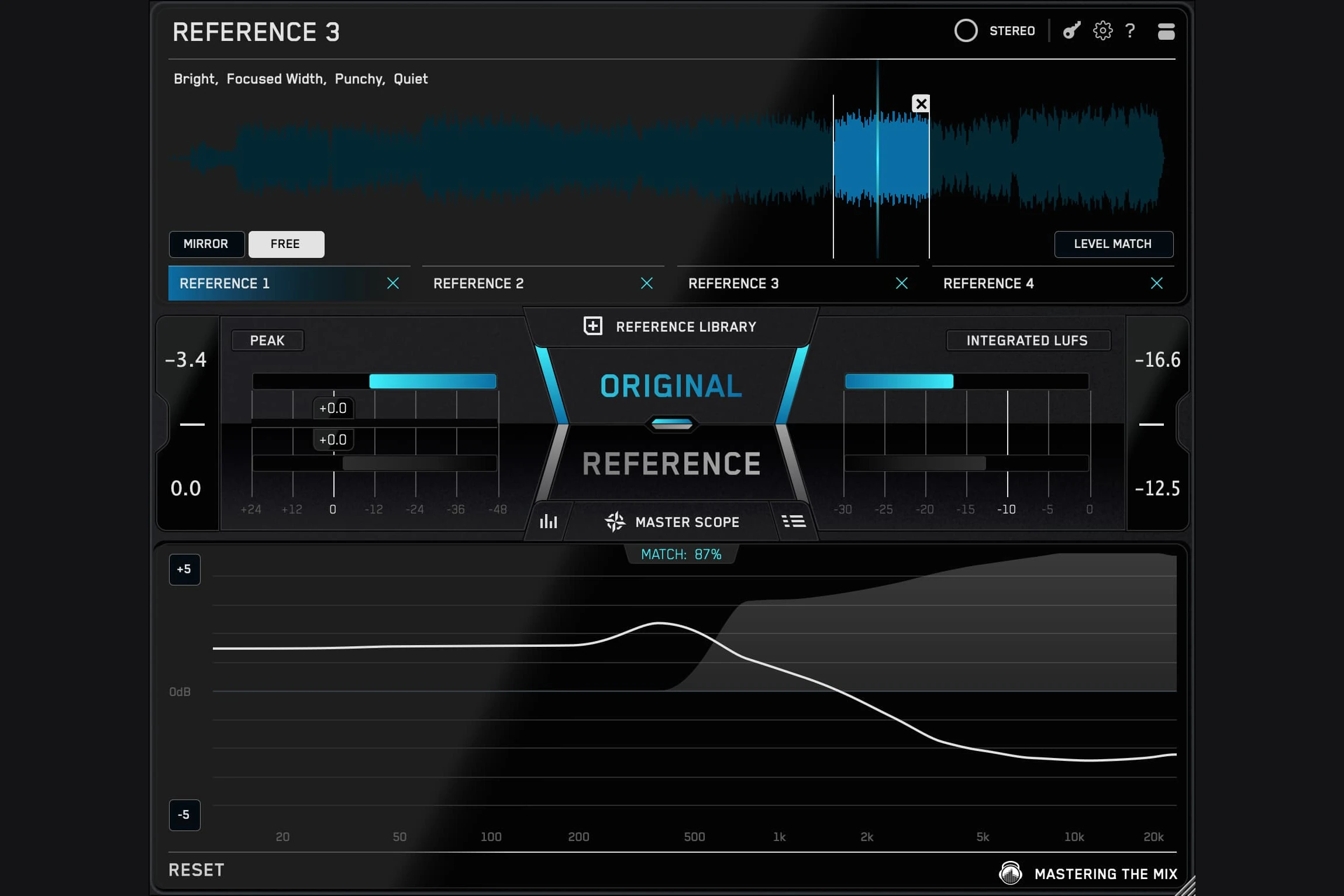

Mastering The Mix REFERENCE 3 is worth considering if comparing your mixes with released music feels slow, inconsistent or difficult to interpret. Its main appeal is a faster comparison workflow: level-matched switching, visual feedback and guidance that helps you decide what to investigate next.
Our advice is to buy it for the comparisons you will actually make. If you rarely finish tracks or already have a referencing setup you trust, another analysis plugin may add less than focused practice with your current tools.
This review is based on the current manufacturer documentation and product listings, rather than a hands-on listening or performance test.
What does REFERENCE 3 do?
REFERENCE 3 lets you compare your mix or master with reference tracks inside your DAW. It provides automatic loudness matching and analysis of tonal balance, stereo width, dynamics and loudness.
Think of it as a second perspective on a decision. If a chorus feels muddy, a reference can help you ask a better question: is your bass too dominant, is the arrangement too dense, or is the reference simply a brighter production?
REFERENCE helps reveal differences. Your existing EQ, faders, compression and arrangement choices are where you make the changes. It does not turn a different performance and arrangement into the same record.

The useful part: making comparisons easier to act on
Level matching before judging tone
A comparison becomes less useful when one version is noticeably louder. Before deciding that your mix needs more treble, more compression or another limiter, bring the listening levels close enough to judge the balance.
For example, a loud reference might initially make a quieter mix seem small. Once the levels are comparable, you may discover that the vocal is already clear and the real problem is the kick-to-bass relationship. That is a more useful starting point than pushing the whole master harder.
Master Scope and Mix Instructor
Master Scope presents tonal and stereo differences alongside phase and overcompression analysis. Mix Instructor offers written guidance across low, mid and high frequency areas.
Use a suggestion as a listening prompt. If the display suggests a brighter balance, listen to the vocal consonants, cymbals and synths separately before applying a broad boost. An already sharp hi-hat may need attention before the entire mix needs more air.
Mix Balance
Mix Balance suggests relative gain changes for vocals, drums, music and bass. This is especially interesting when the issue may be instrument balance rather than master-bus processing.
Our recommendation is to test a fader move before reaching for another processor. If a vocal feels buried, lowering a competing instrument may preserve its tone better than adding a large upper-mid boost to the master.
Choosing references matters more than chasing a score
REFERENCE 3 includes a personal reference library, automatic reference suggestions and a Match percentage. These can help organise comparisons, but a close match is not a creative requirement.
Choose two or three tracks that answer specific questions. One might represent the low-end weight you want; another might have the vocal placement you like. Write down those roles so you do not unconsciously chase every aspect of every song.
Trap and hip-hop: choose a reference with a comparable 808 role and vocal density. A sparse beat and a layered pop chorus ask different things of the low mids.
House and EDM: compare a drop with a drop. Listen to kick impact and bass movement before changing the entire frequency balance.
Pop and vocal music: compare sections with similar backing-vocal and instrument density. A dry verse should not need the width of a stacked final chorus.
Acoustic music: prioritise believable dynamics and instrument relationships. A deliberately intimate recording does not need to resemble a heavily limited electronic release.
When references disagree, use that as a reminder that successful records can sound different. Decide which direction supports your song instead of averaging every display into a target.
A practical REFERENCE 3 workflow in FL Studio
The manufacturer specifies a stereo master-bus position after metering and before headphone or speaker correction. REFERENCE 3 is available as a 64-bit VST3 plugin, making that the relevant format for an FL Studio setup.
1. Choose one finished section. Start with a chorus or drop that represents the main energy of your track.
2. Place REFERENCE after your mix or mastering processing. Keep listening correction after it so both your mix and the references are monitored through the correction.
3. Import suitable reference files. Begin with a small selection you know well. Do not build a huge library before making the first useful comparison.
4. Check the comparison level. Use Level Match and listen to the same type of section in each song.
5. Ask one question. For example: is the vocal too quiet, or does the bass mask the kick? Use the analysis to investigate that question.
6. Change one thing in the mix. Try the relevant fader, EQ or arrangement move, then compare again.
7. Return to normal listening. Close the display and listen to the whole song. Keep the change only if it supports the track beyond that short loop.
If the plugin does not appear, follow our FL Studio VST scanning guide. For the delivery stage, see our FL Studio export settings guide.
REFSEND: is your mastering chain actually helping?
The included REFSEND companion plugin sends audio from before a processing chain to REFERENCE after it, allowing a loudness-matched before-and-after comparison.
A useful audition is to compare your complete mastering chain with its input. Write down what you expect it to improve first: clearer bass, steadier vocals or stronger impact. Then check those points without treating extra output level as proof of improvement.
If the processing mainly makes the song denser while weakening the groove, revisit the settings. Our guide to compressors versus limiters explains the different jobs those tools perform.
REFERENCE 3 versus free DAW referencing
Tight budget and occasional comparisons: Start with reference files in your DAW and careful level matching.
You avoid referencing because setup feels tedious: Trial REFERENCE 3 to see whether the workflow makes you compare more consistently.
You want help interpreting differences: Investigate Mix Instructor and Master Scope, while checking each suggestion by ear.
You already trust another reference plugin: Compare workflows before paying for overlapping features.
You expect automatic mix correction: Reconsider the purchase: you still need to choose and apply the changes.
For manual referencing, make sure the reference bypasses the processing intended for your own mix. Sending a released master through your limiter changes the thing you are trying to compare against. Use routing that lets you switch cleanly without accidentally playing both tracks together.
Price, trial and compatibility
At the time of checking on 20 October 2026, Plugin Boutique displayed REFERENCE 3 at €69.38, with a free trial option and a separate upgrade route for REFERENCE 2 owners. Currency, tax and offers can change, so check the current listing before buying.
The current product pages specify macOS 10.15 or later and Windows 10 or later, with 64-bit VST3/AAX support and Audio Unit on Mac. Apple Silicon native support is listed. Confirm compatibility with your actual DAW and operating system during the trial.
The manual notes that Mix Balance analysis can use substantial CPU and memory; it can be disabled in settings. We have not benchmarked it, so audition it in a representative project rather than assuming a particular performance result.
SoundShaper opinion
REFERENCE 3 is most appealing when uncertainty slows down your mixing decisions. A new synth adds sounds; a reference tool may help you make better use of the sounds and processors you already have. That is a sensible purchase when you regularly finish music and need a repeatable way to check it.
Our suggested trial test is simple: use one track, three references and a short list of questions. If the plugin helps you identify a useful change and repeat that process comfortably, it has a clear role. If you spend the session chasing the Match percentage, simplify the workflow before spending money.
For beginners on a limited budget, we would first learn manual referencing. For producers regularly mixing their own releases, the convenience and explanatory displays make REFERENCE 3 worth auditioning. If you already use Ozone, check the referencing tools available in your edition before adding another purchase; our Ozone edition comparison helps with the wider buying decision.
Conclusion
REFERENCE 3 offers a focused way to compare your work with suitable references and turn differences into questions you can act on. The strongest reason to buy is that it makes referencing a regular, useful part of finishing music.
Try it with your own projects, keep the comparisons fair and judge the changes in the song. A more convincing mix matters more than a closer-looking graph.
Sources
Product details checked against the official REFERENCE 3 product page, manufacturer manual, official overview and Plugin Boutique listing.
![[background image] image of recording equipment (for a musician & band)](https://cdn.prod.website-files.com/68efa70811edd8e5af30a90d/6adbdffd1258b281fa64d9e8_6adbdfe06748b62dcaeff101_vintageverb-vs-pror2-cover-v2.webp)
![[background image] image of recording equipment (for a musician & band)](https://cdn.prod.website-files.com/68efa70811edd8e5af30a90d/6adbdd6f7d47fb086e52b147_6adbdd4e3cb3e94d421e55da_how-to-fix-harsh-vocals.webp)
![[background image] image of recording equipment (for a musician & band)](https://cdn.prod.website-files.com/68efa70811edd8e5af30a90d/6adbd8f9d34e0624a55714e1_6adbd8e12694d8b251e72784_decapitator-vs-saturn-2-corrected.webp)