
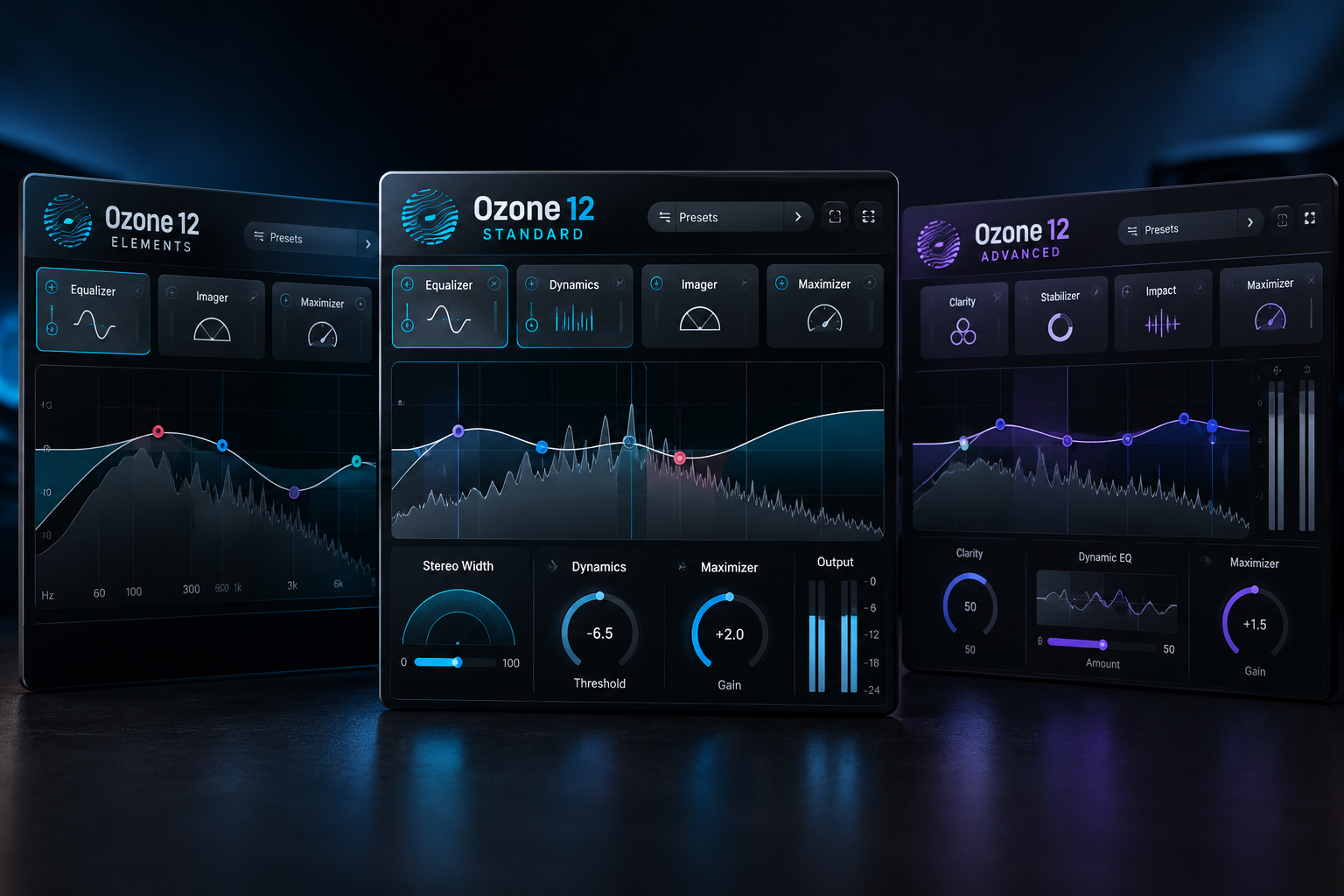

Mastering your own music can feel difficult when every plugin promises a louder and more polished result. iZotope Ozone 12 comes in three editions, but the differences go far beyond the price. Elements provides a guided mastering workflow, Standard adds a complete collection of editable mastering modules, and Advanced includes specialist processing and the option to open individual modules directly in your DAW. For most producers who want real control over their masters, we would start by comparing Standard with the tools already in their studio.
Ozone 12 Elements vs Standard vs Advanced: quick comparison
| Feature | Elements | Standard | Advanced |
|---|---|---|---|
| Official regular price (USD) | $55 | $219 | $499 |
| Master Assistant with Custom Flow | Yes | Yes | Yes |
| Editable mastering modules | No separate module editing | 14 | 20 |
| Maximizer, Dynamic EQ and Bass Control | Not separately accessible | Yes | Yes |
| Stem EQ and Unlimiter | No | No | Yes |
| Individual module plugins | No | No | Yes |
| Best for | Fast guided masters | Hands-on mastering | Specialist mastering and mixing workflows |
These are the regular developer prices checked on 18 October 2026, not promises of current promotional pricing at every retailer. Check the checkout for taxes, discounts and upgrade eligibility.
What do you get with Ozone 12 Elements?
Elements focuses on Master Assistant, including the customizable new flow and Assistive Vocal Balance. It provides a quick starting point when you want to finish a demo or hear how automated mastering decisions might improve a mix. You do not get full direct access to the separate Ozone mastering modules as you do in Standard or Advanced.
That makes Elements a reasonable choice for beginners who primarily want guidance. But if you regularly want to change a precise EQ band, shape dynamics independently, or adjust the Maximizer in detail, Standard is a much more practical long-term edition.
SoundShaper advice: choose Elements only when guided mastering is enough and the price is right. Try your DAW's stock processing first if you already know how to balance EQ, dynamics and final limiting.
Why Ozone 12 Standard is our default recommendation
Standard is the useful middle ground. Its 14 editable mastering modules include tools such as Maximizer, Equalizer, Dynamic EQ, Dynamics, Exciter, Imager, Stabilizer, Master Rebalance and the new Bass Control. These tools load inside Ozone's main plugin, allowing you to build and adjust a mastering chain.
Ozone 12 introduces IRC 5 to the Maximizer and adds new genre targets to Stabilizer. Standard lets you use those controls rather than only relying on an Assistant-generated result. It also supports track referencing and transient/sustain processing modes, which help you compare and adjust a master more deliberately.
For electronic music, hip-hop, pop and other modern productions, these are meaningful tools. You can address low-end balance, tame an uneven spectral region and manage final loudness without immediately needing the Advanced-only features.
SoundShaper advice: if you master tracks regularly and want one integrated suite, choose Standard before paying for Advanced. It handles the core jobs that most home producers actually perform.
What does Ozone 12 Advanced add?
Advanced extends the suite to 20 editable modules and lets you load individual modules separately in your DAW. It includes Advanced-only processors such as Stem EQ, Unlimiter, Low End Focus, Clarity, Impact and Spectral Shaper. Stem Focus processing and Codec Preview are also among its additional workflow features.
Stem EQ
Stem EQ is designed for changing the tonal balance of particular elements inside a mixed track without needing a complete original multitrack session. This can help when the only available file is a stereo mix, though no separation is perfect. Listen for artifacts and request stems from the producer whenever possible.
Unlimiter
Unlimiter aims to restore dynamics to audio that has already been heavily compressed or limited. This is a specialist repair task, not a reason to deliberately over-compress a mix and expect perfect restoration afterwards.
Individual modules as plugins
A major benefit of Advanced is the ability to open tools like its EQ or Maximizer outside the Ozone mastering hub. That matters if you use the same processors across different tracks and mix buses, not only at the end of a project.
SoundShaper advice: pay for Advanced when you can name specific modules you will use—especially Stem EQ, Unlimiter or standalone modules. If you rarely encounter those problems, Standard is likely better value.
Which edition fits your music?
EDM, house and techno
Standard is our first recommendation for producers who want to control low-end energy, EQ and loudness on their own mixes. Advanced becomes interesting when you routinely work on premastered material or want standalone Ozone processors across a larger session.
Hip-hop and trap
For 808-heavy tracks, spend time fixing the balance between kick and bass in the mix before mastering. Bass Control and Maximizer in Standard can help at the mastering stage, but they cannot replace a clear low end. Advanced will not rescue a badly distorted 808 recording.
Acoustic, indie and singer-songwriter music
Many acoustic productions need careful tone, dynamics and consistent playback loudness more than dramatic processing. Standard supplies ample control for that. Elements can suffice for quick drafts if you prefer an assistant-based workflow.
Is Ozone 12 Advanced worth the upgrade from Standard?
Ask yourself three questions: Do you frequently need to alter the balance of components in a finished stereo file? Do you need to restore dynamics in previously limited material? And do you want to use Ozone modules as individual insert plugins throughout a mix?
If your answer to all three is no, stay with Standard. Buying Advanced only because it has a higher module count is not a strong reason to spend the extra money.
How we would master a track with Standard
1. Export a clean mix without unintended clipping and leave the final mastering limiter off.
2. Load Ozone Standard on the stereo master, and optionally start with Master Assistant.
3. Compare the suggested tonal balance against a relevant reference, rather than accepting it automatically.
4. Make modest EQ and dynamic adjustments where there is an actual audible problem.
5. Use Maximizer to reach an appropriate loudness while watching for unwanted pumping or distortion.
6. Level-match processed and bypassed versions, then check the result on more than one playback system.
Mastering cannot completely repair balance problems that should have been corrected during mixing. Return to the mix when a kick, vocal or synth is consistently fighting another track.
Do you need Ozone at all?
No. A stock EQ, compressor, limiter and loudness meter can be enough for a strong master, provided you understand what each one does. Free mastering tools also exist. Ozone's value is its integrated workflow, specialized processing and guidance—not a guarantee that buying it will automatically improve every track.
If your biggest problem is an unfinished mix, invest time there before upgrading your mastering suite.
Prices, licenses and compatibility
The regular prices shown by iZotope on 18 October 2026 are $55 for Elements, $219 for Standard and $499 for Advanced. Retailer promotions, bundles and upgrade offers can lower what existing customers pay. Check edition, license and supported operating system and DAW format before making a purchase.
All three editions offer Master Assistant's new Custom Flow, but the full set of editable modules and advanced features differ. Do not assume an Elements license unlocks the Advanced processors simply because the user interface shares the Ozone name.
The Plugin Boutique buttons use the same Ozone 12 affiliate destination already present in SoundShaper's CMS. The retailer's product selection screen determines the edition; please verify the selected edition and total before checkout. SoundShaper may receive a commission from qualifying purchases.
Related SoundShaper articles
Our FabFilter vs Ozone 12 comparison explains the wider mastering ecosystem. For more context, read best plugins for mastering, and our soft clipper vs limiter guide for peak-control fundamentals.
SoundShaper opinion
Ozone 12 Standard is our strongest general recommendation. It gives producers detailed control over the key mastering tasks without paying for specialist restoration and stem-based tools.
Elements makes sense for quick, guided mastering when the budget is limited, while Advanced is best for engineers who will regularly use its exclusive modules and individual plugin workflow.
These judgments are based on iZotope's published editions and features, not an invented side-by-side listening study.
Frequently asked questions
Does Ozone 12 Standard include the new Bass Control?
Yes. iZotope lists Bass Control in Standard and Advanced, but not as an editable module in Elements.
Is Stem EQ available in Standard?
No. Stem EQ is an Advanced-only module.
Can you use Ozone modules on individual tracks?
Advanced permits loading its modules as separate plugins in the DAW. Standard's editable modules run inside the Ozone hub.
Is Elements enough for Spotify releases?
You can create release-ready audio using many tools, including Elements or your DAW's stock plugins. Meeting delivery specifications and achieving a balanced master matter more than the name of the edition.
Conclusion
Choose Ozone 12 Elements for guided, occasional mastering. Choose Standard for the best balance of control and value. Choose Advanced only when Stem EQ, Unlimiter, individual modules or its other exclusive tools have a clear place in your workflow.
![[background image] image of recording equipment (for a musician & band)](https://cdn.prod.website-files.com/68efa70811edd8e5af30a90d/6ad5421eaf14ef1dbac4dfa8_TAIP%20Review.webp)
![[background image] image of recording equipment (for a musician & band)](https://cdn.prod.website-files.com/68efa70811edd8e5af30a90d/6ad5413cb1504db30162273f_Phoscyon%202%20Review.webp)
![[background image] image of recording equipment (for a musician & band)](https://cdn.prod.website-files.com/68efa70811edd8e5af30a90d/6ad5403dd747f3fbbe4286ab_Chordjam%20Review.png)