
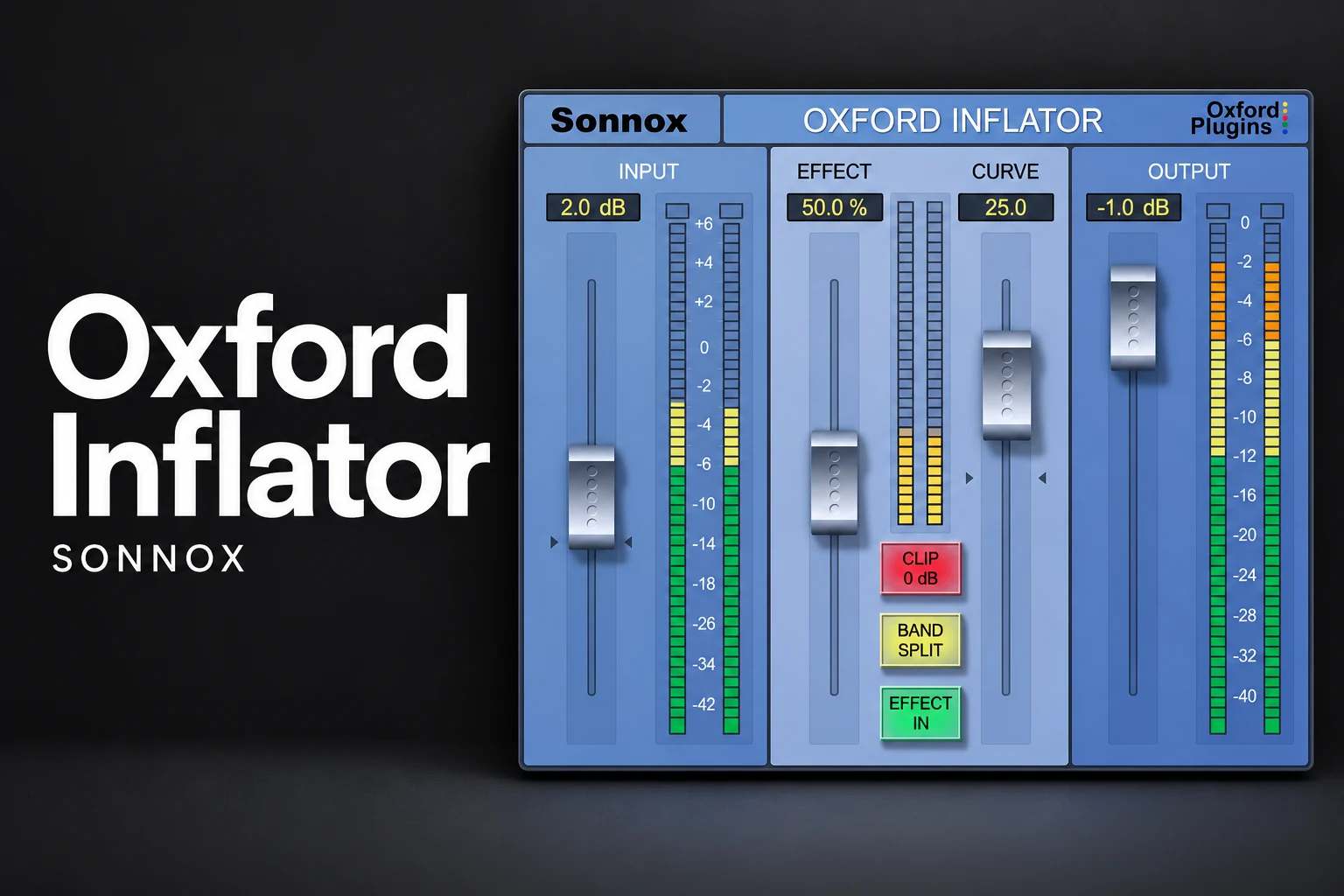

Oxford Inflator is worth considering if you want to audition extra density, harmonic character and perceived loudness on a track or bus. We would try it when a mix already works but a part could use a more substantial feel. If you mainly need controlled peaks, a defined output ceiling or a complete mastering chain, choose tools for those jobs first.
The buying decision is about character and workflow. A louder bypass comparison is easy to enjoy; a useful improvement should still make sense when you bring the playback levels closer together. This review explains how to make that judgment.
What does Oxford Inflator do?
Sonnox describes Inflator as a processor for perceived loudness and density, with harmonic character controlled by Curve. It can be used on individual tracks, buses and full mixes. The manual explains that its process does not use conventional compression.
That does not make it a promise of louder music with no trade-offs. Listen for changes to tone, texture and the relationship between prominent and quieter parts. Decide whether those changes fit the song rather than treating the plugin as a mandatory final step.
Inflator, compressor or limiter: which job are you doing?
| Your goal | Start here |
|---|---|
| Control a vocal's changing level | Level editing and a suitable compressor |
| Set a final peak ceiling | A limiter designed for the required output control |
| Explore more density or harmonic character | Audition Inflator against your existing saturation tools |
| Repair harshness, muddy balance or a weak arrangement | Address the source problem before adding loudness processing |
Our compressor vs limiter guide covers those dynamics jobs in more detail. A plugin's shop category is less useful than understanding what you need the processor to do.
The controls that matter
Input adjusts the signal feeding the process. Effect controls the applied effect, Curve changes its character, and Output sets the outgoing level. Clip 0dB controls input clipping behavior; Band Split changes the processing mode.
The manual's basic loudness procedure starts with Effect at 100%, Band Split off and Clip 0dB on, then uses Input and Curve to find the desired result. This is a documented starting method, not a universal preset.
SoundShaper advice: explore one control at a time on a short section you know well. Rebalance the output before deciding that a change is better. If you keep increasing the input just to maintain the initial excitement, take a break and listen to the original again.
Three places we would audition it
A vocal that needs a little more substance
First check the vocal's level and intelligibility against the backing. If the problem is simply an inconsistent performance, do the level work before adding another processor.
Once the balance is close, audition Inflator for character. Listen to the ends of words, breaths and consonants, not just the loudest notes. Keep it only if the performance feels more convincing in the song without drawing attention to details you wanted to soften.
A drum bus that feels too polite
Try a loop with kick, snare and cymbals playing together. Pay attention to the contrast between the hit and the space after it. Extra density may be useful for one groove and work against another.
Our suggested comparison is simple: bypass, rebalance and listen from a few seconds before the section. If the processed loop is exciting in isolation but makes the chorus feel crowded, reduce the treatment or target a smaller group.
A mix bus before final limiting
We would audition it here only after the balance and arrangement feel settled. Try it before your final limiter as an experiment, then check the complete chain. Changing the signal feeding a limiter changes the situation that limiter has to handle.
Do not assume the chain will preserve the same punch simply because one processor is described as a loudness enhancer. Compare the groove, vocal position and tonal balance after every meaningful change.
Why a fair loudness comparison matters
Use two questions. First, does the processing help you reach the amount of density or excitement you want? Second, after reducing the level difference, do you still prefer the character?
Those questions can have different answers. A louder version may be useful for the intended result, but that alone does not prove the plugin adds a tone you need. You should know which benefit you are buying.
Our recommendation is to save a clean comparison and listen at a comfortable monitoring level. If possible, revisit the choice later. A decision that survives a fresh listen is more useful than an immediate reaction to a brighter or louder passage.
Peak readings still need attention
The manual includes specific operating conditions for avoiding sample overloads; Effect is not simply an interchangeable wet/dry control in every setting. Read those details when pushing the process.
For a final export, check the output of the whole chain with suitable peak and loudness metering. The Clip 0dB switch should not be treated as a guarantee that an entire finished master meets your chosen true-peak ceiling.
For FL Studio users making that final-output decision, see our soft clipper vs limiter guide.
Do you need it if you already own saturation tools?
Not automatically. Take one vocal, one drum bus and one mix section you know well. Compare Inflator with the tool you normally use, adjusting each for the role you actually want.
We would buy it if the result or workflow is something you repeatedly prefer. We would hold off if it mainly adds another way to reach a sound you already create comfortably. A focused interface can be valuable, but familiarity and price should still be part of the decision.
Our Decapitator review explores another character-processing purchase. For a complete mastering setup, start with the different roles in our mastering plugin guide.
Native and UAD licences: check which product you are buying
This article links to the Sonnox product on Plugin Boutique. Sonnox documents Native/HDX products and UAD Oxford products as separate purchase, licensing and support routes. Do not assume owning one automatically includes the other.
Before buying, confirm the edition, plugin format and activation route you need. That is particularly useful if you have previously used Inflator through Universal Audio and now want a licence for a different setup.
Current iLok activation: a dongle is optional
In support guidance updated on 15 October 2026, Sonnox states that Oxford plugins support iLok Machine Activation with the latest installers and iLok License Manager. A valid licence in your iLok account can be activated directly to the computer, while USB and Cloud options remain available.
Older plugin versions do not support this new machine-activation route. Use the current installer rather than relying on an older guide that says a USB device or permanent Cloud session is mandatory.
Price, trial and compatibility
On 18 October 2026, Plugin Boutique displayed Oxford Inflator at €165.61. This is a dated storefront observation. Compare the current checkout total and any relevant bundle or account offer before purchasing.
Sonnox's product page offers a trial. We would use it on real project material before paying the standard price, particularly if you already have several saturation and mastering processors.
The Plugin Boutique specifications list macOS 10.13 or later and Windows 10 or later, with 64-bit VST3 and AAX Native, plus AU on Mac. Check Sonnox's current installer requirements for your exact operating system and DAW. The licence and hardware requirements discussed here concern the Sonnox route, not an interchangeable UAD purchase.
SoundShaper opinion
Oxford Inflator makes the strongest case as a focused character and density tool. We would shortlist it for producers who already understand their balance and dynamics decisions, and want to audition a different finishing texture on tracks or buses.
We would be slower to recommend it as a beginner's first mastering purchase. Learn how your level balance, EQ and limiter behave before deciding you need another loudness processor. At the standard price, the trial should demonstrate a repeatable benefit in your own sessions.
Frequently asked questions
Does Inflator replace my limiter?
Keep the final-output job separate. Use a suitable limiter and metering when you need a defined peak ceiling.
Do I need an iLok USB key?
Not for the current Sonnox machine-activation route. You need the supported current software and a valid iLok account licence.
Can I use it before a limiter?
Yes, that is a useful chain position to audition. Judge the combined result and recheck the final output after adjusting Inflator.
Conclusion
Buy Oxford Inflator when its particular density and harmonic character earn a role in your work. Use the trial, compare at sensible levels and keep final peak control as a separate decision. If your existing tools already deliver the sound comfortably, there is no need to add it.
Editorial basis: official documentation and practical buying guidance; no hands-on listening test is claimed. Sources: Sonnox product information, Inflator user guide, current machine activation instructions, Native/UAD licensing guidance and Plugin Boutique. Details checked 18 October 2026.
![[background image] image of recording equipment (for a musician & band)](https://cdn.prod.website-files.com/68efa70811edd8e5af30a90d/6ad5421eaf14ef1dbac4dfa8_TAIP%20Review.webp)
![[background image] image of recording equipment (for a musician & band)](https://cdn.prod.website-files.com/68efa70811edd8e5af30a90d/6ad5413cb1504db30162273f_Phoscyon%202%20Review.webp)
![[background image] image of recording equipment (for a musician & band)](https://cdn.prod.website-files.com/68efa70811edd8e5af30a90d/6ad5403dd747f3fbbe4286ab_Chordjam%20Review.png)