
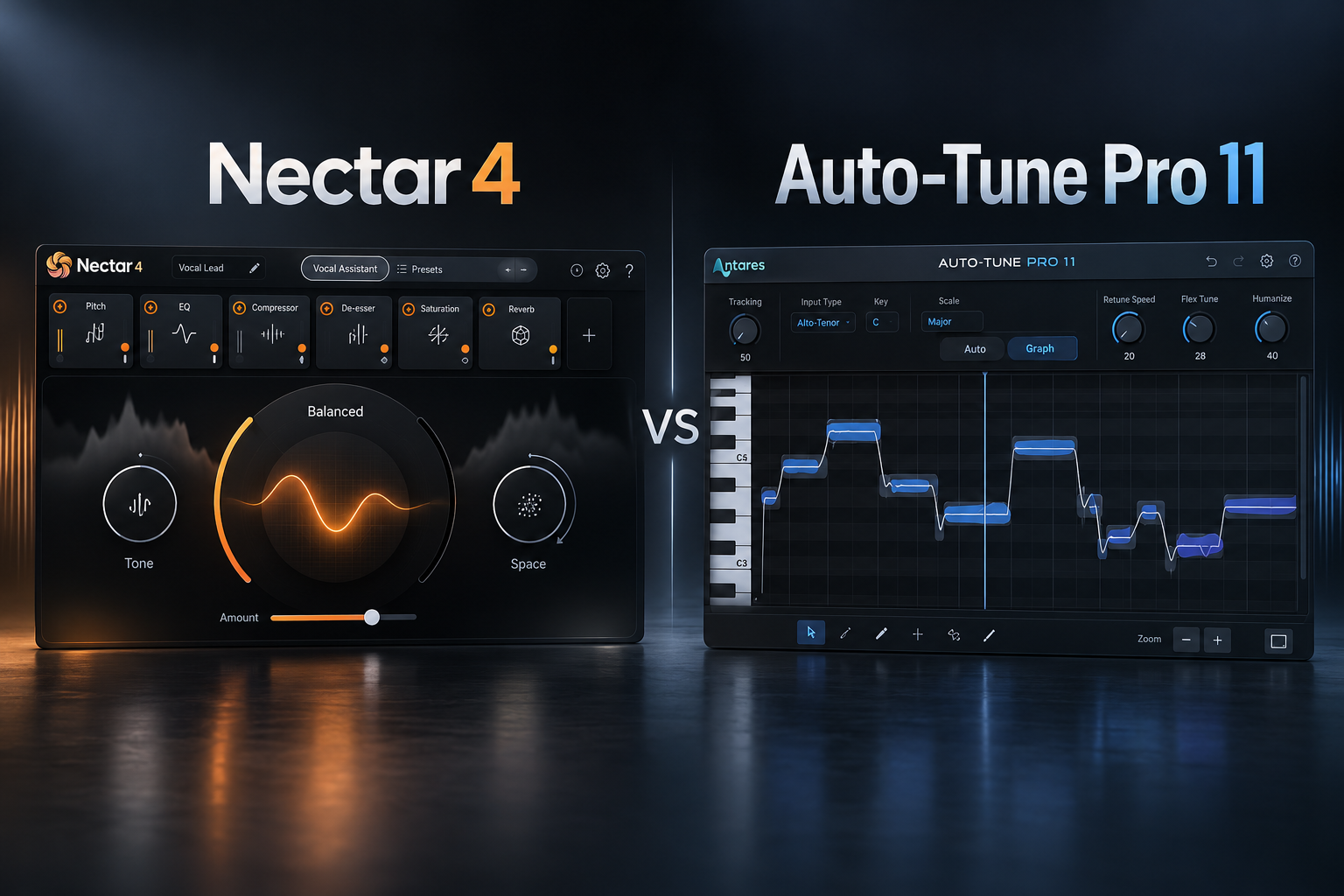

Recording a vocal is only the beginning. You may still need pitch correction, compression, de-essing, tone shaping and creative effects before it fits the track. Nectar 4 and AutoTune Pro 11 can both help with vocals, but they solve different parts of that process. Nectar 4 is the stronger starting point for building a complete vocal chain; AutoTune Pro 11 is the specialist choice when precise pitch correction, live tuning and detailed note editing matter most.
This guide compares their actual workflows rather than treating them as interchangeable vocal plugins. We have not invented listening tests or benchmark results.
Nectar 4 vs AutoTune Pro 11: quick comparison
| What you need | Nectar 4 | AutoTune Pro 11 |
|---|---|---|
| Main strength | Vocal mixing and processing chain | Dedicated automatic and graphical pitch correction |
| Pitch correction | Built-in correction, with features varying by edition | Auto Mode and detailed Graph Mode |
| EQ, dynamics, de-essing | Included vocal-processing modules | Not a replacement for a mixing chain |
| Harmony workflow | Vocal harmonizer tools | Four-part Harmony Player |
| Best for | Producers mixing complete vocals | Artists focused on tuned performances and note editing |
| Budget alternative | DAW stock EQ, compressor and de-esser | DAW pitch tools or a simpler tuning edition |
What makes Nectar 4 useful?
iZotope Nectar 4 combines tools normally spread across a vocal chain. Depending on your edition, you can use vocal assistance, compression, EQ, de-essing, pitch correction, harmony tools, saturation and effects. The Vocal Assistant can suggest a starting chain, but you still need to judge it against the backing music.
For a singer-songwriter vocal that needs a little more consistency and clarity, this all-in-one approach can save setup time. You can work through the basic mix without managing a long chain of separate plugins. But it does not automatically know your artistic taste, and assistants can still suggest too much processing.
SoundShaper advice: use Nectar 4 when your biggest challenge is mixing a vocal so it sits with the instrumental. Start with the Assistant if useful, then bypass modules and adjust them one at a time. Check the edition carefully: Elements, Standard and Advanced do not include identical feature sets.
What makes AutoTune Pro 11 different?
Antares AutoTune Pro 11 focuses on tuning. Auto Mode is designed for real-time correction and the familiar obvious tuned vocal effect, while Graph Mode gives you precise manual pitch and timing editing. It also has a four-part Harmony Player and ARA2 workflows in selected compatible DAWs.
That makes it attractive for melodic rap, tuned pop vocals and sessions where the singer wants to hear the correction during recording. Graph Mode is useful when you need to fix a specific sustained note or phrase rather than applying the same retune behavior across an entire take.
SoundShaper advice: choose AutoTune Pro 11 if pitch is the creative center of your workflow. Don't buy the top edition only for quick automatic correction: compare the simpler AutoTune offerings if Graph Mode and its extra tools are not needed.
Which is better for rap, R&B and pop?
Melodic rap and obvious tuned effects
AutoTune Pro 11 is our starting choice when a tuned sound is part of the performance. Choose the correct song key and scale, test the retune behavior while monitoring, and make sure the result follows the intended melody. An incorrect scale can create notes you never wanted.
Natural pop and acoustic vocals
For a singer whose pitch is already convincing but who needs leveling, clarity and effects, Nectar 4 is likely more immediately useful. Start with corrective EQ, dynamics and de-essing only where they solve an audible problem. You can still add a dedicated tuner if note-by-note editing becomes necessary.
Full vocal stacks
Both products provide harmony tools, but a generated harmony is not always the same as recording a real supporting part. Nectar's chain makes it useful for processing the finished stack; AutoTune Pro 11's Harmony Player is especially relevant for creating and controlling pitched supporting voices.
Can Nectar 4 replace AutoTune Pro 11?
For basic pitch correction, a Nectar edition that includes the appropriate pitch module may be enough. But Nectar is not a direct substitute for Pro 11's full Graph Mode editing workflow or for a preferred low-latency live AutoTune setup. If you routinely draw individual note corrections, that difference is substantial.
The reverse is also true: AutoTune Pro 11 is not a full substitute for Nectar's vocal EQ, compression, de-essing and processing modules. A tuned vocal can still be harsh, uneven or too dry.
What would we use in FL Studio?
For recording a melodic rap vocal and hearing the tuning effect, we would try AutoTune Pro 11 on the recording path, with a suitable low-latency audio setup. For mixing an already recorded lead, Nectar 4 can be a convenient way to handle the rest of the chain. Do not assume Pro 11's ARA2 functions work identically in FL Studio: its documented ARA2 hosts include Logic, Studio One and Cubase/Nuendo.
Our AutoTune with FL Studio guide covers the setup, while our latency guide explains recording-system delay.
Do you need to buy both?
Not when you're starting. If you mostly tune existing tracks, first use the pitch tools you already have. If you mostly mix vocals, try the EQ, compressor and de-esser included with your DAW. Purchase a specialist plugin when a repeated problem justifies it.
Having both can make sense for a dedicated vocal workflow: AutoTune for detailed pitch treatment and Nectar for the processing chain. But a stack of plugins is not proof of a better vocal mix. Learn each stage and compare carefully at matched loudness.
Price, compatibility and editions
As of 18 October 2026, iZotope's official site lists Nectar 4 Advanced at $299 and describes its suite of 13 plugins. The official requirements include 64-bit VST3, AU and AAX, with listed Windows 10/11 and supported macOS versions. Other Nectar editions differ in features and price, so check the edition selected at checkout.
AutoTune Pro 11 supports Auto Mode, Graph Mode, a four-part Harmony Player and selected ARA2 host integration. Antares sells different licensing options and editions; compare the current perpetual-license or subscription terms rather than treating promotional prices as permanent. Check up-to-date platform and DAW compatibility on the developer's product page.
The buttons in this article reuse SoundShaper's verified Plugin Boutique tracking links. They may earn SoundShaper a commission, without affecting the editorial recommendation.
Related SoundShaper articles
Read Nectar 4 Elements vs Standard vs Advanced before choosing an edition. If manual note editing is the priority, see AutoTune vs Melodyne. Our best vocal plugins guide covers the wider chain.
SoundShaper opinion
For someone who wants to improve their overall vocal mixes, we would buy Nectar 4 first—provided its selected edition includes the tools they will use. Compression, EQ and de-essing solve problems that pitch correction alone cannot.
For a producer or singer who makes the tuned vocal effect a core part of the sound, AutoTune Pro 11 is our preferred specialist option. Its automatic and graphical workflows give different forms of control within one dedicated tool.
Neither plugin replaces a good recording or confident musical decisions.
Frequently asked questions
Does Nectar 4 have AutoTune?
It includes pitch-correction capabilities in appropriate editions, but it does not include the Antares AutoTune Pro 11 plugin or its complete Graph Mode workflow.
Is AutoTune Pro 11 good for mixing vocals?
It is strong for pitch correction and harmonies, but you still need tone and dynamics processing when the recording calls for it.
Which is easier for beginners?
Nectar's Vocal Assistant can help start a vocal chain. AutoTune's Auto Mode can also be straightforward when the key and scale are known. The easier choice depends on whether the problem is tuning or mixing.
Can I use them together?
Yes. Use dedicated pitch correction where needed, then process the vocal's tone and dynamics. Listen for unnecessary repeated processing.
Conclusion
Choose Nectar 4 for an all-in-one vocal mixing workflow. Choose AutoTune Pro 11 for specialized automatic and detailed manual pitch correction. Start with your DAW's tools if you are still learning the basics. The most useful purchase is the one that solves your recurring problem, not the one with the longest module list.
![[background image] image of recording equipment (for a musician & band)](https://cdn.prod.website-files.com/68efa70811edd8e5af30a90d/6ad5421eaf14ef1dbac4dfa8_TAIP%20Review.webp)
![[background image] image of recording equipment (for a musician & band)](https://cdn.prod.website-files.com/68efa70811edd8e5af30a90d/6ad5413cb1504db30162273f_Phoscyon%202%20Review.webp)
![[background image] image of recording equipment (for a musician & band)](https://cdn.prod.website-files.com/68efa70811edd8e5af30a90d/6ad5403dd747f3fbbe4286ab_Chordjam%20Review.png)