
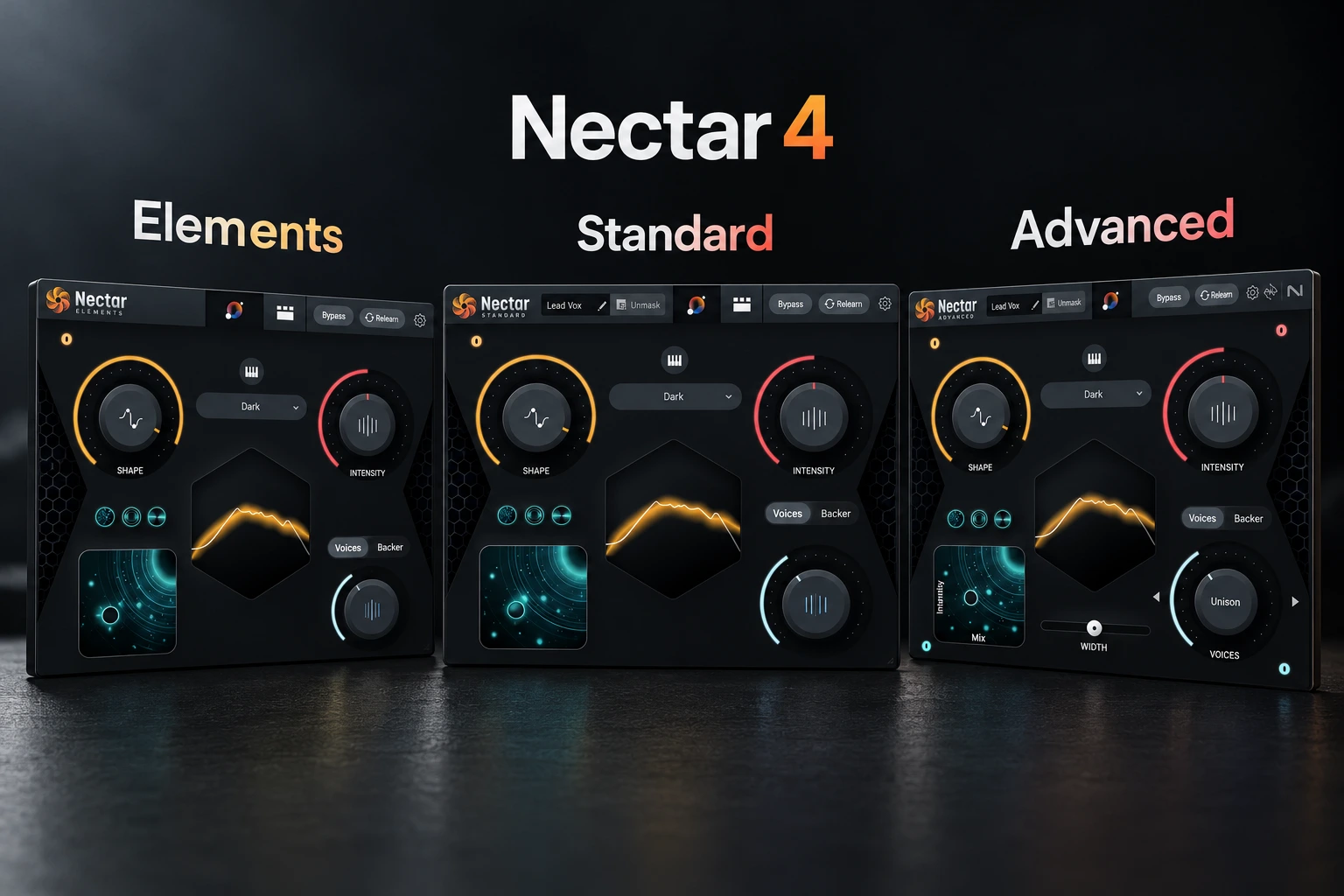

The three Nectar 4 editions are built around the same vocal-mixing idea, but the amount of control changes quite a lot as you move up. Elements is the simplest option for guided processing, Standard opens up the individual modules, and Advanced adds tools such as Auto-Level, Breath Control and separate component plugins. For most producers who want to shape a vocal chain themselves, Standard is where we would start. Advanced is worth the extra cost only when those additional tools solve a regular problem in your workflow.
For producers who want to learn vocal mixing inside one plugin, Standard is our starting recommendation. Advanced is worth considering for specific tools and a more flexible setup. The most expensive edition is not automatically the right purchase.
This Nectar 4 Elements vs Standard vs Advanced comparison explains what changes between editions, which differences matter in real projects, and what to check before paying for an upgrade.
Nectar 4 editions: the quick comparison
| Buying question | Elements | Standard | Advanced |
|---|---|---|---|
| Main workflow | Vocal Assistant and broad controls | Assistant plus detailed module editing | Standard’s core workflow plus extra tools and component plugins |
| Edit and reorder the full module chain | No | Yes | Yes |
| Voices and Backer | Simplified Assistant controls | More detailed editing | Detailed editing plus separate components |
| Auto-Level | No | No | Yes |
| Breath Control component | No | No | Yes |
| 13 separate component plugins | No | No | Yes |
| Bundled Melodyne 5 essential | Not included as a standard edition feature | Included | Included |
| Developer’s displayed USD price* | $55 | $199 | $299 |
| Our suggested buyer | Someone who prefers a few broad decisions | A producer building and adjusting a vocal chain | A regular vocal mixer who needs the extra workflow tools |
*Prices displayed on iZotope’s product pages on 18 October 2026. Currency, tax, retailer offers and personal upgrade prices can change your final total. These are snapshots, not guaranteed sale prices.
Important: Elements is not missing all of the processing heard in the larger editions. It gives you less access to the individual controls. Likewise, Standard already provides detailed vocal mixing; Advanced is not required just to adjust an EQ or compressor.
Nectar 4 Elements: for a simpler starting point
Elements centers the workflow on Vocal Assistant and broad controls for shaping a vocal. It also offers simplified Voices and Backer options. That makes it more useful than describing it as a basic preset player, but it does not give you Standard’s detailed module chain.
We would consider Elements for a songwriter who records ideas, wants the voice to feel more finished, and prefers a small number of decisions. It can also suit occasional voice work when a quick starting point matters more than fine control.
The limitation appears when you hear one specific problem and want to change only that part of the processing. If you regularly want to set compression yourself, refine the de-essing or change the order of effects, Standard is the more relevant edition to try.
SoundShaper opinion: choose Elements because you like its simplified workflow. Buying it as a temporary step toward Standard is less convincing unless the combined purchase and upgrade cost makes sense.
Nectar 4 Standard: our starting choice for hands-on vocal mixing
Standard gives you detailed modules for jobs such as EQ, compression, de-essing and effects, along with pitch processing and deeper Voices and Backer editing. You can change the module order rather than only make broad adjustments from the Assistant view.
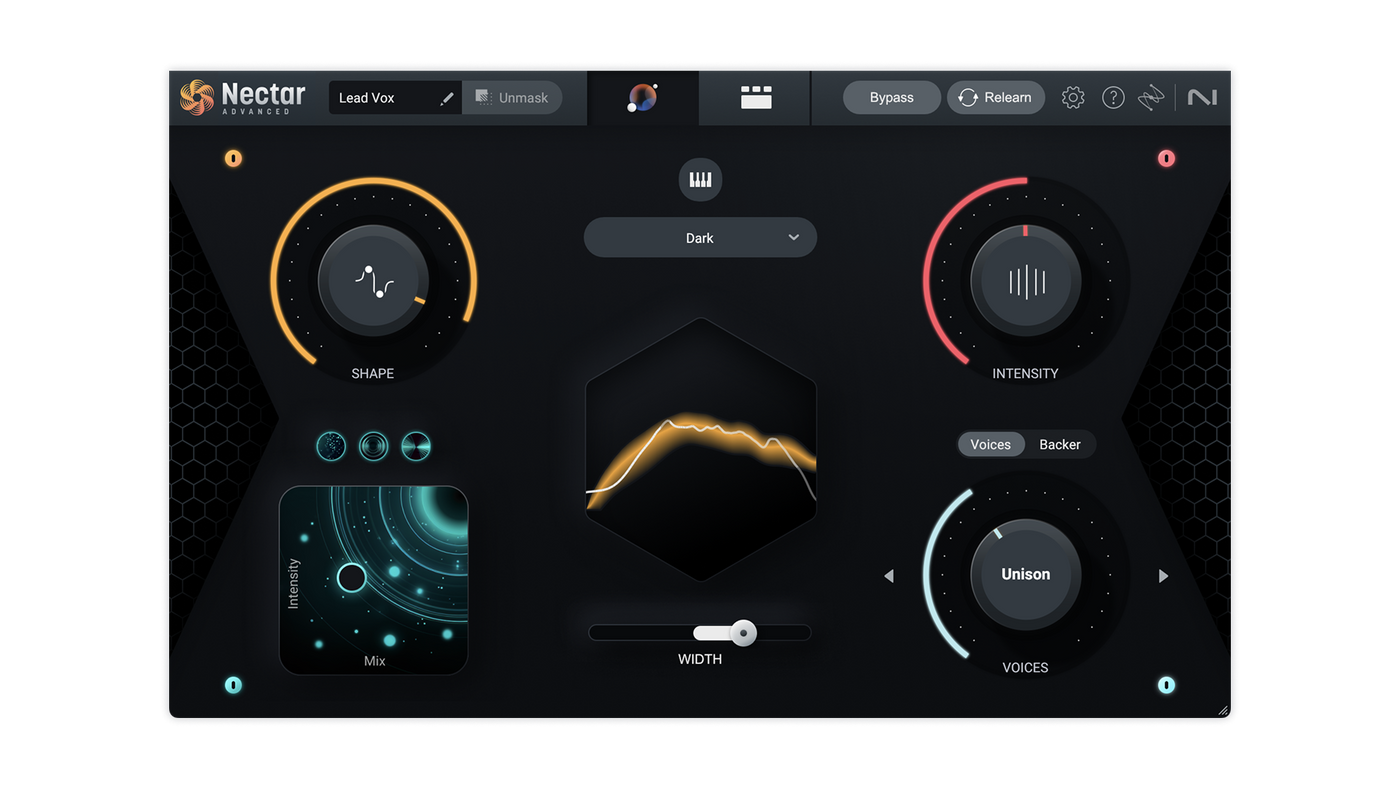
Imagine a rap vocal that needs less low-mid buildup, more consistent dynamics and a small amount of delay. Standard lets you work on those jobs within one plugin. You do not have to move to Advanced just to take control of the chain.
The main benefit for a learner is being able to revisit the Assistant’s starting point and make deliberate changes. Try reducing one effect, bypassing one module and listening to the difference with the beat playing.
Choose Standard if: you want a vocal toolkit in one place and expect to make your own detailed decisions.
Skip it if: you already enjoy a chain of separate plugins and cannot identify anything that Nectar would make easier. Our vocal plugin guide covers that separate-tool approach.
Nectar 4 Standard vs Advanced: what justifies the upgrade?
Auto-Level for uneven performances
Advanced adds Auto-Level, available within Nectar and as a separate plugin. It adjusts vocal levels toward a target and includes controls for the allowed range and strength of the adjustment.
That is useful to investigate when quiet words disappear and louder phrases keep driving your later processing too hard. It can reduce the amount of manual leveling you need, but we would still check the important phrases ourselves.
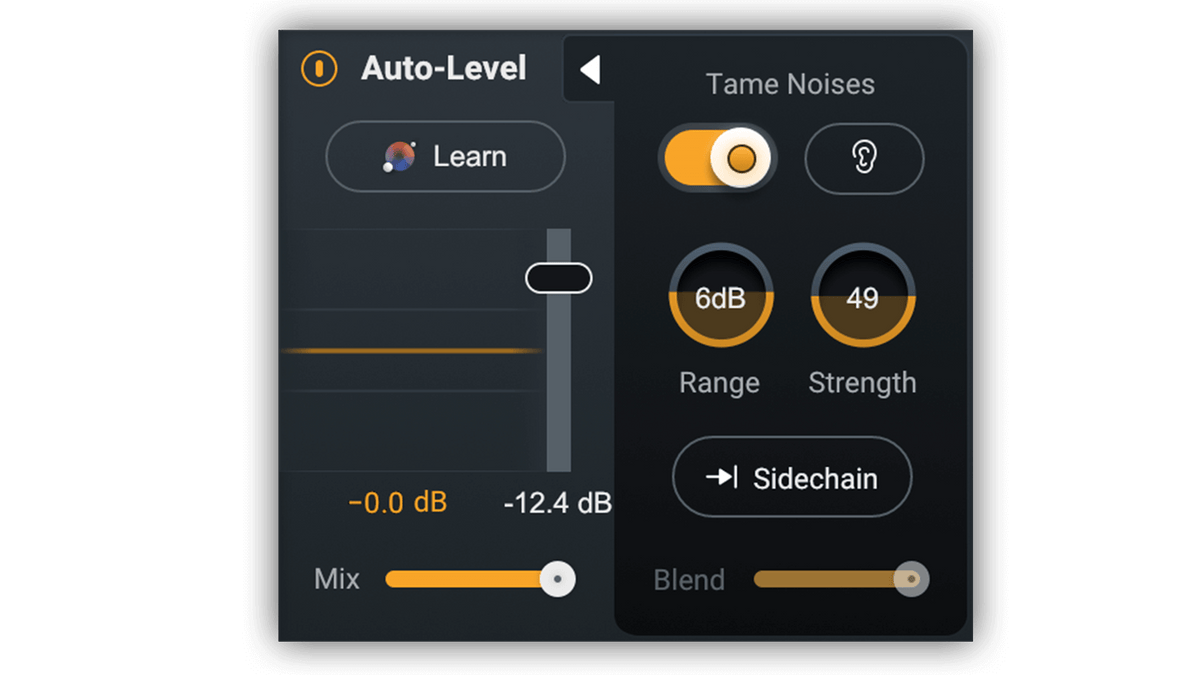
Auto-Level also has a sidechain mode that can use an external signal as a guide. That requires the appropriate routing in your DAW. Start with ordinary leveling before adding this extra complexity.
Our advice: test a verse with real level changes. Listen for preserved expression as well as consistency. A performance that is deliberately quiet in one line should not necessarily become as loud as the chorus.
Separate component plugins for your own chains
Advanced includes 13 component plugins. These let you load Nectar tools separately in the DAW, rather than always inserting the full Nectar plugin.
This matters when you want to place another developer’s effect between two Nectar processors, use one Nectar tool on a bus, or build a template from individual inserts.
If you prefer working inside a single window, Standard may already match your process. Separate components are useful because of where you can put them; their presence does not prove that your finished vocal will sound better.
Breath Control for a recurring editing task
Advanced includes a Breath Control component for reducing breath sounds. We would put it on the trial list for frequent vocal or spoken-word editing.
Keep some perspective here: breaths can be part of a convincing performance. If there are only a few distracting ones, manual clip-gain edits may be all you need. Pay for the tool when that task repeats often enough to matter.
Voices and Backer: check the controls, not just the feature name
iZotope’s edition comparison lists Voices and Backer functions in Elements, with more detailed editing in Standard and Advanced. Do not assume the same feature name means the same amount of control.
For example, the larger editions allow custom Voices editing and additional Backer adjustments. Elements focuses on broad Assistant choices. We would choose between them by deciding whether you want to select an effect quickly or shape it more precisely.
Generated layers can be a creative option for pop hooks, electronic vocal parts or ad-libs. They are not a reason on their own to replace a backing performance you already like. Check the lead and layers together, especially around consonants and phrase endings.
Which edition fits your music and workflow?
• Songwriting demos: start with Elements if you prefer quick decisions. Keep your existing tools if the demo already communicates the song.
• Rap and trap vocals: start by trialing Standard for detailed tonal and dynamics work. Consider Advanced if repeated leveling or a chain of separate components would help.
• Pop and electronic music: Standard is the starting point for producers who want to edit layered effects. Choose Advanced for its additional tools, rather than assuming a polished chorus requires it.
• Acoustic vocals: use subtle processing and preserve the performance. If your main difficulty is inconsistent levels, include Advanced’s Auto-Level in the trial.
• Regular client sessions or dialogue: weigh Advanced against the time you spend leveling, editing breaths and rebuilding chains.
Genre is a starting point, not a licence requirement. A simple rap chain may need less processing than a heavily layered acoustic production.
Melodyne, stock plugins and tools you already own
Standard and Advanced list Melodyne 5 essential as included software. That is the essential edition, not Melodyne editor or studio. Do not count it as a new benefit if you already own a suitable Melodyne licence.
A retailer may separately offer Melodyne or another product as a checkout gift. That is a changing promotion, not the same thing as an edition feature. Check the selected offer and redemption terms before comparing value.
If pitch correction is the only thing you need, start with our FL Studio tuning guide or free pitch-correction options. A whole vocal suite is unnecessary when one specific tool already solves the job.
The same applies to mixing. Stock EQ, compression, de-essing and manual level automation can form a usable chain. Nectar earns its place when the combined workflow helps you make decisions and finish the track.
Full licence, upgrade or crossgrade: compare the right offer
Plugin Boutique lists full editions alongside upgrade, update, crossgrade and educational offers. These are different licence routes with different eligibility rules.
1. Check what you own. Look at your registered Nectar and other iZotope licences before choosing an offer.
2. Read the exact prerequisite. “Any paid iZotope product” and “Nectar Elements” are not interchangeable eligibility conditions.
3. Compare the final total. Check your iZotope account offer as well as the retailer’s eligible route. Use the same edition and currency where possible.
4. Check bundles for overlap. More included products are useful only if you need them. Avoid paying again for tools you already have.
SoundShaper opinion: do not buy Elements solely because you expect a cheap upgrade later. Calculate both purchases first. Upgrade availability and prices can change.
Try the editions on one real vocal
iZotope’s Nectar 4 download pages describe a 10-day unrestricted trial, followed by a demo that inserts silence at intervals. Use the trial period to answer a musical question, not just browse presets.
1. Choose a representative passage. Include quiet and loud phrases, breaths and words with strong S sounds.
2. Run Vocal Assistant with audio playing. If the clip is shorter than 20 seconds, the manual recommends looping it for analysis.
3. Make one version with broad controls. Decide whether this amount of access feels sufficient for your normal work.
4. Make a second version with detailed edits. Change only the modules that address an audible problem. This helps you judge the value of Standard.
5. Evaluate the Advanced extras separately. Try Auto-Level and a component-based chain. Note whether either saves a recurring task.
6. Compare at similar loudness in the full song. Save, reopen and export a short section before making the purchase.
Testing the broad controls in Advanced helps you judge the workflow, but it does not reproduce every restriction of Elements. Use the Elements installer if you need to confirm exactly what you can access.
Current version and compatibility
iZotope’s release notes list Nectar 4.2.0 for Standard and Advanced, released 18 August 2026. That update raised the minimum supported macOS version to Sonoma 14.7. Do not rely on older retailer requirement lists when installing the current version.
The current developer product pages list 64-bit AU, AAX and VST3 formats, Windows 10/11 support for specified builds, and native Apple Silicon support. Check your edition’s current operating-system and host list before buying. In FL Studio, use a compatible 64-bit VST3 installation.
Melodyne is separately installed software with its own requirements. A bundled licence does not mean every integration feature works in every DAW.
If Nectar does not show up after installation, use our FL Studio plugin-scanning guide. If monitoring feels delayed, check our latency guide before assuming the plugin is faulty.
SoundShaper opinion
Standard is our starting recommendation for someone who wants to mix vocals and understand the decisions. Elements makes sense when you actively prefer less detail. Advanced makes sense when you have a use for its extra tools or separate plugin workflow.
We would spend the upgrade money on Advanced for a repeatable improvement: less time leveling difficult takes, easier breath editing, or a template that needs individual components. We would not spend it just to own the largest edition.
These recommendations are editorial judgments based on official documentation. We are not claiming a controlled audio-quality, processing-speed or CPU comparison.
Frequently asked questions
Is Nectar 4 Advanced better-sounding than Standard?
Advanced adds tools and workflow options. Its edition label alone does not guarantee a better result. Choose it when the extra processing addresses something your Standard workflow leaves unresolved.
Does Nectar 4 Standard include Auto-Level?
No. Auto-Level is an Advanced feature. Standard still includes compression and other tools for a detailed vocal chain.
Can I use Nectar 4 Elements for finished songs?
Yes. A simpler interface does not prevent a finished release. The decision is whether its controls give you the result you need for that recording.
Does Nectar 4 require a subscription?
No. Full licences are sold separately. If you choose a subscription or bundle instead, check which edition is included and what happens when access ends.
Conclusion
Elements for simplicity. Standard for detailed vocal mixing. Advanced for specific extra tools and flexible component chains. Start with the edition that suits your decisions today. Upgrade when you can explain the practical benefit in your own sessions.
SoundShaper may earn a commission from purchases through affiliate links, at no extra cost to you.
Sources and editorial basis
Checked on 18 October 2026 against iZotope’s Elements, Standard and edition comparison, Advanced, Vocal Assistant manual, Auto-Level manual, release notes and trial terms, plus the linked Plugin Boutique offers. Buying advice and suggested evaluation steps are SoundShaper’s editorial judgment.
![[background image] image of recording equipment (for a musician & band)](https://cdn.prod.website-files.com/68efa70811edd8e5af30a90d/6ad5421eaf14ef1dbac4dfa8_TAIP%20Review.webp)
![[background image] image of recording equipment (for a musician & band)](https://cdn.prod.website-files.com/68efa70811edd8e5af30a90d/6ad5413cb1504db30162273f_Phoscyon%202%20Review.webp)
![[background image] image of recording equipment (for a musician & band)](https://cdn.prod.website-files.com/68efa70811edd8e5af30a90d/6ad5403dd747f3fbbe4286ab_Chordjam%20Review.png)