


A single vocal can have the right performance but still feel too narrow when the chorus arrives. Waves Doubler and Abbey Road Reel ADT both create extra layers from that recording, but they give you different ways to control the result. The useful distinction is how you want those layers to move around the lead.
Choose Waves Doubler for direct control over several detuned, delayed voices. Choose Abbey Road Reel ADT for tape-style doubling with moving timing and saturation. Both are effects for a recorded performance, rather than substitutes for every musical detail of a second take.
Waves Doubler vs Reel ADT: which workflow fits?
| Decision | Waves Doubler | Abbey Road Reel ADT |
|---|---|---|
| Core approach | Delay and detune additional voices | Model tape-based artificial double tracking |
| Main controls | Per-voice Gain, Pan, Delay and Detune | ADT position, Varispeed, LFO and Drive |
| Extra voices | Two-voice and four-voice components | One ADT signal; two in the 2V components |
| Useful starting goal | A controlled stereo layer behind the lead | A double whose timing moves around the source |
| Main limitation | Too much detuning can become an obvious chorus effect | Too much movement can distract from the phrasing |
| Observed USD price | $29.99 sale; $99 listed MSRP | $29.99 sale; $149 listed MSRP |
Individual plugin prices checked directly on Waves on November 20, 2026. Offers and taxes can change. Check your existing bundles before buying either plugin separately.
Why duplicating a track is not the same as doubling it
Two identical copies played together at the same position mainly increase level. A second sung take differs in timing, pitch, consonants and breath, which is why it can add a different sense of size. An artificial doubler creates some of those differences from one source.
That is useful when the singer is no longer available, when you want a restrained layer rather than another performance, or when the production calls for a deliberately processed vocal. It is less useful when the arrangement needs new phrasing, different emphasis or an actual harmony line. Those are performance decisions.
Before choosing either plugin, decide whether the vocal needs more width, a more obvious double, or simply a better level against the instrumental. Our guide to making vocals sit in the mix covers the last problem. Adding stereo information will not automatically solve masking or uneven vocal level.
Waves Doubler: build the width voice by voice
Doubler makes the construction of the effect easy to see. Each additional voice has its own gain, pan, delay and detuning controls. You can spread two quieter copies around the original, then decide how different those copies should be. The four-voice component extends that approach when you want a denser layer.
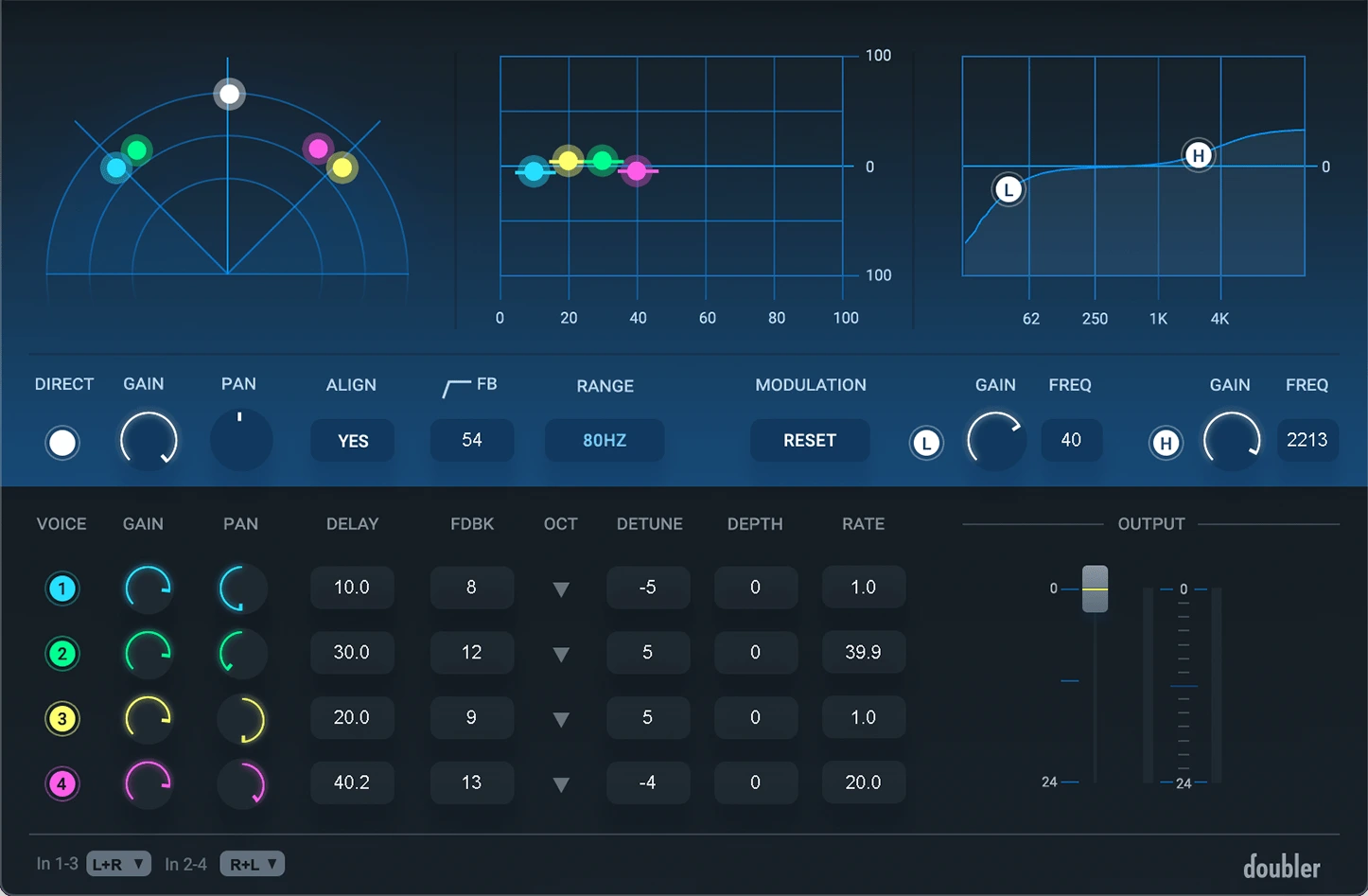
Waves Doubler's four-voice interface. Individual rows control the added voices, while the Direct section controls the original signal. Image: Waves.
This is a useful starting point for a pop chorus where the lead should remain clear but the edges should feel wider. It also suits an instrument part that needs some stereo spread without a long reverb tail. The extra voices do not need to be equally loud: arrangement and balance matter more than filling every available voice slot.
A restrained vocal-width starting point
- Choose a two-voice stereo-output component appropriate to your DAW track.
- Keep the direct voice centred. Pan the added voices left and right.
- Try approximately −6 cents on one voice and +6 cents on the other, with delays around 18 and 27 ms.
- Start the extra voices quietly, around −15 dB each. Leave feedback and modulation depth at zero initially.
- Raise the added voices until the width is useful, then check the phrase in mono and with the full arrangement.
These are suggested test settings for your own material, not a universal vocal preset. If the consonants turn into separate echoes, shorten the delays or lower the extra voices. If the held notes become noticeably seasick, reduce the detuning before adding more processing.
Try a second pass with the effect reduced until you mainly notice its absence when bypassed. That can be a more useful lead-vocal setting than the dramatic sound that impressed you in solo. Keep a louder version available for a particular chorus or phrase ending.
Reel ADT: shape a moving tape-style double
Reel ADT models the artificial double-tracking approach associated with Abbey Road's tape workflow. Its emphasis is the relationship between the original signal and a moving double, with separate drive controls for tape saturation. Varispeed and the LFO give you ways to change that relationship over time.
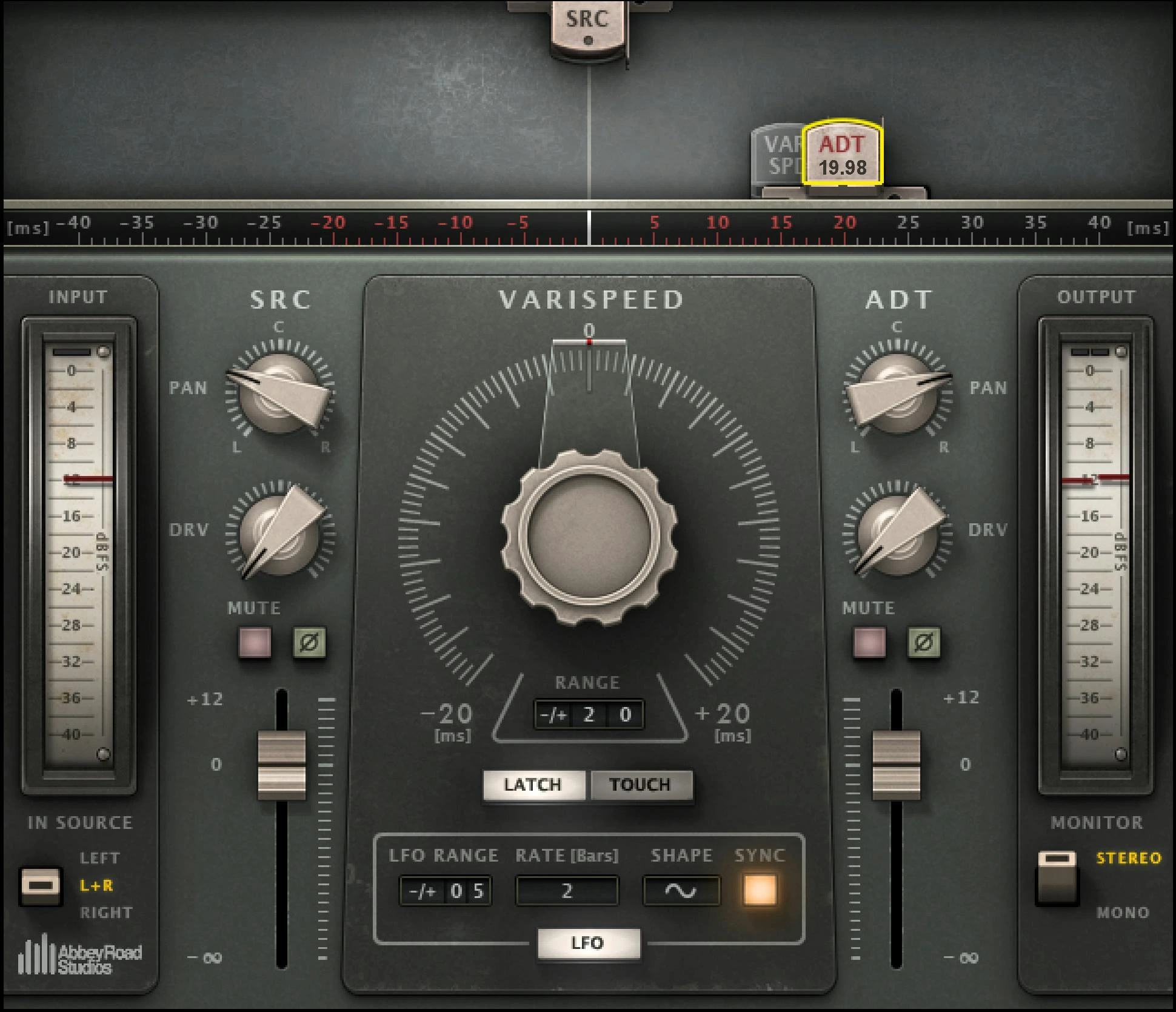
Abbey Road Reel ADT places the source and doubled signal above the Varispeed section. SRC and ADT have separate level, pan and drive controls. Image: Waves.
Choose this approach when movement and colour are part of the intended sound. It can suit a sparse guitar or vocal arrangement where a static layer feels too tidy, but the genre is not a rule: a heavily electronic song can benefit from an imperfect double too.
Start with movement you can still control
For an initial insert experiment, place the ADT signal about 12 ms after the source. Try a small random LFO range, around ±3 ms, and keep Drive low. Start the double quieter than the original, then increase its level while the instrumental plays. Use modest opposite panning before deciding whether a much wider split is helpful.
Judge the ends of sustained notes and the start of each new word. If the effect draws attention away from the melody, reduce movement or lower the double. If it feels like a separate late syllable, revisit the timing position. Adding saturation is a separate choice; establish the timing first so you can hear what Drive contributes.
For a more conspicuous doubled part, bring the two signals closer in level. For a lead that must stay intimate, keep the original more prominent. A doubler should earn its place in the arrangement, not stay loud because the control happens to allow it.
Reel ADT, ADT 2V and ADT Live are different components
ADT 2V adds a second independently controlled double. It is useful when you want separate left and right effect layers. The regular components can place the double before or after the source; the Live components only delay it after the source to reduce latency.
Do not assume a negative timing setting behaves identically when switching to Live. Waves documents how that component converts negative ADT positions to positive ones. Choose the component for the job: editing a mix and monitoring a live performance have different priorities.
This also means the product name alone does not describe the monitoring delay of your whole session. Your audio interface, buffer and other plugins remain part of that path. Check the complete chain before recording through a doubling effect.
Insert or send: keep track of the dry signal
An insert is the simplest way to compare the original and doubled signals inside one plugin. A send makes the effect easier to automate independently, and lets you process the added layer without changing the lead. Either route can work if you know where the unprocessed signal is coming from.
On a wet-only send return, disable Doubler's Direct signal or mute Reel ADT's SRC output. Your original vocal track already supplies the dry voice. Leaving another dry copy on the return can make the result louder before you have added useful width.
For a chorus lift, automate the send level rather than making the entire song equally wide. Leave a quieter verse as a reference. If you want the effect to follow vocal fader changes, our pre-fader vs post-fader sends guide explains that routing decision.
How to compare them fairly in your own session
Use the same short vocal passage for each plugin. Include a held vowel, a quick line and a phrase ending. Match the perceived output level as closely as practical, then compare how well you can follow the words with the instrumental playing.
Switch to mono during the comparison. If the vocal becomes hollow or loses its centre, reduce the effect level and reconsider the timing. Hard panning is not proof that an effect is safe when the channels are combined. Our guide to making a mix wider covers the broader balance between width and a reliable centre.
Finally, compare a narrower version. If it communicates the song better, that is a useful result. You are choosing a support layer for a performance, not trying to maximise the width control.
Who should buy, and who can skip?
Choose Doubler when you want to set the pitch, timing and pan of several added voices directly. Choose Reel ADT when tape-style movement, saturation and the before/after timing relationship are central to the effect you want.
If you already own a doubler that handles your vocal-width task, neither purchase is automatically necessary. MicroShift and Little MicroShift are another route worth comparing if you prefer fewer decisions. Recording an additional take remains the most direct option when you want a distinct performance rather than a generated layer.
Frequently asked questions
Is Waves Doubler a pitch-correction plugin?
No. Its detuning controls create differences between voices. They do not analyse a melody and repair its tuning against a chosen key. Address pitch problems in the source before deciding how much width to add.
Is Reel ADT only for vocals?
No. It can also be used creatively on instruments. Start with a single part whose role is clear; adding the same moving effect across many tracks can make it harder to judge which part needs the space.
Conclusion
Doubler offers a straightforward way to build a controlled layer from several voices. Reel ADT offers a different workflow around tape-style movement and colour. At the checked sale prices, the more useful purchase is the one that matches how you want to work—not the one with the larger discount from MSRP.
Technical references: Doubler user guide, Reel ADT user guide and Abbey Road's vocal-doubling guide. Checked November 20, 2026.


