
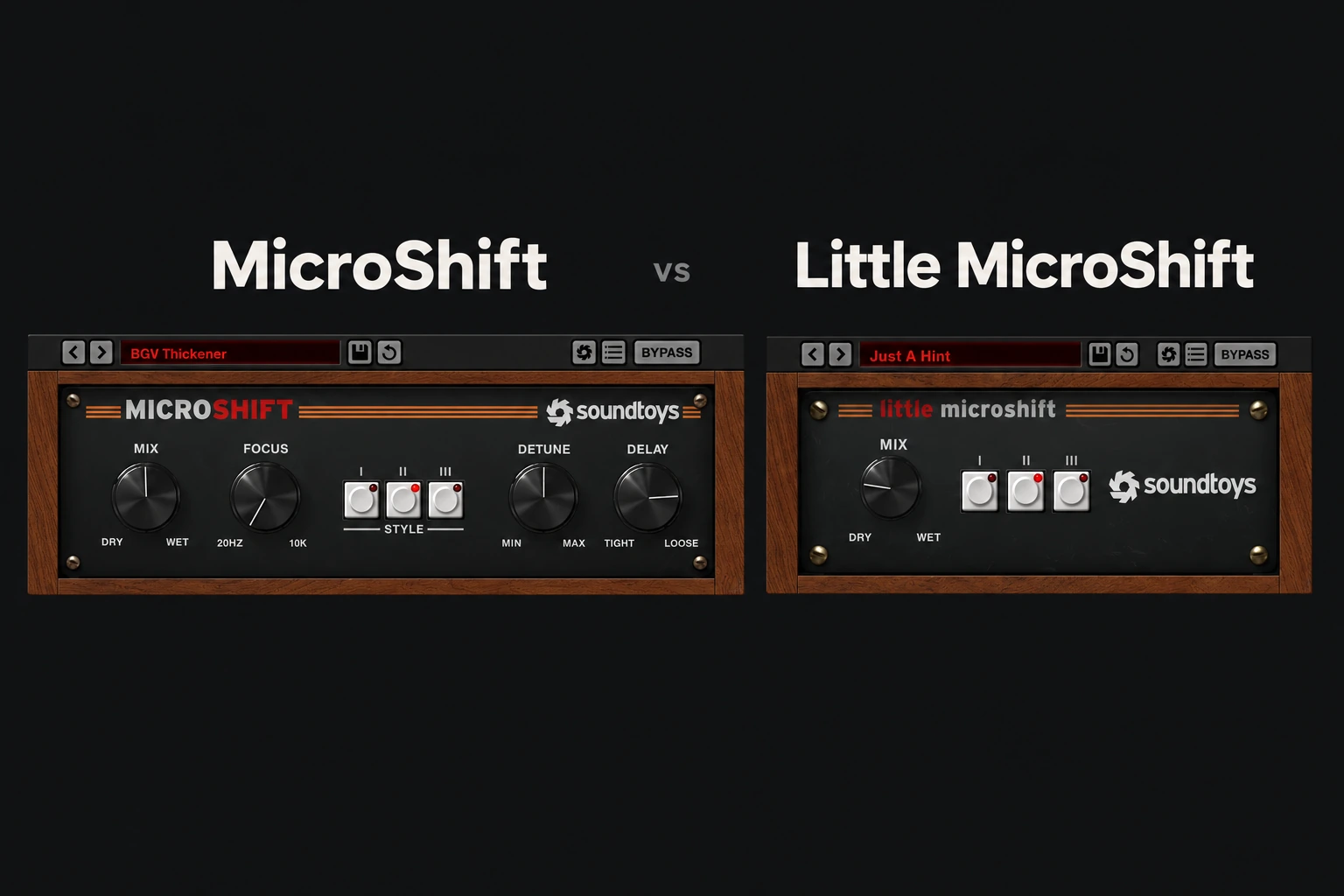

Keep using Little MicroShift if its three styles and Mix control give you the width you want. Upgrade to MicroShift when you need to adjust the pitch-shift amount, delay character or frequency range of the widening. The full version gives you more control, rather than turning a completely different effect into a necessity.
There is an important buying detail: Soundtoys currently lists Little MicroShift as not sold individually. It is included with MicroShift and the Soundtoys 5 bundle. For existing Little MicroShift owners, the useful decision is whether an upgrade solves a recurring limitation.
This is an editorial comparison based on Soundtoys product information and manuals, not a hands-on listening test. Availability and features were checked on 29 October 2026.
What changes in the full version?
| Control or purchase detail | Little MicroShift | MicroShift |
|---|---|---|
| Three widening styles | Yes | Yes |
| Mix control | Yes | Yes |
| Adjustable Detune and Delay | No separate controls | Yes |
| Focus control | No | Yes |
| Current standalone purchase | Not listed by Soundtoys | Available; includes Little MicroShift |
Both use small pitch shifts and time-varying delay to create stereo width. Neither replaces recording another take when you want the phrasing and timing differences of a real double.
When Little MicroShift is enough
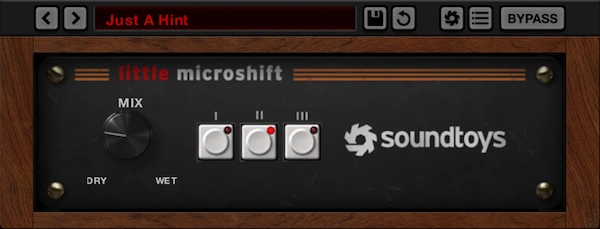
Little MicroShift is a sensible tool when the decision is simple: choose a style, blend some width into the track and continue arranging. Fewer controls can be useful when the part already works and only needs a small change in presentation.
Try it on a backing-vocal layer, a synth accent or a guitar part that has space beside the lead. Keep the effect low enough to judge its contribution against the rest of the song.
If the first style feels wrong, compare the other two before assuming the plugin needs replacing. If one fits, there may be no practical reason to buy more adjustment.
Its limitation becomes relevant when you like the broad effect but cannot get the exact balance you want. Lowering Mix reduces the whole contribution; it does not give you independent control over each ingredient.
When MicroShift earns the upgrade
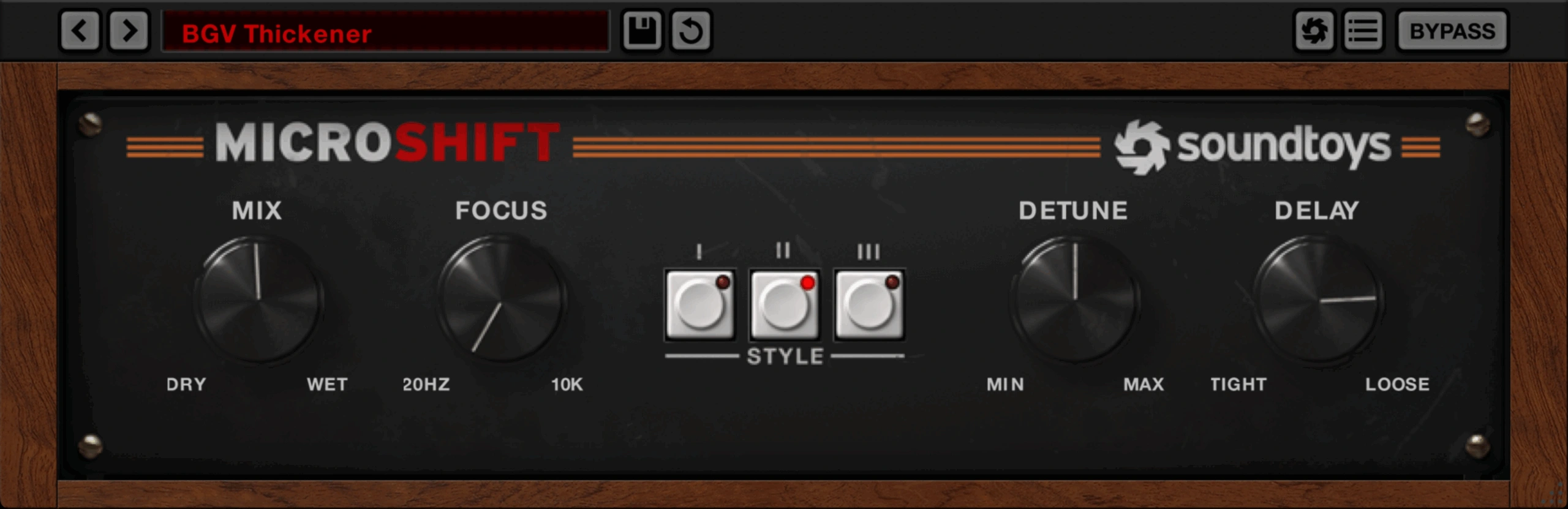
The full version adds Detune for the amount of micro pitch shifting, Delay for the time-varying delay character, and Focus for targeting the frequency range being widened.
That gives an upgrade a concrete purpose. If the effect feels too obviously detuned, you can investigate Detune without simply turning down the entire wet contribution. If the widened layer feels too loose, you have another parameter to audition. If lower frequencies become cluttered, Focus is the feature to investigate.
These are reasons to run the demo on your own material, not promises that every setting will improve it. Make one change at a time and listen through the next section of the arrangement.
Our MicroShift review covers the full plugin beyond the version comparison.
A practical vocal decision
For a backing vocal that only needs a little spread, start with Little MicroShift if you already own it. Choose a style and set a modest Mix amount. Listen with the lead vocal present, since the goal is the relationship between the parts.
If that layer becomes distracting, identify why. Is the wet signal too loud? Does the pitch movement draw attention? Does the lower part of the vocal lose definition? Only the latter two questions begin to suggest a reason for the full version’s extra controls.
For a lead vocal, keep intelligibility and position in mind. Width can be attractive while making the centre of the song less focused. A quieter supporting layer may be more useful than a pronounced effect across the entire lead.
See how to make vocals sit in the mix for the surrounding balance decisions.
Do the mono check before the purchase
A stereo effect should be judged in stereo and mono. Listen for changes in tone, level and clarity when the channels are summed. Do not expect the sense of width to remain; check whether the musical part still does its job.
Compare with bypass, try less effect and include both a sparse section and the busiest chorus. The full version’s controls create more options to investigate, but they do not guarantee that every patch will translate well.
Our guide on making a mix wider without losing mono compatibility covers the wider workflow.
Check ownership and upgrade offers first
Soundtoys tells existing Little MicroShift owners to check their account for upgrade offers. Do that before paying for a new full licence. Also check whether MicroShift is already included in a bundle you own.
Older articles may describe Little MicroShift as a separate purchase or reference a historical promotion. Use the current manufacturer listing for availability, and compare current checkout prices rather than assuming an old offer still applies.
If you are buying MicroShift now, the inclusion of Little MicroShift means you can choose the simpler interface when it is enough. You do not need to buy both separately.
SoundShaper opinion
Little MicroShift is enough when style selection and blend level finish the task. An existing licence does not become less useful because a bigger version exists.
MicroShift is worth a demo when Focus, Detune or Delay answers a limitation you repeatedly encounter. We would upgrade for that control, not on an unsupported claim that the full version automatically sounds better.
Conclusion
Already own Little MicroShift? Keep it until you can name the missing adjustment. Buying into the effect today? MicroShift is the current standalone option from Soundtoys and includes the smaller version. Check ownership, try the controls on a real track and buy only if they make the result easier to finish.
Sources
Soundtoys: MicroShift controls, inclusion and upgrades; Soundtoys: Little MicroShift features and current availability; MicroShift manual; Little MicroShift manual. Checked 29 October 2026.
![[background image] image of recording equipment (for a musician & band)](https://cdn.prod.website-files.com/68efa70811edd8e5af30a90d/6ae28f3ffeabaf5b76db2580_6ae28f255000f820b159a320_crystalline-review-cover.webp)
![[background image] image of recording equipment (for a musician & band)](https://cdn.prod.website-files.com/68efa70811edd8e5af30a90d/6ae28e7e5d1572089570ac87_6ae28e5eead33b2db2a18b5f_transit-2-review-cover.webp)
![[background image] image of recording equipment (for a musician & band)](https://cdn.prod.website-files.com/68efa70811edd8e5af30a90d/6ae28d603a57759da71022d6_6ae28d41f6af13c91dee9c76_drumazon-2-review-cover.webp)