


Valhalla Delay is worth a demo if you want one reasonably priced plugin for ordinary echoes and more experimental textures. Its developer lists it at US$50. That makes it an accessible paid option, but a purchase still needs a purpose: your DAW already has a delay.
The most convincing reason to consider it is range. A simple vocal response and a long, diffuse synth texture can belong to very different sessions. A delay that covers both may earn regular use, provided its controls feel comfortable to you.
This review offers buying advice based on Valhalla DSP’s documentation and product information. We have not conducted controlled listening comparisons, latency measurements or CPU benchmarks. Suggested settings and demo exercises below are starting points for your own evaluation.
Who should consider Valhalla Delay?
| Buying question | Our advice |
|---|---|
| Your main need | A versatile delay for vocals, instruments and creative textures. |
| Reason to try it | Several echo characters plus diffusion and pitch-based options. |
| Reason to wait | Your stock delay already produces your regular effects quickly. |
| Price reference | US$50 from Valhalla DSP; check tax and your local checkout. |
More than an ambient delay
Valhalla Delay includes tape, BBD and digital approaches alongside more experimental modes. Its style choices include conventional and more complex repeat arrangements. You can begin with a straightforward echo before exploring the less familiar options.
For a first demo, avoid the largest preset. Put a short phrase through a simple delay and listen to where the repeats land. Then adjust the character while keeping the rhythm and return level reasonably consistent.
This helps answer a better question than “does the preset sound impressive?” You are checking whether you can shape an echo around an arrangement without losing the original part. A dramatic solo sound is easy to like and surprisingly easy to turn down once the mix returns.
Vocal echoes: protect the next line
A practical starting point is a delay return fed from the vocal. Set the plugin fully wet on that return, keep feedback low at first and bring the send up until the response is audible.
Pick a timing that answers the phrase rather than filling every available gap. Listen through the next lyric, not just the word that triggers the echo. If the repeat distracts from the words, lower the return, reduce Feedback or adjust the tone.
For a throw, automate the send so one chosen word feeds the delay. Keep the return available for its tail. This arrangement technique is useful with many delays; you do not need Valhalla specifically to learn it.
Ducking is mode-dependent: BBDuck, Clarity, DuckTape and PitchDuck are the relevant starting points. PitchDuck uses the incoming level to control both feedback gain and output level. On a throw-only return, however, the plugin receives only the sent word. To duck its tail under the following unsent lyric, use a separate compressor keyed from the continuous vocal.
If the dry vocal already struggles, work on that first. Our guide to making vocals sit in the mix covers the wider balance. Extra echoes will not repair an unclear performance or an unsuitable level.
Diffusion: when echoes become a texture
Diffusion can smear the repeats towards a more continuous, reverb-like result. Pitch-based modes offer another route into effects that become part of the arrangement.
Try a sustained instrument with plenty of space around it. Begin with audible repeats, then introduce diffusion gradually. Listen for the point where the effect stops behaving like a response and starts acting like a background layer.
Now play through a chord change. A texture that works beautifully behind one chord can make the next one feel crowded. Reduce the send or shorten the tail before assuming the patch itself is wrong. In some sections, automating the effect only at the end of a phrase is the more useful choice.
For low notes, check whether the return adds weight that the arrangement does not need. Keep the dry source present while you adjust the effect. The aim is to give the part a space, rather than turn every source into the same cloud.
Chrome Tape and Analog: check which version a review shows
Version 3.0 added Chrome Tape and Analog. Valhalla describes Chrome Tape as a less noisy alternative to the original Tape approach, and Analog as a revised BBD-inspired design. The update was free for existing owners.
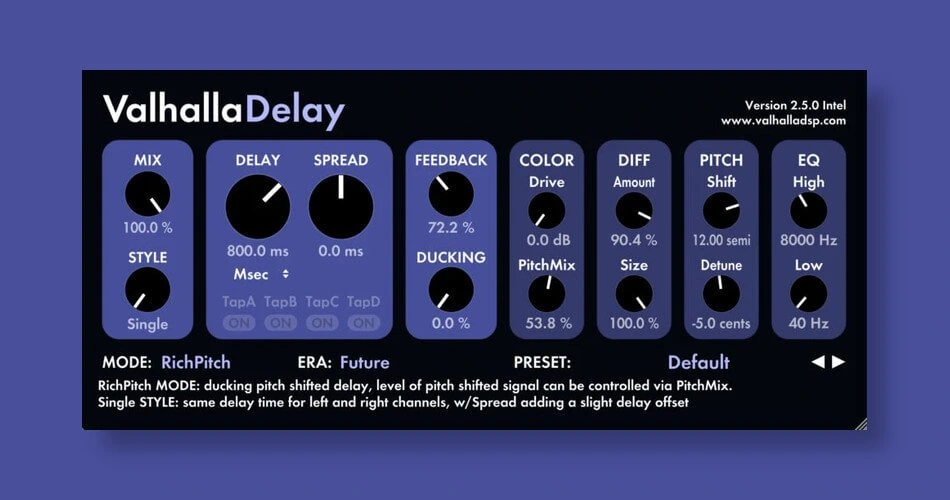
That matters when watching older demonstrations. A video or screenshot can still explain the workflow without showing every mode in the later product. The RichPitch image in this article predates the 3.x additions.
During your trial, compare a few related modes with the same source. Keep the return level controlled and change one major decision at a time. Ask whether the difference helps that part fit the track. Choosing between several flavours of echo should remain a musical decision, not a requirement to use every mode.
Valhalla Delay versus EchoBoy or a stock delay
For ordinary tempo-synced repeats, first recreate the effect in your DAW. If you can get the sound quickly, you have a useful baseline. The paid plugin must add something you value beyond a different interface.
Try Valhalla when you want to move from basic echoes into more diffuse or pitch-based processing within one plugin. If the specific appeal of EchoBoy is its rhythm-editing workflow, compare that task directly rather than judging two unrelated presets.
Our EchoBoy vs Valhalla Delay guide examines the choice in more detail. There is enough overlap that most producers should explore one thoroughly before deciding they need both.
For a zero-cost starting point, our free delay plugin guide offers other directions. A free option that meets your needs is a better purchase decision than a paid plugin you never open.
Price and demo limitations
Valhalla DSP lists the plugin at US$50. Check the checkout total and any applicable tax before buying.
The demo fades the audio out and back in every 45 seconds and does not save presets. Those restrictions matter when comparing a long passage or trying to recall an experiment. Keep notes about the settings you want to revisit, and avoid using the demo as though it were a fully licensed production copy.
Use the developer’s current installer and requirements to check your DAW and operating system. Also test project playback in a realistic session. We cannot promise a particular CPU result on your computer without measuring it.
Conclusion
We would put Valhalla Delay near the start of a shortlist for a first versatile paid delay. The combination of a modest listed price and several creative directions gives it a clear buying argument.
Compare one ordinary echo and one diffuse texture against your existing delay. If Valhalla makes the latter easier while remaining quick for the former, its range has a practical benefit. If you only use a single clean repeat, the stock option may remain sufficient.
Sources
Valhalla DSP: product features and listed price; Valhalla DSP: the 3.0 additions; Valhalla DSP: demo limitations. Product information checked 2 November 2026 against the available official listings.


