
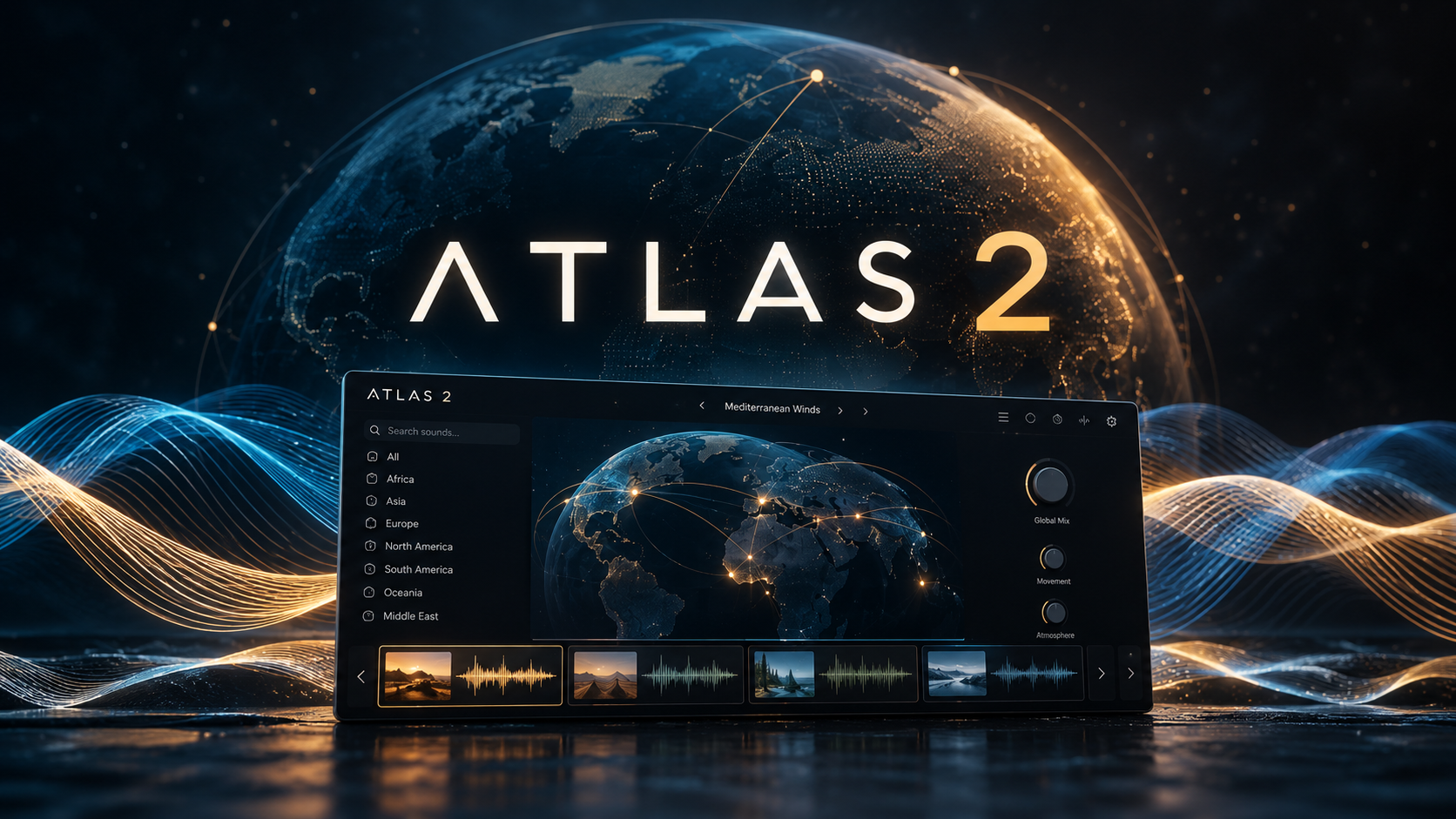

Algonaut Atlas 2 is one of the most useful drum tools for producers whose sample library has become too large to browse normally. Instead of forcing you through folder after folder, it analyzes your drum samples, places similar sounds together on a visual map and lets you turn those sounds into playable kits and complete patterns.
That sounds simple, but it changes the job. Atlas 2 is not mainly about giving you another 5,000 samples. Its value is helping you rediscover the samples you already own, build kits faster and move from sound selection into an actual beat without switching between several plugins.
My take: Atlas 2 makes the most sense when sample hunting is slowing down your sessions. If your drum folders are already small and perfectly curated, the benefit is much smaller. If you have years of downloaded one-shots spread across different drives and packs, this is exactly the kind of workflow problem Atlas is designed to solve.
| Atlas 2 at a glance | Details |
|---|---|
| Best for | Producers with large drum sample libraries who want faster browsing, kit building and sequencing |
| Main strength | AI-assisted sample maps combined with a full drum kit and sequencer workflow |
| Price checked | $99 for Atlas 2; $19 upgrade for qualifying Atlas 1 owners |
| Trial | 14 days with all features unlocked |
| Formats | Standalone, VST, VST3, AU and AAX; 64-bit |
| Platforms | macOS, Windows and Linux |
| Best alternative | XLN Audio XO |
Atlas 2 review: the short verdict
I would shortlist Atlas 2 if you regularly lose time auditioning kicks, snares, hats and percussion from a large collection. The visual map is the headline feature, but the reason the plugin is more useful than a basic sample organizer is what happens after you find the sounds: you can assemble a kit, edit individual samples, write a sequence, export audio or MIDI and keep moving.
The strongest part of the concept is that browsing and beat creation are connected. You can hear a sound, find nearby alternatives, replace it in context and keep the pattern running. That is a much more musical way to make a decision than opening fifty similarly named WAV files one by one.
The limitation is just as important: Atlas is still fundamentally a drum-sample workflow. It is not a full melodic sampler, synthesizer or replacement for every drum instrument. Producers who mainly work from a few favorite curated kits may not gain enough to justify another tool.
What is Algonaut Atlas 2?
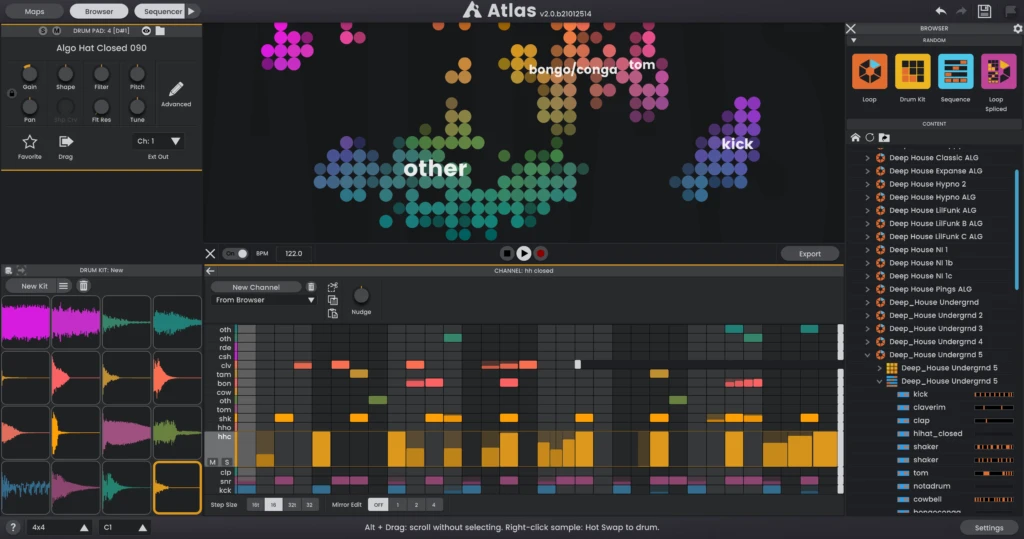
Atlas 2 is a sample organizer, drum sampler and sequencer from Algonaut. Its defining feature is the Sample Map: Atlas analyzes your imported drum samples and groups similar sounds together visually. Kicks end up near other kicks, snares near related snares and so on, so you can browse by sound rather than by filename or folder structure.
The company describes this as artificial-intelligence-based sorting. In practical terms, the important part is not the AI label; it is that the software creates a useful map from your existing library. You can create multiple maps, which is helpful if you want separate collections for genres, favorite folders or specific projects.
Atlas also includes a drum-kit section, sample editing, a flexible sequencer and a content browser. The current download page lists Atlas 2.6.2, and recent updates added official AAX support plus host-sync improvements for DAWs.
The Sample Map is the reason to buy Atlas 2
The biggest advantage appears when your sample library stops being human-scale. A folder with thirty kicks is manageable. Twenty folders containing thousands of vaguely named one-shots are not. Atlas gives that material a visual structure.
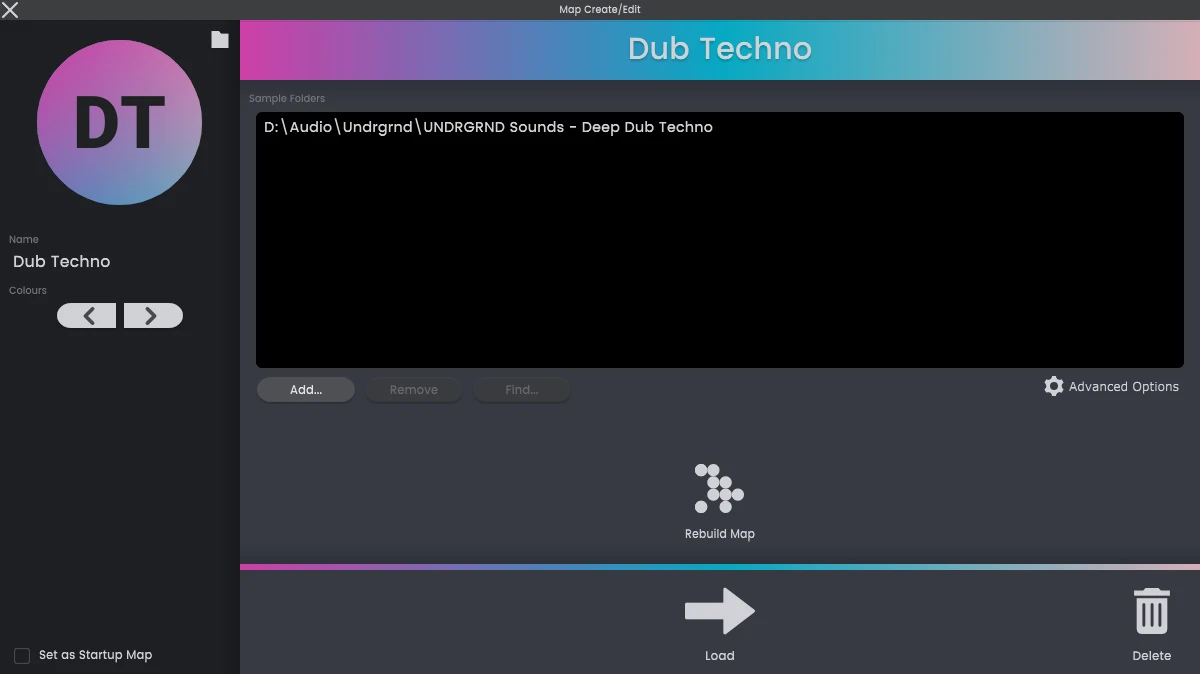
You can move around the map, audition sounds and use nearby samples as alternatives. Atlas also includes filters and a list view, so the map is not your only navigation method. Multiple maps let you control the scope of a search rather than dumping your entire drive into one giant universe.
My take: the best use of the map is not random browsing for its own sake. Start with a sound that is almost right, then inspect the nearby options. That turns the system into a fast A/B tool. You are making a controlled musical choice instead of endlessly searching for a theoretically perfect snare.
I would create one broad map for the full library and a few smaller maps for the packs or styles I reach for most. A huge visual map is impressive, but a focused map is usually faster when the song already has a direction.
Building drum kits in Atlas 2
After finding sounds, Atlas lets you place them on a drum-kit layout and build a playable kit. Pad layouts can be changed to suit different controllers, and MIDI mapping helps keep the plugin connected to hardware instead of turning every choice into mouse work.
Atlas can also generate a new kit from the material in your map. Individual sounds can be locked while the others change, which is useful when the kick is right but the rest of the kit still needs work. Auto-volume uses the analyzed drum categories to put newly loaded sounds into a more reasonable starting balance.
One particularly practical feature is the ability to embed samples with the DAW project. That reduces the classic missing-sample problem when a project is moved, backed up or opened on another machine.
My take: random kit generation is useful as a starting point, not as an excuse to stop listening. Lock the parts that already support the song and randomize only what still needs inspiration. That keeps the happy-accident side of Atlas without letting the tool make every decision for you.
Sample editing and variation controls
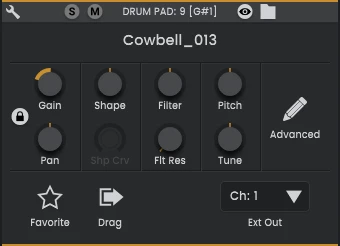
Atlas exposes common sample controls directly and provides a deeper panel when you need more detail. Samples can be reversed, filtered, pitched and shaped without first moving them into another sampler. The variation engine can introduce changes to parameters such as volume, pan, pitch, filtering and timing.
This matters because sample selection and sample shaping are related. A snare that is slightly too long does not necessarily need to be replaced; shortening or filtering it may solve the problem faster than another search.
My take: keep the edits small while choosing the kit. If every sample requires major repair, the kit itself is probably wrong. I would use the editor to make good sounds fit together, then do more deliberate processing in the DAW once the groove is working.
The Atlas 2 sequencer is more than a preview tool
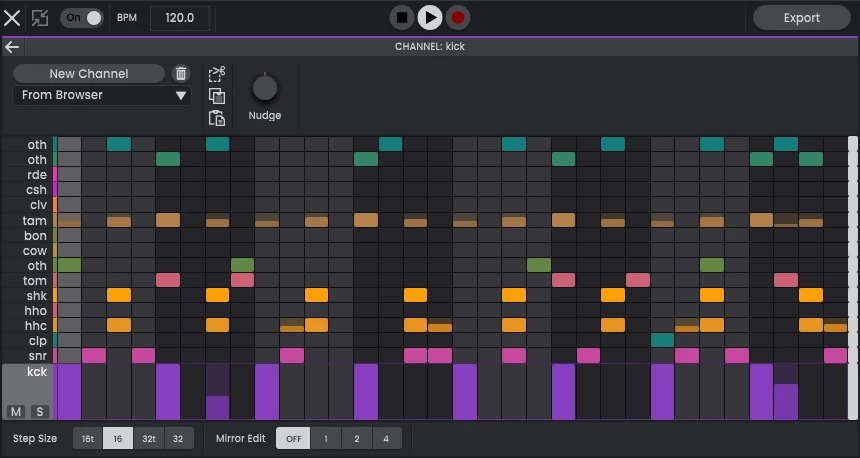
The sequencer is designed specifically around drums. Algonaut combines the speed of a step sequencer with editing flexibility closer to a piano roll. You can record from MIDI, import MIDI, edit velocity, work with different step timings, create polyrhythms and send MIDI out to another instrument or piece of hardware.
Once a pattern works, Atlas can export it as MIDI or render audio. Audio export can produce a mix or individual stems, which makes it easy to leave Atlas and continue arranging or mixing in the DAW.
There are also variation and random functions for generating related patterns. Used carefully, these are good for quickly testing an alternate hat rhythm, fill or percussion idea without rebuilding a groove from zero.
My take: this is what separates Atlas from a sample-management utility. I would build enough of the beat inside Atlas to judge the sounds in context, then export or route the result when the song needs deeper arrangement. The sequencer should help you make the decision; it does not have to become the permanent home of the entire track.
A practical Atlas 2 workflow
If I were evaluating Atlas during the trial, I would not spend the first day importing everything and staring at the map. I would use it to finish one real drum loop:
- Create a focused map. Start with a few folders you genuinely use rather than every sample on every drive.
- Choose one anchor sound. Find a kick or snare that fits the track, then browse its neighbors.
- Build the rest of the kit around it. Lock successful sounds instead of repeatedly replacing the whole kit.
- Program a simple groove. Get the kick and snare relationship right before filling every empty step.
- Add velocity and timing variation. Judge the groove at normal listening level, not only in solo.
- Export or route the parts. Continue the mix in your DAW when you need more detailed processing.
The purchase test is simple: did that process get you to a usable beat faster than your normal folder browser and sampler? If yes, Atlas is solving a real problem. If not, another sample tool is unlikely to become useful just because its interface looks interesting.
Atlas 2 price, upgrade and 14-day trial
On October 6, 2026, Algonaut lists Atlas 2 at $99 and the Atlas upgrade at $19. Prices can change, so check the current product page before purchasing. The upgrade is for qualifying existing owners rather than a cheaper license for new users.
The Atlas 2 trial runs for 14 days with all features unlocked. That is enough time to import a representative part of your library, build several kits and decide whether the map-plus-sequencer workflow actually improves your sessions.
My take: use the trial before buying, especially if you already own another sample browser. The value is almost entirely in workflow fit. You can understand the feature list in five minutes, but you need a few sessions with your own sample folders to know whether Atlas really saves time.
Atlas 2 vs XO: which should you choose?
For the full head-to-head breakdown, read our Atlas 2 vs XO comparison.
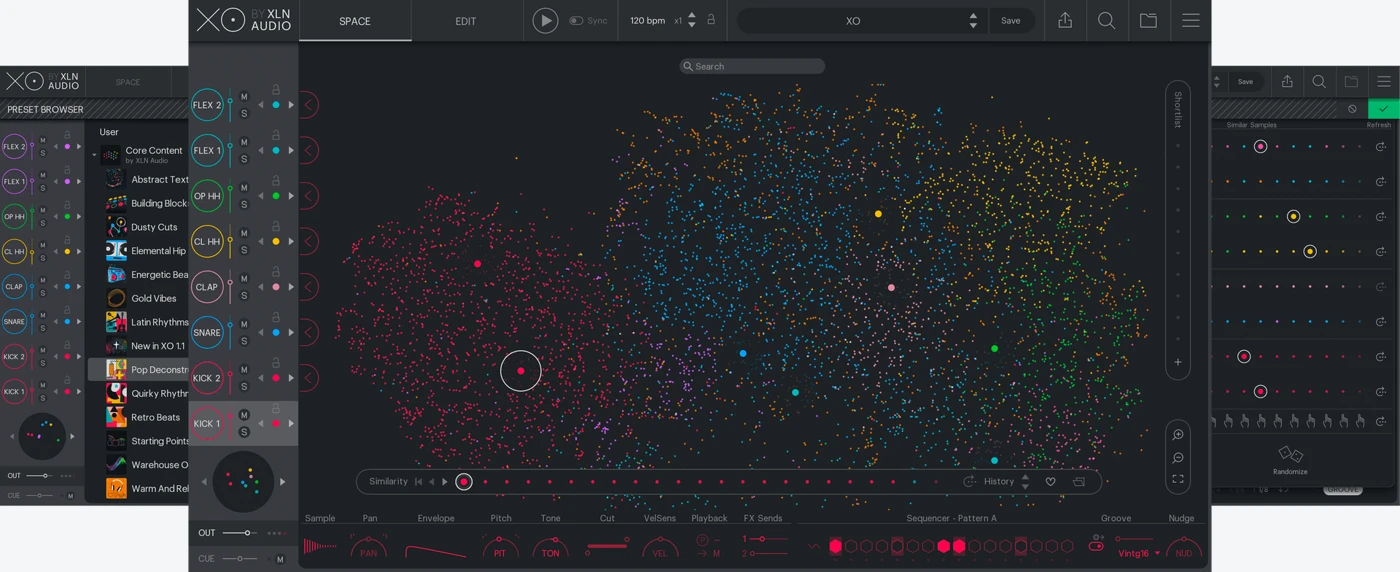
XLN Audio XO is the comparison I would make before buying Atlas. Both products visually organize one-shot samples and combine discovery with beat creation, but they feel different enough that the better choice depends on which workflow clicks with you.
| Decision | Atlas 2 | XLN Audio XO |
|---|---|---|
| Core idea | Sample maps, configurable drum kits and a flexible drum sequencer | Visual XO Space, an eight-slot beat workflow and a polished sample universe |
| Your own samples | Central to the product | Central to the product |
| Factory content | Optional 1,500-sample map plus kits, sequences and loops | 8,000+ factory samples are advertised by XLN |
| Pattern workflow | Strong focus on detailed sequencing, MIDI import/export and drum-kit flexibility | Fast groove creation, Groove Templates, Accentuator and Playground variations |
| Best reason to choose it | You want a deeper drum-kit/sequencer workflow around your own library | You prefer XO's browsing and beat-generation experience or its larger bundled factory library |
My take: I would not choose between them from screenshots or feature counts. Put the same sample folders in both trials and try to build the same kind of beat. The winner is the one that makes you stop thinking about file management first.
There are also small workflow differences that can matter more than the headline features. Atlas gives you configurable pad layouts and a strong sequence/export workflow. XO has a very polished visual browsing concept, plenty of bundled samples and its own groove tools. Neither is automatically better for every producer.
Atlas 2 pros and cons
| Pros | Cons |
|---|---|
| Turns large drum folders into a visual, searchable map | Less compelling if your sample library is already small and curated |
| Browsing, kit building and sequencing live in the same workflow | Drum-focused rather than a broad melodic sampling environment |
| Useful MIDI and audio export options | AI categorization still deserves your ears; no classifier replaces listening |
| Standalone and major plugin formats across Mac, Windows and Linux | Owners of a competing browser may find substantial workflow overlap |
| 14-day full-feature trial makes it easy to test with your own library | Best value depends heavily on how much time you currently waste searching for sounds |
System requirements and plugin formats
Algonaut currently lists Atlas 2 as a 64-bit standalone application and VST, VST3, AU and AAX plugin. The download page covers macOS, Windows and Linux. Apple Silicon is supported natively, and Atlas can run offline after authorization.
Because operating-system support can change over time, I would confirm the latest requirement on Algonaut's download page before updating a studio computer. Compatibility on paper also does not tell you how a large map will feel with your own drive setup, so the trial remains the best compatibility test.
Who should buy Atlas 2?
I would buy Atlas 2 if your sample collection is valuable but difficult to use. That includes producers who have accumulated years of drum packs, one-shots and downloaded folders and now spend too much time navigating them.
I would also consider it if you like generating new kit combinations and want the sample browser connected directly to a proper drum sequencer. Electronic producers, hip-hop beatmakers and anyone working heavily with one-shot percussion can get meaningful value from that loop.
I would skip it if you already work from a tiny hand-picked library, rarely change drum sounds or mainly need synthesized drums. In that case, our best drum synthesizer plugins guide is a better direction. If your main need is broader sample manipulation rather than drum-kit creation, see our Serato Sample review.
Final verdict: is Atlas 2 worth it?
Yes, for the right sample-heavy workflow. Atlas 2 solves a specific problem well: turning an oversized drum library into something you can actually explore and use while a musical idea is still fresh. The visual map gets the attention, but the integrated kit, editing and sequencer tools are what make the product useful beyond organization.
At $99, I would judge it against the amount of time it saves rather than the number of included sounds. Producers with thousands of one-shots may get more value from organizing existing material than from buying another sample pack. Producers with a clean, minimal library may barely need it.
My recommendation is to run the 14-day trial with the same folders you use in real projects. Build a few complete grooves, export them and compare the process with your current workflow. If Atlas consistently gets you from “I need a drum sound” to “the beat works” faster, it earns its place.
Frequently asked questions about Atlas 2
What does Atlas 2 do?
Atlas 2 analyzes drum samples, organizes them into visual maps, lets you build playable drum kits and includes a sequencer for creating and exporting beats.
Does Atlas 2 use AI?
Algonaut describes its sample sorting as artificial intelligence. The practical function is automatic analysis and grouping of similar drum sounds so you can browse the library visually.
How much does Atlas 2 cost?
Algonaut listed the full Atlas 2 license at $99 when this article was checked on October 6, 2026. A $19 upgrade was shown for qualifying existing owners. Check the official page for the current price.
Is there an Atlas 2 demo?
Yes. Algonaut offers a 14-day trial with the Atlas 2 features unlocked, making it possible to test the workflow with your own samples before buying.
Does Atlas 2 work in Ableton, FL Studio, Logic and Pro Tools?
Atlas is available in major plugin formats including VST, VST3, AU and AAX, plus standalone. Confirm the format required by your current DAW and operating system on the latest download page.
Is Atlas 2 better than XO?
Not universally. Both organize samples visually and help build beats. Atlas emphasizes its maps, flexible drum-kit layouts and sequencer workflow, while XO has its own Space browser, groove tools and a large bundled factory library. Trial both with the same sample folders if the choice matters.
Can Atlas 2 export MIDI and audio?
Yes. Atlas can export MIDI and render loops to audio, including options for separate stems, which makes it practical to continue arranging and mixing in your DAW.
Research notes and official references
This review combines documented features with editorial judgments about workflow and buying decisions. It does not claim a controlled hands-on benchmark. Product details and pricing were checked on October 6, 2026.
Sources: Algonaut Atlas 2 product page, Atlas 2 downloads and trial information, Atlas 2 changelog, Atlas 2 feature overview and XLN Audio XO at Plugin Boutique.
![[background image] image of recording equipment (for a musician & band)](https://cdn.prod.website-files.com/68efa70811edd8e5af30a90d/6acd43b8998701bbde84e11a_Best%20Export%20Settings%20for%20FL%20Studio.png)
![[background image] image of recording equipment (for a musician & band)](https://cdn.prod.website-files.com/68efa70811edd8e5af30a90d/6acd3f9347bd0dd62b202621_ShaperBox%203%20vs%20Infiltrator%202.png)
![[background image] image of recording equipment (for a musician & band)](https://cdn.prod.website-files.com/68efa70811edd8e5af30a90d/6acd3d99fa68785e0f58960e_Kontakt%208%20vs%20Decent%20Sampler.png)