


A singer holds a bright note beautifully, then the S at the end jumps out of the chorus. Turning down the vocal costs you the note along with the consonant. Waves Sibilance is the easier starting point when both sharp S and softer SH sounds need attention across a take. Renaissance DeEsser is the one to reach for when you can pick out a recurring whistle and want to tune the detector straight to it.
Set up a useful loop on your own vocal
Make a short loop with the word that hurts, an ordinary word starting with S and a breath you like. Add a few seconds of the instrumental before the line. Working on the sharp word in solo makes it surprisingly easy to remove enough of the consonant to change the lyric. The ordinary word tells you when you have gone too far.
Mute the vocal for one pass. If the same splash is still there, listen to the hi-hat or to the vocal effects return. De-essing a lead will do little for a cymbal on another track. If the vocal sounds abrasive through an entire held vowel, our guide to fixing harsh vocals addresses a different problem that can sound similar at first.
How the two Waves de-essers target a consonant
| Mix decision | Waves Sibilance | Renaissance DeEsser |
|---|---|---|
| Choose what triggers it | Detection adjusts the width used to identify consonants. | Freq and Type tune a high-pass or band-pass sidechain. |
| Hear the detector | Monitor auditions the detected sibilant sounds. | Side Chain Listen auditions the filtered sidechain signal. |
| Choose what gets quieter | Mode blends from Wide to Split, with a 4 kHz boundary at the Split end. | Choose Wideband or Split. Split targets the region defined by the sidechain setting. |
| Best first audition | A take with a mix of narrow S and broader SH sounds. | A repeatable whistle you can find with a frequency sweep. |
Set Waves Sibilance for a changing vocal performance
Sibilance lets you audition what it identifies as sibilant. That makes Monitor a good first stop on a lead that moves between a breathy verse and a bright, projected chorus. Listen for the hiss of the target consonants. If a recognizable chunk of the lyric comes through, the detector is catching material you probably want to keep.
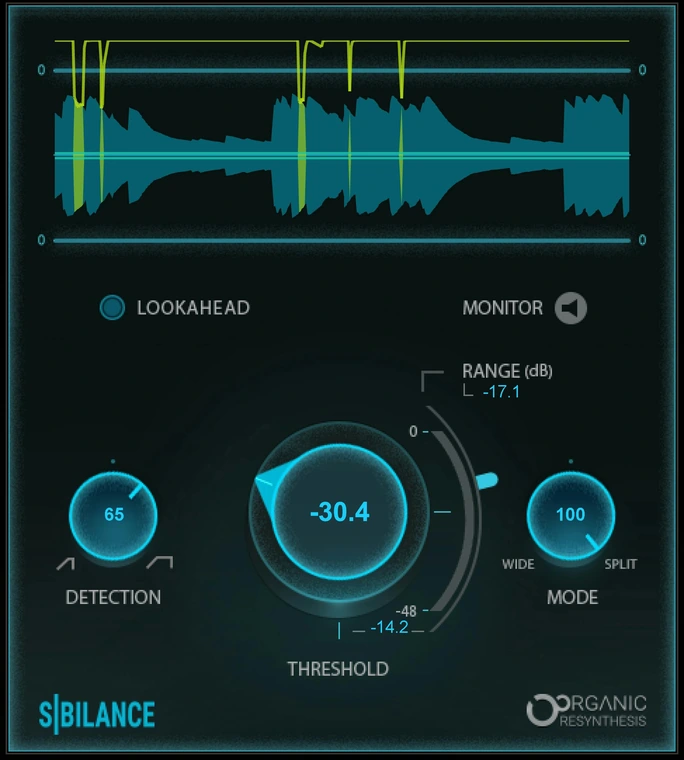
- Start with Detection near its midpoint. Turn Monitor on for the problem word. Move Detection toward Narrow for a thin S. Try Wide for a broader SH that keeps slipping through. Replay the ordinary S and the breath after each change.
- Turn Monitor off before setting the amount. As a starting exercise, set Range to about −4 dB. Lower Threshold until the sharp word settles back into the phrase. Range caps the reduction. If the processor catches the right consonants but takes too much off each one, bring Range closer to zero.
- Decide where to apply the reduction. Move Mode toward Split if the body of the word seems to dip. At the Split end, Sibilance focuses the reduction above 4 kHz. A broader SH can benefit from moving Mode back toward Wide. Compare the transition into the following vowel each time.
For a singer monitoring through the session, Waves supplies a Sibilance-Live component without lookahead. For a recorded take, you can audition Lookahead in the standard component if a short onset still pokes through. Keep the choice that preserves the start of the word when the beat is back in.
Tune Renaissance DeEsser to one recurring whistle
Imagine the final S in every chorus has a thin, pitched edge, while softer SH sounds already sit well. Renaissance DeEsser gives the detector a frequency control and a choice of filter shape. You can leave most of the phrase alone and make that repeated edge the thing that triggers reduction.
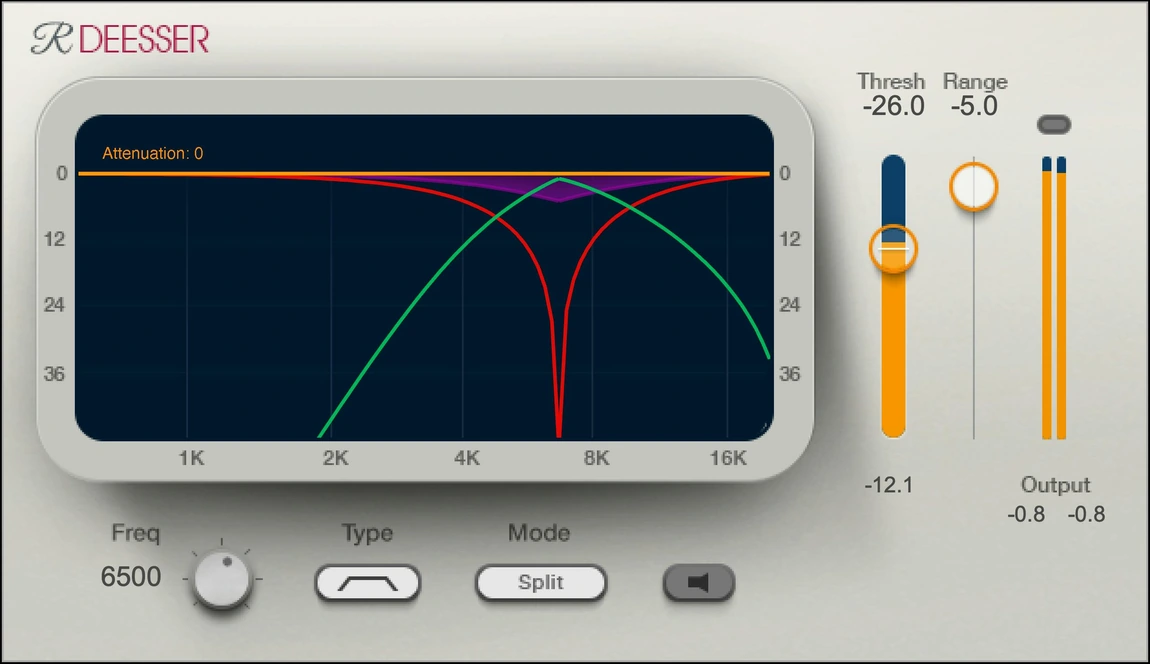
Enable Side Chain Listen and choose the band-pass shape under Type. Start around 6 kHz and sweep Freq slowly through the troublesome word. Look for the spot where the whistle is easy to recognize and the following vowel recedes. Six kilohertz is just somewhere to begin the sweep. The recording decides the frequency.
Switch back to Audio, choose Split, then try a modest Range such as −3 dB. Lower Thresh until the sharp edge stops distracting from the word. The threshold adapts to the input, so copying a threshold number from a louder recording tells you little. If the next SH still bites, audition the high-pass Type with a lower Freq before asking for deeper reduction. Compare Wideband as well if a brief whole-word dip sounds more convincing on this singer.
What the two monitor buttons actually tell you
In Sibilance, Monitor auditions the sounds the detector identifies. In Renaissance DeEsser, Side Chain Listen auditions the filtered signal driving the detector. You may hear bits of the singer through Renaissance DeEsser’s sidechain even with a good setting. To judge what either plugin actually does to the word, return to normal audio and switch bypass on and off. Treating the two audition buttons as identical can send you chasing a narrower setting than the take needs.
What to change when “see” is sharp but “she” sounds right
Start with the line that contains both words. In Renaissance DeEsser, audition the band-pass sidechain, sweep Freq until the whistle in “see” comes forward, then return to Audio. In Sibilance, move Detection toward Narrow and check the same two words in Monitor. A good setting brings “see” back into line without dulling the opening of “she.” If both words trigger at the right times but the singer starts to lisp, bring Range closer to zero before touching the detector again.
Check the chorus, the breath and the reverb send
Keep the vocal fader in place and compare one processor at a time. Play the chorus quietly. Can you still distinguish “see” from “she”? Now turn the instrumental down and listen to the breath after the line. If it suddenly sounds chopped, reduce sensitivity or back off Range. A small gain-reduction reading on the worst word is a perfectly good result when the performance still reads naturally.
Finally, solo the reverb return for one phrase. If an S blooms in the tail while the dry lead sounds fine, work on the signal feeding the reverb. If the send branches before your de-esser, the return still receives the original consonant. If heavy vocal compression brings the sharpness forward, audition the de-esser after that compressor as well. Keep the rest of the chain fixed while you compare. For a stock-plugin workflow, see how to de-ess vocals in FL Studio.
Conclusion
Waves listed each plugin at $29.99 in the U.S. on November 20, 2026. The listed regular prices were $79 for Sibilance and $99 for Renaissance DeEsser. Pick Sibilance if its Monitor and variable Detection help you handle several consonant shapes quickly. Buy Renaissance DeEsser if finding a specific frequency by ear was what finally fixed the chorus. For one troublesome syllable in an otherwise finished take, a small clip-gain edit may finish the job for free.
The Sibilance user guide and Renaissance DeEsser user guide document the controls. Interface images are from Waves. The settings and listening exercises are SoundShaper suggestions.


