
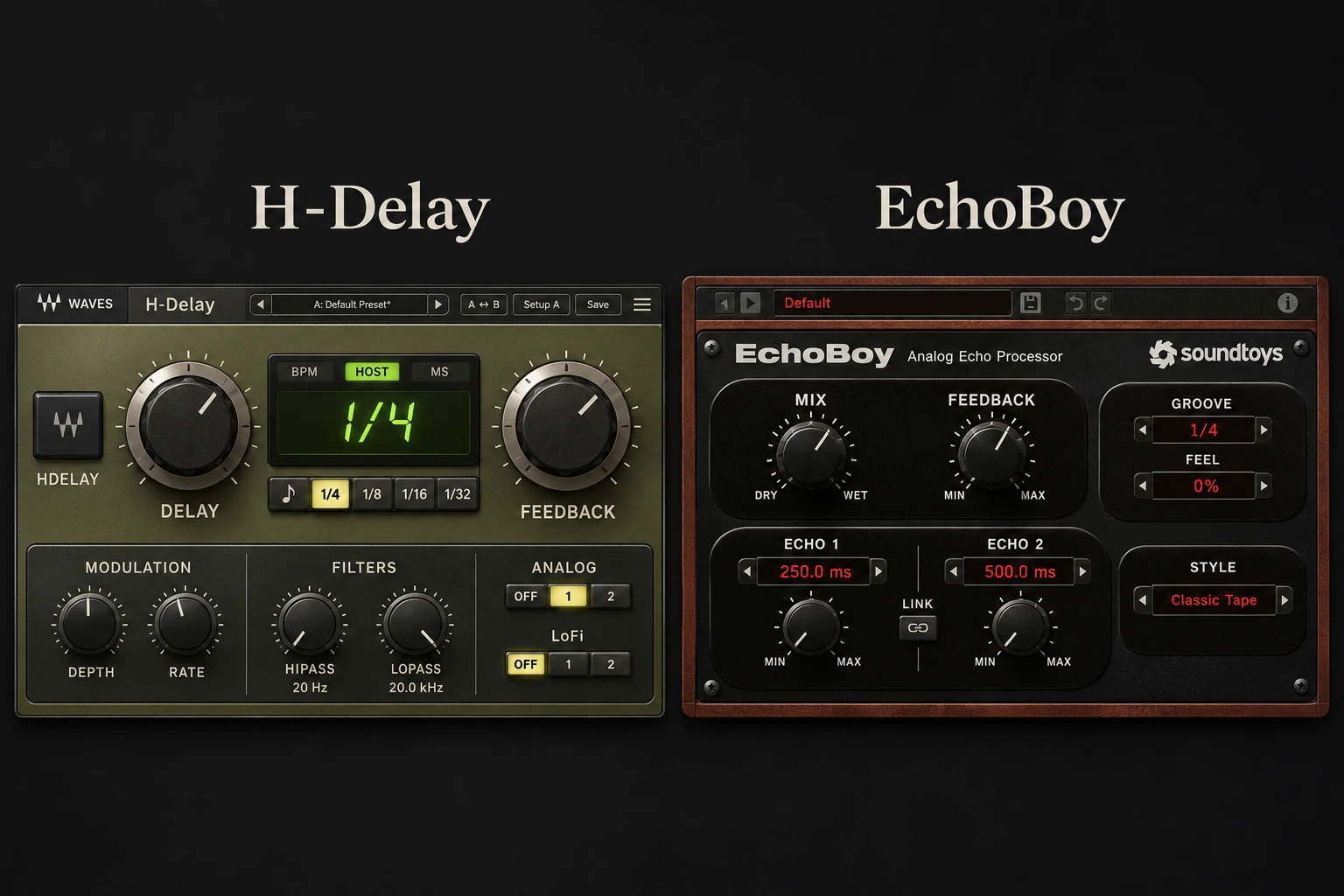

A delay can be a quiet layer behind a vocal or a rhythmic part that changes the whole arrangement. Waves H-Delay and Soundtoys EchoBoy offer focused timing and character controls, but EchoBoy gives you more ways to design the rhythm and texture of individual repeats. We would start with H-Delay for routine vocal throws and slapback, and consider EchoBoy when groove editing and more elaborate patterns are the reason for buying. The useful choice depends on how much of your session you want to spend shaping the echo itself.
The examples below show how to build a vocal throw, a slapback and a rhythmic echo, then decide which extra controls help. Settings are suggested starting points; feature descriptions follow the manufacturers' documentation.
H-Delay vs EchoBoy: Quick Comparison
| Decision | Waves H-Delay | Soundtoys EchoBoy |
|---|---|---|
| Main reason to consider it | Compact timing, filtering and character controls for everyday echoes | More detailed echo styles, groove changes and multi-tap patterns |
| Stereo timing | Current Dual mode provides separate left/right times; Ping Pong is another option | Single Echo, Dual Echo, Ping-Pong and Rhythm Echo modes |
| Rhythm beyond a note value | Choose delay time, feedback and stereo timing | Groove and Feel controls, plus Rhythm Echo with up to 16 taps |
| Character workflow | Analog selector, LoFi, filters and modulation | 30 styles and a Style Editor for deeper texture changes |
| First project to try | A vocal throw or short slap that needs to fit quickly | A synth or vocal echo that should create a distinct rhythmic part |
| U.S. offers checked November 20, 2026 | $29.99 offer; stated regular price $149 at Waves | $49 promotional price; stated regular price $199 at Soundtoys and Plugin Boutique |
H-Delay: the case for a focused mixing delay
H-Delay puts its main timing display between Delay and Feedback, with Dry/Wet and Output on the right. Filters and modulation sit below. That layout makes a practical first pass straightforward: choose where the first repeat lands, decide how long the tail continues, then remove frequencies that get in the way.
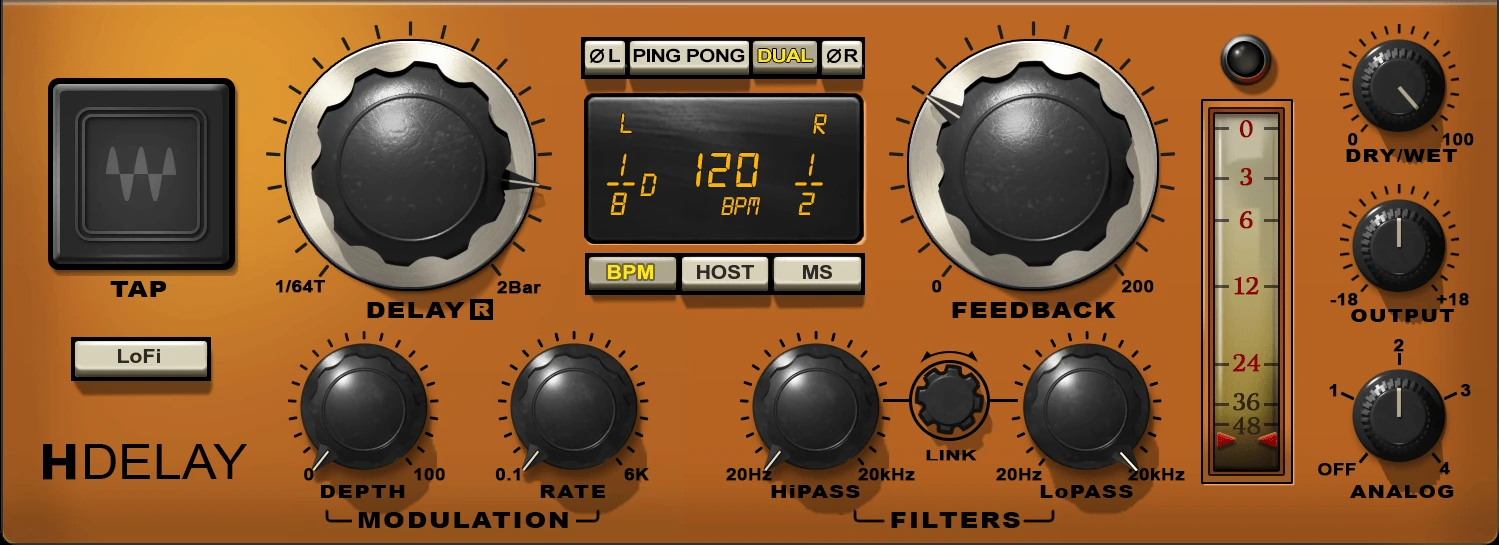
Host mode follows the project tempo; MS lets you judge a short delay in milliseconds. Analog and LoFi can change the repeats' character, but start with Analog Off and modulation Depth at zero so you can assess the timing first. If an older installation lacks Dual mode, check the installed version against the current manual.
Delay, Feedback and Dry/Wet solve different problems
Delay sets the spacing between echoes. Feedback sends processed signal back through the delay, determining how long the repeats continue. Dry/Wet balances the original sound and effect. If an echo lands on the next lyric, reducing Dry/Wet makes it quieter but leaves that timing collision intact. Shorten Delay, reduce Feedback or send a different word.
For an ordinary throw, try Feedback around 20–30 on H-Delay's 0–200 scale and adjust the tail from there. At and above 100, repeats can sustain or build instead of fading. Treat that as a deliberate transition effect with controlled output, rather than a default vocal setting.
In current Dual mode, select L or R in the time display to adjust the two sides separately. An eighth note on the left and a quarter note on the right gives an asymmetric answer. Ping Pong instead makes repeats travel between channels. Choose the motion the arrangement needs before adding modulation or LoFi.
EchoBoy: when the echo becomes part of the arrangement
EchoBoy adds choices that matter when a repeating pattern is itself a musical part. Its Groove and Feel controls let you explore the relationship between echoes and the beat, while Rhythm Echo can use up to 16 taps. The 30 styles and Style Editor make texture a separate area to explore after the rhythm works.
Groove changes the pattern; Feel changes its placement
Set Groove to its centre position for straight timing. Turning toward Shuffle or Swing changes the rhythmic relationship of the repeats. Feel shifts the echo pattern toward a more rushed or delayed position against the beat. These controls answer separate questions: whether the repeats have the right internal rhythm, and whether that rhythm sits in the right place.
Rhythm Echo exposes individual taps: separate repeats with editable timing and level. That helps when you want a quiet intermediate repeat followed by a stronger answer without creating several returns. The Style Editor then handles texture. Build the rhythmic idea first so a dramatic style does not distract from awkward timing.
Vocal throws: compare the same musical job
Use a vocal line with a clear pause after its final word. Create two separate delay returns, route the same vocal send to each, and listen to only one return at a time. Set both plugins fully wet: the dry vocal already reaches the mix through its own track.
At 120 BPM, the quarter-note delay is 500 ms. If that repeat overlaps the next lyric, try an eighth note or shorten the tail in both versions. A better rhythmic decision can matter more than the difference between delay models.
For H-Delay, try a high-pass near 250 Hz and a low-pass near 5 kHz as suggested audition points. With EchoBoy, move LowCut and HighCut by ear toward a similarly focused return. The controls use different scales, so compare the audible role rather than copying numbers.
Our H-Delay review covers that plugin's throw workflow in more detail.
Automate the send for a repeat on one word
Once the basic throw works, automate which part of the vocal reaches it. The following sequence works with either plugin on a fully wet return.
- Start with the send down. Keep the dry vocal playing through its original mixer channel and leave the delay return open.
- Raise the send for the selected word. Begin just before its first syllable. A jump partway into a sustained vowel can sound less natural than feeding the complete word.
- Bring the send down after the word. This stops new vocal entering the delay while allowing existing repeats to decay. Muting the return here would cut that decay.
- Replay the next line. If the last echo competes with the new lyric, shorten Feedback or send only the final syllable. Keep the dry vocal level stable while solving the effect.
A post-fader send is a useful starting choice when you want changes to the vocal fader reflected in the delay input. If a throw must remain independent of later vocal level rides, consider a dedicated throw track. The routing decision matters more than which delay is loaded.
Slapback: extra features may add little
For a short slap, try approximately 90 ms with almost no feedback in each plugin. Bring the return up until you hear a clear second event, then lower it until the vocal gains depth without sounding doubled throughout the line.
Compare 70, 90 and 120 ms on the same performance. Listen to the consonants: if every word gets an obvious second edge, a lower return level or shorter time may be more useful than a different character preset. In a sparse verse, the most convincing result may be quieter than you expect.
Rhythmic synth echoes: where EchoBoy earns a closer look
Choose a short synth stab with space between notes and play it against the drums. Begin with a dotted eighth in both plugins. At 120 BPM that is 375 ms, which provides a useful common starting point before changing the pattern.
Keep H-Delay on that straight timing as a reference. If you choose the asymmetric Dual setup described above instead, check that the left and right echoes still form a clear pattern when the mix is summed to mono.
In EchoBoy, start in Single Echo with Groove and Feel neutral. Move Groove slightly, reset it, then try Feel while following the hi-hats. Keep the adjustment that helps the answer lock to the drums. Switch to Rhythm Echo only if you want to move individual repeats; begin with a few taps and leave gaps for the original note and the kick.
Listen through a chord change. An attractive delay pattern can carry the previous chord into the next one, and additional taps can make that collision more noticeable. Remove or quiet an unnecessary repeat before adding more processing to disguise it.
Character: compare textures after the timing works
A useful character comparison keeps the rhythm and return level stable. With H-Delay, compare Analog Off with one numbered setting, then audition LoFi separately. With EchoBoy, change Style before adjusting several Style Editor parameters at once.
Include the quiet end of the section. H-Delay's Analog modes can introduce noise, so a mode that seems appealing during the chorus may be distracting after the last word. Choosing Off is a valid mixing decision.
For a darker EchoBoy texture, try Studio Tape as one audition candidate and keep the Saturation change restrained. Match the return level again after changing the style. A louder or denser tail can win the first impression while making the next lyric harder to understand.
Neither product label predicts the best texture for every source. Test a held vowel as well as a short syllable: modulation that adds life to the short event can become an exposed pitch movement on the longer one.
What filtering, saturation and diffusion change
Filtering narrows the frequencies occupied by the echo. For a muddy return, raise the high-pass until the bass and kick recover their space, then back it down if the repeats become too thin. Lowering the low-pass can soften repeated consonants. Neither move changes how many echoes the feedback produces, so shorten the tail separately when the pattern itself is too busy.
In EchoBoy, Saturation adds character beyond filtering, while the Style Editor offers diffusion that spreads distinct repeats into a softer texture. For a pad, that can help an echo behave more like a background wash. For a precise guitar rhythm, the same blur may erase the gaps that made the part work. Save a version before adding it and compare through the next chord change.
H-Delay's LoFi is a separate character choice from its filters and Analog setting. Try it on a short answer after the vocal rather than assuming a darker sound always fits better. If the first repeat loses the identity of the word, restore some clarity before raising the whole return.
Combining delay and reverb
Separate returns give you independent balances. Feeding delay into reverb puts the repeats into a shared ambience; delaying a reverb output repeats the ambience itself. Try the first route for echoes that need a surrounding space and keep both effects quiet while judging their combined tail.
When echoes cover the next vocal line
First shorten the tail, reduce the return, or send fewer words. If the song still needs a long echo between lines, you can put a separate sidechain compressor after either delay and trigger it from the dry vocal. That routing lowers the return while the singer performs, then allows it to recover in the gaps.
This is an external workflow you can apply to either choice. It is not a reason to assume H-Delay includes a dedicated ducking section. Listen for an awkward surge between syllables and ease the compression if the effect keeps drawing attention to itself.
For the underlying routing choices, see our pre-fader and post-fader send guide.
Feedback and timing changes for transitions
For a transition, save the ordinary mix setting, automate a brief Feedback increase near the end of a section, then return it before the next downbeat. Bring the send down too if the next section should stop feeding the effect. Keep control of the return level as the repeats build.
H-Delay can create pitch movement when its delay time changes. If you want a clean switch between rhythmic values, use two returns and change which receives the send. This also lets the old timing decay while the new pattern starts, without asking one delay instance to perform both roles.
CPU and everyday workflow
We have not run a controlled CPU benchmark, so we cannot name a measured performance winner. Test the number of instances you expect to use at your usual sample rate and buffer. Play the busiest section and inspect the DAW's real-time load; one idle instance tells you little about a full arrangement.
A shared return works well when several tracks need the same timing and tone. Separate returns make sense when their automation or patterns differ. Save your finished throw with its routing where your DAW allows it. That repeatable setup often contributes more to daily speed than having hundreds of factory presets to browse.
Price, ownership and what to buy
On November 20, 2026, Waves listed H-Delay at $29.99 against a stated regular $149. Soundtoys and Plugin Boutique listed EchoBoy at a promotional $49 against $199 regular pricing. These are USD offers, not permanent prices; taxes, region and the final checkout total can differ.
The checked promotional gap is $19.01. At that difference, EchoBoy is a realistic option if you want one delay for both ordinary mixing and detailed rhythm design. H-Delay remains the lower-cost choice for focused throws and slapback. If you already own it, identify a recurring need for EchoBoy's additional editing before paying for overlapping functions.
Check existing bundle ownership first. For a Waves perpetual purchase, included Update Plan coverage and future updates are separate from keeping the version you own. Confirm current host and operating-system support for both products, especially when using an older license on a newer computer.
Conclusion
H-Delay is the focused choice for routine mixing echoes. EchoBoy offers more control when the repeats need their own groove, accents and texture. Base the choice on the pattern you need to create and the checked purchase price.
Sources and editorial basis
Control descriptions were checked against the H-Delay manual, EchoBoy manual and Soundtoys product information. Prices were checked on November 20, 2026 at Soundtoys, Plugin Boutique and the Waves product page. The EchoBoy retailer listing confirms its checked promotional offer. In-article interfaces are manufacturer images; listening exercises and buying judgments are SoundShaper's proposed evaluation workflow.


